
Bootstrap -- 网格系统、排版样式类、 <blockquote>、 <abbr> 元素
Bootstrap -- 网格系统、排版样式类、 <blockquote>、 <abbr> 元素
1. Bootstrap 提供了一套响应式、移动设备优先的流式网格系统,随着屏幕尺寸的增加,系统会自动分为最多12列。
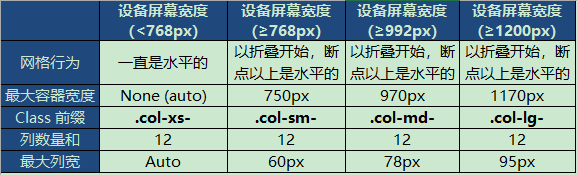
举例:
<!DOCTYPE html>

<html>

<head>

<meta http-equiv="Content-Type" content="text/html; charset=utf-8"/>

<title>My Test bootstrap</title>

    <link rel="stylesheet" href="./css/bootstrap.min.css">

    <script type="text/javascript" src="./js/bootstrap.min.js"></script>

</head>

<body>

 <div class="container" style="background-color: #6AC239;">

      <div class="row">

        <div class="col-lg-4" style="border:1px solid black;">

          第一列

        </div>

        <div class="col-lg-4" style="border:1px solid black;">

          第二列

        </div>

        <div class="col-lg-4" style="border:1px solid black;">

          第三列

        </div>

      </div>

      <div class="row">

        <div class="col-lg-3" style="border:1px solid black;">

          第一列

        </div>

        <div class="col-lg-3" style="border:1px solid black;">

          第二列

        </div>

        <div class="col-lg-3" style="border:1px solid black;">

          第三列

        </div>

        <div class="col-lg-3" style="border:1px solid black;">

          第四列

        </div>

      </div>

 </div>

</body>

</html>
实现效果:

2. 一些进行 Bootstrap 排版类的样式
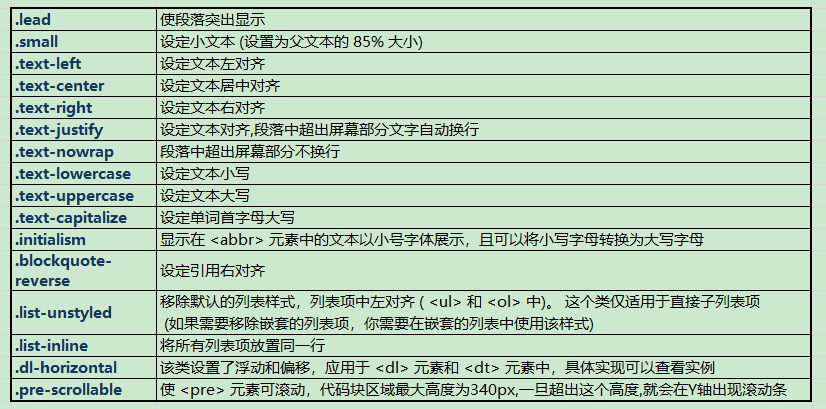
3. <abbr> 元素,<blockquote>引用
<!DOCTYPE html>

<html>

<head>

<meta http-equiv="Content-Type" content="text/html; charset=utf-8"/>

<title>My Test bootstrap</title>

    <link rel="stylesheet" href="./css/bootstrap.min.css">

    <script type="text/javascript" src="./js/bootstrap.min.js"></script>

</head>

<body>

 <abbr title="World Wide Web">WWW</abbr><br>

 <blockquote class="pull-right">

  学海无涯。

  <small>来自于<cite title="Source Title">小胡子语录</cite></small>

</blockquote>

</body>

</html>
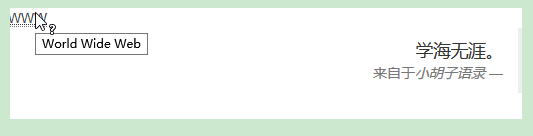
实现效果:
Bootstrap -- 网格系统、排版样式类、 <blockquote>、 <abbr> 元素的更多相关文章
- Bootstrap 一. 排版样式(内联文本元素,对齐,大小写,缩略语,地址文本,引用文本,列表排版 ,代码 )
第 2 章 排版样式 在 h1 ~ h6 元素之间,还可以嵌入一个 small 元素作为副标题 <h1>Bootstrap 框架 <small>Bootstrap 小标题< ...
- bootstrap之排版样式
<!DOCTYPE html> <html lang="en"> <head> <meta charset="UTF-8&quo ...
- Bootstrap(2) 排版样式
1.页面主体,Bootstrap 将全局 font-size 设置为 14px,line-height 行高设置为 1.428(即20px):<p>段落元素被设置等于 1/2 行高(即 1 ...
- 吴裕雄 Bootstrap 前端框架开发——Bootstrap 排版:显示在 <abbr> 元素中的文本以小号字体展示,且可以将小写字母转换为大写字母
<!DOCTYPE html> <html> <head> <title>菜鸟教程(runoob.com)</title> <meta ...
- Bootstrap - 全局css样式类
状态类 通过这些状态类可以为行或单元格设置颜色. .active 鼠标悬停在行或单元格上时所设置的颜色 .success 标识成功或积极的动作 .info 标识普通的提示信息或动作 .warning ...
- BootStrap中常用样式类
网格选项 row:行 col--:列(第一个可以为xs[超小]/sm[小型]/md[中型]/lg[大型]:第二个必须为12以内的[列数]) col--offset-:列偏移(第一个同上,第二个范围为1 ...
- bootstrap 全局 CSS 样式
http://v3.bootcss.com/css/#less-mixins-utility 深入了解 Bootstrap 底层结构的关键部分,包括我们让 web 开发变得更好.更快.更强壮的最佳实践 ...
- bootstrap全局css样式
以下从官网抄来的,感觉还是很实用的,运用得好,灵活运用,非常方便快捷,能大大提高开发效率,也为调整不同尺寸的屏幕节省了时间. hidden-xs @media (max-width: 767px){ ...
- Bootstrap基本CSS样式
一.简介.使用 1.简介 Bootstrap 来源于 Twitter,是一款基于 Html.Css.JavaScript 的前端UI框架.可以方便.快速的开发web界面. 教程:https://www ...
随机推荐
- scala的map操作
新建一个不定参数的 map: var cs = mutable.Map.empty[String, String] 对其进行赋值: cs += (key -> value) 读取里面所有的 ke ...
- Python内置函数(61)——str
英文文档: class str(object='') class str(object=b'', encoding='utf-8', errors='strict') Return a string ...
- BBS论坛(四)
4.1.cms登录页面csrf保护 (1)Perfect_bbs.py from flask_wtf import CSRFProtect CSRFProtect(app) 添加csrf保护后,现在再 ...
- 【安卓本卓】Android系统源码篇之(一)源码获取、源码目录结构及源码阅读工具简介
前言 古人常说,“熟读唐诗三百首,不会作诗也会吟”,说明了大量阅读诗歌名篇对学习作诗有非常大的帮助.做开发也一样,Android源码是全世界最优秀的Android工程师编写的代码,也是A ...
- 从锅炉工到AI专家(4)
手写数字识别问题 图像识别是深度学习众多主流应用之一,手写数字识别则是图像识别范畴简化版的入门学习经典案例.在TensorFlow的官方文档中,把手写数字识别"MNIST"案例称为 ...
- SpringBoot入门教程(十八)@value、@Import、@ImportResource、@PropertySource
Spring Boot提倡基于Java的配置.这两篇博文主要介绍springboot 一些常用的注解介绍 v@value 通过@Value可以将外部的值动态注入到Bean中. 添加applicatio ...
- Chapter 5 Blood Type——28
Mike came through the door then, glancing from me to Edward. 然后Mike从门里走出来,看了一眼我和Edward The look he g ...
- linux rsync 实际应用
linux rsync 实际应用 一.rsync的概述 rsync是类unix系统下的数据镜像备份工具,从软件的命名上就可以看出来了——remote sync.rsync是Linux系统下的文件同步和 ...
- 练习使用 __attribute__ 属性(仿照内核)
上一篇文章分析了内核中各种 initcall 的调用过程,在这个基础上大概掌握了内核中使用的这种方法,于是参考内核及网友的文章自己动手写了下,记录在这个随笔中. 源代码如下: #include < ...
- shell编程练习(四): 笔试31-68
笔试练习(四): 31.找查较多的SYN连接 netstat -an | grep SYN | awk '{print $5}' | awk -F: '{print $1}' | sort | uni ...