
Prometheus-配置解析
1.Prometheus整体架构图
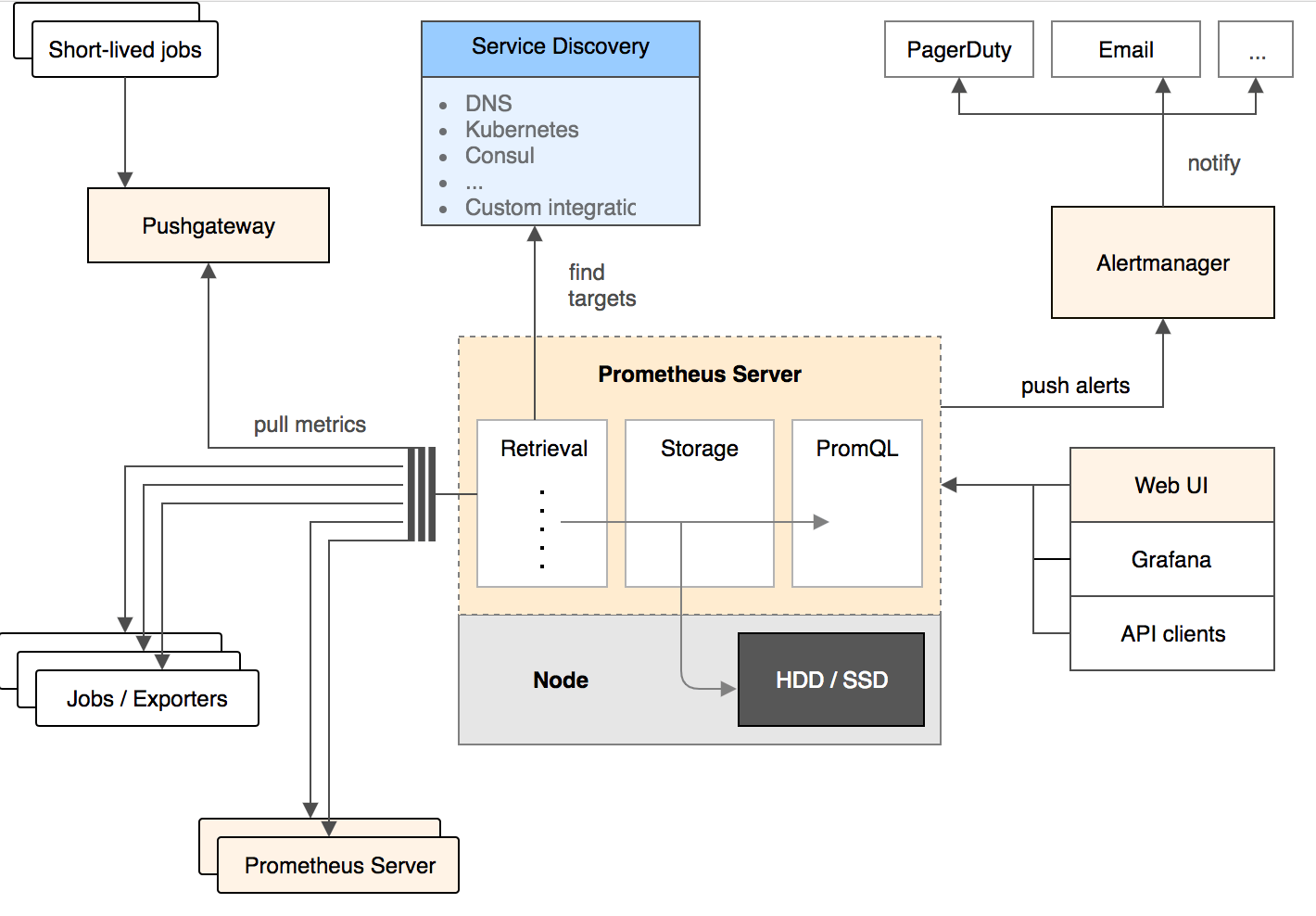
2.配置文件
# 全局配置

global:

  scrape_interval:     15s   # 多久 收集 一次数据

  evaluation_interval: 30s   # 多久评估一次 规则

  scrape_timeout:      10s   # 每次 收集数据的 超时时间

  # 当Prometheus和外部系统(联邦, 远程存储, Alertmanager)通信的时候,添加标签到任意的时间序列或者报警

  external_labels:

    monitor: codelab

    foo:     bar

# 规则文件, 可以使用通配符

rule_files:

- "first.rules"

- "my/*.rules"

# 远程写入功能相关的设置

remote_write:

  - url: http://remote1/push

    write_relabel_configs:

    - source_labels: [__name__]

      regex:         expensive.*

      action:        drop

  - url: http://remote2/push

# 远程读取相关功能的设置

remote_read:

  - url: http://remote1/read

    read_recent: true

  - url: http://remote3/read

    read_recent: false

    required_matchers:

      job: special

# 收集数据 配置 列表

scrape_configs:

- job_name: prometheus  # 必须配置, 自动附加的job labels, 必须唯一

  honor_labels: true   # 标签冲突, true 为以抓取的数据为准 并 忽略 服务器中的, false 为 通过重命名来解决冲突

  # scrape_interval is defined by the configured global (15s).

  # scrape_timeout is defined by the global default (10s).

  metrics_path:     '/metrics'

  # scheme defaults to 'http'.

  # 文件服务发现配置 列表

  file_sd_configs:

    - files:  # 从这些文件中提取目标

      - foo/*.slow.json

      - foo/*.slow.yml

      - single/file.yml

      refresh_interval: 10m  # 刷新文件的 时间间隔

    - files:

      - bar/*.yaml

  # 使用job名作为label的 静态配置目录 的 列表

  static_configs:

  - targets: ['localhost:9090', 'localhost:9191']

    labels:

      my:   label

      your: label

  # 目标节点 重新打标签 的配置 列表.  重新标记是一个功能强大的工具,可以在抓取目标之前动态重写目标的标签集。 可以配置多个,按照先后顺序应用

  relabel_configs:

  - source_labels: [job, __meta_dns_name]   # 从现有的标签中选择源标签, 最后会被 替换, 保持, 丢弃

    regex:         (.*)some-[regex]  # 正则表达式, 将会提取source_labels中匹配的值

    target_label:  job   # 在替换动作中将结果值写入的标签.

    replacement:   foo-${1}  # 如果正则表达匹配, 那么替换值. 可以使用正则表达中的 捕获组

    # action defaults to 'replace'

  - source_labels: [abc]  # 将abc标签的内容复制到cde标签中

    target_label:  cde

  - replacement:   static

    target_label:  abc

  - regex:

    replacement:   static

    target_label:  abc

  bearer_token_file: valid_token_file  # 可选的, bearer token 文件的信息

- job_name: service-x

  # HTTP basic 认证信息

  basic_auth:

    username: admin_name

    password: "multiline\nmysecret\ntest"

  scrape_interval: 50s  # 对于该job, 多久收集一次数据

  scrape_timeout:  5s

  sample_limit: 1000  # 每次 收集 样本数据的限制. 0 为不限制

  metrics_path: /my_path  # 从目标 获取数据的 HTTP 路径

  scheme: https  # 配置用于请求的协议方案

  # DNS 服务发现 配置列表

  dns_sd_configs:

  - refresh_interval: 15s

    names:  # 要查询的DNS域名列表

    - first.dns.address.domain.com

    - second.dns.address.domain.com

  - names:

    - first.dns.address.domain.com

    # refresh_interval defaults to 30s.

  # 目标节点 重新打标签 的配置 列表

  relabel_configs:

  - source_labels: [job]

    regex:         (.*)some-[regex]

    action:        drop

  - source_labels: [__address__]

    modulus:       8

    target_label:  __tmp_hash

    action:        hashmod

  - source_labels: [__tmp_hash]

    regex:         1

    action:        keep

  - action:        labelmap

    regex:         1

  - action:        labeldrop

    regex:         d

  - action:        labelkeep

    regex:         k

  # metric 重新打标签的 配置列表

  metric_relabel_configs:

  - source_labels: [__name__]

    regex:         expensive_metric.*

    action:        drop

- job_name: service-y

  # consul 服务发现 配置列表

  consul_sd_configs:

  - server: 'localhost:1234'  # consul API 地址

    token: mysecret

    services: ['nginx', 'cache', 'mysql']  # 被检索目标的 服务 列表. 如果不定义那么 所有 服务 都会被 收集

    scheme: https

    tls_config:

      ca_file: valid_ca_file

      cert_file: valid_cert_file

      key_file:  valid_key_file

      insecure_skip_verify: false

  relabel_configs:

  - source_labels: [__meta_sd_consul_tags]

    separator:     ','

    regex:         label:([^=]+)=([^,]+)

    target_label:  ${1}

    replacement:   ${2}

- job_name: service-z

  # 收集 数据的 TLS 设置

  tls_config:

    cert_file: valid_cert_file

    key_file: valid_key_file

  bearer_token: mysecret

- job_name: service-kubernetes

  # kubernetes 服务 发现 列表

  kubernetes_sd_configs:

  - role: endpoints   # 必须写, 必须是endpoints, service, pod, node, 或者 ingress

    api_server: 'https://localhost:1234'

    basic_auth:  # HTTP basic 认证信息

      username: 'myusername'

      password: 'mysecret'

- job_name: service-kubernetes-namespaces

  kubernetes_sd_configs:

  - role: endpoints  # 应该被发现的 kubernetes 对象 实体

    api_server: 'https://localhost:1234'  # API Server的地址

    namespaces:  # 可选的命名空间发现, 如果省略 那么所有的命名空间都会被使用

      names:

        - default

- job_name: service-marathon

  # Marathon 服务发现 列表

  marathon_sd_configs:

  - servers:

    - 'https://marathon.example.com:443'

    tls_config:

      cert_file: valid_cert_file

      key_file: valid_key_file

- job_name: service-ec2

  ec2_sd_configs:

    - region: us-east-1

      access_key: access

      secret_key: mysecret

      profile: profile

- job_name: service-azure

  azure_sd_configs:

    - subscription_id: 11AAAA11-A11A-111A-A111-1111A1111A11

      tenant_id: BBBB222B-B2B2-2B22-B222-2BB2222BB2B2

      client_id: 333333CC-3C33-3333-CCC3-33C3CCCCC33C

      client_secret: mysecret

      port: 9100

- job_name: service-nerve

  nerve_sd_configs:

    - servers:

      - localhost

      paths:

      - /monitoring

- job_name: 0123service-xxx

  metrics_path: /metrics

  static_configs:

    - targets:

      - localhost:9090

- job_name: 測試

  metrics_path: /metrics

  static_configs:

    - targets:

      - localhost:9090

- job_name: service-triton

  triton_sd_configs:

  - account: 'testAccount'

    dns_suffix: 'triton.example.com'

    endpoint: 'triton.example.com'

    port: 9163

    refresh_interval: 1m

    version: 1

    tls_config:

      cert_file: testdata/valid_cert_file

      key_file: testdata/valid_key_file

# Alertmanager相关的配置

alerting:

  alertmanagers:

  - scheme: https

    static_configs:

    - targets:

      - "1.2.3.4:9093"

      - "1.2.3.5:9093"

      - "1.2.3.6:9093"
3.基于consul的服务发现
注意: Prometheus的consul_sd_config使用的是catalog的API。
使用http接口注册consul
# curl -X PUT -d '{"ID": "node_exporter", "Name": "node_exporter", "Address": "10.6.28.37", "Port": 9100, "Tags": ["lock"], "EnableTagOverride": false}' http://10.6.28.37:8500/v1/agent/service/register
# curl -s http://10.6.28.37:8500/v1/agent/services|jq

{

  "node_exporter": {

    "ID": "node_exporter",

    "Service": "node_exporter",

    "Tags": [

      "lock"

    ],

    "Address": "10.6.28.37",

    "Port": 9100,

    "EnableTagOverride": false,

    "CreateIndex": 0,

    "ModifyIndex": 0

  }

}
4.prometheus配置详解
当查询的时候存在十分复杂的表达式,这样会降低prometheus的性能可以使用 Recording rules
允许您预先计算经常需要的或计算上昂贵的表达式,并将其结果保存为新的 time series。这对于仪表板尤其有用,每次刷新时它都需要重复查询相同的表达式。 将复杂的计算后台计算 放到一个新的时序里
二元算术运算符 应用于 应用于 即时向量/即时向量 时
运算符将应用于左侧向量中的元素及其在右侧向量中的匹配到的元素.
运算结果被传播到结果向量中,并且度量名称被丢弃.
那些在右侧向量中没有匹配条目的条目 不是结果的一部分。
例如:
employee_age_bucket_bucket{le=~"20|30|40"} + employee_age_bucket_bucket{le=~"30|40|50"}
返回的结果是:
{instance="10.0.86.71:8080",job="prometheus",le="30"} 6000

{instance="10.0.86.71:8080",job="prometheus",le="40"} 8000
Prometheus-配置解析的更多相关文章
- NGINX(四)配置解析
前言 nginx配置解析是在初始化ngx_cycle_t数据结构时,首先解析core模块,然后core模块依次解析自己的子模块. 配置解析过程 nginx调用ngx_conf_parse函数进行配置文 ...
- nsq源码阅读笔记之nsqd(一)——nsqd的配置解析和初始化
配置解析 nsqd的主函数位于apps/nsqd.go中的main函数 首先main函数调用nsqFlagset和Parse进行命令行参数集初始化, 然后判断version参数是否存在,若存在,则打印 ...
- configparser_配置解析器
configparser:配置解析器 import configparser config = configparser.ConfigParser() #配置文件 config[', 'Compres ...
- prometheus 配置介绍
prometheus 配置介绍 prometheus 配置分global.alerting.rule_files.scrape_configs 1.global(全局配置) scrape_interv ...
- spring+mybaits xml配置解析----转
一.项目中spring+mybaits xml配置解析 一般我们会在datasource.xml中进行如下配置,但是其中每个配置项原理和用途是什么,并不是那么清楚,如果不清楚的话,在使用时候就很有可能 ...
- DNS Bind服务配置解析
DNS域名解析服务(Domain Name System)是用于解析域名与IP地址对应关系的服务,功能上可以实现正向解析与反向解析: 一.DNS服务器工作模式分类: 1.主服务器:在特定区域内具有唯一 ...
- 初识nginx——配置解析篇
一.nginx的介绍 nginx是由俄罗斯人开发的一款高性能的http和反向代理服务器,也可以用来作为邮件代理.相比较于其他的服务器,具有占用内存少,稳定性高等优势 二.nginx的配置 nginx的 ...
- Apache入门 篇(二)之apache 2.2.x常用配置解析
一.httpd 2.2.x目录结构 Cnetos 6.10 YUM安装httpd 2.2.x # yum install -y httpd 程序环境 主配置文件: /etc/httpd/conf/ht ...
- OK335xS 系统启动配置解析
OK335xS 系统启动配置解析 一.参考文档: AM335x ARM® Cortex™-A8 Microprocessors (MPUs) Technical Reference Manual 二. ...
- prometheus配置
本文主要记录下测试环境积累的prometheus配置信息,主要是k8s基本节点的配置和cadvisor的配置,方便以后使用做为参考 global: scrape_interval: 30s scrap ...
随机推荐
- C#中Activator.CreateInstance()方法用法分析
本文实例讲述了C#中Activator.CreateInstance()方法用法. Activator 类 包含特定的方法,用以在本地或从远程创建对象类型,或获取对现有远程对象的引用. C#在类工厂中 ...
- web 项目运用通用的xml配置
jdk10的转换: <properties> <project.build.sourceEncoding>UTF-8</project.build.sourceEncod ...
- Python开发【第二篇】运算符
"+" 加号 __author__ = 'Tang' a = 8 b = 9 c = a + b a = 8.0 b = 9 c = a + b print(c) # 17.0 a ...
- IIS出现The specified module could not be found的解决方法
1.打开IIS 信息服务,在左侧找到自己的计算机,点右键,选择属性,在主属性中选编辑,打开“目录安全性”选项卡,单击“匿名访问和验证控制”里的“编辑”按钮,在弹出的对话框中确保只选中了“匿名访问 ...
- HBase实践案例:车联网监控系统
项目背景 本项目为车联网监控系统,系统由车载硬件设备.云服务端构成.车载硬件设备会定时采集车辆的各种状态信息,并通过移动网络上传到服务器端.服务器端接收到硬件设备发送的数据首先需要将数据进行解析,校验 ...
- 好程序员分享居中一个float元素
好程序员分享居中一个float元素,我们布局的时候,用margin来设置float元素的外边距来达到效果.对于,在文档流中的元素,我们很容易让它水平居中,只要给元素设置一个固定的宽度,用margin: ...
- let声明
<script> /** * es6 let 练习 * 生效范围:块级代码代码内. */ // { // let a=2; // var c=2; // } // console.log( ...
- iOS开发基础-UIScrollView基础
普通的 UIView 不具备滚动功能,不能显示过多的内容.UIScrollView 是一个能够滚动的视图控件,可用来展示大量的内容. UIScrollView 的简单使用: 1)将需要展示的内容添 ...
- 判断语句之if...else
判断语句之if...else if语句第二种格式: if...else: 格式: 执行流程 首先判断关系表达式看其结果是true还是false 如果是true就执行语句体1 如果是false就执行语句 ...
- H5 基于Web Storage 的客户端留言板
<!DOCTYPE html> <html> <head> <meta name="author" content="Yeeku ...