
vue:vuex中mapState、mapGetters、mapActions辅助函数及Module的使用
一、普通store中使用mapState、mapGetters辅助函数:
在src目录下建立store文件夹:
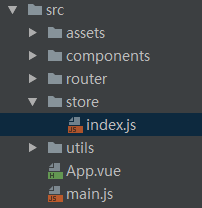

index.js如下:
import Vue from 'vue';

import Vuex from 'vuex';

Vue.use(Vuex);

const state={//要设置的全局访问的state对象

  showFooter: true,

  changableNum:0

  count: 0

  //要设置的初始属性值

};

const getters = {   //实时监听state值的变化(最新状态)

  isShow(state) {  //方法名随意,主要是来承载变化的showFooter的值

    return state.showFooter

  },

  getChangedNum(){  //方法名随意,主要是用来承载变化的changableNum的值

    return state.changebleNum

  }

};

const mutations = {

  show(state) {   //自定义改变state初始值的方法,这里面的参数除了state之外还可以再传额外的参数(变量或对象);

    state.showFooter = true;

  },

  hide(state) {  //同上

    state.showFooter = false;

  },

  newNum(state,sum){ //同上,这里面的参数除了state之外还传了需要增加的值sum

    state.changableNum+=sum;

  }

};

const actions = {

  hideFooter(context) {  //自定义触发mutations里函数的方法,context与store 实例具有相同方法和属性

    context.commit('hide');

  },

  showFooter(context) {  //同上注释

    context.commit('show');

  },

  getNewNum(context,num){   //同上注释,num为要变化的形参

    context.commit('newNum',num)

  }

};

const store = new Vuex.Store({

  state,

  getters,

  mutations

});

export default store;
vue提供了注入机制,就是把我们的store 对象注入到根实例中。vue的根实例就是 new Vue构造函数,然后在所有的子组件中this.$store 来指向store 对象。在index.js 中,我们用export store把store已经暴露出去了,然后直接在main.js中引入store并注入store即可。
// The Vue build version to load with the `import` command

// (runtime-only or standalone) has been set in webpack.base.conf with an alias.

import Vue from 'vue'

import ElementUI from 'element-ui'

import 'element-ui/lib/theme-chalk/index.css'

import App from './App'

import router from './router/router.js'

import store from './store'

import echarts from 'echarts'

Vue.config.productionTip = false

Vue.use(ElementUI)

Vue.use(echarts)

Vue.prototype.$echarts = echarts

/* eslint-disable no-new */

new Vue({

  el: '#app',

  router,

  store,

  components: { App },

  template: '<App/>'

})
子组件中的computed属性是根据它的依赖自动更新的,所以只要store中的state发生变化,它就会自动变化,在一般情况下子组件中获取store中属性的方式如下:
<template>

 <div>

  <h3>Count is {{某属性}}</h3>

 </div>

</template>

<script>

 export default {

  computed: {

   count () {

    return this.$store.state.某属性

   }

  }

 }

</script>
通过computed属性可以获取到状态值,但是组件中每一个属性(如:count)都是函数,如果有10个,那么就要写10个函数,且重复写10遍return this.$store.state不是很方便。vue 提供了mapState函数,它把state直接映射到我们的组件中。
当然使用mapState之前要先引入它,它两种用法,或接受一个对象,或接受一个数组,其中使用对象的方式又有三种方法。
对象用法如下:
<script>

 import {mapState} from "vuex"; // 引入mapState

 export default {

  // 下面这三种写法都可以

  computed: mapState({

   // 箭头函数可使代码更简练

    count: state => state.count,

    // 传字符串参数 'count' 等同于 `state => state.count`

    countAlias: 'count',

    // 为了能够使用 `this` 获取局部状态,必须使用常规函数

    countPlusLocalState (state) {

      return state.count + this.localCount

    }

  })

 }

</script>
当映射的计算属性的名称与state的子节点名称相同时,我们也可以给 mapState传一个字符串数组。
<script>

 import {mapState} from "vuex";

 export default {

  computed: mapState([ // 数组

   "count"

  ])

 }

</script>
如果我们组件内部也有computed属性怎么办?它又不属于mapState,我们可以使用es6中的对象分割语法,把mapState函数生成的对象再分割成一个个的,就像最开始的时候我们一个一个罗列计算属性,有10个属性,我们就写10个函数。
<script>

 import {mapState} from "vuex";

 export default {

  computed: {

       ...mapState([

           "count"

       ]),

       getValue(){

           return 1;

        }

    }

 }

</script>
二、Module中使用mapState、mapGetters、mapActions辅助函数:
在src目录下建立store文件夹:
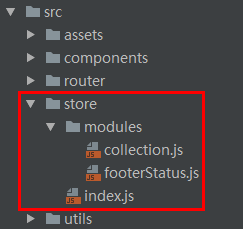
其中:
collection.js
//collection.js

const state={

  collects:['hi'],  //初始化一个colects数组

  field: '空天作战任务规划'

};

const getters={

};

const mutations={

};

const actions={

};

export default {

  namespaced:true,//用于在全局引用此文件里的方法时标识这一个的文件名

  state,

  getters,

  mutations,

  actions

}
footerStatus.js:
//footerStatus.js

const state={   //要设置的全局访问的state对象

  name: 'beautiful',

  address: 'Hunan Changsha',

  school: '国防科大',

  showFooter: true,

  changableNum:0

  //要设置的初始属性值

};

const getters = {   //实时监听state值的变化(最新状态)

};

const mutations = {

  changeSchool(state, value){

    state.school = value;

  }

};

const actions = {

  _changeSchool(context, value){

    context.commit('changeSchool', value)

  }

};

export default {

  namespaced: true, //用于在全局引用此文里的方法时标识这一个的文件名

  state,

  getters,

  mutations,

  actions

}
index.js:
import Vue from 'vue'

import Vuex from 'vuex'

import collection from './modules/collection'

import footerStatus from './modules/footerStatus'

Vue.use(Vuex)

export default new Vuex.Store({

  modules: {

    collection,

    footerStatus

  }

})
假如我们想在组件中使用module中的state、getters、mutations、actions,那该如何使用呢?
除了和普通store一样需要在main.js中注入store外,具体方法如下:
<template>

  <div>

    <p>name: {{name}}</p>

    <p>school: {{school}}</p>

    <p>address: {{address}}</p>

    <p>field: {{field}}</p>

    <p>arrList: {{arrList}}</p>

    <div><button @click="changeSchool()">改变值</button></div>

  </div>

</template>

<script>

  import {mapState, mapGetters} from 'vuex'

  export default {

    data(){

      return {

        use: 'vuex高级使用方法'

      }

    },

    computed: {

      ...mapState({

        name: state => state.footerStatus.name,

        address(state){

          return state.footerStatus.address;

        }

      }),

      ...mapState('footerStatus', {

        school: 'school'

      }),

      ...mapState('collection', ['field']),

      _use(){

        this.use;

      },

      ...mapGetters('collection', {

        arrList: 'renderCollects'

      })

    },

    methods: {

      changeSchool(){

        this.$store.dispatch("footerStatus/_changeSchool", '北大');

      }

    }

  }

</script>

<style scoped>

</style>
vue:vuex中mapState、mapGetters、mapActions辅助函数及Module的使用的更多相关文章
- vuex之 mapState, mapGetters, mapActions, mapMutations 的使用
一.介绍 vuex里面的四大金刚:State, Mutations,Actions,Getters (上次记得关于vuex笔记 http://www.cnblogs.com/adouwt/p/8283 ...
- vuex里mapState,mapGetters使用详解
这次给大家带来vuex里mapState,mapGetters使用详解,vuex里mapState,mapGetters使用的注意事项有哪些,下面就是实战案例,一起来看一下. 一.介绍 vuex里面的 ...
- Vuex中mapState的用法
Vuex中mapState的用法 今天使用Vuex的时候遇到一个坑,也可以说是自己的无知吧,折腾了好久,终于发现自己代码的错误了.真是天雷滚滚~~~~~~ index.js import Vue ...
- vuex中的辅助函数 mapState,mapGetters, mapActions, mapMutations
1.导入辅助函数 导入mapState可以调用vuex中state的数据 导入mapMutations可以调用vuex中mutations的方法 四个辅助函数 各自对应自己在vuex上的自己 2.ma ...
- vuex中mapState、mapMutations、mapAction的理解
当一个组件需要获取多个状态时候,将这些状态都声明为计算属性会有些重复和冗余.为了解决这个问题,我们可以使用 mapState 辅助函数帮助我们生成计算属性. // 在单独构建的版本中辅助函数为 Vue ...
- Vue Vuex中的严格模式/实例解析/dispatch/commit /state/getters
严格模式 import getters from './getters' import mutations from './mutations' import actions from './acti ...
- vuex 中关于 mapGetters 的作用
mapGetters 工具函数会将 store 中的 getter 映射到局部计算属性中.它的功能和 mapState 非常类似,我们来直接看它的实现: export function mapGett ...
- vuex2中使用mapGetters/mapActions报错解决方法
解决方案 可以安装整个stage2的预置器或者安装 Object Rest Operator 的babel插件 babel-plugin-transform-object-rest-spread . ...
- Vue.js中学习使用Vuex详解
在SPA单页面组件的开发中 Vue的vuex和React的Redux 都统称为同一状态管理,个人的理解是全局状态管理更合适:简单的理解就是你在state中定义了一个数据之后,你可以在所在项目中的任何一 ...
随机推荐
- http 协议_DNS_域名解析 DNS 服务器_内容分发网络 CDN_缓存机制_HTML5 浏览器存储技术_cookie_sessionStorage_localStorage
TCP/IP 协议族 是按层次去划分的 应用层 决定了向用户提供应用服务时通信的活动. FTP 协议(文件传输协议)DNS(域名协议)HTTP(超文本传输协议) 传输层 提供处于网络连接中 ...
- python中的基础2
2 2.1 字符串的索引与切片: a = 'ABCDEFGHIJK' print(a[0]) print(a[3]) print(a[5]) print(a[7]) 2.2 字符串的常用方法. pr ...
- openlayers应用原理
1.数据组织 OpenLayers通过同层(Layer)进行组织渲染,然后通过数据源设置具体的地图数据来源.因此,Layer与Source是密切相关的对应关系,缺一不可.Layer可看做渲染地图的层容 ...
- C++中继承与抽象类
继承语法格式如下: class 子类名称 : 继承方式(public private protected 三种) 父类名称 纯虚函数格式: virtual 返回值类型 函数名(参数列表)= 0:含有纯 ...
- Random类 一般跟生成随机数有关
public class MyRandom extends Random{ public static void main(String[] args) { // 随机数,生产随机数 // java提 ...
- type显示的是访问类型,是较为重要的一个指标,结果值从好到坏依次是: system > const > eq_ref > ref > fulltext > ref_or_null > index_merge > unique_subquery > index_subquery > range > index > ALL ,一般来说,得保证查询至少达到range级别,最好能达到ref。 作者:高
MySQL EXPLAIN详解 - 简书 https://www.jianshu.com/p/ea3fc71fdc45 type显示的是访问类型,是较为重要的一个指标,结果值从好到坏依次是: syst ...
- 【转载】Python日期时间模块datetime详解与Python 日期时间的比较,计算实例代码
本文转载自脚本之家,源网址为:https://www.jb51.net/article/147429.htm 一.Python中日期时间模块datetime介绍 (一).datetime模块中包含如下 ...
- 学习ActiveMQ(一):安装与启动
一:简单介绍 AvtiveMQ是Apaceh所研发的一个开源消息中间件,用来在服务与服务之间进行异步通信,是基于JMS规范的.activemq包含发送者(sender).消息(message).队列( ...
- 2018-2019-2 网络对抗技术 20165317 Exp3 免杀原理与实践
2018-2019-2 网络对抗技术 20165317 Exp3 免杀原理与实践 实验内容 任务一:正确使用msf编码器,msfvenom生成如jar之类的其他文件,veil-evasion,自己利用 ...
- python之dict
一.字典的定义 在python中,字典数据类型使用{}来定义,在大括号中,存储的是键值对,即key:value的形式,并且key不能有重复值,如果有重复,后面的值会覆盖前面的:值可以重复 # 字典的定 ...