
Dynamics 365检查工作流、SDK插件步骤是否选中运行成功后自动删除系统作业记录
本人微信公众号:微软动态CRM专家罗勇 ,回复298或者20190120可方便获取本文,同时可以在第一间得到我发布的最新博文信息,follow me!我的网站是 www.luoyong.me 。
系统作业(逻辑名称asyncoperation)这个实体存储了工作流、异步SDK插件步骤的运行记录,若是不及时删除的话,这个实体记录数太多会严重影响系统性能。
所以我们一般做法分成两种,一个是建立一个系统批量删除作业,删除状态为成功、失败、已取消,且创建日期为X个月之前的记录(因为不少公司对日志保留有要求,起码保留一个月),这个批量删除作业最频繁可以每隔七天运行一次。
另外一个就是切记两个选项要选中,一个是工作流的【自动删除已完成的工作流作业(以节省磁盘空间)】要选中。
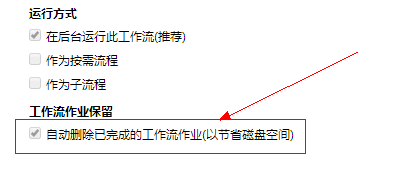
另一个就是SDK插件步骤的【Delete AsyncOperation if StatusCode = Successful】要选中。
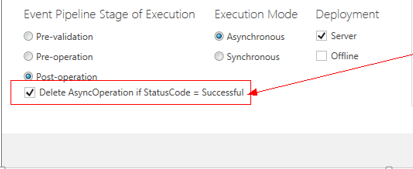
这两个选项如果不选中,有时候会带来严重问题,比如说SDK插件步骤,注册在所有实体的RetrieveMutiple,Retrieve等运行非常频繁的消息上,那带来的系统作业记录会非常多,可能一天几百万。
难道每次都一个个用眼睛看手工检查,太Low,我们当然有程序办法,跑一下程序就可以检查出来,下面就是可以参考的代码。
using Microsoft.Crm.Sdk.Messages;

using Microsoft.Xrm.Sdk;

using Microsoft.Xrm.Sdk.Client;

using Microsoft.Xrm.Sdk.Query;

using System;

using System.Configuration;

using System.Net;

using System.ServiceModel.Description;

namespace CheckWorkflowPluginStepAutoDelete

{

    class Program

    {

        static void Main(string[] args)

        {

            try

            {

                string inputKey;

                ServicePointManager.SecurityProtocol = SecurityProtocolType.Ssl3 | SecurityProtocolType.Tls | SecurityProtocolType.Tls11 | SecurityProtocolType.Tls12;

                IServiceManagement<IOrganizationService> orgServiceMgr = ServiceConfigurationFactory.CreateManagement<IOrganizationService>(new Uri(ConfigurationManager.AppSettings["orgUrl"]));

                AuthenticationCredentials orgAuCredentials = new AuthenticationCredentials();

                orgAuCredentials.ClientCredentials.UserName.UserName = ConfigurationManager.AppSettings["userName"];

                orgAuCredentials.ClientCredentials.UserName.Password = ConfigurationManager.AppSettings["passWord"];

                string needConfirm = ConfigurationManager.AppSettings["needConfirm"];

                using (var orgSvc = GetProxy<IOrganizationService, OrganizationServiceProxy>(orgServiceMgr, orgAuCredentials))

                {

                    orgSvc.Timeout = new TimeSpan(, , );

                    WhoAmIRequest whoReq = new WhoAmIRequest();

                    var whoRsp = orgSvc.Execute(whoReq) as WhoAmIResponse;

                    var userEntity = orgSvc.Retrieve("systemuser", whoRsp.UserId, new Microsoft.Xrm.Sdk.Query.ColumnSet("fullname"));

                    Console.WriteLine(string.Format("欢迎【{0}】登陆到【{1}】", userEntity.GetAttributeValue<string>("fullname"), ConfigurationManager.AppSettings["orgUrl"]));

                    Console.WriteLine("本程序用于检查工作流/SDK插件步骤是否选中了【运行成功后自动删除日志】!");

                    if (needConfirm == "Y")

                    {

                        Console.WriteLine("当前处于需要确认才会继续的模式,若要继续请输入Y然后回车确认!");

                        inputKey = Console.ReadLine();

                        if (inputKey.ToUpper() == "Y")

                        {

                            CheckSDKMessageProcessingStepAutoDelete(orgSvc);

                            CheckWorkflowAutoDelete(orgSvc);

                        }

                        else

                        {

                            Console.WriteLine("你选择了取消运行!");

                        }

                    }

                    else

                    {

                        CheckSDKMessageProcessingStepAutoDelete(orgSvc);

                        CheckWorkflowAutoDelete(orgSvc);

                    }

                }

                Console.Write("程序运行完成,按任意键退出." + DateTime.Now.ToString());

                Console.ReadLine();

            }

            catch (Exception ex)

            {

                Console.WriteLine("程序运行出错:" + ex.Message + ex.StackTrace);

                Console.ReadLine();

            }

        }

        private static void CheckSDKMessageProcessingStepAutoDelete(OrganizationServiceProxy orgSvc)

        {

            const string functionName = "检查SDK插件步骤是否选中了【运行成功后自动删除日志】";

            Console.WriteLine(string.Format("开始 {0} - {1}", functionName, DateTime.Now.ToString()));

            try

            {

                QueryExpression qe = new QueryExpression("sdkmessageprocessingstep");

                qe.ColumnSet = new ColumnSet("name");

                qe.NoLock = true;

                qe.Criteria.AddCondition(new ConditionExpression("mode", ConditionOperator.Equal, ));

                qe.Criteria.AddCondition(new ConditionExpression("asyncautodelete", ConditionOperator.Equal, false));

                qe.Criteria.AddCondition(new ConditionExpression("iscustomizable", ConditionOperator.Equal, true));

                EntityCollection ec = orgSvc.RetrieveMultiple(qe);

                if (ec.Entities.Count == )

                {

                    Console.WriteLine("Perfect!所有SDK插件步骤都选中了成功后自动删除运行日志!");

                }

                else

                {

                    Console.WriteLine("所有异步运行的SDK插件步骤没有选中【运行成功后自动删除日志】清单如下:");

                    foreach (Entity ent in ec.Entities)

                    {

                        Console.WriteLine(ent.GetAttributeValue<string>("name"));

                        Console.WriteLine(ent.Id);

                    }

                }

            }

            catch (Exception ex)

            {

                Console.WriteLine(string.Format("运行 {0} 出现异常:{1}", functionName, ex.Message + ex.StackTrace));

            }

            Console.WriteLine(string.Format("结束 {0} - {1}", functionName, DateTime.Now.ToString()));

            Console.WriteLine("================================================");

        }

        private static void CheckWorkflowAutoDelete(OrganizationServiceProxy orgSvc)

        {

            const string functionName = "检查工作流是否选中了【运行成功后自动删除日志】";

            Console.WriteLine(string.Format("开始 {0} - {1}", functionName, DateTime.Now.ToString()));

            try

            {

                var fetchXml = @"<fetch version='1.0' mapping='logical' distinct='false' no-lock='true'>

  <entity name='workflow'>

    <attribute name='name' />

    <filter type='and'>

      <condition attribute='type' operator='eq' value='1' />

      <condition attribute='category' operator='eq' value='0' />

      <condition attribute='statecode' operator='eq' value='1' />

      <condition attribute='asyncautodelete' operator='ne' value='1' />

      <condition attribute='mode' operator='eq' value='0' />

    </filter>

  </entity>

</fetch>";

                var workflowEntities = orgSvc.RetrieveMultiple(new FetchExpression(fetchXml));

                if (workflowEntities.Entities.Count == )

                {

                    Console.WriteLine("Perfect!所有工作流都选中了成功后自动删除运行日志!");

                }

                else

                {

                    Console.WriteLine("所有异步运行的工作流没有选中【运行成功后自动删除日志】清单如下:");

                    foreach (var item in workflowEntities.Entities)

                    {

                        Console.WriteLine(item.GetAttributeValue<string>("name"));

                    }

                }

            }

            catch (Exception ex)

            {

                Console.WriteLine(string.Format("运行 {0} 出现异常:{1}", functionName, ex.Message + ex.StackTrace));

            }

            Console.WriteLine(string.Format("结束 {0} - {1}", functionName, DateTime.Now.ToString()));

            Console.WriteLine("================================================");

        }

        private static TProxy GetProxy<TService, TProxy>(

IServiceManagement<TService> serviceManagement,

AuthenticationCredentials authCredentials)

            where TService : class

            where TProxy : ServiceProxy<TService>

        {

            Type classType = typeof(TProxy);

            if (serviceManagement.AuthenticationType !=

                AuthenticationProviderType.ActiveDirectory)

            {

                AuthenticationCredentials tokenCredentials =

                    serviceManagement.Authenticate(authCredentials);

                return (TProxy)classType

                    .GetConstructor(new Type[] { typeof(IServiceManagement<TService>), typeof(SecurityTokenResponse) })

                    .Invoke(new object[] { serviceManagement, tokenCredentials.SecurityTokenResponse });

            }

            return (TProxy)classType

                .GetConstructor(new Type[] { typeof(IServiceManagement<TService>), typeof(ClientCredentials) })

                .Invoke(new object[] { serviceManagement, authCredentials.ClientCredentials });

        }

    }

}
Dynamics 365检查工作流、SDK插件步骤是否选中运行成功后自动删除系统作业记录的更多相关文章
- Dynamics 365使用Execute Multiple Request删除系统作业实体记录
摘要: 本人微信公众号:微软动态CRM专家罗勇 ,回复295或者20190112可方便获取本文,同时可以在第一间得到我发布的最新博文信息,follow me!我的网站是 www.luoyong.me ...
- Dynamics 365 Customer Engagement中插件的调试
微软动态CRM专家罗勇 ,回复319或者20190319可方便获取本文,同时可以在第一间得到我发布的最新博文信息,follow me!我的网站是 www.luoyong.me . 本文主要根据官方的教 ...
- Dynamics 365 CE中AsyncOperationBase表记录太多,影响系统性能怎么办?
微软动态CRM专家罗勇 ,回复311或者20190311可方便获取本文,同时可以在第一间得到我发布的最新博文信息,follow me!我的网站是 www.luoyong.me . 本文主要是根据微软官 ...
- Dynamics 365 Online通过OAuth 2 Client Credential授权(Server-to-Server Authentication)后调用Web API
微软动态CRM专家罗勇 ,回复332或者20190505可方便获取本文,同时可以在第一间得到我发布的最新博文信息,follow me! 本文很多内容来自 John Towgood 撰写的Dynamic ...
- Dynamics 365的系统作业实体记录增长太快怎么回事?
摘要: 本人微信公众号:微软动态CRM专家罗勇 ,回复294或者20190111可方便获取本文,同时可以在第一间得到我发布的最新博文信息,follow me!我的网站是 www.luoyong.me ...
- 为Dynamics 365启用部署级的跟踪以及跟踪文件的定期删除
关注本人微信和易信公众号: 微软动态CRM专家罗勇 ,回复260或者20170712可方便获取本文,同时可以在第一间得到我发布的最新的博文信息,follow me!我的网站是 www.luoyong. ...
- Dynamics 365需要的最小的权限用来更改用户的业务部门和角色
我是微软Dynamics 365 & Power Platform方面的工程师罗勇,也是2015年7月到2018年6月连续三年Dynamics CRM/Business Solutions方面 ...
- Dynamics 365中的批量删除作业执行频率可以高于每天一次吗?
微软动态CRM专家罗勇 ,回复317或者20190314可方便获取本文,同时可以在第一间得到我发布的最新博文信息,follow me!我的网站是 www.luoyong.me . 我先来做一个例子,登 ...
- 配置Postman通过OAuth 2 implicit grant获取Dynamics 365 CE Online实例的Access Token
微软动态CRM专家罗勇 ,回复335或者20190516可方便获取本文,同时可以在第一间得到我发布的最新博文信息,follow me. 对于测试Web API, Get 类型,不需要设定特别reque ...
随机推荐
- [.net 面向对象程序设计深入](31)实战设计模式——使用Ioc模式(控制反转或依赖注入)实现松散耦合设计(1)
[.net 面向对象程序设计深入](31)实战设计模式——使用IoC模式(控制反转或依赖注入)实现松散耦合设计(1) 1,关于IOC模式 先看一些名词含义: IOC: Inversion of con ...
- Axure环境安装,组件引入,使用示例
资源下载: Axure的中文官方下载地址:https://www.axure.com.cn/3510/ Axure汉化包:https://www.axure.com.cn/2616/ Axure元件库 ...
- 惊奇!用Java也能实现比特币系统
最近区块链技术突然爆火,身边做技术的朋友茶余饭后不谈点区块链什么的都被认为是跟不上时代了,为啥会这样了? 这其实跟比特币价格去年的突飞猛进是分不开的,比特币价格从去年初不到一千美金到今年初最高接近两万 ...
- [Swift]LeetCode134. 加油站 | Gas Station
There are N gas stations along a circular route, where the amount of gas at station i is gas[i]. You ...
- [Swift]LeetCode199. 二叉树的右视图 | Binary Tree Right Side View
Given a binary tree, imagine yourself standing on the right side of it, return the values of the nod ...
- [Swift]LeetCode995. K 连续位的最小翻转次数 | Minimum Number of K Consecutive Bit Flips
In an array A containing only 0s and 1s, a K-bit flip consists of choosing a (contiguous) subarray o ...
- 看完Andoird9.0 Pie的隐藏特性,我买了SSL证书
今年 8 月,Google 正式公布了 Android 9.0 ,新的甜点名称也正式揭晓——Pie.这次的大版本升级中,藏着一个不起眼的特性:默认使用 HTTPS 为了将所有网络流量从明文(未加密的 ...
- 如何通过js调用接口
例如一个接口的返回值如下:var returnCitySN = {"cip": "221.192.178.158", "cid": &quo ...
- oauth2.0通过JdbcClientDetailsService从数据库读取相应的配置
oauth2.0通过JdbcClientDetailsService从数据库读取相应的配置 在上一节我们讲述的配置是把授权码存储在redis中,把相应的请求的路径用使用in-memory存储 ,这个是 ...
- Unable to build: the file dx.jar was not loaded from the SDK folder
eclipse 运行 android 时失败了,提示 Unable to build: the file dx.jar was not loaded from the SDK folder! 解决办法 ...