
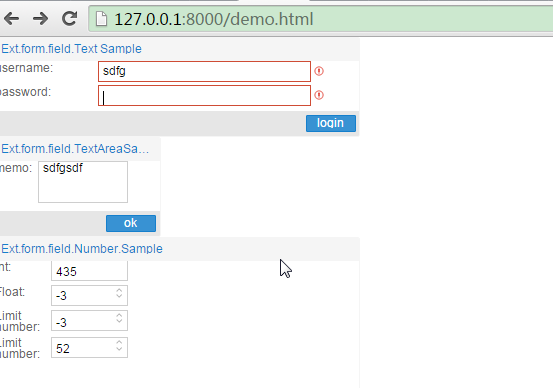
ExtJs之文本框及数字输入
结合HTML来理解,
比较容易。
<!DOCTYPE html>
<html>
<head>
    <title>ExtJs</title>
        <meta http-equiv="Content-Type" content="text/html; charset=utf-8"/>
    <link rel="stylesheet" type="text/css" href="ExtJs/packages/ext-theme-crisp/build/resources/ext-theme-crisp-all.css">
        <script type="text/javascript" src="ExtJs/ext-all.js"></script>
        <script type="text/javascript" src="ExtJs/bootstrap.js"></script>
        <script type="text/javascript" src="ExtJs/packages/ext-theme-crisp/build/ext-theme-crisp.js"></script>

    <script type="text/javascript">
            Ext.onReady(function() {
                Ext.QuickTips.init();
                var testForm = new Ext.form.Panel({
                    title: 'Ext.form.field.TextAreaSample',
                    bodyStyle: 'padding: 5 5 5 5',
                    frame: true,
                    height: 150,
                    width: 250,
                    renderTo: 'formArea',
                    items: [{
                        xtype: 'textarea',
                        fieldLabel: 'memo',
                        id: 'memo',
                        labelSeparator: ':',
                        labelWidth: 60,
                        width: 200
                    }],
                    buttons: [{text: 'ok', handler: showValue}]
                });
                var loginForm = new Ext.form.Panel({
                    title: 'Ext.form.field.Text Sample',
                    bodyStyle: 'padding: 5 5 5 5',
                    frame: true,
                    height: 150,
                    width: 550,
                    renderTo: 'form',
                    defaultType: 'textfield',
                    defaults: {
                        labelSeparator: ':',
                        labelWidth: 150,
                        width: 500,
                        allowBlank: false,
                        labelAlign: 'left',
                        msgTarget: 'side'
                    },
                    items: [{
                        fieldLabel: 'username',
                        name: 'userName',
                        selectOnFocus: true,
                        regex: /^([\w]+)(.[\w+]+)*@([\w-]+\.){1,5}([A-Za-z]){2,4}$/,
                        regexText: 'format error'
                    }, {
                        name: 'password',
                        fieldLabel: 'password',
                        inputType: 'password'
                    }],
                    buttons: [{
                        text: 'login',
                        handler: function() {
                            loginForm.form.setValues({userName: 'user@com', password: '123456'});
                        }
                    }]
                });
                var numberForm = new Ext.form.FormPanel({
                    title: 'Ext.form.field.Number.Sample',
                    bodyStyle: 'padding: 5 5 5 5',
                    renderTo: 'numberForm',
                    frame: true,
                    height: 350,
                    width: 550,
                    defaultType: 'numberfield',
                    defaults: {
                        labelSeparator: ':',
                        labelWidth: 80,
                        width: 200,
                        labelAlign: 'left',
                        msgTarget: 'side'
                    },
                    items: [{
                        fieldLabel: 'Int',
                        hideTrigger: true,
                        allowDecimals: false,
                        nanText: 'input valid number.'
                    }, {
                        fieldLabel: 'Float',
                        decimalPrecision: 2,
                        allowDecimals: true,
                        nanText: 'input valid number.'
                    }, {
                        fieldLabel: 'Limit number',
                        baseChars: '12345'
                    },{
                        fieldLabel: 'Limit number',
                        maxValue: 100,
                        minValue: 50
                    }]
                });
                function showValue(){
                    var memo = testForm.getForm().findField('memo');
                    alert(memo.getValue());
                };
            });
    </script>
</head>
<body>
    <div id='form'></div>
        <div id='formArea'></div>
        <div id='numberForm'></div>
        <div id='errorMsg'></div>

</body>
</html>
ExtJs之文本框及数字输入的更多相关文章
- 65. ExtJs获取文本框中值的几种方式
转自:https://blog.csdn.net/qiu512300471/article/details/17415675/ 1.Html文本框 如:<input type=" ...
- [置顶] 解决EXTJS文本框长度验证在ORACLE数据库下不正确的问题
由于ORACLE数据库里面一个汉字和符号占2 个字节,数字和英文占1个字节,所以用EXTJS的文本框MaxLenght去限制输入的长度是不正确的,因为EXTJS只限制了输入的字数量,而不是字节数量. ...
- 使用Javascript限制文本框只允许输入数字
很多时候需要用到限制文本框的数字输入,试过许多方法,都不太理想,遂决定自己实现一个来玩玩.曾经使用过的方法通过onkeydown事件来控制只允许数字: <input onkeydown=&quo ...
- Extjs 下拉框
刚刚熟练了easyui控件的使用,又開始了如今的这个项目. 这个项目是个半成品.前端使用的是Extjs控件,jsp中没有代码.就引用了非常多的js...于是乎有种不知所措了呀. . . 说实话特别的不 ...
- (二十八)c#Winform自定义控件-文本框(一)
前提 入行已经7,8年了,一直想做一套漂亮点的自定义控件,于是就有了本系列文章. 开源地址:https://gitee.com/kwwwvagaa/net_winform_custom_control ...
- (二十九)c#Winform自定义控件-文本框(二)
前提 入行已经7,8年了,一直想做一套漂亮点的自定义控件,于是就有了本系列文章. 开源地址:https://gitee.com/kwwwvagaa/net_winform_custom_control ...
- (三十)c#Winform自定义控件-文本框(三)
前提 入行已经7,8年了,一直想做一套漂亮点的自定义控件,于是就有了本系列文章. 开源地址:https://gitee.com/kwwwvagaa/net_winform_custom_control ...
- (三十一)c#Winform自定义控件-文本框(四)
前提 入行已经7,8年了,一直想做一套漂亮点的自定义控件,于是就有了本系列文章. 开源地址:https://gitee.com/kwwwvagaa/net_winform_custom_control ...
- 无废话ExtJs 入门教程五[文本框:TextField]
无废话ExtJs 入门教程五[文本框:TextField] extjs技术交流,欢迎加群(201926085) 继上一节内容,我们在表单里加了个两个文本框.如下所示代码区的第42行位置,items: ...
随机推荐
- bootstrap插件之Carousel
兼容:ie9以上 特点:滑动图片看起来永远只有两帧,过度完美:是html css js的完美配合:其中html的data属性起了关键性作用 前提:normalize.css jquery.js ht ...
- OpenStack的bridge_sto off的解释
北京_张华(28620211) 2014/1/27 星期一 11:10:57传统的网络是通过STP协议来避免交换机在二层形成环路,但是对于虚拟交换机,因为有东西向的流量,故将bridge_stp设成o ...
- OpenStack: 安装准备
>安装准备1. 安装MySQL# apt-get install python-mysqldb mysql-server将/etc/mysql/my.cnf修改bind-address为&quo ...
- Awesome Swift
Awesome Swift https://github.com/matteocrippa/awesome-swift A collaborative list of awesome Swift re ...
- MVC4.0 利用IActionFilter实现简单的后台操作日志功能
首先我们要了解MVC提供了4种常用的拦截器:IActionFilter(Action拦截器接口).IExceptionFilter(异常拦截器接口).IResultFilter(Result拦截器接口 ...
- Java实现Internet地址获取
Java实现Internet地址获取 代码内容 输入域名输出IPV4地址 输入IP地址输出域名 支持命令行输入 支持交互式输入 代码实现 /* nslookup.java */ import java ...
- Mono for Android (3)-- AbsoluteLayout、FrameLayout、LinearLayout、RelativeLayout、TableLayout
AbsoluteLayout:允许开发人员将视图放在所定义的位置.该布局已经过时了,建议改用其他 FrameLayout:最简单的布局选项,其设计目的是在屏幕上显示单个对象.所有元素都固定在左上角.如 ...
- Machine Learning 学习笔记 (2) —— 使用牛顿法寻找极值
本系列文章允许转载,转载请保留全文! [请先阅读][说明&总目录]http://www.cnblogs.com/tbcaaa8/p/4415055.html 1. 用牛顿法解方程 牛顿法是一种 ...
- Xcode 添加代码块
我们经常会定义一些retain的property,而且大概每次我们都会像这样写: @property (nonatomic, retain) Type *name; 每次都要老老实实的把“@prop ...
- WPF多窗口传参解决方案
在WPF中,我们的常常涉及到多个窗口之间传递参数的问题,那么该怎么传呢? 答:在窗口的构造函数中添加想要传递的参数.(我表达不好,请看下面代码.) 在主窗口中单机button打开一个新的子窗口. // ...