
html之input系列标签
input属性太多,我这里仅列出几个我喜欢的吧。
disabled:首次加载时禁用此元素
checked:首次加载时选中此元素
form:输入字段所属的一个或多个表单
hieght:定义input字段的高度,适用于type=image
max_length:输入字段中字符的最大长度
min:与上相反
name:定义input元素的名称
pattern:输入字段值的模式或格式
multiple:允许一个以上的值
required:输入字段的值是必须的
size:输入字段的宽度
width:输入字段的宽度,适用于type=image
type:
button 按扭
checkbox 复选框
file 文件
hidden 隐藏
imag 图片
password 密码
radio 单选框
submit 提交按扭
text 文本
value:input元素的值,提交后台的标识
实例演示区:
文本域:form表单:块级标签
    <form> #文本域

        姓:<input type="text" name="firstname">

        名:<input type="text" name="lastname">

        <input type="submit" value="提交">

    </form>

    <form>#密码

        用户名:<input type="text" name="user">

        密码:<input type="password" name="password">

        <input type="submit" value="提交">

    </form>

    <form>#复选框

        我喜欢:

            汔车:<input type="checkbox">

            美女:<input type="checkbox">

            电影:<input type="checkbox">

        <input type="submit" value="提交">

    </form>

    <form>#单选框,name名称要一致才能互斥

        你的姓别

        男:<input type="radio" name="r">

        女:<input type="radio" name="r">

        <input type="submit" value="提交">

    </form>

    <form>#围绕数据的fileset

        <fieldset>

            <legend>健康信息</legend>

            身高:<input type="text">

            体重:<input type="text">

        </fieldset>

    </form>
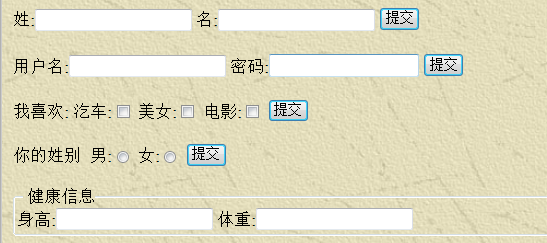
效果图:
好玩的:提交文件给后台并保存文件
说明:后台用的是django接收,有看到的朋友自己搭建,这里只列出过程
views.py
from django.shortcuts import render,HttpResponse

import os

# Create your views here.

def upload(request):

    if request.method=='POST':

        myfiles = request.FILES.get('myfile',None)

        if not myfiles:

            return HttpResponse('no files need upload..')

        des_file = os.path.join(r'c:\test',myfiles.name)

        with open(des_file,'wb+') as f:

            for each_block in myfiles.chunks():

                f.write(each_block)

            return HttpResponse('upload over...')

def index(request):

    return render(request,'index.html')
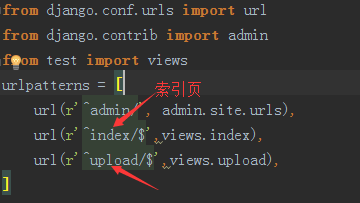
配置好URL地址:
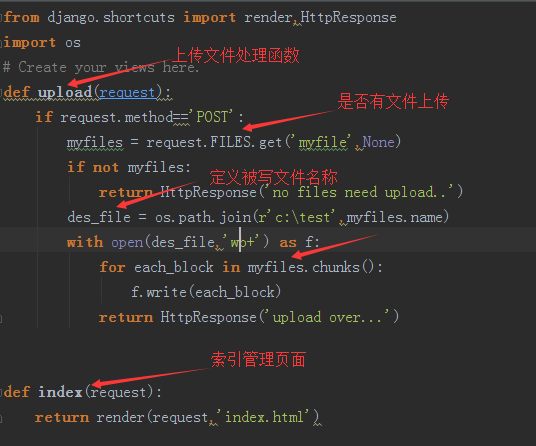
在views中编写接收文件后的处理函数
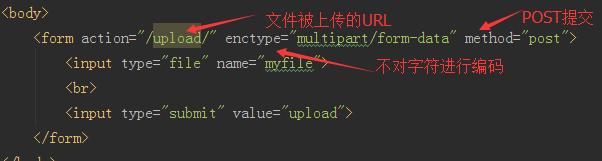
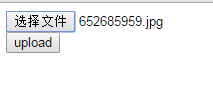
编写索引页代码
选择上传文件 :
html之input系列标签的更多相关文章
- 第一篇-Html标签中head标签,body标签中input系列,textarea和select标签
第十四周课程(1-12章节) HTML 裸体 CSS 穿华丽衣服 Javascript 动起来 一 HTML (20个标签) 1.我们的浏览器是socket客户端 2.一套规则,浏览器认识的规则 ...
- html的body内标签之input系列2
一,input系列:name属性用于让后台拿数据.value 只是在屏幕上的显示. 1. input type='text' name='query' value="张三"(相当于 ...
- html基础 表单标签 input系列 以及优化方法
场景:在网页中显示手机用户信息的表单效果. 如:登录页.注册页标签名:input 用法是通过改变type属性值,来展示不同效果 1.1 html 代码 <!--placeholder 提示符又叫 ...
- input[file]标签的accept=”image/*”属性响应很慢的解决办法
转自:http://blog.csdn.net/lx583274568/article/details/52983693 input[file]标签的accept属性可用于指定上传文件的 MIME类型 ...
- 从重置input file标签中看jQuery的 .val() 和 .attr(“value”) 区别
背景: 在清空input file标签选中值时,分别用了以下方法,发现有的对有的错: [√]$("#file")[0].value = ""; [√]$(&qu ...
- HTML:Input元素标签的详细介绍
总结Input的标签: Input表示Form表单中的一种输入对象,其又随Type类型的不同而分文本输入框,密码输入框,单选/复选框,提交/重置按钮等,下面一一介绍.1,type=text输入类型是t ...
- 4、html的body内标签之input系列
一.input标签与form表单 <!DOCTYPE html> <html lang="en"> <head> <meta charse ...
- html的body内标签之input系列1
1. Form的作用:提交当前的表单. 类似于去了银行提交的纸质单子,递到后台去办理相关业务. text,password只有输入的功能:button,submit只有点击的功能.想要把这些信息提交, ...
- html input file标签的上传文件 注意点
文件上传框 代码格式:<input type=“file” name=“...” size=“15” input enctype="multipart/form-data“ maxl ...
随机推荐
- Eclipse的maven构建一个web项目,以构建SpringMVC项目为例
http://www.cnblogs.com/javaTest/archive/2012/04/28/2589574.html springmvc demo实例教程源代码下载:http://zuida ...
- Native VS H5 VS React Native
现在软件行业已经跨入大前端时代,所以势必学一点前端的知识.本来移动端开发都是使用各自平台的语言,如iOS端使用OC,swift:Android使用java,但是随着H5的出现,导致移动端Native出 ...
- HttpWebRequest 和HttpWebResponse总结
1. 总结 总结2 3. Code using System; using System.Collections.Generic; using System.Linq; using System.Te ...
- show master status empty解决方案
The following MySQL error might occur if you are using MySQL replication and binary logs. mysql> ...
- iOS-appDelegate 生命周期
- (void)applicationWillResignActive:(UIApplication *)application 说明:当应用程序将要入非活动状态执行,在此期间,应用程序不接收消息或事 ...
- Nginx启动出错 error while loading shared libraries:
在centos5.7 32位上编译安照 nginx-1.1.16 出错 [root@localhost conf]# /usr/local/nginx/sbin/nginx/usr/local/ngi ...
- 【Modal】
1.Bootstrap Modal 文档里标签.属性.方法.事件都写的很清楚 2.AngularUI - Bootstrap UI Bootstrap 2.1 $scope.open = functi ...
- MySQL优化—工欲善其事,必先利其器之EXPLAIN(转)
最近慢慢接触MySQL,了解如何优化它也迫在眉睫了,话说工欲善其事,必先利其器.最近我就打算了解下几个优化MySQL中经常用到的工具.今天就简单介绍下EXPLAIN. 内容导航 id select_t ...
- Day03_JAVA语言基础第三天
1.位运算符 1.面试题(掌握) ^:一个数据对同一个数据^两次,结果还是数据本身 举例:a ^ b ^ b = a 2.注意 知道结论,面试题,以后就完全不用看了 2.逻辑运算符(掌握) ...
- Generic Netlink详解
netlink socket是一种用于用户态进程和内核态进程之间的通信机制.它通过为内核模块提供一组特殊的API,并为用户程序提供了一组标准的socket接口的方式,实现了全双工的通讯连接. Netl ...