
已经重写,源码和文章请跳转http://www.cnblogs.com/ymnets/p/5621706.html
文章由于写得比较仓促
已经重写,源码和文章请跳转
http://www.cnblogs.com/ymnets/p/5621706.html
系列目录
前言:
导入导出实在多例子,很多成熟的组建都分装了导入和导出,这一节演示利用LinqToExcel组件对Excel的导入,这个是一个极其简单的例子。
我并不是说导入的简单。而是LinqToExcel让我们对Excel操作更加简单!
最后我们将利用ClosedXML输出Excel。这个比现流行NPOI与EPPlus更加优秀的组件,以Open XML SDK为基础,所以只支持xlsx,不支持xls格式(现阶段谁没有个office2007以上版本)
他导出的Excel根据官方描述,兼容性远超同行对手
如果你不是使用本架构只看2,3,4点,使用BLL层的代码,这同样适用你的MVC程序
知识点:
- LinqToExcel组件读取Excel文件
- ClosedXML组件输出Excel
准备:
- 一张演示的数据库表
- 安装LinqToExcel NuGet包
- 文件上传样例
- (时间关系只能在下一节)
开始:
1.数据表
CREATE TABLE [dbo].[Spl_Person](

    [Id] [nvarchar](50) NOT NULL,          --ID

    [Name] [nvarchar](50) NULL,            --姓名

    [Sex] [nchar](10) NULL,                --性别

    [Age] [int] NULL,                      --年龄

    [IDCard] [nvarchar](50) NULL,          --IDCard

    [Phone] [nvarchar](50) NULL,           --电话

    [Email] [nvarchar](200) NULL,          --邮件

    [Address] [nvarchar](300) NULL,        --地址

    [CreateTime] [datetime] NOT NULL,      --创建时间

    [Region] [nvarchar](50) NULL,          --区域

    [Category] [nvarchar](50) NULL,        --类别

 CONSTRAINT [PK_Spl_Person] PRIMARY KEY CLUSTERED

(

    [Id] ASC

)WITH (PAD_INDEX = OFF, STATISTICS_NORECOMPUTE = OFF, IGNORE_DUP_KEY = OFF, ALLOW_ROW_LOCKS = ON, ALLOW_PAGE_LOCKS = ON) ON [PRIMARY]

) ON [PRIMARY]

GO
按照之前的做法,更新到EF。并利用T4生成DAL,BLL,MODEL。再用代码生成器生成界面复制进解决方案,一步到位
配置好访问地址和权限,直接运行

再手动在工具栏添加导入和导出的按钮(别忘记添加权限)
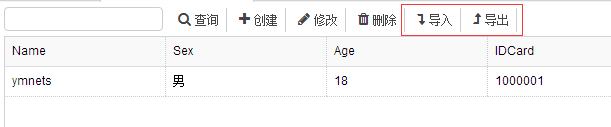
    @Html.ToolButton("btnImport", "fa fa-level-down", Resource.Import, perm, "Import", true)

    @Html.ToolButton("btnExport", "fa fa-level-up", Resource.Export, perm, "Export", true)
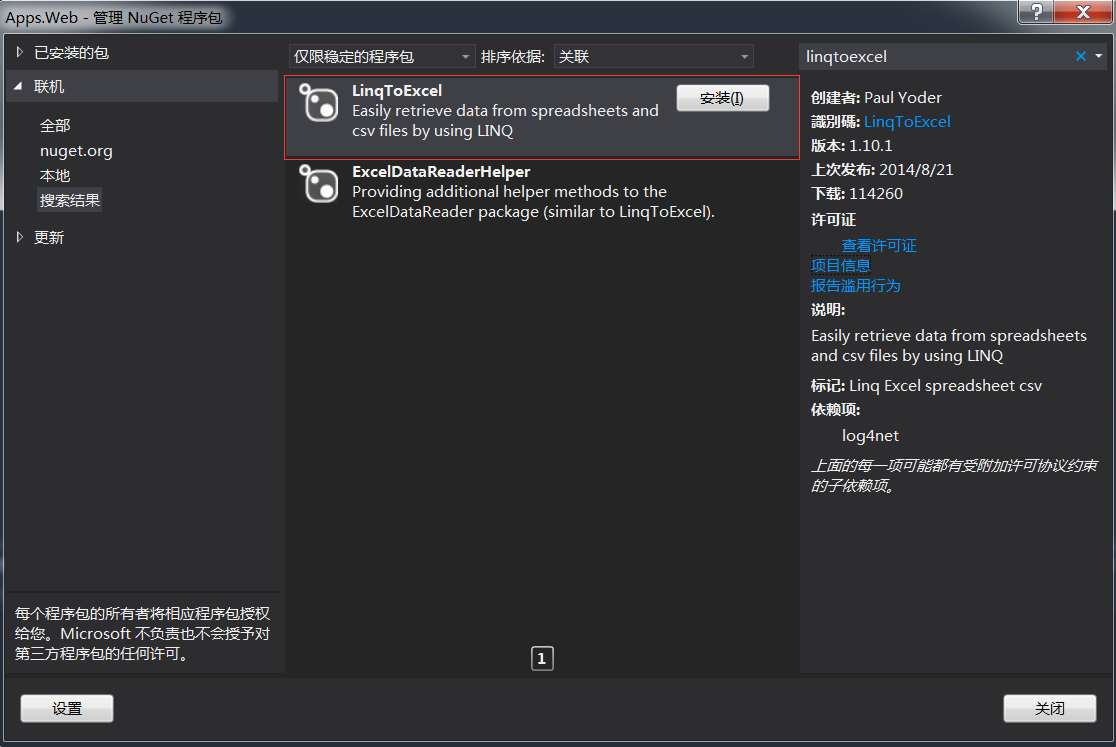
2.安装LinqToExcel包
因为我们读取Excel放在BLL层,所有在BLL层安装LinqToExcel包
3.文件上传
(这一点简单带过,可以到网上下载上传代码植入到自己系统中)
或者下载第32节的源码 或者使用你有自己的上传文件功能
我这里使用普通的form上传功能
添加导入前端代码
<div id="uploadExcel" class="easyui-window" data-options="modal:true,closed:true,minimizable:false,shadow:false">

    <form name="form1" method="post" id="form1">

        <table>

            <tr>

                <th style=" padding:20px;">Excel:</th>

                <td style=" padding:20px;">

                    <input name="ExcelPath" type="text" maxlength="" id="txtExcelPath" readonly="readonly" style="width:200px" class="txtInput normal left">

                    <a href="javascript:$('#FileUpload').trigger('click').void(0);;" class="files">@Resource.Browse</a>

                    <input class="displaynone" type="file" id="FileUpload" name="FileUpload" onchange="Upload('ExcelFile', 'txtExcelPath', 'FileUpload');">

                    <span class="uploading">@Resource.Uploading</span>

                </td>

            </tr>

        </table>

        <div class="endbtndiv">

            <a id="btnSave" href="javascript:ImportData()" class="easyui-linkbutton btns">Save</a>

            <a id="btnReturn" href="javascript:$('#uploadExcel').window('close')" class="easyui-linkbutton btnc">Close</a>

        </div>

    </form>

</div>
导入按钮事件只要弹出上传框就好
  $("#btnImport").click(function () {

            $("#uploadExcel").window({ title: '@Resource.Import', width: 450, height: 160, iconCls: 'icon-details' }).window('open');

        });

保证上传是成功的。

-------------------------------------------------------------------------------------------------------上面只是前期的准备工作--------------------------------------------------------------
在业务层添加以下代码
using Apps.Common;

using Apps.Models;

using Apps.Models.Spl;

using LinqToExcel;

using System;

using System.Collections.Generic;

using System.IO;

using System.Linq;

using System.Text;

using System.Threading.Tasks;

namespace Apps.Spl.BLL

{

    public partial class Spl_ProductBLL

    {

        /// <summary>

        /// 校验Excel数据

        /// </summary>

        public bool CheckImportData( string fileName, List<Spl_PersonModel> personList,ref ValidationErrors errors )

        {

            var targetFile = new FileInfo(fileName);

            if (!targetFile.Exists)

            {

                errors.Add("导入的数据文件不存在");

                return false;

            }

            var excelFile = new ExcelQueryFactory(fileName);

            //对应列头

            excelFile.AddMapping<Spl_PersonModel>(x => x.Name, "Name");

            excelFile.AddMapping<Spl_PersonModel>(x => x.Sex, "Sex");

            excelFile.AddMapping<Spl_PersonModel>(x => x.Age, "Age");

            excelFile.AddMapping<Spl_PersonModel>(x => x.IDCard, "IDCard");

            excelFile.AddMapping<Spl_PersonModel>(x => x.Phone, "Phone");

            excelFile.AddMapping<Spl_PersonModel>(x => x.Email, "Email");

            excelFile.AddMapping<Spl_PersonModel>(x => x.Address, "Address");

            excelFile.AddMapping<Spl_PersonModel>(x => x.Region, "Region");

            excelFile.AddMapping<Spl_PersonModel>(x => x.Category, "Category");

            //SheetName

            var excelContent = excelFile.Worksheet<Spl_PersonModel>(0);

            int rowIndex = 1;

            //检查数据正确性

            foreach (var row in excelContent)

            {

                var errorMessage = new StringBuilder();

                var person = new Spl_PersonModel();

                person.Id =

                person.Name = row.Name;

                person.Sex = row.Sex;

                person.Age = row.Age;

                person.IDCard = row.IDCard;

                person.Phone = row.Phone;

                person.Email = row.Email;

                person.Address = row.Address;

                person.Region = row.Region;

                person.Category = row.Category;

                if (string.IsNullOrWhiteSpace(row.Name))

                {

                    errorMessage.Append("Name - 不能为空. ");

                }

                if (string.IsNullOrWhiteSpace(row.IDCard))

                {

                    errorMessage.Append("IDCard - 不能为空. ");

                }

                //=============================================================================

                if (errorMessage.Length > 0)

                {

                    errors.Add(string.Format(

                        "第 {0} 列发现错误:{1}{2}",

                        rowIndex,

                        errorMessage,

                        "<br/>"));

                }

                personList.Add(person);

                rowIndex += 1;

            }

            if (errors.Count > 0)

            {

                return false;

            }

            return true;

        }

        /// <summary>

        /// 保存数据

        /// </summary>

        public void SaveImportData(IEnumerable<Spl_PersonModel> personList)

        {

            try

            {

                DBContainer db = new DBContainer();

                foreach (var model in personList)

                {

                    Spl_Person entity = new Spl_Person();

                    entity.Id = ResultHelper.NewId;

                    entity.Name = model.Name;

                    entity.Sex = model.Sex;

                    entity.Age = model.Age;

                    entity.IDCard = model.IDCard;

                    entity.Phone = model.Phone;

                    entity.Email = model.Email;

                    entity.Address = model.Address;

                    entity.CreateTime = ResultHelper.NowTime;

                    entity.Region = model.Region;

                    entity.Category = model.Category;

                    db.Spl_Person.Add(entity);

                }

                db.SaveChanges();

            }

            catch (Exception ex)

            {

                throw;

            }

        }

    }

}
BLL
 public class ValidationErrors : List<ValidationError>

    {

        /// <summary>

        /// 添加错误

        /// </summary>

        /// <param name="errorMessage">信息描述</param>

        public void Add(string errorMessage)

        {

            base.Add(new ValidationError { ErrorMessage = errorMessage });

        }

        /// <summary>

        /// 获取错误集合

        /// </summary>

        public string Error

        {

            get {

                string error = "";

                this.All(a => {

                    error += a.ErrorMessage;

                    return true;

                });

                return error;

            }

        }

    }
ValidationError
代码包含两个方法
public bool CheckImportData( string fileName, List<Spl_PersonModel> personList,ValidationErrors errors )
fileName为我们上传的文件。
personList为承接数据List
ValidationErrors 错误集合
public void SaveImportData(IEnumerable<Spl_PersonModel> personList)
保存数据
别忘记添加接口
   public partial interface ISpl_PersonBLL

    {

        bool CheckImportData(string fileName, List<Spl_PersonModel> personList, ref ValidationErrors errors);

        void SaveImportData(IEnumerable<Spl_PersonModel> personList);

    }
简单明白,直接看代码,不再解析。OK这样控制器就可以直接调用了
  public ActionResult Import(string filePath)

        {

            var personList = new List<Spl_PersonModel>();

             //校验数据is

            bool checkResult = m_BLL.CheckImportData(filePath, personList, ref errors);

             //校验通过直接保存

             if (checkResult)

             {

                 m_BLL.SaveImportData(personList);

                 LogHandler.WriteServiceLog(GetUserId(),"导入成功", "成功", "导入", "Spl_Person");

                 return Json(JsonHandler.CreateMessage(, Resource.InsertSucceed));

             }

             else

             {

                 string ErrorCol = errors.Error;

                 LogHandler.WriteServiceLog(GetUserId(), ErrorCol, "失败", "导入", "Spl_Person");

                 return Json(JsonHandler.CreateMessage(, Resource.InsertFail + ErrorCol));

              }

        }
最后前端还需要把路径给回来。
 function ImportData()

    {

        $.post("@Url.Action("Import")?filePath=" + $("#txtExcelPath").val(), function (data) {

            if (data.type == ) {

                $("#List").datagrid('load');

                $('#uploadExcel').window('close');

            }

            $.messageBox5s('@Resource.Tip', data.message);

        }, "json");

    }
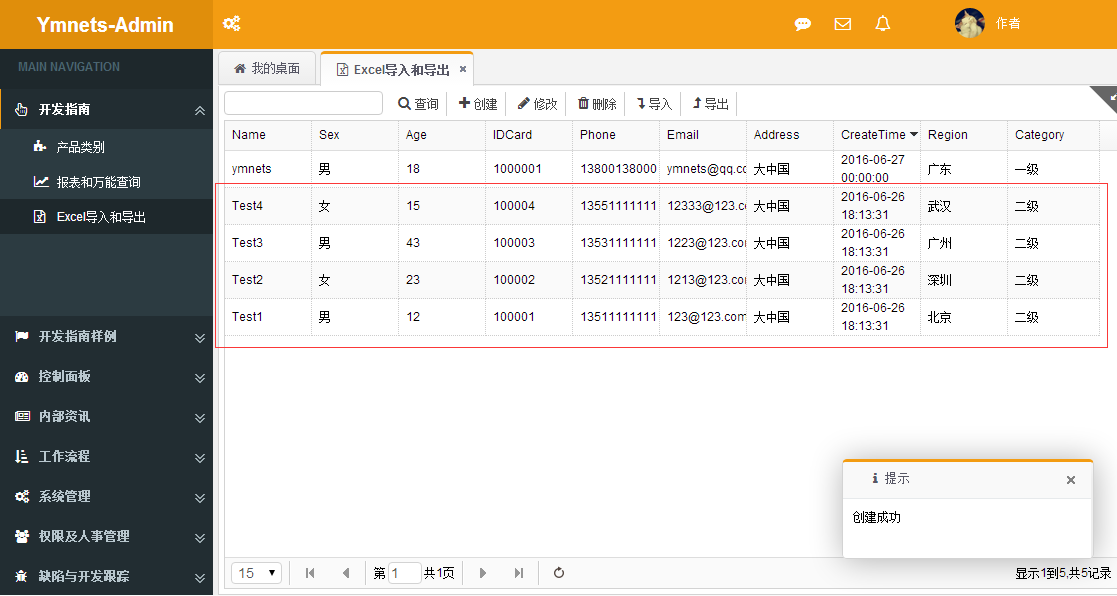
OK测试一下!建立一个新的excel格式

一般情况下我们是提供模版给用户下载供用户输入数据,来确保格式的正确性
总结:
虽然做好了导出功能,但是来不及发代码。只能到下次有时间再分析导出功能
本节知识点,全部聚集在CheckImportData方法上。
对应列头是模版xlsx的列头

1.如果模版需要是是中文的,如Name=名字,那么方法应该这么写
excelFile.AddMapping<Spl_PersonModel>(x => x.Name, "名字");
2.导入第几个sheet工作薄可以这么写
我这里写0是指第一个sheet工作薄。可以直接指定工作薄
var excelContent = excelFile.Worksheet<Spl_PersonModel>("Sheet1");
3.检查正确性可以确保数据的来源。可以给出用户正确的修改提示。

已经重写,源码和文章请跳转http://www.cnblogs.com/ymnets/p/5621706.html的更多相关文章
- [Abp vNext 源码分析] - 文章目录
一.简要介绍 ABP vNext 是 ABP 框架作者所发起的新项目,截止目前 (2019 年 2 月 18 日) 已经拥有 1400 多个 Star,最新版本号为 v 0.16.0 ,但还属于预览版 ...
- 精尽Spring Boot源码分析 - 文章导读
该系列文章是笔者在学习 Spring Boot 过程中总结下来的,里面涉及到相关源码,可能对读者不太友好,请结合我的源码注释 Spring Boot 源码分析 GitHub 地址 进行阅读 Sprin ...
- 精尽MyBatis源码分析 - 文章导读
该系列文档是本人在学习 Mybatis 的源码过程中总结下来的,可能对读者不太友好,请结合我的源码注释(Mybatis源码分析 GitHub 地址.Mybatis-Spring 源码分析 GitHub ...
- 精尽Spring MVC源码分析 - 文章导读
该系列文档是本人在学习 Spring MVC 的源码过程中总结下来的,可能对读者不太友好,请结合我的源码注释 Spring MVC 源码分析 GitHub 地址 进行阅读 Spring 版本:5.2. ...
- Dubbo源码学习文章目录
目录 Dubbo源码学习--服务是如何发布的 Dubbo源码学习--服务是如何引用的 Dubbo源码学习--注册中心分析 Dubbo源码学习--集群负载均衡算法的实现
- winrt 上的翻书特效组件 源码分享 转载请说明
http://blog.csdn.net/wangrenzhu2011/article/details/10207413 (转) [TemplatePart(Name = A_PARTNAME, Ty ...
- [微信跳转浏览器]微信跳转外部浏览器下载APP源码,可以实现自动跳转外部浏览器打开链接
基于微信后端开发了一款微信推广助手,使用了本程序生成的链接,用户在微信任意环境下点击链接或者扫描二维码,可以实现直接跳转手机默认浏览器并打开指定网页. 我们开发的此款跳转产品,应用范围广泛.除了下载A ...
- 读logback源码系列文章(五)——Appender --转载
原文地址:http://kyfxbl.iteye.com/blog/1173788 明天要带老婆出国旅游几天,所以这段时间暂时都更新不了博客了,临走前再最后发一贴 上一篇我们说到Logger类的inf ...
- cocos creator 重写源码按钮Button点击音频封装
(function(){ var Super = function(){}; Super.prototype = cc.Button.prototype; //实例化原型 Super.prototyp ...
随机推荐
- 日期格式代码出现两次的错误 ORA-01810
错误的原因是使用了两次MM . 一.Oracle中使用to_date()时格式化日期需要注意格式码 如:select to_date('2005-01-01 11:11:21','yyyy-MM-dd ...
- Security Policy:行级安全(Row-Level Security)
行级安全RLS(Row-Level Security)是在数据行级别上控制用户的访问,控制用户只能访问数据库表的特定数据行.断言是逻辑表达式,在SQL Server 2016中,RLS是基于安全断言( ...
- Android业务组件化之子模块SubModule的拆分以及它们之间的路由Router实现
前言: 前面分析了APP的现状以及业务组件化的一些探讨(Android业务组件化之现状分析与探讨),以及通信的桥梁Scheme的使用(Android业务组件化之URL Scheme使用),今天重点来聊 ...
- Android线程管理之ThreadLocal理解及应用场景
前言: 最近在学习总结Android的动画效果,当学到Android属性动画的时候大致看了下源代码,里面的AnimationHandler存取使用了ThreadLocal,激起了我很大的好奇心以及兴趣 ...
- [.NET] 利用 async & await 的异步编程
利用 async & await 的异步编程 [博主]反骨仔 [出处]http://www.cnblogs.com/liqingwen/p/5922573.html 目录 异步编程的简介 异 ...
- Create a Team in RHEL7
SOLUTION VERIFIED September 13 2016 KB2620131 Environment Red Hat Enterprise Linux 7 NetworkManager ...
- The Zen of Python
Beautiful is better than ugly. 优美总比丑陋好Explicit is better than implicit. 直率总比含蓄好Simple is better than ...
- CRM 数据密钥 忘记 解决方案
UPDATE EmailServerProfile SET IncomingPassword=nullUPDATE EmailServerProfile SET OutgoingPassword=nu ...
- Linux常用命令
命令格式与目录处理命令 ls 命令格式与目录处理命令 ls 命令格式:命令 [-选项][参数] 例:ls -la /etc 说明: 1)个别命令使用不遵循格式 2)当有多个选项时,可以写在一起 3)简 ...
- Firefox开发者专版浏览器,Web开发者利器.
2015的11月9日,Firefox迎来了自己的十周岁生日.在庆祝Firefox十周年之际,Mozilla发布了Firefox开发者专版,这是首款专门为开发者打造的浏览器. 浏览器中独特的暗色调设计. ...