
(WPF) MVVM: 动态添加控件及绑定。
比如需要显示一个键盘,里面有各个按键。实现的效果如下:
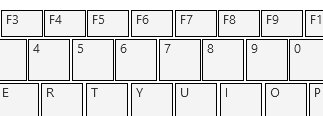
之前的思路,就是建立一个singleKey的控件,然后在后台用代码动态的添加到父控件里去, 再用代码在后台进行绑定。
这种实现方法并不是真正的MVVM的模式。体会不到MVVM带来的便捷和惊喜。
用MVVM模式来实现时的思路如下:
1. 建立singleKey的ViewModel,定义需要绑定View的属性。
2. 在Key的ViewModel中,使用可观察集合,并绑定到View的ItemsSource上。
ViewModel
        public ObservableCollection<DutSingleKeyViewModel> Keysets

        {

            get

            {

                return this.keysets;

            }

            set

            {

                this.keysets = value;

            }

        }
3. 对于singleKey的显示,可以在DataTemplat里面定义。
View
    <UserControl.DataContext>

        <vm:DutKeysetViewModel />

    </UserControl.DataContext>

    <UserControl.Resources>

        <DataTemplate DataType="{x:Type vm:DutSingleKeyViewModel}">

            <Canvas>

                <Grid Canvas.Left="{Binding KeyLocationLeft, Mode=OneWay}"

                      Canvas.Top="{Binding KeyLocationTop, Mode=OneWay}"

                      >

                    <Rectangle Fill="#FFF4F4F5"

                               HorizontalAlignment="Left"

                               Width="{Binding KeySizeWidth}"

                               Height="{Binding KeySizeHeight}"

                               Stroke="Black"

                               VerticalAlignment="Top"></Rectangle>

                        <TextBlock HorizontalAlignment="Left"

                           TextWrapping="Wrap"

                           Text="{Binding KeyCharacter}"

                           Margin="5,0,0,0"

                           VerticalAlignment="Top" />

                </Grid>

            </Canvas>

        </DataTemplate>

    </UserControl.Resources>

    <Grid>

        <WrapPanel HorizontalAlignment="Left"

                   Height="227"

                   Width="532">

            <ItemsControl ItemsSource="{Binding Keysets}">

                <ItemsControl.ItemsPanel>

                    <ItemsPanelTemplate>

                        <WrapPanel Orientation="Horizontal" />

                    </ItemsPanelTemplate>

                </ItemsControl.ItemsPanel>

            </ItemsControl>

        </WrapPanel>
于是,并不用在后台写过多的代码,修改ViewModel后, View的显示就相应变更了。
补充网上大牛的回复。
if you really want to do mvvm , try to forget "how can i add controls". you dont have to, just think about your viewmodels - WPF create the contols for you :)
in your case lets say we have a SearchViewModel and a SearchEntryViewmodel.
public class SearchEntryViewmodel

{

    //Properties for Binding to Combobox and Textbox goes here

}

public class SearchViewModel

{

    public ObservableCollection<SearchEntryViewmodel> MySearchItems {get;set;}

    public ICommand AddSearchItem {get;}

}
till now you dont have to think about usercontrols/view. in your SearchView you create an ItemsControl and bind the ItemsSource to MySearchItems.
<ItemsControl ItemsSource="{Binding MySearchItems}"/>you see now all of your SearchEntryViewmodels in the ItemsControl(just the ToString() atm).
To fit your requirements to show every SearchEntryViewmodel with 3Comboboxes and so on you just have to define a DataTemplate in your Resources
<DataTemplate DataType="{x:Type local:SearchEntryViewmodel}">

    <StackPanel Orientation="Horizontal">

        <Combobox ItemsSource="{Binding MyPropertyInSearchEntryViewmodel}"/>

        <!-- the other controls with bindings -->

    </StackPanel>

</DataTemplate>
thats all :) and you never has to think about how can i add controls dynamically. you just have to add new SearchEntryViewmodel to your collection.
this approach is called Viewmodel First and i think its the easiest way to do MVVM.
在实践发现,通用的方法还是创建一个userControl view,重要的是再DataTemplate里面引用:
    <Window.Resources>

        <DataTemplate DataType={x:Type viewmodels:MyUserControlViewModel}">

            <views:MyUserControlView />

        </DataTemplate>

    </Window.Resources>
(WPF) MVVM: 动态添加控件及绑定。的更多相关文章
- C# WPF后台动态添加控件(经典)
概述 在Winform中从后台添加控件相对比较容易,但是在WPF中,我们知道界面是通过XAML编写的,如何把后台写好的控件动态添加到前台呢?本节举例介绍这个问题. 这里要用到UniformGrid布局 ...
- WPF 动态添加控件以及样式字典的引用(Style introduction)
原文:WPF 动态添加控件以及样式字典的引用(Style introduction) 我们想要达到的结果是,绑定多个Checkbox然后我们还可以获取它是否被选中,其实很简单,我们只要找到那几个关键的 ...
- WPF:理解ContentControl——动态添加控件和查找控件
WPF:理解ContentControl--动态添加控件和查找控件 我认为WPF的核心改变之一就是控件模型发生了重要的变化,大的方面说,现在窗口中的控件(大部分)都没有独立的Hwnd了.而且控件可以通 ...
- JQuery动态添加控件并取值
<!doctype html> <html> <head> <meta charset="utf-8"> <title> ...
- winform导入导出excel,后台动态添加控件
思路: 导入: 1,初始化一个OpenFileDialog类 (OpenFileDialog fileDialog = new OpenFileDialog();) 2, 获取用户选择文件的后缀名(s ...
- Android 在布局容器中动态添加控件
这里,通过一个小demo,就可以掌握在布局容器中动态添加控件,以动态添加Button控件为例,添加其他控件同样道理. 1.addView 添加控件到布局容器 2.removeView 在布局容器中删掉 ...
- VC中动态添加控件
VC中动态添加控件 动态控件是指在需要时由Create()创建的控件,这与预先在对话框中放置的控件是不同的. 一.创建动态控件: 为了对照,我们先来看一下静态控件的创建. 放置静态控件时必须先建立一个 ...
- jQuery EasyUI动态添加控件或者ajax加载页面后不能自动渲染问题的解决方法
博客分类: jquery-easyui jQueryAjax框架HTML 现象: AJAX返回的html无法做到自动渲染为EasyUI的样式.比如:class="easyui-layout ...
- asp.net动态添加控件学习
看了老师的教程后,自己一点感悟记录下来: 1.在页面提交后,动态生成的控件会丢失, 但如果生成控件的代码在pageload中,就可以,原理是每次生成页面都执行生成. 2.动态按件或页面原来控件, 在页 ...
随机推荐
- viewpager中对fragment的操作
XXAdatper xxAdapter = (XXAdatper)viewpager.getAdapter(); XXFragment xxFragment= (XXFragment )adapte ...
- C++ Primer : 第十章 : 泛型算法 之 lambda表达式和bind函数
一.lambda表达式 lambda表达式原型: [capture list] (parameter list) -> retrue type { function body } 一个lambd ...
- Fresco最最最简单使用
http://blog.csdn.net/wa991830558/article/details/46005063
- apache开启url rewrite模块
在把服务器数据转移到本地服务器之后,本地打开首页出现排版紊乱等问题,经过大神指点说是url rewrite的问题. 本篇文章主要写怎样开启apache的url rewrite功能. 打开Apache2 ...
- C中的基本数据类型和变量
C语言中的数据类型 基本数据类型 1) 整型 (int %d) 2) 字符型 (char %c) 3) 浮点型 %d ①. 单精度浮点型(float) ②. 双精度浮点型(double) 2.指 ...
- 学习笔记之 初试Caffe,Matlab接口提取feature
Caffe 提供了matlab接口,可以用于提取图像的feature.
- QueryRunner使用
在相继学习了JDBC和数据库操作之后,我们明显感到编写JDBC代码并非一件轻松的事儿.为了帮助我们更高效的学习工作,从JDBC的繁重代码中解脱出来,老佟给我们详尽介绍了一个简化JDBC操作的组件——D ...
- 初识boost之boost::share_ptr用法
boost中提供了几种智能指针方法:scoped_ptr shared_ptr intrusive_ptr weak_ptr,而标准库中提供的智能指针为auto_ptr. 这其中,我最喜欢,使用最多的 ...
- Linux启动新进程的三种方法
程序中,我们有时需要启动一个新的进程,来完成其他的工作.下面介绍了三种实现方法,以及这三种方法之间的区别. 1.system函数-调用shell进程,开启新进程system函数,是通过启动shell进 ...
- C++泛型编程原理
1.什么是泛型编程前面我们介绍的vector,list,map都是一种数据结构容器,容器本身的存储结构不同,各容器中存在的数据类型也可以不同.但我们在访问这些容器中数据时,拥有相同的方式.这种方式就叫 ...