
文件浏览器及数码相框 -2.3.1freetype_pc
例子
#include <stdio.h>

#include <string.h>

#include <math.h>

#include <ft2build.h>

#include FT_FREETYPE_H

#define WIDTH   80

#define HEIGHT  80

/* origin is the upper left corner */

unsigned char image[HEIGHT][WIDTH];

/* Replace this function with something useful. */

void

draw_bitmap( FT_Bitmap*  bitmap,

             FT_Int      x,

             FT_Int      y)

{

  FT_Int  i, j, p, q;

  FT_Int  x_max = x + bitmap->width;

  FT_Int  y_max = y + bitmap->rows;

  for ( i = x, p = ; i < x_max; i++, p++ )

  {

    for ( j = y, q = ; j < y_max; j++, q++ )

    {

      if ( i <       || j <        ||

           i >= WIDTH || j >= HEIGHT )

        continue;

      image[j][i] |= bitmap->buffer[q * bitmap->width + p];

    }

  }

}

void

show_image( void )

{

  int  i, j;

  for ( i = ; i < HEIGHT; i++ )

  {

    for ( j = ; j < WIDTH; j++ )

      putchar( image[i][j] ==  ? ' '

                                : image[i][j] <  ? '+'

                                                    : '*' );

    putchar( '\n' );

  }

}

int

main( int     argc,

      char**  argv )

{

  FT_Library    library;

  FT_Face       face;

  FT_GlyphSlot  slot;

  FT_Matrix     matrix;                 /* transformation matrix */

  FT_Vector     pen;                    /* untransformed origin  */

  FT_Error      error;

  char*         filename;

  char*         text;

  double        angle;

  int           target_height;

  int           n, num_chars;

  if ( argc !=  )

  {

    fprintf ( stderr, "usage: %s font sample-text\n", argv[] );

    exit(  );

  }

  filename      = argv[];                           /* first argument     */

  text          = argv[];                           /* second argument    */

  num_chars     = strlen( text );

  angle         = ( 0.0 /  ) * 3.14159 * ;      /* use 25 degrees     */

  target_height = HEIGHT;

  error = FT_Init_FreeType( &library );              /* initialize library */

  /* error handling omitted */

  error = FT_New_Face( library, argv[], , &face ); /* create face object */

  /* error handling omitted */

#if 0

  /* use 50pt at 100dpi */

  error = FT_Set_Char_Size( face,  * , ,

                            ,  );                /* set character size */

    /* pixels = 50 /72 * 100 = 69 个像素点*/

#else

    FT_Set_Pixel_Sizes(face, , );

#endif

  /* error handling omitted */

  slot = face->glyph;

  /* set up matrix */

  matrix.xx = (FT_Fixed)( cos( angle ) * 0x10000L );

  matrix.xy = (FT_Fixed)(-sin( angle ) * 0x10000L );

  matrix.yx = (FT_Fixed)( sin( angle ) * 0x10000L );

  matrix.yy = (FT_Fixed)( cos( angle ) * 0x10000L );

  /* the pen position in 26.6 cartesian space coordinates; */

  /* start at (0,40) relative to the upper left corner  */

  pen.x =  * ;

  pen.y = ( target_height -  ) * ;

  for ( n = ; n < num_chars; n++ )

  {

    /* set transformation */

    FT_Set_Transform( face, &matrix, &pen );

    /* load glyph image into the slot (erase previous one) */

    error = FT_Load_Char( face, text[n], FT_LOAD_RENDER );

    if ( error )

      continue;                 /* ignore errors */

    /* now, draw to our target surface (convert position) */

    draw_bitmap( &slot->bitmap,

                 slot->bitmap_left,

                 target_height - slot->bitmap_top );

    /* increment pen position */

    pen.x += slot->advance.x;

    pen.y += slot->advance.y;

  }

  show_image();

  FT_Done_Face    ( face );

  FT_Done_FreeType( library );

  return ;

}
1.编译free_type
配置 ./configure
编译 make
安装 sudo make install
gcc -o example1 example1.c
error: freetype/config/ftheader.h: No such file or directory
example1.c:12:10: error: #include expects "FILENAME" or <FILENAME>
指定头文件目录编译
gcc -o example1 example1.c -I /usr/local/include/freetype2
报错缺库
example1.c:(.text+0x1ea): undefined reference to `FT_Init_FreeType'
example1.c:(.text+0x216): undefined reference to `FT_New_Face'
example1.c:(.text+0x236): undefined reference to `FT_Set_Pixel_Sizes'
example1.c:(.text+0x24d): undefined reference to `cos'
example1.c:(.text+0x285): undefined reference to `sin'
example1.c:(.text+0x2bd): undefined reference to `sin'
example1.c:(.text+0x2f5): undefined reference to `cos'
example1.c:(.text+0x360): undefined reference to `FT_Set_Transform'
example1.c:(.text+0x386): undefined reference to `FT_Load_Char'
example1.c:(.text+0x409): undefined reference to `FT_Done_Face'
example1.c:(.text+0x415): undefined reference to `FT_Done_FreeType'
example1.c:(.text+0x24d): undefined reference to `cos'
example1.c:(.text+0x285): undefined reference to `sin'
example1.c:(.text+0x2bd): undefined reference to `sin'
example1.c:(.text+0x2f5): undefined reference to `cos'
指定库编译freetype gcc -o example1 example1.c -I /usr/local/include/freetype2 –lfreetype
缺数学类定义
example1.c:(.text+0x24d): undefined reference to `cos'
example1.c:(.text+0x285): undefined reference to `sin'
example1.c:(.text+0x2bd): undefined reference to `sin'
example1.c:(.text+0x2f5): undefined reference to `cos'
加-lm为加数学类库意思 gcc -o example1 example1.c -I /usr/local/include/freetype2 -lfreetype -lm
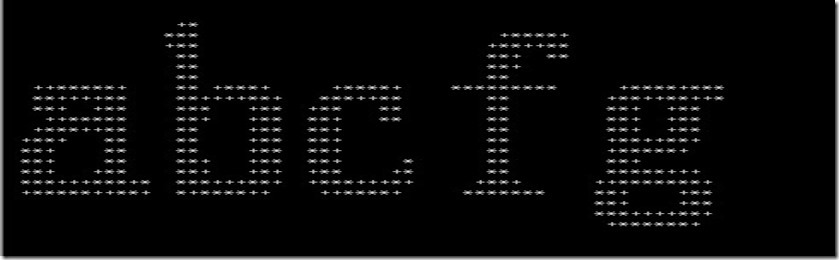
执行exampe1 用宋体文件 显示abcfg
./example1 ./simsun.ttc abcfg
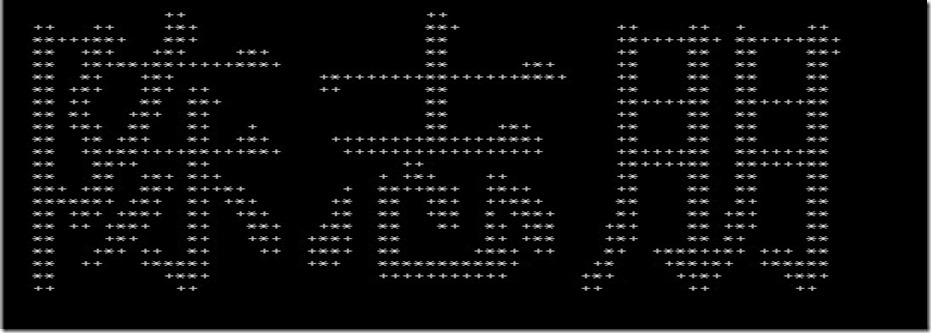
陈志朋uicode码为 48 96 D7 5F 67 0B
int chinese_str[] = {0x9648,0x5fd7,0x670b};
for ( n = ; n < ; n++ )

  {

    /* set transformation */

    FT_Set_Transform( face, &matrix, &pen );

    /* load glyph image into the slot (erase previous one) */

    error = FT_Load_Char( face, chinese_str[n], FT_LOAD_RENDER );

    if ( error )

      continue;                 /* ignore errors */

    /* now, draw to our target surface (convert position) */

    draw_bitmap( &slot->bitmap,

                 slot->bitmap_left,

                 target_height - slot->bitmap_top );

    /* increment pen position */

    pen.x += slot->advance.x;

    pen.y += slot->advance.y;

  }
./example1 ./simsun.ttc abc
无法直接使用“abc陈志朋a”
使用宽字符
添加头文件include<wchar.h>
#include <wchar.h>
wchar_t * chinese_str = L"陈志朋~陈";
unsigned int *p = (wchar_t *)chinese_str;
int i = 0;
printf("uicode: \n");
for( i = 0; i < wcslen(chinese_str); i++)
{
printf("0x%x " , p[i]);
}
printf("\n");
return 0;
85:27: error: converting to execution character set: Invalid or incomplete multibyte or wide character
代码格式为asii应转化为uicode码
gcc -finput-charset=GBK -fexec-charset=UTF-8 -o example1 example1.c -I /usr/local/include/freetype2 -lfreetype -lm
结果
uicode:
0x9648 0x5fd7 0x670b 0x7e 0x9648
打印出位置大小参数
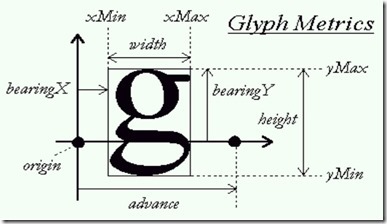
添加头文件#include FT_GLYPH_H
FT_BBox bbox;

      FT_Glyph  glyph;

    // 将FT_GlyphSlot glyph转化为 FT_Glyph  glyph;

    error = FT_Get_Glyph( face->glyph, &glyph );

    if(error)

    {

        printf("FT_Get_Glyph error \n");

    }

    /*从glyph中获取bbox*/

    FT_Glyph_Get_CBox( glyph, FT_GLYPH_BBOX_TRUNCATE, &bbox );
//汉字uicode码

    printf("uicode: %x\n", chinese_str[n]);

    //汉字位置原点

    printf("origin.x /64 = %d , origin.y /64 = %d ", pen.x/, pen.y/);

    //最小最大X,Y

    printf("x_min = %d ,x_max = %d, y_min = %d, y_max = %d \n", bbox.xMin, bbox.xMax, bbox.yMin, bbox.yMax);

    //X,Y偏移值

    printf("slot.advance.x/64 = %d, slot.advance.y/64 = %d \n", slot->advance.x/, slot->advance.y/);
结果
uicode: 9648
origin.x /64 = 0 , origin.y /64 = 40 x_min = 2 ,x_max = 23, y_min = 37, y_max = 60
slot.advance.x/64 = 24, slot.advance.y/64 = 0
uicode: 5fd7
origin.x /64 = 24 , origin.y /64 = 40 x_min = 25 ,x_max = 47, y_min = 38, y_max = 60
slot.advance.x/64 = 24, slot.advance.y/64 = 0
uicode: 670b
origin.x /64 = 48 , origin.y /64 = 40 x_min = 48 ,x_max = 70, y_min = 37, y_max = 59
slot.advance.x/64 = 24, slot.advance.y/64 = 0
uicode: 7e
origin.x /64 = 72 , origin.y /64 = 40 x_min = 73 ,x_max = 84, y_min = 55, y_max = 60
slot.advance.x/64 = 12, slot.advance.y/64 = 0
uicode: 9648
origin.x /64 = 84 , origin.y /64 = 40 x_min = 86 ,x_max = 107, y_min = 37, y_max = 60
slot.advance.x/64 = 24, slot.advance.y/64 = 0
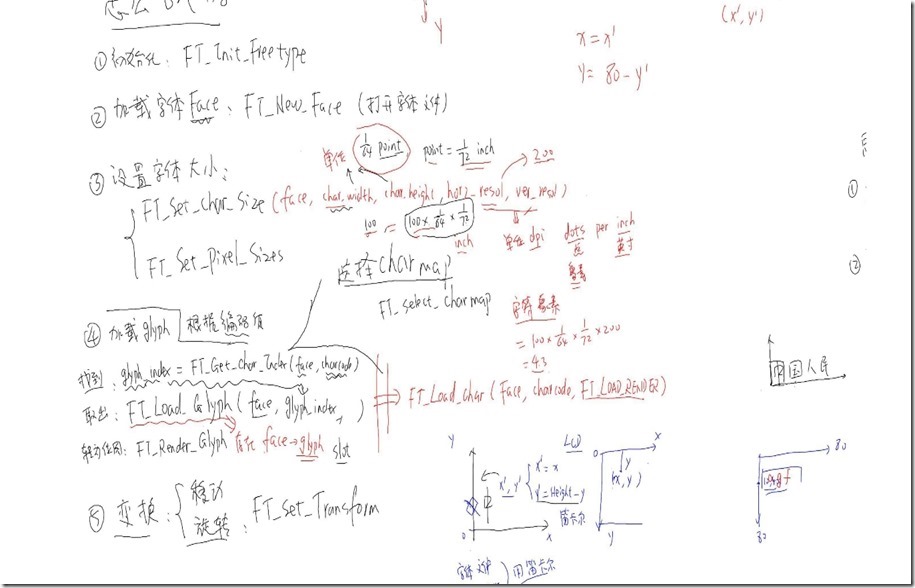
文件浏览器及数码相框 -2.3.1freetype_pc的更多相关文章
- 文件浏览器及数码相框 -2.3.2-freetype_arm-1
交叉编译:tar xjf freetype-2.4.10.tar.bz2 ./configure --host=arm-linuxmakemake DESTDIR=$PWD/tmp install f ...
- 文件浏览器及数码相框 -2.3.2-freetype_arm-2
显示多行文字 两行文字左边对齐 简单使用两个循环显示两行字体 根据上一行字体的宽度来进行下一行左边的计算 #include <sys/mman.h> #include <sys/ty ...
- 下载apk文件浏览器会直接打开并显示乱码的问题
今天同事反映他的apk文件在自己的老项目中下载有问题:下载apk文件浏览器会直接打开并显示乱码,在别的项目中就没有问题. 后分析response的content-type发现,老项目的类型是text/ ...
- Win 10 文件浏览器无法打开
今天遇到个很奇怪的问题,文件浏览器File Explorer无法正常显示,点击打开后任务栏上已经显示打开了,但是屏幕上却看不到任何窗口,开始以为机子中了恶意的木马,然后就疯狂的查毒,然而并没有解决问题 ...
- Mac下DIY文件浏览器
2015-07-14 15:07:53 Mac下的finder不能浏览Linux文件目录, 一些优秀的资源管理器是收费的..... 于是想到了既然Mac的本质是类Unix, 而在windows下查看L ...
- 比nerdtree更好的文件浏览器:vimfiler
通过:VimFilerExplorer来打开一个文件浏览器 h:收起 t:展开 -:close 回车:进入或展开 空格:收起
- 【转】显示Ubuntu文件浏览器的地址栏--不错
原文网址:http://www.blogbus.com/anythingok-logs/144447448.html Ubuntu默认使用nautilus作为其可视化的文件浏览器,其默认值不显示地址栏 ...
- 【Java】 实现一个简单文件浏览器(1)
学习Java的Swing的时候写的一个超简单文件浏览器 效果如图: 项目结构: 这里面主要用了两个控件,JTree和JTable 下面先说下左侧的文件树如何实现: 首先是FileTree类,继承于JT ...
- SharePoint 2013 解惑 无法打开文件浏览器
你有时候会看到这东西谈出来,当你想像管理文件一样,管理SharePoint上资源的时候 意思是说,不能打开文件浏览器,请加入你的站点到信任站点,这个有两个问题,一个是IE设置,一个是WebClient ...
随机推荐
- (五)Super VLAN
- 浅谈 MVP in Android
一.概述 对于MVP(Model View Presenter),大多数人都能说出一二:“MVC的演化版本”,“让Model和View完全解耦”等等.本篇博文仅是为了做下记录,提出一些自己的看法,和帮 ...
- TCP/IP,Http,Socket,XMPP的区别
大学学习网络基础的时候老师讲过,网络由下往上分为物理层.数据链路层.网络层.传输层.会话层.表示层和应用层.通过初步的了解,我知道IP协议对应于网络层,TCP协议对应于传输层,而HTTP协议对应于应用 ...
- JavaScript的事件对象_键盘事件
用户在使用键盘时会触发键盘事件.“DOM2 级事件”最初规定了键盘事件,结果又删除了相应的内容.最终还是使用最初的键盘事件,不过 IE9 已经率先支持“DOM3”级键盘事件. 一.键码 在发生 key ...
- Multipath多路径冗余全解
一.什么是multipath 普通的电脑主机都是一个硬盘挂接到一个总线上,这里是一对一的关系.而到了有光纤组成的SAN环境,由于主机和存储通过了光纤交换机连接,这样的话,就构成了多对多的关系.也就是说 ...
- Mybatis关联查询,查询出的记录数量与数据库直接查询不一致,如何解决?
<select id="findUserInfoListForMap" resultMap="BaseResultMap"> SELECT ...
- 解决Win7中第一次HttpWebRequest连接缓慢、超时等问题
在使用HttpWebRequest的时候发现,第一次连接需要15S左右,我的系统是win7,很崩溃,除了我那个用户可以等待的了,但是第二次,就没有问题了,于是百度之...... http://www. ...
- xcode 真机调试 failed to get the task for process xxx
xcode 真机调试 failed to get the task for process xxx 此错误原因是,使用 in house profile 签名了真机调试的证书: 在 target--- ...
- Linux命令行下编译Android NDK的示例代码
这几天琢磨写一个Android的Runtime用来加速HTML5 Canvas,让GameBuilder+CanTK 不但开发速度快,运行速度也能接近原生应用.所以花了点时间研究 Android ND ...
- java 多线程3(线程安全)
需求:模拟三个窗口同时买票. 问题1:static 修饰num,只创建一份在内存中,要不就会创建3份. 问题2:线程安全问题.(代码重1的红色字体) 出现的原因:存在两个或两个以上的线程对象,而且线程 ...