
【原创】Quartz代码详解
阅读目录
简单介绍
- Scheduler:调度器,将Job和Trigger关联起来;
- Job :需要执行的作业;
- Trigger :触发器,指定执行的时间,主要包括两种方式:
一、Quartz简单实例
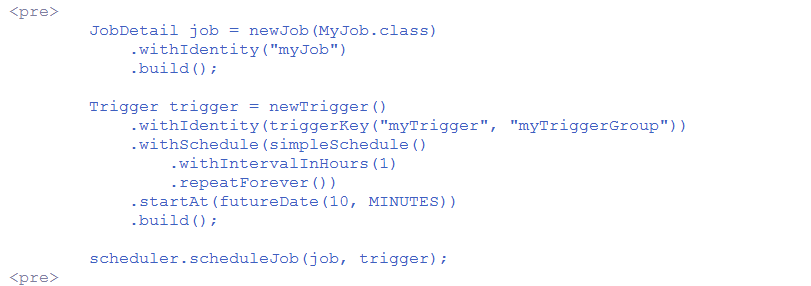
SchedulerFactory schedFact = new org.quartz.impl.StdSchedulerFactory();Scheduler sched = schedFact.getScheduler();sched.start();// define the job and tie it to our HelloJob classJobDetail job = newJob(HelloJob.class).withIdentity("myJob", "group1").build();// Trigger the job to run now, and then every 40 secondstrigger = newTrigger().withIdentity("myTrigger", "group1").startNow().withSchedule(simpleSchedule().withIntervalInSeconds(40).repeatForever()).build();// Tell quartz to schedule the job using our triggersched.scheduleJob(job, trigger);
二、Job、JobDetail、JobBuilder
- Job - an interface to be implemented by components that you wish to have executed by the scheduler.
- JobDetail - used to define instances of Jobs.
- JobBuilder - used to define/build JobDetail instances, which define instances of Jobs.
Job

public class HelloJob implements Job {

    public HelloJob() {

    }

    public void execute(JobExecutionContext context)

      throws JobExecutionException

    {

      System.err.println("Hello!  HelloJob is executing.");

    }

  }
JobDetail
JobDetail job = newJob(HelloJob.class)

      .withIdentity("myJob", "group1") // name "myJob", group "group1"

      .build();
//带参数JobDetail job = JobBuilder.newJob(clazz).withIdentity(new JobKey(jobName, groupName)).usingJobData(new JobDataMap(params)).build();
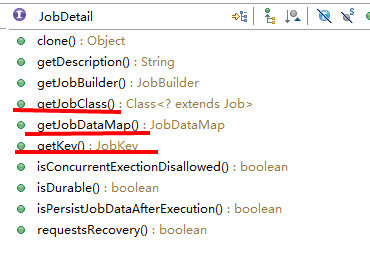
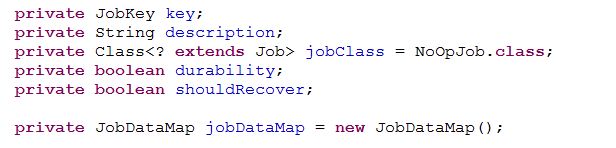
- key;
- JobClass;
- JobDataMap;等

JobBuilder




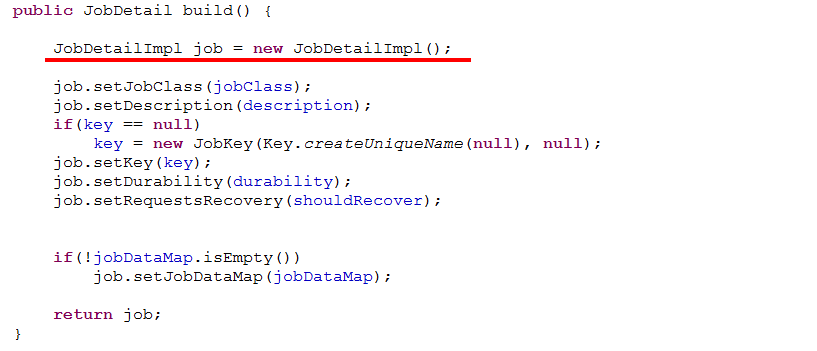

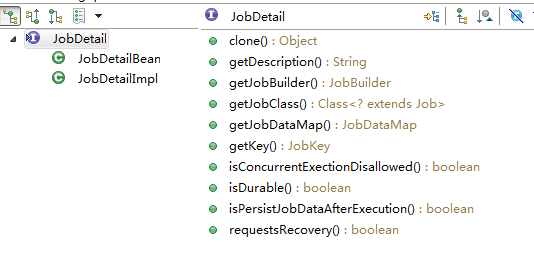
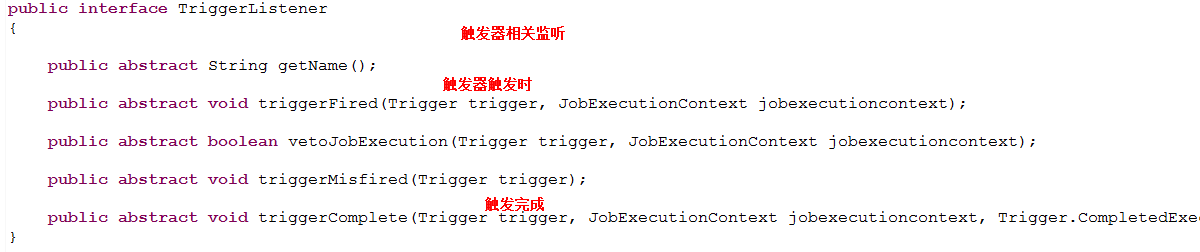
三、Trigger、TriggerBuilder
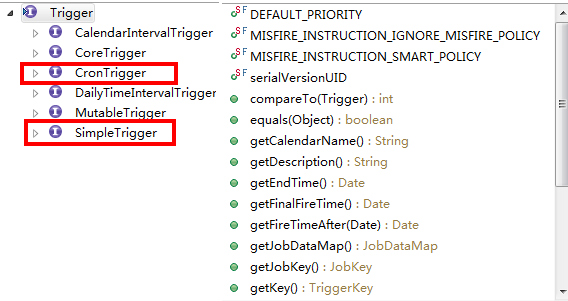
SimpleTrigger



CronTrigger
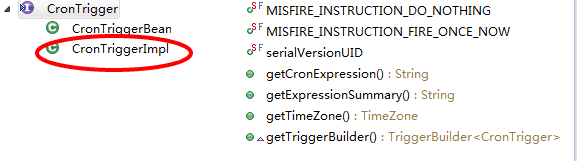


TriggerBuilder
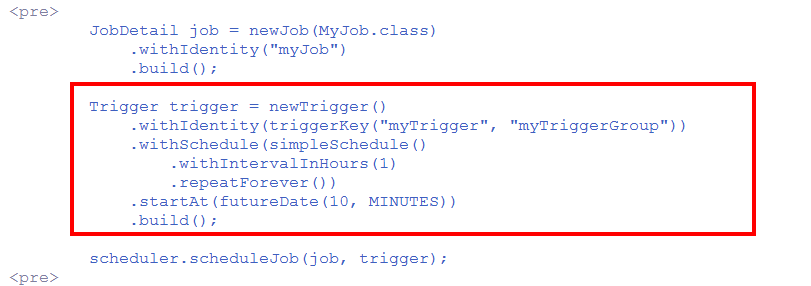


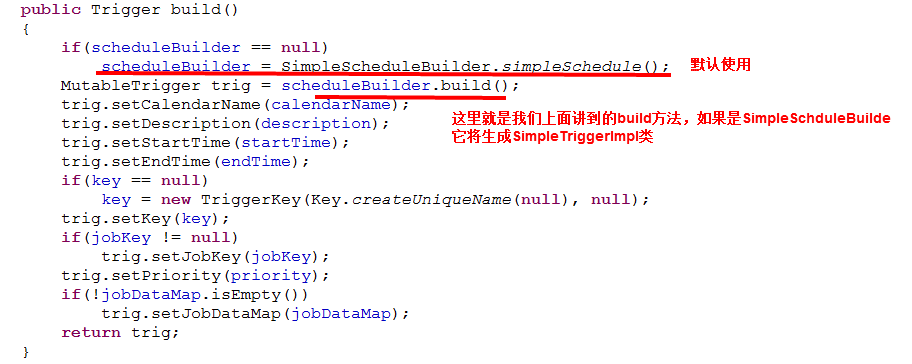
通过forJob()方法将Trigger和指定的Job绑定
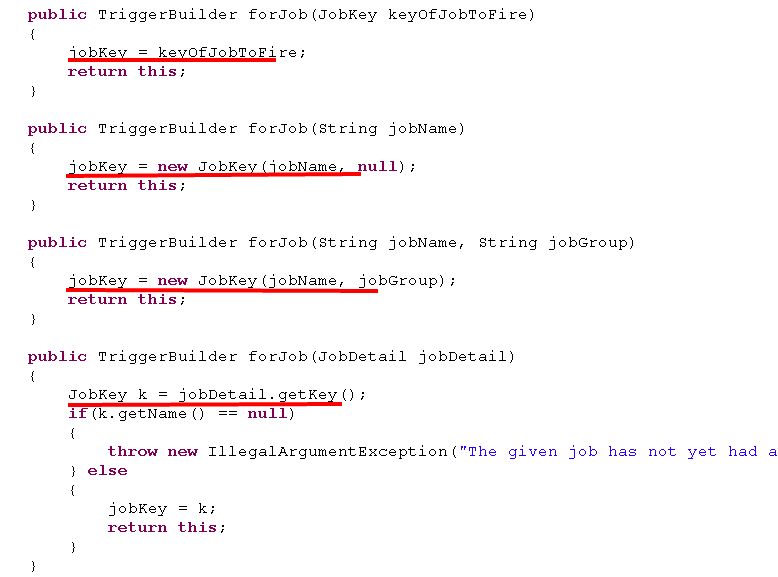
- 在使用JobBuilder创建JobDetail时,通过方法withIdentity()指定了JobDetail的JobKey;
- 这里通过TriggerBuilder的forJob()同样指定了JobKey;





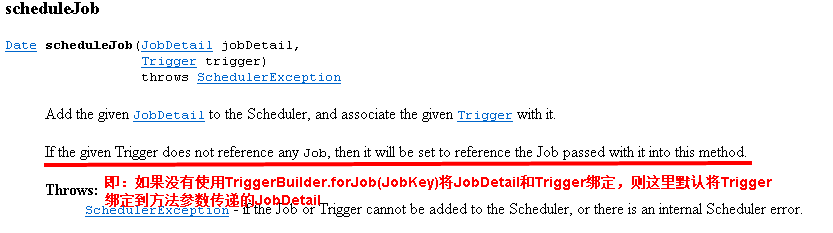
四、Scheduler

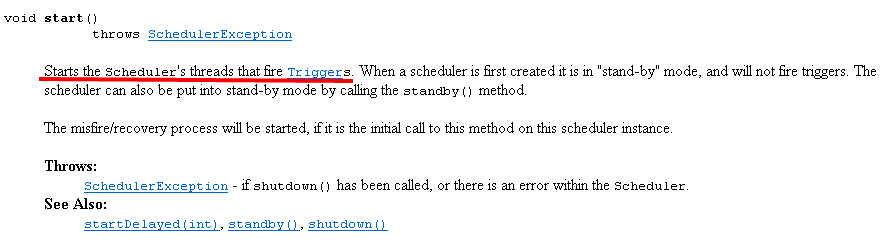
Scheduler scheduler = StdSchedulerFactory.getDefaultScheduler();scheduler.schedeleJob(Job,trigger)scheduler.start();scheduler.shutdown();
// Tell quartz to schedule the job using our triggersched.scheduleJob(job, trigger);


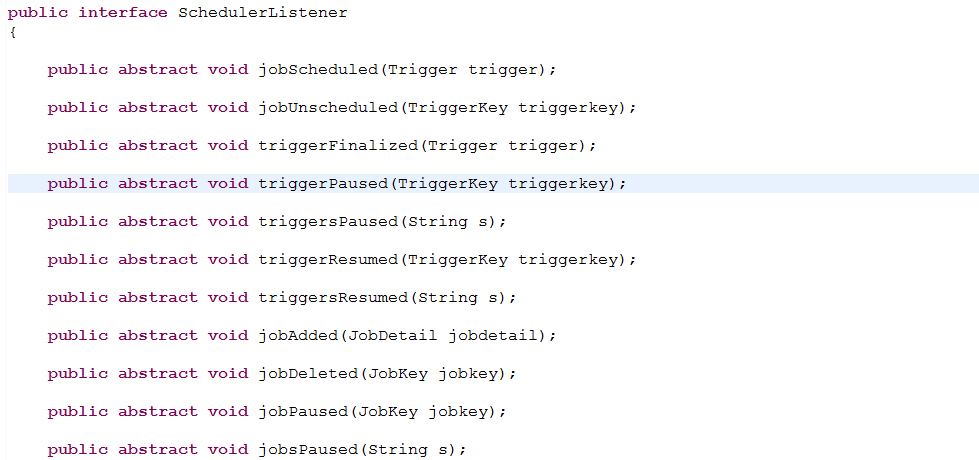
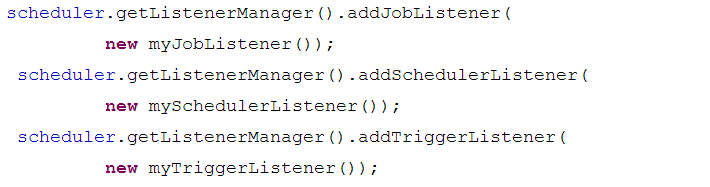
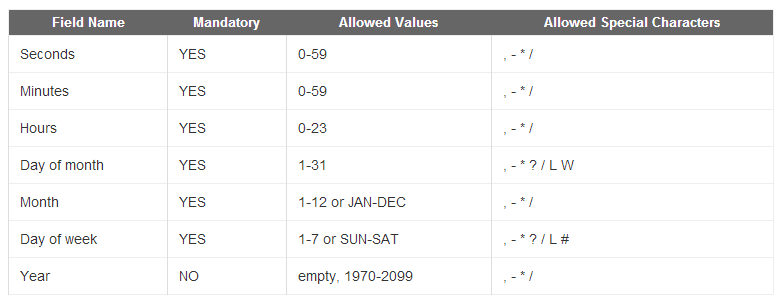
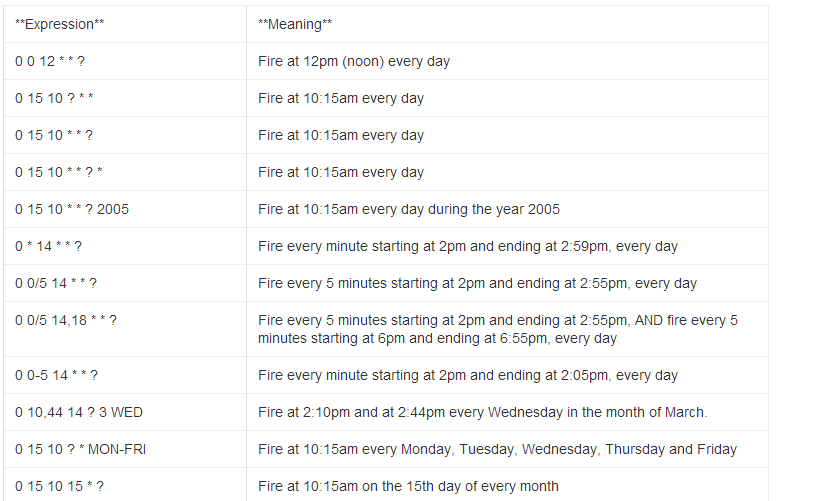
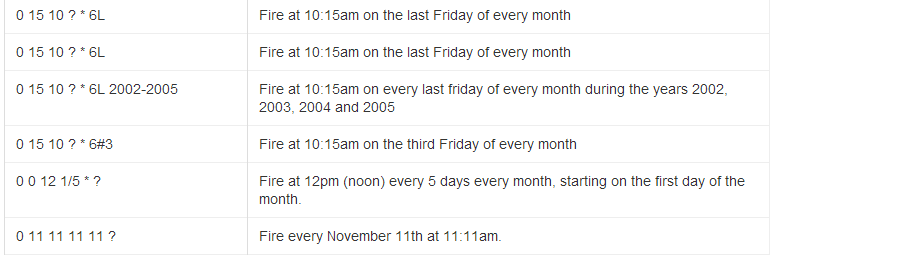
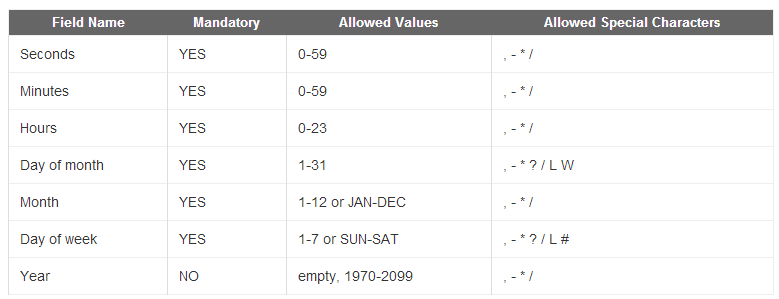
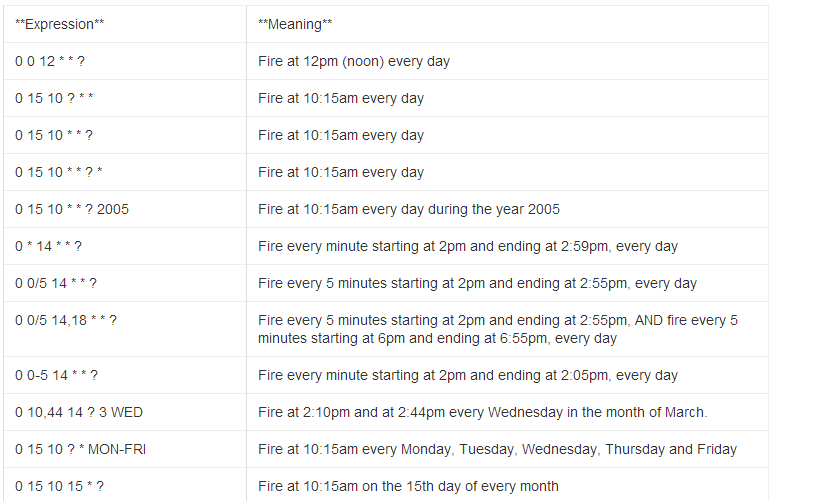
* ("all values") - used to select all values within a field. For example, "" in the minute field means *"every minute".
? ("no specific value") - useful when you need to specify something in one of the two fields in which the character is allowed, but not the other. For example, if I want my trigger to fire on a particular day of the month (say, the 10th), but don't care what day of the week that happens to be, I would put "10" in the day-of-month field, and "?" in the day-of-week field. See the examples below for clarification.
- - used to specify ranges. For example, "10-12" in the hour field means "the hours 10, 11 and 12".
, - used to specify additional values. For example, "MON,WED,FRI" in the day-of-week field means "the days Monday, Wednesday, and Friday".
/ - used to specify increments. For example, "0/15" in the seconds field means "the seconds 0, 15, 30, and 45". And "5/15" in the seconds field means "the seconds 5, 20, 35, and 50". You can also specify '/' after the '' character - in this case '' is equivalent to having '0' before the '/'. '1/3' in the day-of-month field means "fire every 3 days starting on the first day of the month".
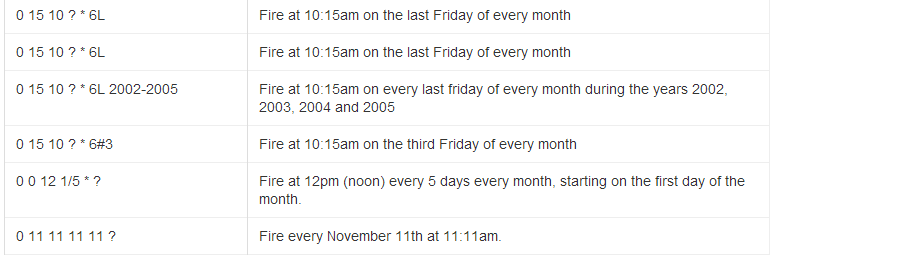
L ("last") - has different meaning in each of the two fields in which it is allowed. For example, the value "L" in the day-of-month field means "the last day of the month" - day 31 for January, day 28 for February on non-leap years. If used in the day-of-week field by itself, it simply means "7" or "SAT". But if used in the day-of-week field after another value, it means "the last xxx day of the month" - for example "6L" means "the last friday of the month". You can also specify an offset from the last day of the month, such as "L-3" which would mean the third-to-last day of the calendar month. When using the 'L' option, it is important not to specify lists, or ranges of values, as you'll get confusing/unexpected results.
W ("weekday") - used to specify the weekday (Monday-Friday) nearest the given day. As an example, if you were to specify "15W" as the value for the day-of-month field, the meaning is: "the nearest weekday to the 15th of the month". So if the 15th is a Saturday, the trigger will fire on Friday the 14th. If the 15th is a Sunday, the trigger will fire on Monday the 16th. If the 15th is a Tuesday, then it will fire on Tuesday the 15th. However if you specify "1W" as the value for day-of-month, and the 1st is a Saturday, the trigger will fire on Monday the 3rd, as it will not 'jump' over the boundary of a month's days. The 'W' character can only be specified when the day-of-month is a single day, not a range or list of days.
The 'L' and 'W' characters can also be combined in the day-of-month field to yield 'LW', which translates to *"last weekday of the month"*.
- # - used to specify "the nth" XXX day of the month. For example, the value of "6#3" in the day-of-week field means"the third Friday of the month" (day 6 = Friday and "#3" = the 3rd one in the month). Other examples: "2#1" = the first Monday of the month and "4#5" = the fifth Wednesday of the month. Note that if you specify "#5" and there is not 5 of the given day-of-week in the month, then no firing will occur that month.
七、程序示例
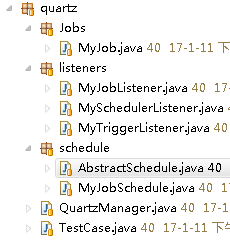
AbstractSchedule类:抽象基类

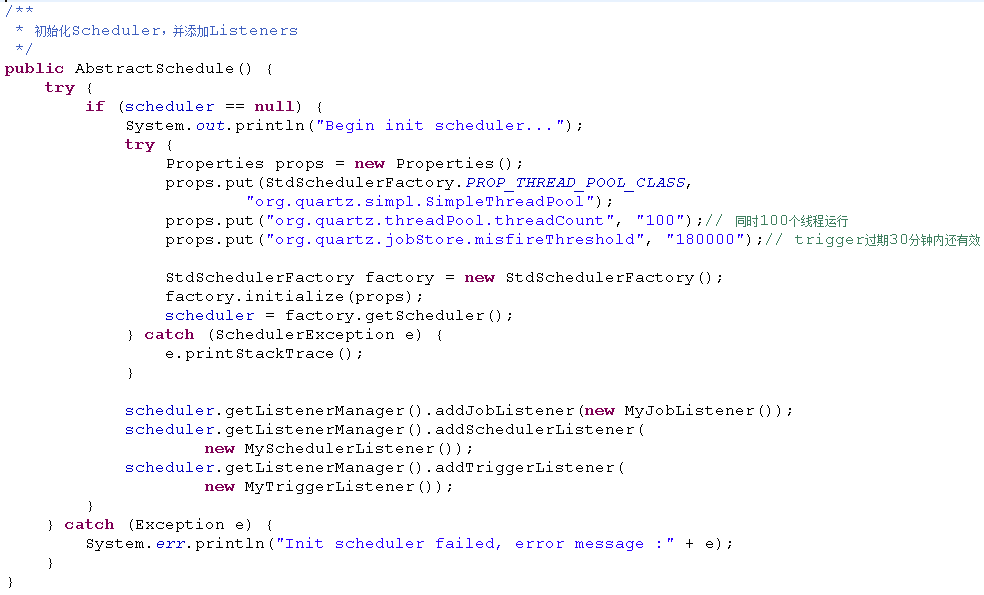
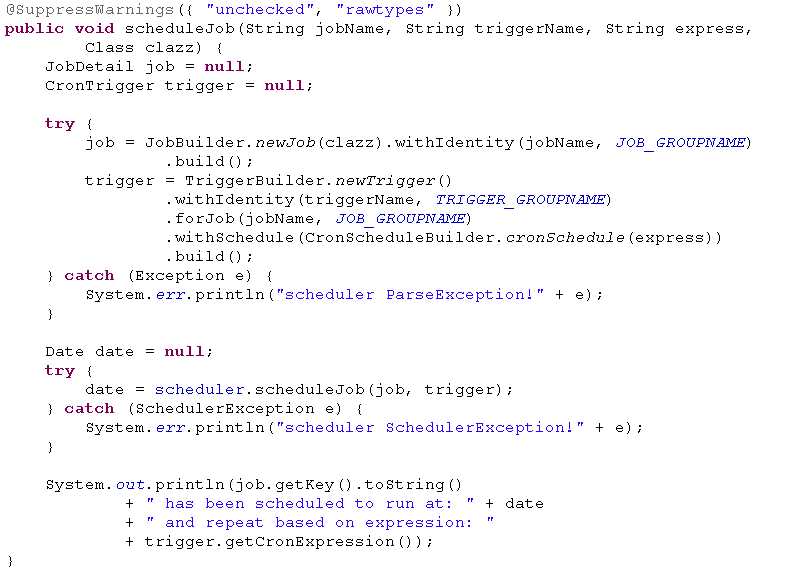
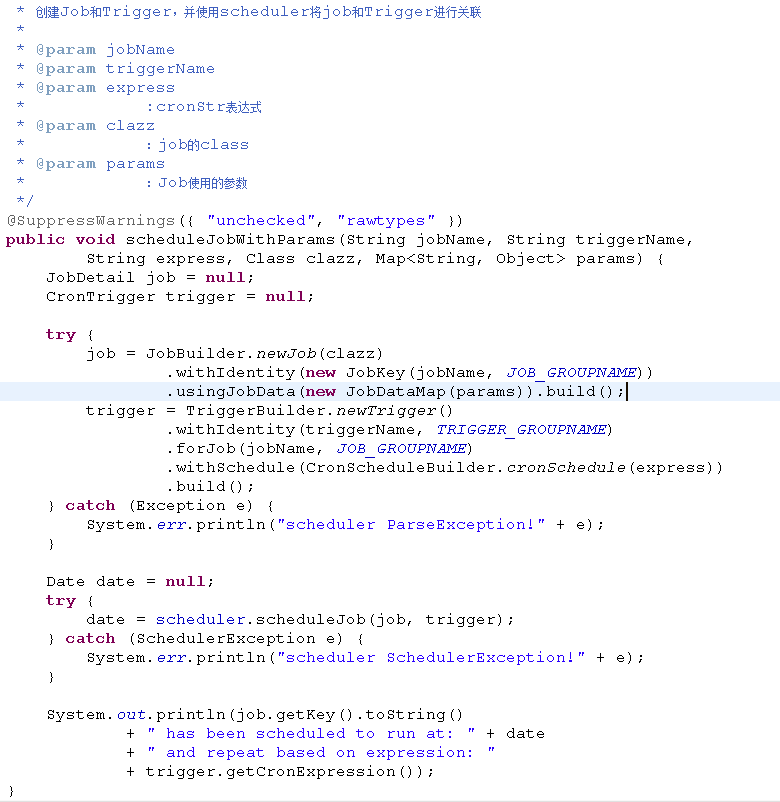
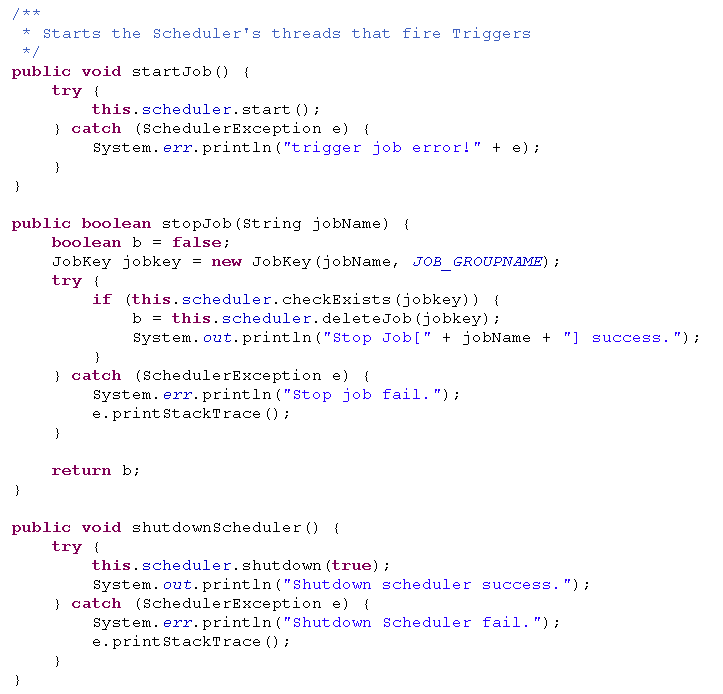
package com.sssppp.TimerSchedule.quartz.schedule;import java.util.Date;import java.util.Map;import java.util.Properties;import org.quartz.CronScheduleBuilder;import org.quartz.CronTrigger;import org.quartz.JobBuilder;import org.quartz.JobDataMap;import org.quartz.JobDetail;import org.quartz.JobKey;import org.quartz.Scheduler;import org.quartz.SchedulerException;import org.quartz.TriggerBuilder;import org.quartz.impl.StdSchedulerFactory;import com.sssppp.TimerSchedule.quartz.listeners.MyJobListener;import com.sssppp.TimerSchedule.quartz.listeners.MySchedulerListener;import com.sssppp.TimerSchedule.quartz.listeners.MyTriggerListener;public abstract class AbstractSchedule {public Scheduler scheduler = null;private static final String JOB_GROUPNAME = "MY_JOB_GROUP";private static final String TRIGGER_GROUPNAME = "MY_TRIGGER_GROUP";/*** 初始化Scheduler,并添加Listeners*/public AbstractSchedule() {try {if (scheduler == null) {System.out.println("Begin init scheduler...");try {Properties props = new Properties();props.put(StdSchedulerFactory.PROP_THREAD_POOL_CLASS,"org.quartz.simpl.SimpleThreadPool");props.put("org.quartz.threadPool.threadCount", "100");// 同时100个线程运行props.put("org.quartz.jobStore.misfireThreshold", "180000");// trigger过期30分钟内还有效StdSchedulerFactory factory = new StdSchedulerFactory();factory.initialize(props);scheduler = factory.getScheduler();} catch (SchedulerException e) {e.printStackTrace();}scheduler.getListenerManager().addJobListener(new MyJobListener());scheduler.getListenerManager().addSchedulerListener(new MySchedulerListener());scheduler.getListenerManager().addTriggerListener(new MyTriggerListener());}} catch (Exception e) {System.err.println("Init scheduler failed, error message :" + e);}}public abstract Scheduler handleJob(String jobName, String triggerName,String cronStr);@SuppressWarnings({ "unchecked", "rawtypes" })public void scheduleJob(String jobName, String triggerName, String express,Class clazz) {JobDetail job = null;CronTrigger trigger = null;try {job = JobBuilder.newJob(clazz).withIdentity(jobName, JOB_GROUPNAME).build();trigger = TriggerBuilder.newTrigger().withIdentity(triggerName, TRIGGER_GROUPNAME).forJob(jobName, JOB_GROUPNAME).withSchedule(CronScheduleBuilder.cronSchedule(express)).build();} catch (Exception e) {System.err.println("scheduler ParseException!" + e);}Date date = null;try {date = scheduler.scheduleJob(job, trigger);} catch (SchedulerException e) {System.err.println("scheduler SchedulerException!" + e);}System.out.println(job.getKey().toString()+ " has been scheduled to run at: " + date+ " and repeat based on expression: "+ trigger.getCronExpression());}/*** 创建Job和Trigger,并使用scheduler将job和Trigger进行关联** @param jobName* @param triggerName* @param express* :cronStr表达式* @param clazz* :job的class* @param params* :Job使用的参数*/@SuppressWarnings({ "unchecked", "rawtypes" })public void scheduleJobWithParams(String jobName, String triggerName,String express, Class clazz, Map<String, Object> params) {JobDetail job = null;CronTrigger trigger = null;try {job = JobBuilder.newJob(clazz).withIdentity(new JobKey(jobName, JOB_GROUPNAME)).usingJobData(new JobDataMap(params)).build();trigger = TriggerBuilder.newTrigger().withIdentity(triggerName, TRIGGER_GROUPNAME).forJob(jobName, JOB_GROUPNAME).withSchedule(CronScheduleBuilder.cronSchedule(express)).build();} catch (Exception e) {System.err.println("scheduler ParseException!" + e);}Date date = null;try {date = scheduler.scheduleJob(job, trigger);} catch (SchedulerException e) {System.err.println("scheduler SchedulerException!" + e);}System.out.println(job.getKey().toString()+ " has been scheduled to run at: " + date+ " and repeat based on expression: "+ trigger.getCronExpression());}/*** Starts the Scheduler's threads that fire Triggers*/public void startJob() {try {this.scheduler.start();} catch (SchedulerException e) {System.err.println("trigger job error!" + e);}}public boolean stopJob(String jobName) {boolean b = false;JobKey jobkey = new JobKey(jobName, JOB_GROUPNAME);try {if (this.scheduler.checkExists(jobkey)) {b = this.scheduler.deleteJob(jobkey);System.out.println("Stop Job[" + jobName + "] success.");}} catch (SchedulerException e) {System.err.println("Stop job fail.");e.printStackTrace();}return b;}public void shutdownScheduler() {try {this.scheduler.shutdown(true);System.out.println("Shutdown scheduler success.");} catch (SchedulerException e) {System.err.println("Shutdown Scheduler fail.");e.printStackTrace();}}}

package com.sssppp.TimerSchedule.quartz.schedule;import java.util.HashMap;import java.util.Map;import org.quartz.Scheduler;import com.sssppp.TimerSchedule.quartz.Jobs.MyJob;public class MyJobSchedule extends AbstractSchedule {private static MyJobSchedule myJobSchedule = new MyJobSchedule();private MyJobSchedule() {}public static MyJobSchedule getInstance() {return myJobSchedule;}@Overridepublic Scheduler handleJob(String jobName, String triggerName,String cronStr) {Map<String, Object> params = new HashMap<String, Object>();params.put(MyJob.JOB_PARAM_KEY, "This is myJob param");scheduleJobWithParams(jobName, triggerName, cronStr, MyJob.class, params);startJob();return this.scheduler;}}
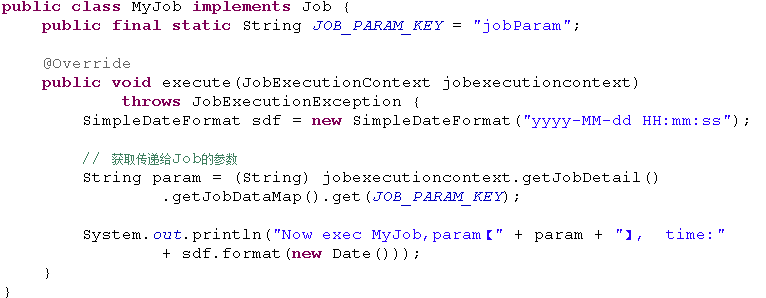
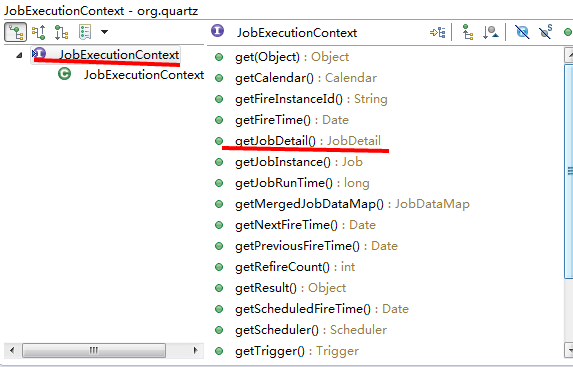
package com.sssppp.TimerSchedule.quartz.Jobs;import java.util.Date;import org.quartz.Job;import org.quartz.JobExecutionContext;import org.quartz.JobExecutionException;import com.ibm.icu.text.SimpleDateFormat;public class MyJob implements Job {public final static String JOB_PARAM_KEY = "jobParam";@Overridepublic void execute(JobExecutionContext jobexecutioncontext)throws JobExecutionException {SimpleDateFormat sdf = new SimpleDateFormat("yyyy-MM-dd HH:mm:ss");// 获取传递给Job的参数String param = (String) jobexecutioncontext.getJobDetail().getJobDataMap().get(JOB_PARAM_KEY);System.out.println("Now exec MyJob,param【" + param + "】, time:"+ sdf.format(new Date()));}}
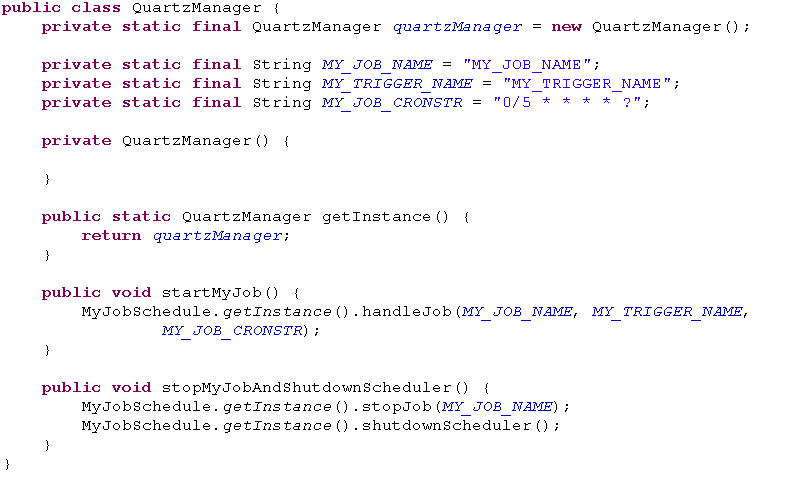
package com.sssppp.TimerSchedule.quartz;import com.sssppp.TimerSchedule.quartz.schedule.MyJobSchedule;public class QuartzManager {private static final QuartzManager quartzManager = new QuartzManager();private static final String MY_JOB_NAME = "MY_JOB_NAME";private static final String MY_TRIGGER_NAME = "MY_TRIGGER_NAME";private static final String MY_JOB_CRONSTR = "0/5 * * * * ?";private QuartzManager() {}public static QuartzManager getInstance() {return quartzManager;}public void startMyJob() {MyJobSchedule.getInstance().handleJob(MY_JOB_NAME, MY_TRIGGER_NAME,MY_JOB_CRONSTR);}public void stopMyJobAndShutdownScheduler() {MyJobSchedule.getInstance().stopJob(MY_JOB_NAME);MyJobSchedule.getInstance().shutdownScheduler();}}
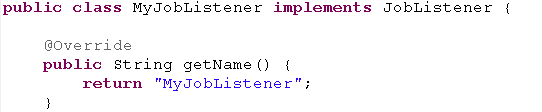


TestCase.java


package com.sssppp.TimerSchedule.quartz;public class TestCase {@SuppressWarnings("static-access")public static void main(String[] args) throws InterruptedException {QuartzManager.getInstance().startMyJob();Thread.currentThread().sleep(12 * 1000);QuartzManager.getInstance().stopMyJobAndShutdownScheduler();}}


【原创】Quartz代码详解的更多相关文章
- 任务调度Cron表达式及Quartz代码详解
在线Cron表达式生成器 http://cron.qqe2.com/ cron表达式详解 http://www.cnblogs.com/linjiqin/archive/2013/07/08/3178 ...
- 【原创】Junit4详解二:Junit4 Runner以及test case执行顺序和源代码理解
概要: 前一篇文章我们总体介绍了Junit4的用法以及一些简单的测试.之前我有个疑惑,Junit4怎么把一个test case跑起来的,在test case之前和之后我们能做些什么? Junit4执行 ...
- quartz配置文件详解
quartz配置文件详解(转载) quartz学习总结: 一.关于job: 用Quartz的行话讲,作业是一个执行任务的简单Java类.任务可以是任何Java代码.只需你实现org.qu ...
- Quartz 入门详解
Quartz是OpenSymphony开源组织在Job scheduling领域又一个开源项目,它可以与J2EE与J2SE应用程序相结合也可以单独使用.Quartz可以用来创建简单或为运行十个,百个, ...
- ASP.NET MVC 5 学习教程:生成的代码详解
原文 ASP.NET MVC 5 学习教程:生成的代码详解 起飞网 ASP.NET MVC 5 学习教程目录: 添加控制器 添加视图 修改视图和布局页 控制器传递数据给视图 添加模型 创建连接字符串 ...
- Quartz学习——SSMM(Spring+SpringMVC+Mybatis+Mysql)和Quartz集成详解(四)
当任何时候觉你得难受了,其实你的大脑是在进化,当任何时候你觉得轻松,其实都在使用以前的坏习惯. 通过前面的学习,你可能大致了解了Quartz,本篇博文为你打开学习SSMM+Quartz的旅程!欢迎上车 ...
- Quartz学习——SSMM(Spring+SpringMVC+Mybatis+Mysql)和Quartz集成详解(转)
通过前面的学习,你可能大致了解了Quartz,本篇博文为你打开学习SSMM+Quartz的旅程!欢迎上车,开始美好的旅程! 本篇是在SSM框架基础上进行的. 参考文章: 1.Quartz学习——Qua ...
- (转) Quartz学习——SSMM(Spring+SpringMVC+Mybatis+Mysql)和Quartz集成详解(四)
http://blog.csdn.net/u010648555/article/details/60767633 当任何时候觉你得难受了,其实你的大脑是在进化,当任何时候你觉得轻松,其实都在使用以前的 ...
- Quartz 入门详解 专题
Cron-Expressions are used to configure instances of CronTrigger. Cron-Expressions are strings that a ...
随机推荐
- ANTLR3完全参考指南读书笔记[08]
前言 不要让用户被那些“专业术语”吓住! 用心设计的提示和反馈信息是软件设计者的“职业良心”. 内容 1 存在哪些错误? 2 美化错误提示 3 错误恢复策略 1 存在哪些错误? 在DSL语言开 ...
- ajax 上传
使用FormData,进行Ajax请求并上传文件:具体代码如下: html代码: <!DOCTYPE html><html lang="en"><he ...
- C陷阱与缺陷 1
1,符号之间的空白被忽略 符号中间不能嵌入空白 2,词法分析中的贪心法 a---b 和 a-- -b相同 和 a- --b不同 1 a=b/*p //根据贪心法 /*被解释成 注释符,便不再往下读,直 ...
- php归获取当前目录下的二级目录数 和文件数
<?php header('Content-Type: text/html; charset=gb2312'); // $baseDir = "/www/u ...
- Reverse a Singly LinkedList
Reverse a Singly LinkedList * Definition for singly-linked list. * public class ListNode { * int val ...
- centos 6.4/redhat 6.4 安装gitlab
一,把所有包升级到最新版本 yum -y upgrade 二,安装最新版ruby 2.1.5 步骤http://my.oschina.net/duolus/blog/348353 三,安装官方给出的o ...
- Questions that are independent of programming language. These questions are typically more abstract than other categories.
Questions that are independent of programming language. These questions are typically more abstract ...
- linux操作文本文件
打开文件 #vi 文件名 保存退出 从编辑模式退到命令行模式,按esc键 保存退出命令 #:wq 强制退出,不保存 #:q!
- python tornado框架实现CRUD
1.本例采用postgresql数据库,创建数据表 user_tbl ),signup_date date); 2.webapi接口 (1)tornado框架配置 t_tornado.py #-*- ...
- TFS 强制撤销别人签出的代码
有个同事离职一段时间了,今天改一下她的代码,发现有个文件签出了,晕,而且TFS用的也是只允许单用户签出. 1,找原来的用的机器,已经被人占用了,系统已经重做. 2,只有用命令行来搞了. 大致如下: t ...