
【原创】Quartz代码详解
阅读目录
简单介绍
- Scheduler:调度器,将Job和Trigger关联起来;
- Job :需要执行的作业;
- Trigger :触发器,指定执行的时间,主要包括两种方式:
一、Quartz简单实例
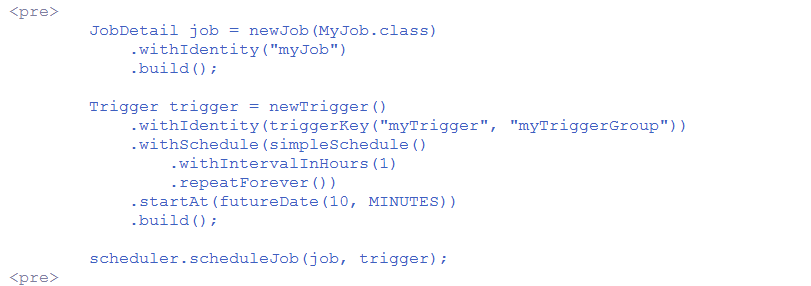
SchedulerFactory schedFact = new org.quartz.impl.StdSchedulerFactory();Scheduler sched = schedFact.getScheduler();sched.start();// define the job and tie it to our HelloJob classJobDetail job = newJob(HelloJob.class).withIdentity("myJob", "group1").build();// Trigger the job to run now, and then every 40 secondstrigger = newTrigger().withIdentity("myTrigger", "group1").startNow().withSchedule(simpleSchedule().withIntervalInSeconds(40).repeatForever()).build();// Tell quartz to schedule the job using our triggersched.scheduleJob(job, trigger);
二、Job、JobDetail、JobBuilder
- Job - an interface to be implemented by components that you wish to have executed by the scheduler.
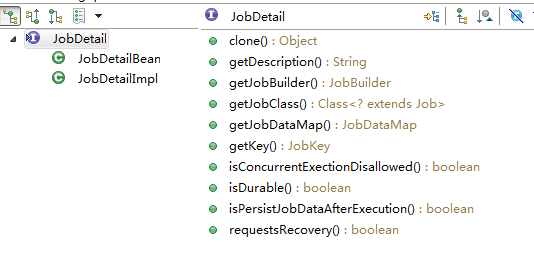
- JobDetail - used to define instances of Jobs.
- JobBuilder - used to define/build JobDetail instances, which define instances of Jobs.
Job

public class HelloJob implements Job {

    public HelloJob() {

    }

    public void execute(JobExecutionContext context)

      throws JobExecutionException

    {

      System.err.println("Hello!  HelloJob is executing.");

    }

  }
JobDetail
JobDetail job = newJob(HelloJob.class)

      .withIdentity("myJob", "group1") // name "myJob", group "group1"

      .build();
//带参数JobDetail job = JobBuilder.newJob(clazz).withIdentity(new JobKey(jobName, groupName)).usingJobData(new JobDataMap(params)).build();
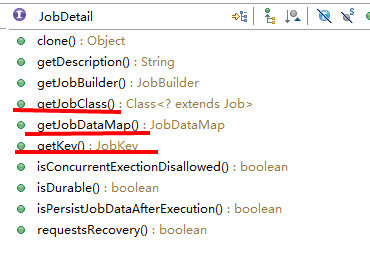
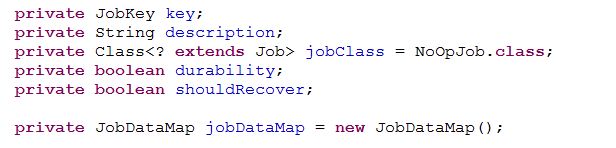
- key;
- JobClass;
- JobDataMap;等

JobBuilder




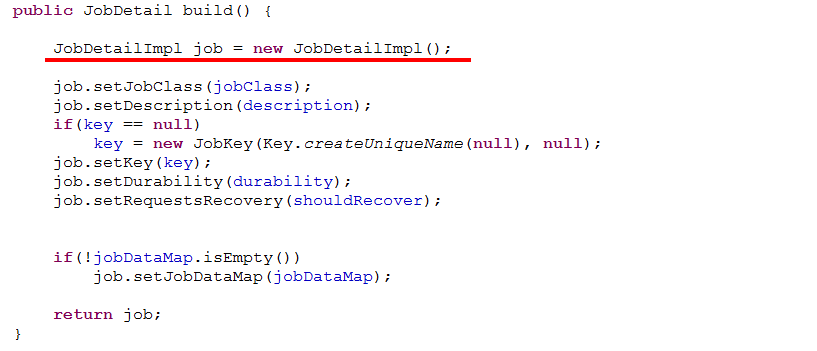

三、Trigger、TriggerBuilder
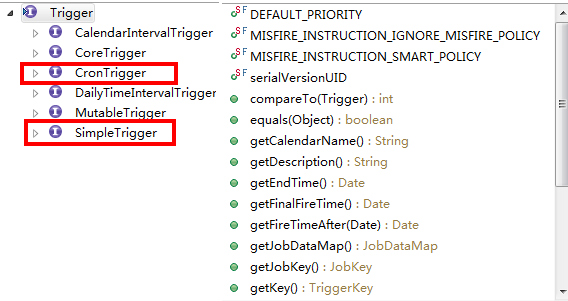
SimpleTrigger



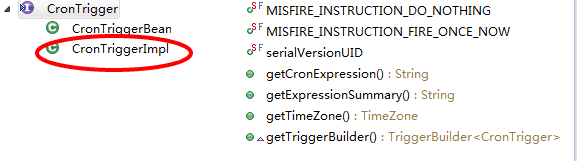
CronTrigger


TriggerBuilder
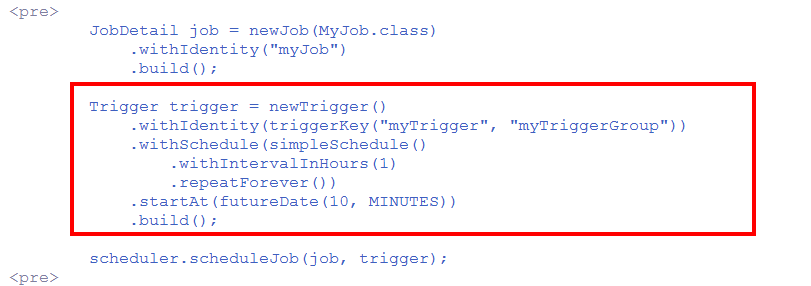


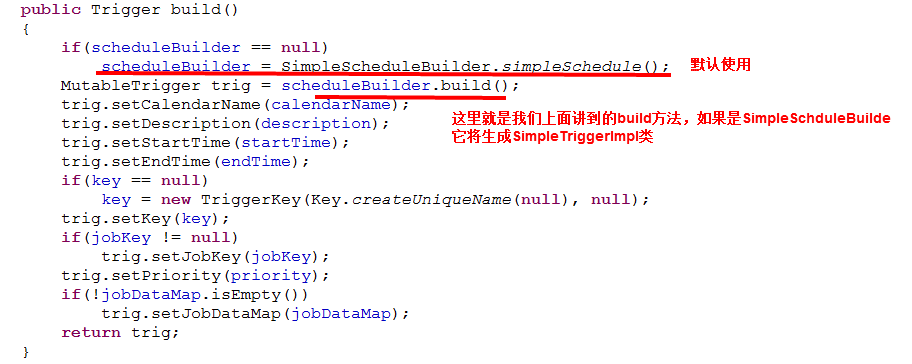
通过forJob()方法将Trigger和指定的Job绑定
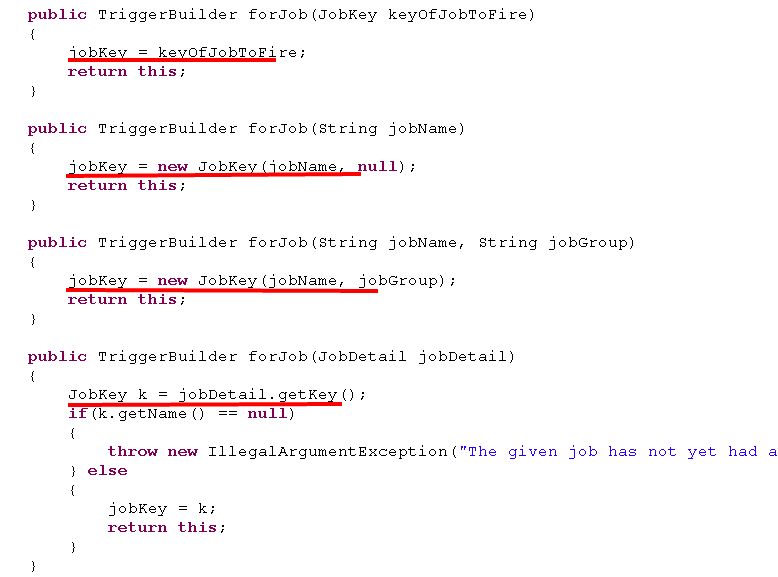
- 在使用JobBuilder创建JobDetail时,通过方法withIdentity()指定了JobDetail的JobKey;
- 这里通过TriggerBuilder的forJob()同样指定了JobKey;





四、Scheduler

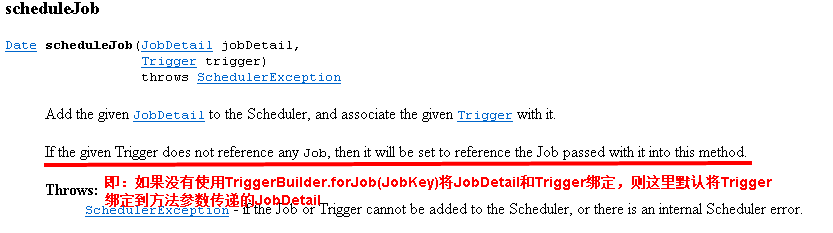
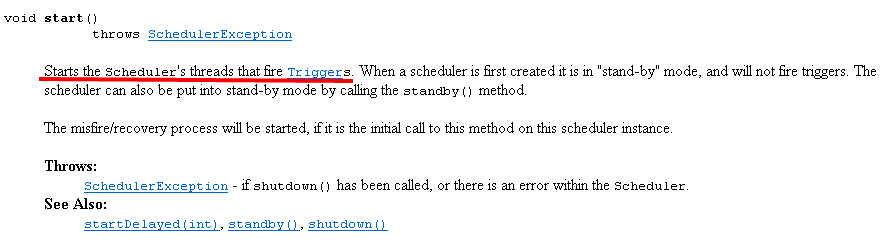
Scheduler scheduler = StdSchedulerFactory.getDefaultScheduler();scheduler.schedeleJob(Job,trigger)scheduler.start();scheduler.shutdown();
// Tell quartz to schedule the job using our triggersched.scheduleJob(job, trigger);


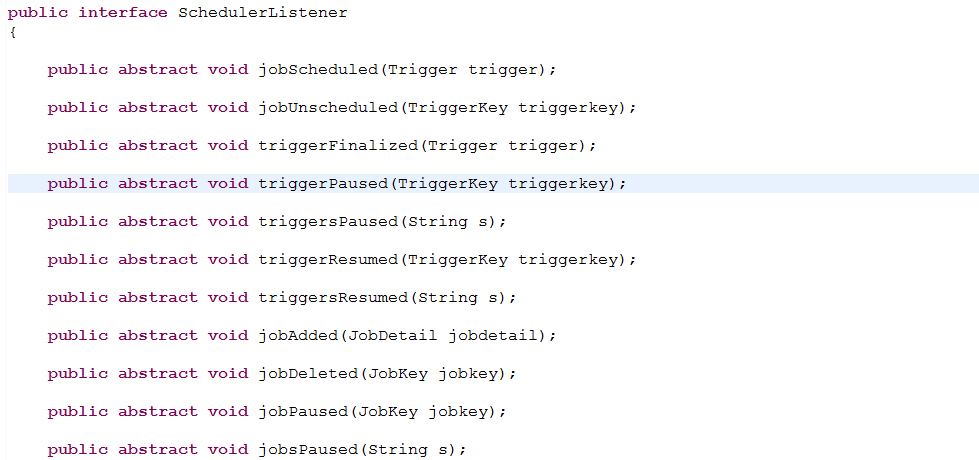
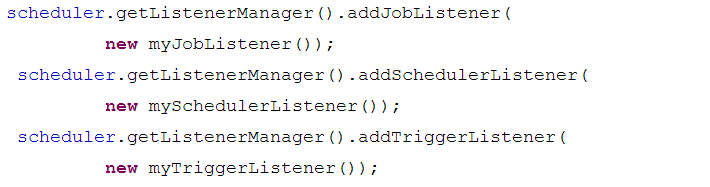
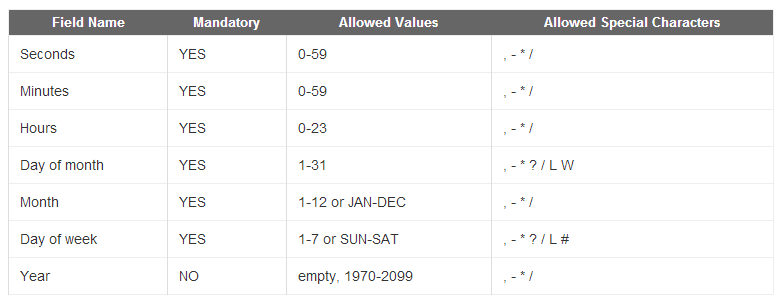
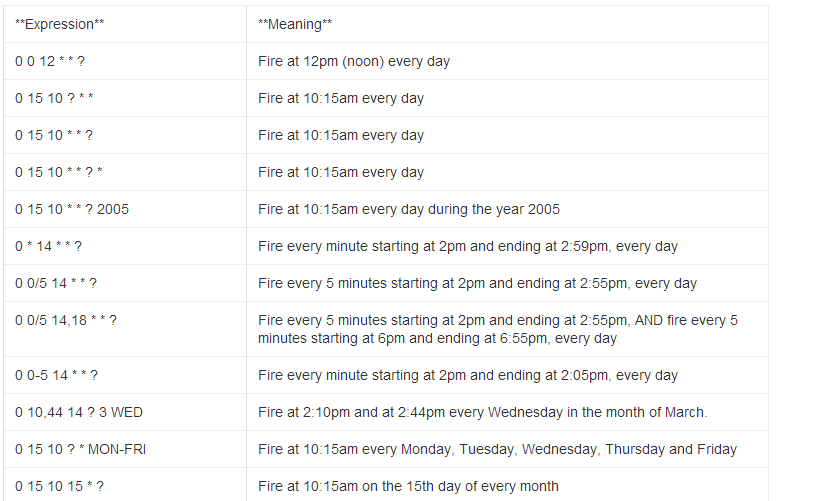
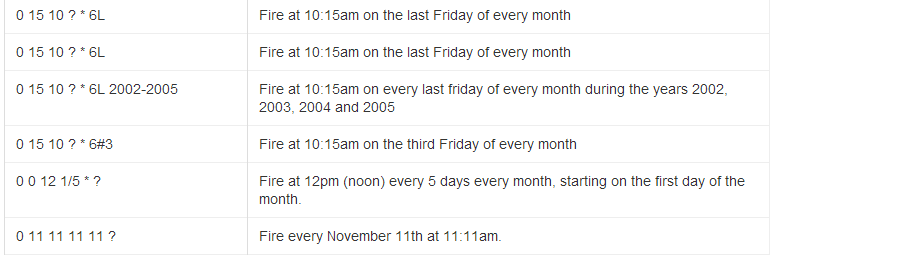
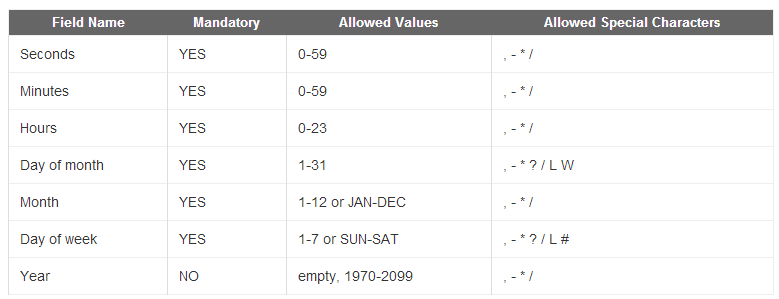
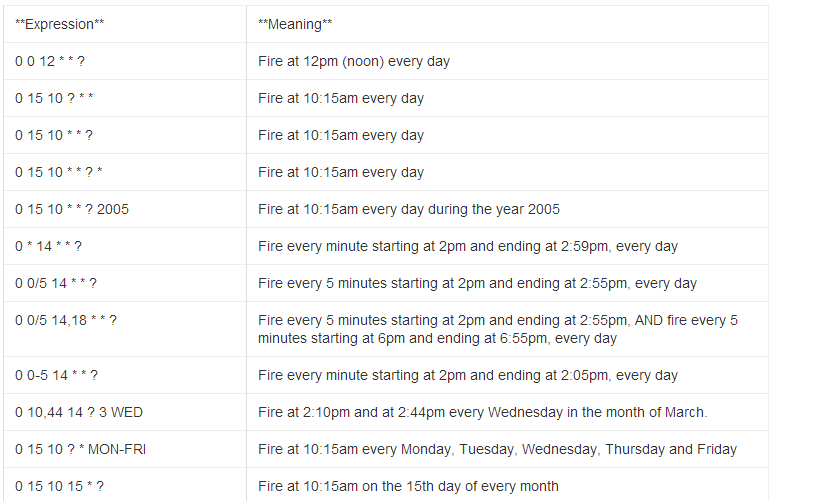
* ("all values") - used to select all values within a field. For example, "" in the minute field means *"every minute".
? ("no specific value") - useful when you need to specify something in one of the two fields in which the character is allowed, but not the other. For example, if I want my trigger to fire on a particular day of the month (say, the 10th), but don't care what day of the week that happens to be, I would put "10" in the day-of-month field, and "?" in the day-of-week field. See the examples below for clarification.
- - used to specify ranges. For example, "10-12" in the hour field means "the hours 10, 11 and 12".
, - used to specify additional values. For example, "MON,WED,FRI" in the day-of-week field means "the days Monday, Wednesday, and Friday".
/ - used to specify increments. For example, "0/15" in the seconds field means "the seconds 0, 15, 30, and 45". And "5/15" in the seconds field means "the seconds 5, 20, 35, and 50". You can also specify '/' after the '' character - in this case '' is equivalent to having '0' before the '/'. '1/3' in the day-of-month field means "fire every 3 days starting on the first day of the month".
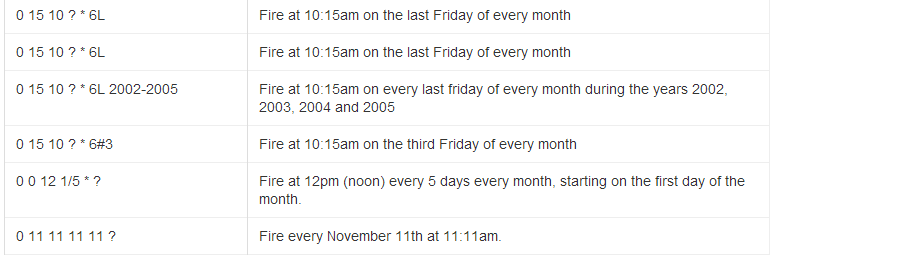
L ("last") - has different meaning in each of the two fields in which it is allowed. For example, the value "L" in the day-of-month field means "the last day of the month" - day 31 for January, day 28 for February on non-leap years. If used in the day-of-week field by itself, it simply means "7" or "SAT". But if used in the day-of-week field after another value, it means "the last xxx day of the month" - for example "6L" means "the last friday of the month". You can also specify an offset from the last day of the month, such as "L-3" which would mean the third-to-last day of the calendar month. When using the 'L' option, it is important not to specify lists, or ranges of values, as you'll get confusing/unexpected results.
W ("weekday") - used to specify the weekday (Monday-Friday) nearest the given day. As an example, if you were to specify "15W" as the value for the day-of-month field, the meaning is: "the nearest weekday to the 15th of the month". So if the 15th is a Saturday, the trigger will fire on Friday the 14th. If the 15th is a Sunday, the trigger will fire on Monday the 16th. If the 15th is a Tuesday, then it will fire on Tuesday the 15th. However if you specify "1W" as the value for day-of-month, and the 1st is a Saturday, the trigger will fire on Monday the 3rd, as it will not 'jump' over the boundary of a month's days. The 'W' character can only be specified when the day-of-month is a single day, not a range or list of days.
The 'L' and 'W' characters can also be combined in the day-of-month field to yield 'LW', which translates to *"last weekday of the month"*.
- # - used to specify "the nth" XXX day of the month. For example, the value of "6#3" in the day-of-week field means"the third Friday of the month" (day 6 = Friday and "#3" = the 3rd one in the month). Other examples: "2#1" = the first Monday of the month and "4#5" = the fifth Wednesday of the month. Note that if you specify "#5" and there is not 5 of the given day-of-week in the month, then no firing will occur that month.
七、程序示例
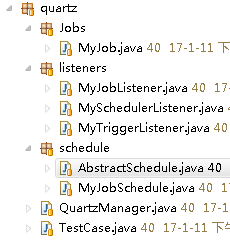
AbstractSchedule类:抽象基类

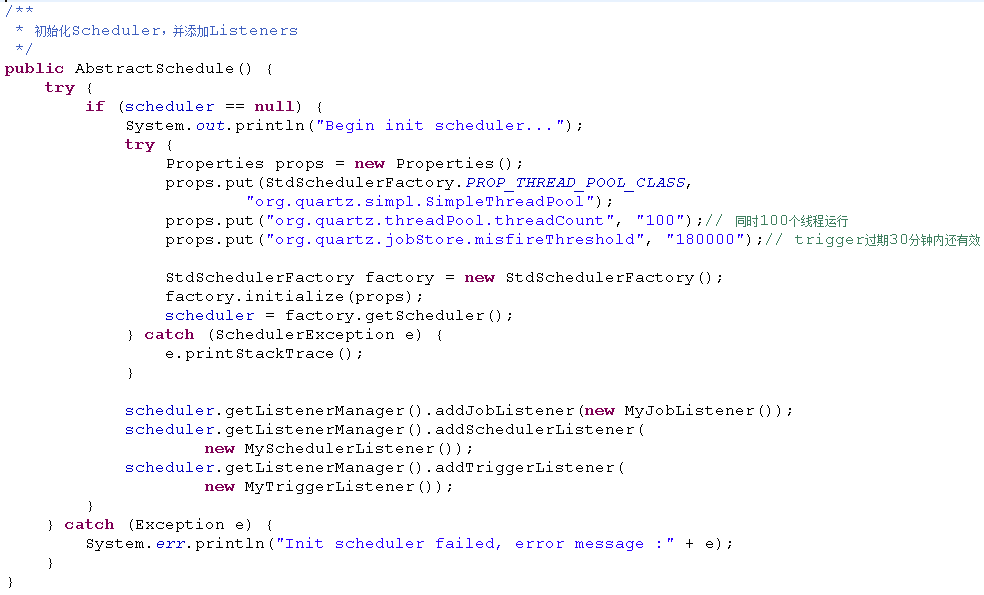
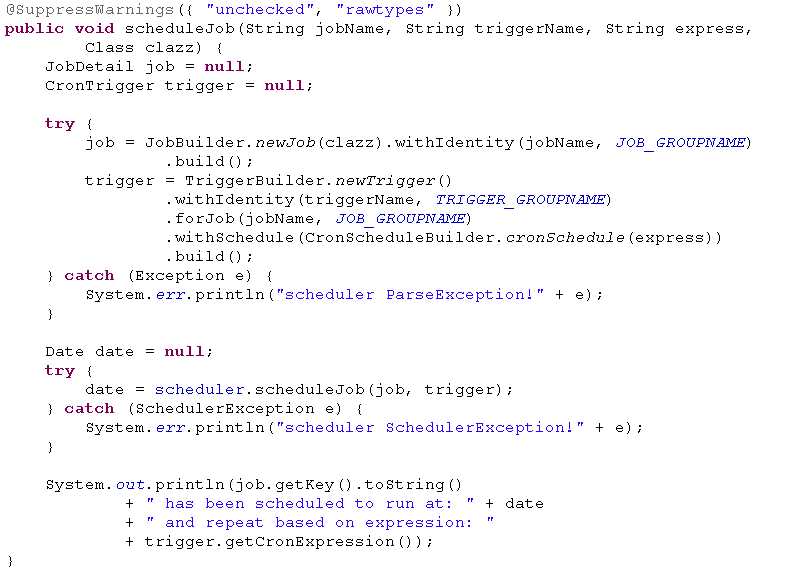
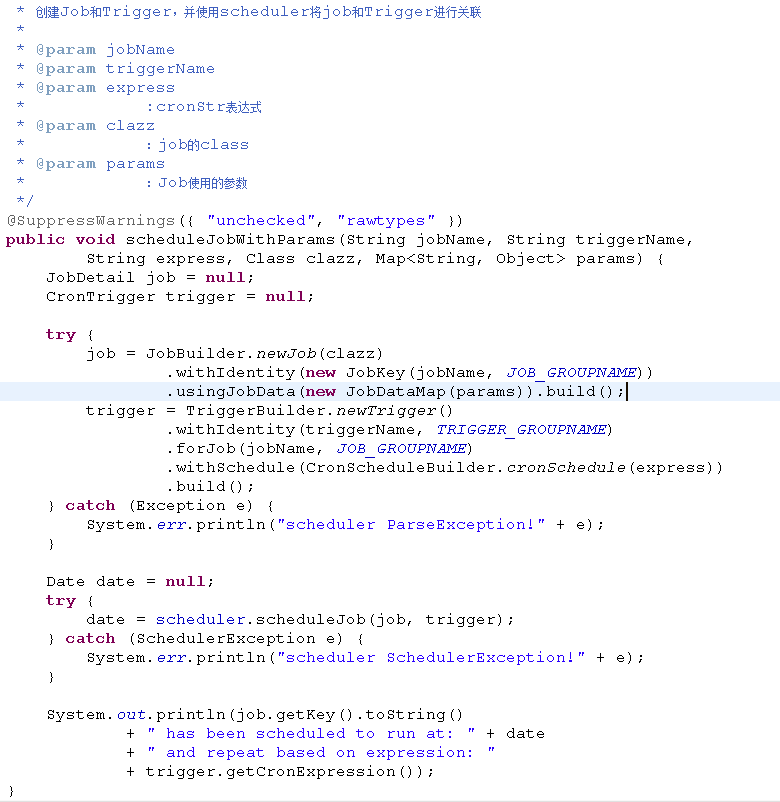
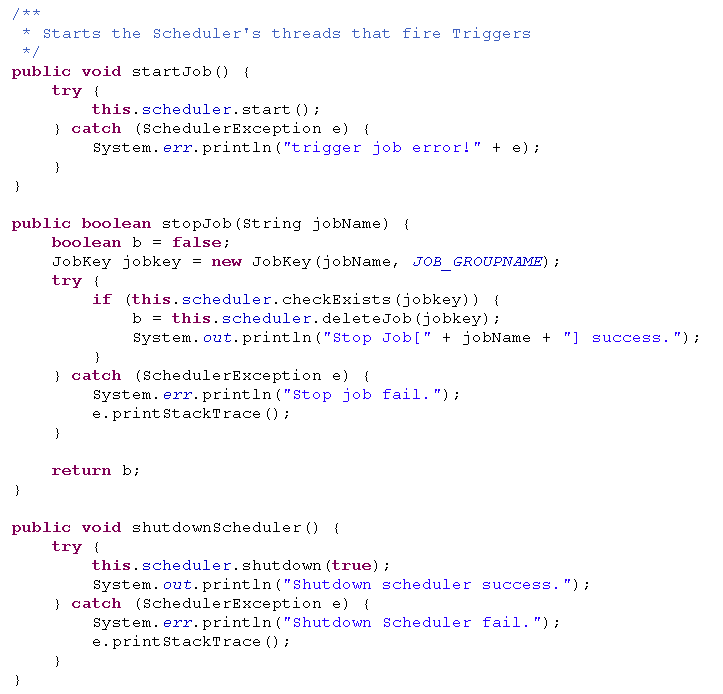
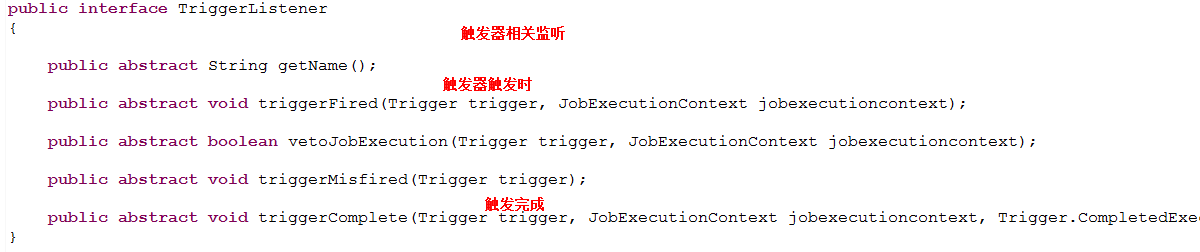
package com.sssppp.TimerSchedule.quartz.schedule;import java.util.Date;import java.util.Map;import java.util.Properties;import org.quartz.CronScheduleBuilder;import org.quartz.CronTrigger;import org.quartz.JobBuilder;import org.quartz.JobDataMap;import org.quartz.JobDetail;import org.quartz.JobKey;import org.quartz.Scheduler;import org.quartz.SchedulerException;import org.quartz.TriggerBuilder;import org.quartz.impl.StdSchedulerFactory;import com.sssppp.TimerSchedule.quartz.listeners.MyJobListener;import com.sssppp.TimerSchedule.quartz.listeners.MySchedulerListener;import com.sssppp.TimerSchedule.quartz.listeners.MyTriggerListener;public abstract class AbstractSchedule {public Scheduler scheduler = null;private static final String JOB_GROUPNAME = "MY_JOB_GROUP";private static final String TRIGGER_GROUPNAME = "MY_TRIGGER_GROUP";/*** 初始化Scheduler,并添加Listeners*/public AbstractSchedule() {try {if (scheduler == null) {System.out.println("Begin init scheduler...");try {Properties props = new Properties();props.put(StdSchedulerFactory.PROP_THREAD_POOL_CLASS,"org.quartz.simpl.SimpleThreadPool");props.put("org.quartz.threadPool.threadCount", "100");// 同时100个线程运行props.put("org.quartz.jobStore.misfireThreshold", "180000");// trigger过期30分钟内还有效StdSchedulerFactory factory = new StdSchedulerFactory();factory.initialize(props);scheduler = factory.getScheduler();} catch (SchedulerException e) {e.printStackTrace();}scheduler.getListenerManager().addJobListener(new MyJobListener());scheduler.getListenerManager().addSchedulerListener(new MySchedulerListener());scheduler.getListenerManager().addTriggerListener(new MyTriggerListener());}} catch (Exception e) {System.err.println("Init scheduler failed, error message :" + e);}}public abstract Scheduler handleJob(String jobName, String triggerName,String cronStr);@SuppressWarnings({ "unchecked", "rawtypes" })public void scheduleJob(String jobName, String triggerName, String express,Class clazz) {JobDetail job = null;CronTrigger trigger = null;try {job = JobBuilder.newJob(clazz).withIdentity(jobName, JOB_GROUPNAME).build();trigger = TriggerBuilder.newTrigger().withIdentity(triggerName, TRIGGER_GROUPNAME).forJob(jobName, JOB_GROUPNAME).withSchedule(CronScheduleBuilder.cronSchedule(express)).build();} catch (Exception e) {System.err.println("scheduler ParseException!" + e);}Date date = null;try {date = scheduler.scheduleJob(job, trigger);} catch (SchedulerException e) {System.err.println("scheduler SchedulerException!" + e);}System.out.println(job.getKey().toString()+ " has been scheduled to run at: " + date+ " and repeat based on expression: "+ trigger.getCronExpression());}/*** 创建Job和Trigger,并使用scheduler将job和Trigger进行关联** @param jobName* @param triggerName* @param express* :cronStr表达式* @param clazz* :job的class* @param params* :Job使用的参数*/@SuppressWarnings({ "unchecked", "rawtypes" })public void scheduleJobWithParams(String jobName, String triggerName,String express, Class clazz, Map<String, Object> params) {JobDetail job = null;CronTrigger trigger = null;try {job = JobBuilder.newJob(clazz).withIdentity(new JobKey(jobName, JOB_GROUPNAME)).usingJobData(new JobDataMap(params)).build();trigger = TriggerBuilder.newTrigger().withIdentity(triggerName, TRIGGER_GROUPNAME).forJob(jobName, JOB_GROUPNAME).withSchedule(CronScheduleBuilder.cronSchedule(express)).build();} catch (Exception e) {System.err.println("scheduler ParseException!" + e);}Date date = null;try {date = scheduler.scheduleJob(job, trigger);} catch (SchedulerException e) {System.err.println("scheduler SchedulerException!" + e);}System.out.println(job.getKey().toString()+ " has been scheduled to run at: " + date+ " and repeat based on expression: "+ trigger.getCronExpression());}/*** Starts the Scheduler's threads that fire Triggers*/public void startJob() {try {this.scheduler.start();} catch (SchedulerException e) {System.err.println("trigger job error!" + e);}}public boolean stopJob(String jobName) {boolean b = false;JobKey jobkey = new JobKey(jobName, JOB_GROUPNAME);try {if (this.scheduler.checkExists(jobkey)) {b = this.scheduler.deleteJob(jobkey);System.out.println("Stop Job[" + jobName + "] success.");}} catch (SchedulerException e) {System.err.println("Stop job fail.");e.printStackTrace();}return b;}public void shutdownScheduler() {try {this.scheduler.shutdown(true);System.out.println("Shutdown scheduler success.");} catch (SchedulerException e) {System.err.println("Shutdown Scheduler fail.");e.printStackTrace();}}}

package com.sssppp.TimerSchedule.quartz.schedule;import java.util.HashMap;import java.util.Map;import org.quartz.Scheduler;import com.sssppp.TimerSchedule.quartz.Jobs.MyJob;public class MyJobSchedule extends AbstractSchedule {private static MyJobSchedule myJobSchedule = new MyJobSchedule();private MyJobSchedule() {}public static MyJobSchedule getInstance() {return myJobSchedule;}@Overridepublic Scheduler handleJob(String jobName, String triggerName,String cronStr) {Map<String, Object> params = new HashMap<String, Object>();params.put(MyJob.JOB_PARAM_KEY, "This is myJob param");scheduleJobWithParams(jobName, triggerName, cronStr, MyJob.class, params);startJob();return this.scheduler;}}
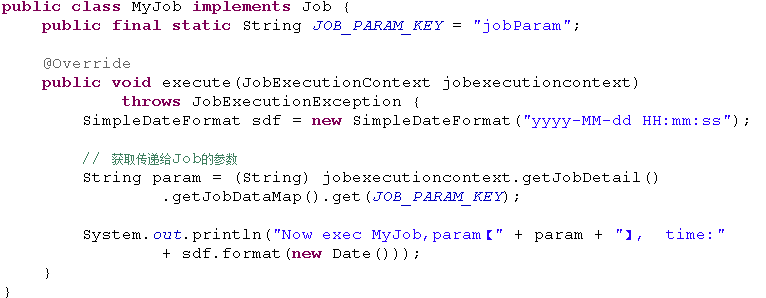
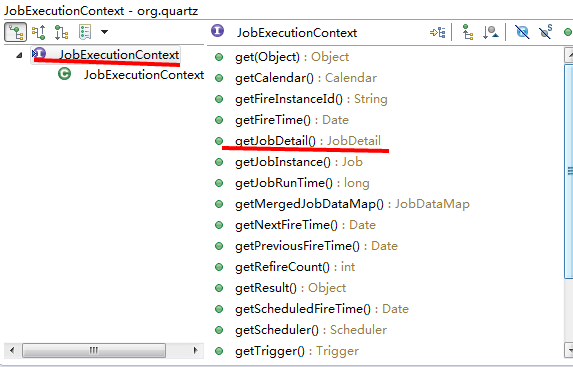
package com.sssppp.TimerSchedule.quartz.Jobs;import java.util.Date;import org.quartz.Job;import org.quartz.JobExecutionContext;import org.quartz.JobExecutionException;import com.ibm.icu.text.SimpleDateFormat;public class MyJob implements Job {public final static String JOB_PARAM_KEY = "jobParam";@Overridepublic void execute(JobExecutionContext jobexecutioncontext)throws JobExecutionException {SimpleDateFormat sdf = new SimpleDateFormat("yyyy-MM-dd HH:mm:ss");// 获取传递给Job的参数String param = (String) jobexecutioncontext.getJobDetail().getJobDataMap().get(JOB_PARAM_KEY);System.out.println("Now exec MyJob,param【" + param + "】, time:"+ sdf.format(new Date()));}}
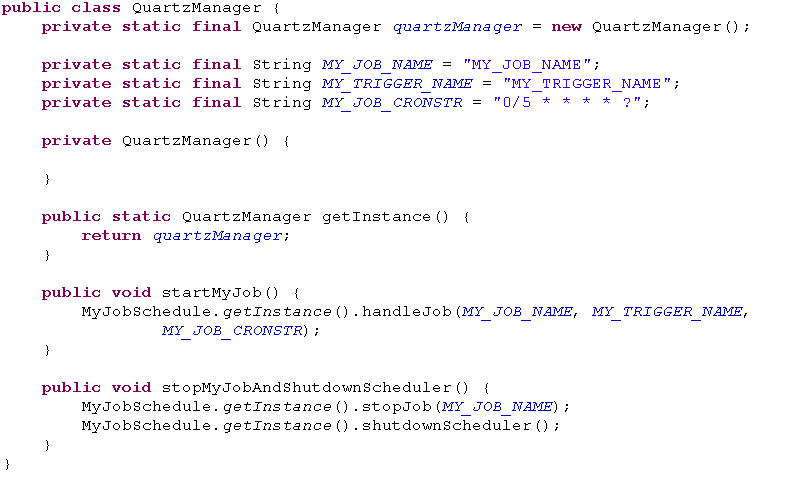
package com.sssppp.TimerSchedule.quartz;import com.sssppp.TimerSchedule.quartz.schedule.MyJobSchedule;public class QuartzManager {private static final QuartzManager quartzManager = new QuartzManager();private static final String MY_JOB_NAME = "MY_JOB_NAME";private static final String MY_TRIGGER_NAME = "MY_TRIGGER_NAME";private static final String MY_JOB_CRONSTR = "0/5 * * * * ?";private QuartzManager() {}public static QuartzManager getInstance() {return quartzManager;}public void startMyJob() {MyJobSchedule.getInstance().handleJob(MY_JOB_NAME, MY_TRIGGER_NAME,MY_JOB_CRONSTR);}public void stopMyJobAndShutdownScheduler() {MyJobSchedule.getInstance().stopJob(MY_JOB_NAME);MyJobSchedule.getInstance().shutdownScheduler();}}
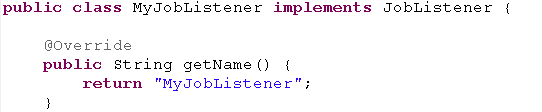


TestCase.java


package com.sssppp.TimerSchedule.quartz;public class TestCase {@SuppressWarnings("static-access")public static void main(String[] args) throws InterruptedException {QuartzManager.getInstance().startMyJob();Thread.currentThread().sleep(12 * 1000);QuartzManager.getInstance().stopMyJobAndShutdownScheduler();}}


【原创】Quartz代码详解的更多相关文章
- 任务调度Cron表达式及Quartz代码详解
在线Cron表达式生成器 http://cron.qqe2.com/ cron表达式详解 http://www.cnblogs.com/linjiqin/archive/2013/07/08/3178 ...
- 【原创】Junit4详解二:Junit4 Runner以及test case执行顺序和源代码理解
概要: 前一篇文章我们总体介绍了Junit4的用法以及一些简单的测试.之前我有个疑惑,Junit4怎么把一个test case跑起来的,在test case之前和之后我们能做些什么? Junit4执行 ...
- quartz配置文件详解
quartz配置文件详解(转载) quartz学习总结: 一.关于job: 用Quartz的行话讲,作业是一个执行任务的简单Java类.任务可以是任何Java代码.只需你实现org.qu ...
- Quartz 入门详解
Quartz是OpenSymphony开源组织在Job scheduling领域又一个开源项目,它可以与J2EE与J2SE应用程序相结合也可以单独使用.Quartz可以用来创建简单或为运行十个,百个, ...
- ASP.NET MVC 5 学习教程:生成的代码详解
原文 ASP.NET MVC 5 学习教程:生成的代码详解 起飞网 ASP.NET MVC 5 学习教程目录: 添加控制器 添加视图 修改视图和布局页 控制器传递数据给视图 添加模型 创建连接字符串 ...
- Quartz学习——SSMM(Spring+SpringMVC+Mybatis+Mysql)和Quartz集成详解(四)
当任何时候觉你得难受了,其实你的大脑是在进化,当任何时候你觉得轻松,其实都在使用以前的坏习惯. 通过前面的学习,你可能大致了解了Quartz,本篇博文为你打开学习SSMM+Quartz的旅程!欢迎上车 ...
- Quartz学习——SSMM(Spring+SpringMVC+Mybatis+Mysql)和Quartz集成详解(转)
通过前面的学习,你可能大致了解了Quartz,本篇博文为你打开学习SSMM+Quartz的旅程!欢迎上车,开始美好的旅程! 本篇是在SSM框架基础上进行的. 参考文章: 1.Quartz学习——Qua ...
- (转) Quartz学习——SSMM(Spring+SpringMVC+Mybatis+Mysql)和Quartz集成详解(四)
http://blog.csdn.net/u010648555/article/details/60767633 当任何时候觉你得难受了,其实你的大脑是在进化,当任何时候你觉得轻松,其实都在使用以前的 ...
- Quartz 入门详解 专题
Cron-Expressions are used to configure instances of CronTrigger. Cron-Expressions are strings that a ...
随机推荐
- 大数据hadoop入门学习之集群环境搭建集合
目录: 1.基本工作准备 1.虚拟机准备 2.java 虚拟机-jdk环境配置 3.ssh无密码登录 2.hadoop的安装与配置 3.hbase安装与配置(集成安装zookeeper) 4.zook ...
- UVa 10795 - A Different Task
题目大意:给出n,表示说有n个大小不同的盘子,然后再给出每个盘子的初始位置和目标位置,要求计算出最少的步数使得每个盘子都移动到它的目标位置. 分析: 首先找最大不在目标柱子上的盘子K,因为如果最大的 ...
- springmvc学习笔记--REST API的异常处理
前言: 最近使用springmvc写了不少rest api, 觉得真是一个好框架. 之前描述的几篇关于rest api的文章, 其实还是不够完善. 比如当遇到参数缺失, 类型不匹配的情况时, 直接抛出 ...
- href="#"与javascript:void(0)的区别
共同点:都是一个空链接. 不同点:所以,#与javascript:void(0)的区别也很明显,#方法会跳转到页面的顶部,并且在页面URL后面会出现#,而javascript:void(0)方法不会, ...
- Codeforces Round #374 (Div. 2) A B C D 水 模拟 dp+dfs 优先队列
A. One-dimensional Japanese Crossword time limit per test 1 second memory limit per test 256 megabyt ...
- win10新增快捷键
按此键 出现位置 重要程度 联想记忆 替代 用途 +A 打开“操作中心” 右侧, ★★★★★ Action 控制面板 +S ...
- linux下的符号链接和硬链接
一 Linux下链接文件的作用 Linux特别注重用户的权限,而链接文件的作用也正体现了这个方面.对源文件的位置进行了隐藏,用户只对链接文件操作. 二 链接文件的区别 链接文件分为硬链接文件和软 ...
- Android-Universal-Image-Loader开源项目的简要说明及使用实例
本文转载于:http://www.cnblogs.com/hsx514/p/3460179.html 一.核心类的说明及相关参数的说明 ImageLoaderConfiguration 1.作用:为I ...
- Error using subsindex Function 'subsindex' is not defined for values of class 'struct'.
clc; clear all; close all; image_path = '/media/wangxiao/Elements/image_segment_backup/'; savePath = ...
- MySQL 5.5.35 单机多实例配置详解
一.前言 二.概述 三.环境准备 四.安装MySQL 5.5.35 五.新建支持多实例的配置文件(我这里配置的是四个实例) 六.初始化多实例数据库 七.提供管理脚本 mysqld_multi.serv ...