
spring-boot5代码
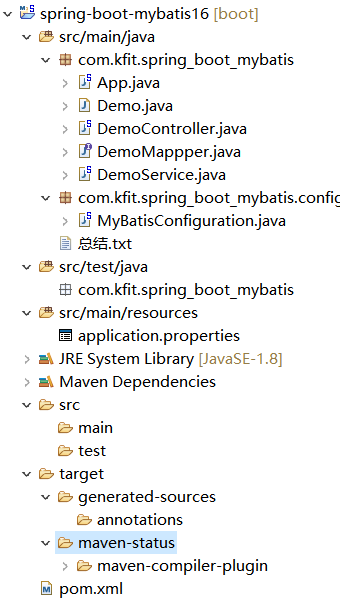
App.java
package com.kfit.spring_boot_mybatis;

import org.mybatis.spring.annotation.MapperScan;

import org.springframework.boot.SpringApplication;

import org.springframework.boot.autoconfigure.SpringBootApplication;

/**

 * Spring Boot启动类.

 */

@SpringBootApplication

@MapperScan("com.kfit.*")//扫描:该包下相应的class,主要是MyBatis的持久化类.

public class App {

    public static void main(String[] args) {

        SpringApplication.run(App.class, args);

    }

}
Demo.java
package com.kfit.spring_boot_mybatis;

//这里先要建表demo

public class Demo {

    private long id;

    private String name;

    public long getId() {

        return id;

    }

    public void setId(long id) {

        this.id = id;

    }

    public String getName() {

        return name;

    }

    public void setName(String name) {

        this.name = name;

    }

}
DemoController.java
package com.kfit.spring_boot_mybatis;

import java.util.List;

import org.springframework.beans.factory.annotation.Autowired;

import org.springframework.web.bind.annotation.RequestMapping;

import org.springframework.web.bind.annotation.RestController;

import com.github.pagehelper.PageHelper;

@RestController

public class DemoController {

    @Autowired

    private DemoService demoService;

    @RequestMapping("/likeName")

    public List<Demo> likeName(String name){

        /*

         * 第一个参数:第几页;

         * 第二个参数:每页获取的条数.

         */

        PageHelper.startPage(1, 2);//请求进行拦截,只返回前2条数据

        return demoService.likeName(name);

    }

    @RequestMapping("/save")

    public Demo save(){

        Demo demo = new Demo();

        demo.setName("张三55");

        demoService.save(demo);

        return demo;

    }

}
DemoMappper.java
package com.kfit.spring_boot_mybatis;

import java.util.List;

import org.apache.ibatis.annotations.Insert;

import org.apache.ibatis.annotations.Options;

import org.apache.ibatis.annotations.Select;

public interface DemoMappper {

    //#{name}:参数占位符

    @Select("select *from Demo where name=#{name}")

    public List<Demo> likeName(String name);

    @Select("select *from Demo where id = #{id}")

    public Demo getById(long id);

    @Select("select name from Demo where id = #{id}")

    public String getNameById(long id);

    /**

     * 保存数据.

     */

    @Insert("insert into Demo(name) values(#{name})")

    @Options(useGeneratedKeys=true,keyProperty="id",keyColumn="id")

    //是否开启自增涨主键key,属性名字和对应的数据库的名字

    public void save(Demo demo);

}
DemoService.java
package com.kfit.spring_boot_mybatis;

import java.util.List;

import org.springframework.beans.factory.annotation.Autowired;

import org.springframework.stereotype.Service;

import org.springframework.transaction.annotation.Transactional;

@Service

public class DemoService {

    @Autowired

    private DemoMappper demoMappper;

    public List<Demo> likeName(String name){

        return demoMappper.likeName(name);

    }

    @Transactional//添加事务.

    public void save(Demo demo){

        demoMappper.save(demo);

    }

}
MyBatisConfiguration.java
package com.kfit.spring_boot_mybatis.config;

import java.util.Properties;

import org.springframework.context.annotation.Bean;

import org.springframework.context.annotation.Configuration;

import com.github.pagehelper.PageHelper;

@Configuration

public class MyBatisConfiguration {

    @Bean

    public PageHelper pageHelper() {

        System.out.println("MyBatisConfiguration.pageHelper()");

        PageHelper pageHelper = new PageHelper();

        Properties p = new Properties();

        p.setProperty("offsetAsPageNum", "true");

        p.setProperty("rowBoundsWithCount", "true");

        p.setProperty("reasonable", "true");

        pageHelper.setProperties(p);

        return pageHelper;

    }

}
总结.txt
Spring Boot 集成Mybatis:

---------------------------------------

1、新建一个新的Maven Project;

2、需要在pom.xml文件添加相应的依赖,

       比如:mysql驱动;

       PageHelper分页插件,需要版本号;

3、编写启动类,大部分和之前的代码是一样的,需要的注意的是:

    需要添加一个注解@MapperScan --指定MyBatis持久类的位置;

4、编写一个测试的实体类Demo;

5、编写一个DemoMapper,使用@Select和@Save进行数据库操作;

   使用@Options配置返回的主键信息;

6、编写DemoService;

7、编写DemoController;

8、添加分页配置信息,需要添加一个MyBatisConfiguration;

9、使用PageHelper.startPage(pageNum,pageSize)进行分页;
application.properties
spring.datasource.url = jdbc:mysql://localhost:3306/spboot1

spring.datasource.username = root

spring.datasource.password =

spring.datasource.driverClassName = com.mysql.jdbc.Driver

spring.datasource.max-active=20

spring.datasource.max-idle=8

spring.datasource.min-idle=8

spring.datasource.initial-size=10
pom.xml
<!-- 添加依赖 -->

<project xmlns="http://maven.apache.org/POM/4.0.0" xmlns:xsi="http://www.w3.org/2001/XMLSchema-instance"

    xsi:schemaLocation="http://maven.apache.org/POM/4.0.0 http://maven.apache.org/xsd/maven-4.0.0.xsd">

    <modelVersion>4.0.0</modelVersion>

    <groupId>com.kfit</groupId>

    <artifactId>spring-boot-mybatis</artifactId>

    <version>0.0.1-SNAPSHOT</version>

    <packaging>jar</packaging>

    <name>spring-boot-mybatis</name>

    <url>http://maven.apache.org</url>

    <!-- spring boot parent节点,引入这个之后,在下面和spring boot相关的就不需要引入版本了; -->

    <parent>

        <groupId>org.springframework.boot</groupId>

        <artifactId>spring-boot-starter-parent</artifactId>

        <version>1.4.1.RELEASE</version>

    </parent>

    <properties>

        <project.build.sourceEncoding>UTF-8</project.build.sourceEncoding>

        <!-- 指定一下jdk的版本 ,这里我们使用jdk 1.8 ,默认是1.6 -->

        <java.version>1.8</java.version>

    </properties>

    <dependencies>

        <!-- web支持: 1、web mvc; 2、restful; 3、jackjson支持; 4、aop ........ -->

        <dependency>

            <groupId>org.springframework.boot</groupId>

            <artifactId>spring-boot-starter-web</artifactId>

        </dependency>

        <!-- mysql 数据库驱动. -->

        <dependency>

            <groupId>mysql</groupId>

            <artifactId>mysql-connector-java</artifactId>

        </dependency>

        <!-- spring-boot mybatis依赖: 请不要使用1.0.0版本,因为还不支持拦截器插件, 1.1.1 是博主写帖子时候的版本,大家使用最新版本即可 -->

        <dependency>

            <groupId>org.mybatis.spring.boot</groupId>

            <artifactId>mybatis-spring-boot-starter</artifactId>

            <version>1.1.1</version>

        </dependency>

        <!-- MyBatis提供了拦截器接口,我们可以实现自己的拦截器, 将其作为一个plugin装入到SqlSessionFactory中。 Github上有位开发者写了一个分页插件,我觉得使用起来还可以,挺方便的。

            Github项目地址: https://github.com/pagehelper/Mybatis-PageHelper -->

        <dependency>

            <groupId>com.github.pagehelper</groupId>

            <artifactId>pagehelper</artifactId>

            <version>4.1.0</version>

        </dependency>

    </dependencies>

    <build>

        <defaultGoal>compile</defaultGoal>

    </build>

</project>
spring-boot5代码的更多相关文章
- spring事务代码实践
事务一般是指数据库事务,是指作为一个程序执行单元执行的一系列操作,要么完全执行,要么完全不执行.事务就是判断以结果为导向的标准. 一.spring的特性(ACID) (1).原子性(atomicity ...
- Spring用代码来读取properties文件
我们都知道,Spring可以@Value的方式读取properties中的值,只需要在配置文件中配置org.springframework.beans.factory.config.PropertyP ...
- Spring Ioc代码阅读
1,理解控制反转 以前一直说着这个词,然后把它等于上ioc这个词,再等于上代码里一个bean里依赖了其他bean,不用new,用注解,用xml去描述,就可以了.能用就行了,实际理论的不管也不影响编 ...
- Spring在代码中获取bean的几种方式
方法一:在初始化时保存ApplicationContext对象 方法二:通过Spring提供的utils类获取ApplicationContext对象 方法三:继承自抽象类ApplicationObj ...
- Spring在代码中获取bean的几种方式(转:http://www.dexcoder.com/selfly/article/326)
方法一:在初始化时保存ApplicationContext对象 方法二:通过Spring提供的utils类获取ApplicationContext对象 方法三:继承自抽象类ApplicationObj ...
- 构建你的spring boot代码
Spring boot不需要任何特定的代码布局来工作.然而,有一些最佳实践可以帮助您. 1.避免使用缺省包 当一个类不包含包声明时,它被认为是在“缺省包”中.“默认包”的使用通常是不鼓励的,应该避免. ...
- Spring在代码中获取properties文件属性
这里介绍两种在代码中获取properties文件属性的方法. 使用@Value注解获取properties文件属性: 1.因为在下面要用到Spring的<util />配置,所以,首先要在 ...
- (转)Spring用代码来读取properties文件
转至http://www.cnblogs.com/Gyoung/p/5507063.html 我们都知道,Spring可以@Value的方式读取properties中的值,只需要在配置文件中配置org ...
- Spring在代码中获取bean的几种方式(转)
获取spring中bean的方式总结: 方法一:在初始化时保存ApplicationContext对象 ApplicationContext ac = new FileSystemXmlApplica ...
- spring boot2X代码混淆
为了防止代码很容易被反编译而造成泄露,所以打包时进行代码混淆 使用 proguard-maven-plugin插件 <build> <finalName>${artifactI ...
随机推荐
- 利用mvn/maven如何检查依赖冲突,并解决依赖冲突
mvn/maven如何检查依赖冲突,并解决依赖冲突 如图,点击图示位置,就可以把整个项目的依赖关系展示出来 在图里选中一个artifact,则所有依赖该artifact的地方都会一起连带出来突出显示, ...
- Flutter开发记录part2
(1)文本超出折叠:child: Text('跑马灯dddd的范德萨范德萨放多少范德萨范德萨范德萨范德萨范德萨发',maxLines: 1,overflow: TextOverflow.ellipsi ...
- hdu 5381 The sum of gcd(线段树+gcd)
题目链接:hdu 5381 The sum of gcd 将查询离线处理,依照r排序,然后从左向右处理每一个A[i],碰到查询时处理.用线段树维护.每一个节点表示从[l,i]中以l为起始的区间gcd总 ...
- Linux下ntp时间同步
在root用户下执行 先安装同步时间软件,每台机器执行 yum install -y ntp 然后执行以下命令: crontab -e */10 * * * * /usr/sbin/ntpdate - ...
- linux 打开文件数too many open files解决方法
出现这句提示的原因是程序打开的文件/socket连接数量超过系统设定值.查看每个用户最大允许打开的文件数量ulimit -a 其中 open files (-n) 1024 表示每个用户最大允许打开的 ...
- Linux学习之十八-sudo分权管理
sudo分权管理 1.为什么需要sudo? 当我的主机是多人共管的环境时,如果大家都使用 su 来切换成为 root 的身份,那么就得每个人知道 root 的密码,这样密码太多人知道可能会流出去,很不 ...
- 115. distinct subsequence leetcode python
Given a string S and a string T, count the number of distinct subsequences of T in S. A subsequence ...
- HDU 1006 Tick and Tick 解不等式解法
一開始思考的时候认为好难的题目,由于感觉非常多情况.不知道从何入手. 想通了就不难了. 能够转化为一个利用速度建立不等式.然后解不等式的问题. 建立速度,路程,时间的模型例如以下: /******** ...
- HTML5 Support In Visual Studio 2010
最近HTML5浪潮已经开始了,VS2010已经有一个扩展支持在HTML5智能提示.你可以从这里下载这个扩展: http://visualstudiogallery.msdn.microsoft.com ...
- VueJS绑定缩写:可省略v-on、v-bind
v-bind 缩写 Vue.js 为两个最为常用的指令提供了特别的缩写: <!-- 完整语法 --> <a v-bind:href="url"></a ...