
Spring Boot 生成接口文档 swagger2
swagger,中文“拽”的意思。它是一个功能强大的api框架,它的集成非常简单,不仅提供了在线文档的查阅,而且还提供了在线文档的测试。
另外swagger很容易构建restful风格的api,简单优雅帅气,正如它的名字。
引入依赖
 <dependency>

            <groupId>io.springfox</groupId>

            <artifactId>springfox-swagger2</artifactId>

            <version>2.8.0</version>

        </dependency>

        <dependency>

            <groupId>io.springfox</groupId>

            <artifactId>springfox-swagger-ui</artifactId>

            <version>2.8.0</version>

        </dependency>
写配置类
import org.springframework.beans.factory.annotation.Value;

import org.springframework.context.annotation.Bean;

import org.springframework.context.annotation.Configuration;

import springfox.documentation.builders.ApiInfoBuilder;

import springfox.documentation.builders.PathSelectors;

import springfox.documentation.builders.RequestHandlerSelectors;

import springfox.documentation.service.ApiInfo;

import springfox.documentation.service.Contact;

import springfox.documentation.spi.DocumentationType;

import springfox.documentation.spring.web.plugins.Docket;

import springfox.documentation.swagger2.annotations.EnableSwagger2;

@Configuration

@EnableSwagger2

public class SwaggerConfig {

    Boolean swaggerEnabled = true;

    @Bean

    public Docket createRestApi() {

        return new Docket(DocumentationType.SWAGGER_2)

                .apiInfo(apiInfo())

                // 是否开启

                .enable(swaggerEnabled)//true

                .select()

                .apis(RequestHandlerSelectors.basePackage("com.user.controller"))

                .paths(PathSelectors.any())

                .build();

    }

    private ApiInfo apiInfo() {

        return new ApiInfoBuilder()

                //页面标题

                .title(" 测试使用 ")

                //创建人

                .contact(new Contact("clc", "http://www.baidu.com", ""))

                //版本号

                .version("1.0")

                //描述

                .description("API 描述")

                .build();

    }

}
通过@Configuration注解,表明它是一个配置类,
@EnableSwagger2开启swagger2。
apiINfo()配置一些基本的信息。apis()指定扫描的包会生成文档。
写生产文档的注解
swagger通过注解表明该接口会生成文档,包括接口名、请求方法、参数、返回信息的等等。
- @Api:修饰整个类,描述Controller的作用
- @ApiOperation:描述一个类的一个方法,或者说一个接口
- @ApiParam:单个参数描述
- @ApiModel:用对象来接收参数
- @ApiProperty:用对象接收参数时,描述对象的一个字段
- @ApiResponse:HTTP响应其中1个描述
- @ApiResponses:HTTP响应整体描述
- @ApiIgnore:使用该注解忽略这个API
- @ApiError :发生错误返回的信息
- @ApiParamImplicitL:一个请求参数
- @ApiParamsImplicit 多个请求参数
现在通过一个栗子来说明:
package clc.user.controller;

import clc.user.bean.User;

import io.swagger.annotations.Api;

import io.swagger.annotations.ApiImplicitParam;

import io.swagger.annotations.ApiImplicitParams;

import io.swagger.annotations.ApiOperation;

import org.springframework.web.bind.annotation.PathVariable;

import org.springframework.web.bind.annotation.RequestBody;

import org.springframework.web.bind.annotation.RequestMapping;

import org.springframework.web.bind.annotation.RequestMethod;

import org.springframework.web.bind.annotation.RestController;

import springfox.documentation.annotations.ApiIgnore;

import java.util.ArrayList;

import java.util.Collections;

import java.util.HashMap;

import java.util.List;

import java.util.Map;

/**

 * ClassName: TestSwaggerController<br/>

 * Description: <br/>

 * date: 2018/11/30 10:06 AM<br/>

 *

 * @author chengluchao

 * @since JDK 1.8

 */

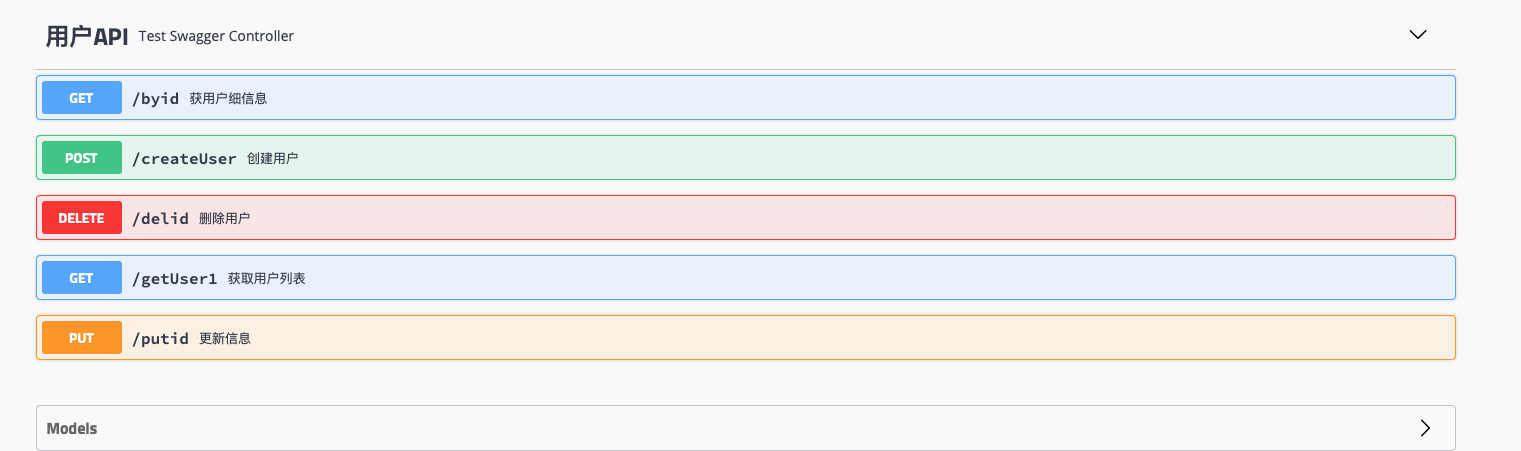
@Api(tags = "用户API")

@RestController

public class TestSwaggerController {

    Map<Object, User> users = Collections.synchronizedMap(new HashMap<Object, User>());

    @ApiOperation(value = "获取用户列表", notes = "获取用户列表")

    @RequestMapping(value = {"/getUser1"}, method = RequestMethod.GET)

    public List<User> getUser() {

        List<User> user = new ArrayList<>(users.values());

        return user;

    }

    @ApiOperation(value = "创建用户", notes = "创建用户")

    @ApiImplicitParam(name = "user", value = "用户详细实体", required = true, dataType = "User")

    @RequestMapping(value = "/createUser", method = RequestMethod.POST)

    public String postUser(@RequestBody User user) {

        users.put(user.getAge(), user);

        return "success";

    }

    @ApiOperation(value = "获用户细信息", notes = "根据url的id来获取详细信息")

    @ApiImplicitParam(name = "id", value = "ID", required = true, dataType = "Long", paramType = "path")

    @RequestMapping(value = "/byid", method = RequestMethod.GET)

    public User getUser(@PathVariable Long id) {

        return users.get(id);

    }

    @ApiOperation(value = "更新信息", notes = "根据url的id来指定更新用户信息")

    @ApiImplicitParams({

            @ApiImplicitParam(name = "id", value = "用户ID", required = true, dataType = "Long", paramType = "path"),

            @ApiImplicitParam(name = "user", value = "用户实体user", required = true, dataType = "User")

    })

    @RequestMapping(value = "/putid", method = RequestMethod.PUT)

    public String putUser(@PathVariable Long id, @RequestBody User user) {

        User user1 = users.get(id);

        user1.setName(user.getName());

        users.put(id, user1);

        return "success";

    }

    @ApiOperation(value = "删除用户", notes = "根据url的id来指定删除用户")

    @ApiImplicitParam(name = "id", value = "用户ID", required = true, dataType = "Long", paramType = "path")

    @RequestMapping(value = "/delid", method = RequestMethod.DELETE)

    public String deleteUser(@PathVariable Long id) {

        users.remove(id);

        return "success";

    }

    @ApiIgnore//使用该注解忽略这个API

    @RequestMapping(value = "/hi", method = RequestMethod.GET)

    public String jsonTest() {

        return " hi you!";

    }

}
http://localhost:8081/swagger-ui.html
Spring Boot 生成接口文档 swagger2的更多相关文章
- Spring Boot(九)Swagger2自动生成接口文档和Mock模拟数据
一.简介 在当下这个前后端分离的技术趋势下,前端工程师过度依赖后端工程师的接口和数据,给开发带来了两大问题: 问题一.后端接口查看难:要怎么调用?参数怎么传递?有几个参数?参数都代表什么含义? 问题二 ...
- Java | Spring Boot Swagger2 集成REST ful API 生成接口文档
Spring Boot Swagger2 集成REST ful API 生成接口文档 原文 简介 由于Spring Boot 的特性,用来开发 REST ful 变得非常容易,并且结合 Swagg ...
- Spring Boot Swagger2自动生成接口文档
一.简介 在当下这个前后端分离的技术趋势下,前端工程师过度依赖后端工程师的接口和数据,给开发带来了两大问题: 1.问题一.后端接口查看难:要怎么调用?参数怎么传递?有几个参数?参数都代表什么含义? 2 ...
- Spring boot 添加日志 和 生成接口文档
<dependency> <groupId>org.springframework.boot</groupId> <artifactId>spring- ...
- Springboot集成swagger2生成接口文档
[转载请注明]: 原文出处:https://www.cnblogs.com/jstarseven/p/11509884.html 作者:jstarseven 码字挺辛苦的..... 一 ...
- SpringBoot集成Swagger(Swagger的使用),生成接口文档,方便前后端分离开发
首先上一张成果图. 1.Maven依赖 <dependency> <groupId>io.springfox</groupId> <artifactId&g ...
- spring-boot-route(六)整合JApiDocs生成接口文档
上一篇文章中介绍了使用Swagger生成接口文档,非常方便,功能也十分强大.如果非要说Swaager有什么缺点,想必就是注解写起来比较麻烦.如果我说有一款不用写注解,就可以生成文档的工具,你心动了吗? ...
- SpringBoot接口 - 如何生成接口文档之非侵入方式(通过注释生成)Smart-Doc?
通过Swagger系列可以快速生成API文档,但是这种API文档生成是需要在接口上添加注解等,这表明这是一种侵入式方式: 那么有没有非侵入式方式呢, 比如通过注释生成文档? 本文主要介绍非侵入式的方式 ...
- SpringBoot整合Swagger3生成接口文档
前后端分离的项目,接口文档的存在十分重要.与手动编写接口文档不同,swagger是一个自动生成接口文档的工具,在需求不断变更的环境下,手动编写文档的效率实在太低.与swagger2相比新版的swagg ...
随机推荐
- php 报错等级
定义和用法: error_reporting() 设置 PHP 的报错级别并返回当前级别. 函数语法: error_reporting(report_level) 如果参数 level 未 ...
- htop简介
htop可谓top的升级版,top不可以鼠标操作,但是htop可以使用鼠标操作 启动方式:命令行下输入htop直接启动,启动后的界面如图所示 操作:可以使用上下左右方向键进行移动查看.可以使用鼠标点击 ...
- flask的日志输出current_app.logger.debug
环境部署方式:nginx+supervisord+gunicorn在/etc/supervisord.conf中配置日志的输出路径stdout_logfile=/home/admin/workspac ...
- 给java类加static修饰编译器会说什么?
Illegal modifier for the class XXX;only public abstract & final are permitted.
- MongoDB基本文件操作
MongoDB中主要的文件操作有put.get.list.search几种.能够非常方便地进行文件存储于查找,下面是一个简单的演示样例. 1.利用dd命令生成要求大小随机文件 2.使用put命令将生 ...
- 【Python】ModuleNotFoundError: No module named 'matplotlib.pyplot'
安装好matplotlib后,很激动的建立了一个文件夹matplotlib,并且在其下面建立了,mpl_squraes.py文件,代码编辑完成以后,点击运行,报错如下: 仔细分析了之后,发现是文件夹名 ...
- npm安装package.json
npm安装package.json时,直接转到当前项目目录下,用命令npm install 或npm install --save-dev安装即可,自动将package.json中的模块安装到node ...
- jQuery Mobile开发的新闻阅读器,适应iphone和android手机
程序猿都非常赖.你懂的! 我们常常上新浪,腾讯.雅虎等各大站点上面看新闻.他们也都各自推出了自家的手机新闻阅读器.今天我自己使用jQuery Mobile 来实现这一功能.图片大小上传限制了大小250 ...
- 图片压缩CompressUtil解析
CompressUtil 流程图: CompressUtil 类 具体解释 public class CompressUtil { /** * 终于封装的压缩方法 * @param imgPath * ...
- URL Handle in Swift (二) — 响应链处理 URL
最后更新: Swift4时候的博客,以前在 CMD markdown 上编辑的,现在搬到这里 在上篇文章-URL Handle in Swift (一) -- URL 分解中,我们已经将URL进行了分 ...