
EntityFramework4.1 MODEL代码生成器 database first
原文发布时间为:2011-04-02 —— 来源于本人的百度文章 [由搬家工具导入]
Generating EF Code First model classes from an existing database
http://www.microsoft.com/downloads/en/details.aspx?FamilyID=35adb688-f8a7-4d28-86b1-b6235385389d
Entity Framework Code First is a lightweight way to "turn on" data access for a simple CLR class. As the name implies, the intended use is that you're writing the code first and thinking about the database later.
However, I really like the Entity Framework Code First works, and I want to use it in existing projects and projects with pre-existing databases. For example, MVC Music Store comes with a SQL Express database that's pre-loaded with a catalog of music (including genres, artists, and songs), and while it may eventually make sense to load that seed data from a different source, for the MVC 3 release we wanted to keep using the existing database. While I'm not getting the full benefit of Code First - writing code which drives the database schema - I can still benefit from the simplicity of the lightweight code approach.
Scott Guthrie blogged about how to use entity framework with an existing database, looking at how you can override the Entity Framework Code First conventions so that it can work with a database which was created following other conventions. That gives you the information you need to create the model classes manually. However, it turns out that with Entity Framework 4 CTP 5, there's a way to generate the model classes from the database schema. Once the grunt work is done, of course, you can go in and modify the model classes as you'd like, but you can save the time and frustration of figuring out things like mapping SQL database types to .NET types.
Note that this template requires Entity Framework 4 CTP 5 or later. You can install EF 4 CTP 5 here.
Step One: Generate an EF Model from your existing database
The code generation system in Entity Framework works from a model. You can add a model to your existing project and delete it when you're done, but I think it's simpler to just spin up a separate project to generate the model classes. When you're done, you can delete the project without affecting your application, or you may choose to keep it around in case you have other database schema updates which require model changes.
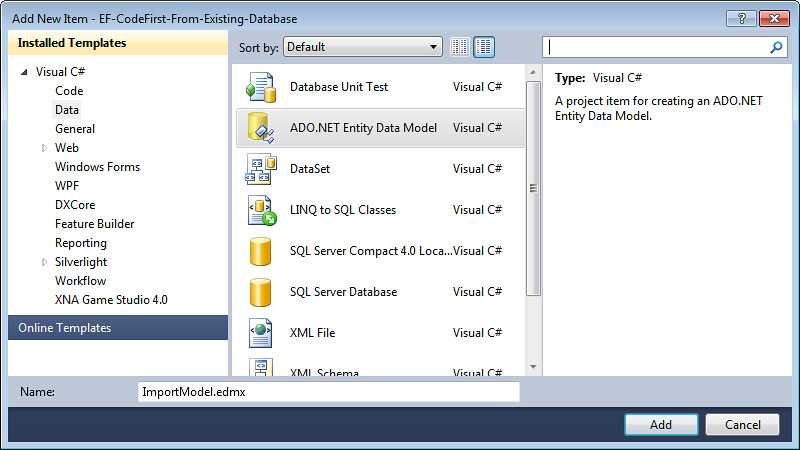
I chose to add the Model classes to the Models folder of a new MVC 3 application. Right-click the folder and select "Add / New Item..."

Next, select ADO.NET Entity Data Model from the Data Templates list, and name it whatever you want (the name is unimportant).
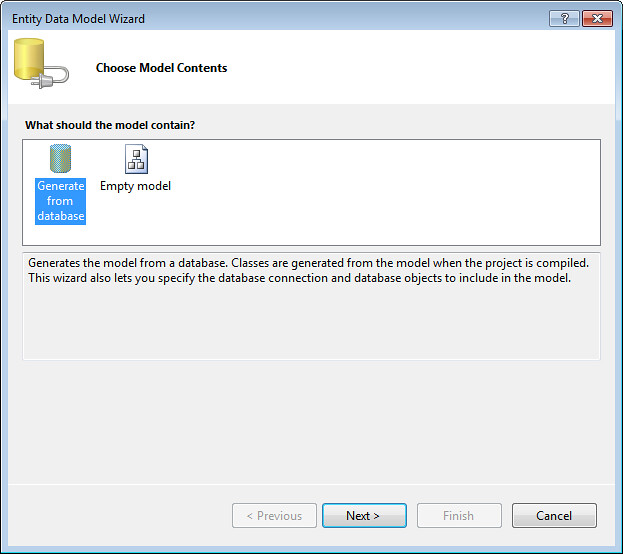
Next, select "Generate from database." This is important - it's what kicks off the next few steps, which read your database's schema.
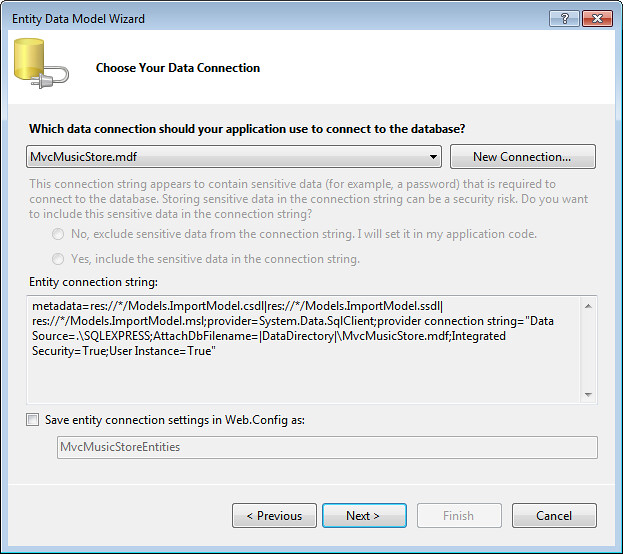
Now it's time to point the Entity Data Model Wizard at your existing database. I'll assume you know how to find your database - if not, I covered that a bit in the MVC Music Store tutorial section on Models and Data. Select your database, uncheck the "Save entity connection settings in Web.config" (since we won't be using them within the application), and click Next.
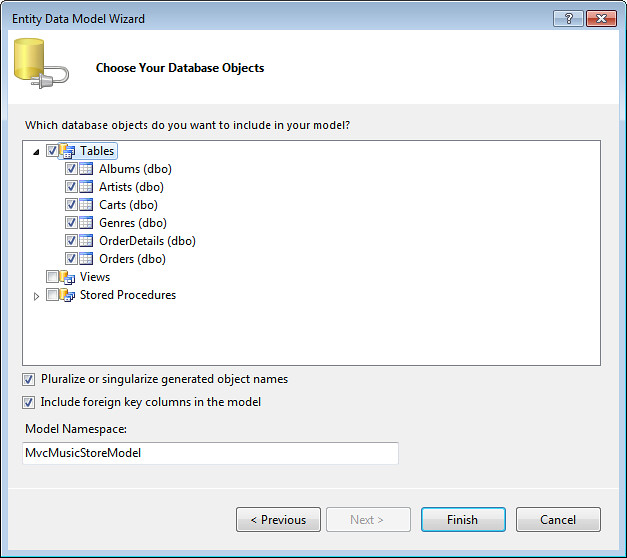
Now you can select the database objects you'd like modeled. I just selected all tables and clicked Finish.
And there's your model. If you want, you can make additional changes here before going on to generate the code.
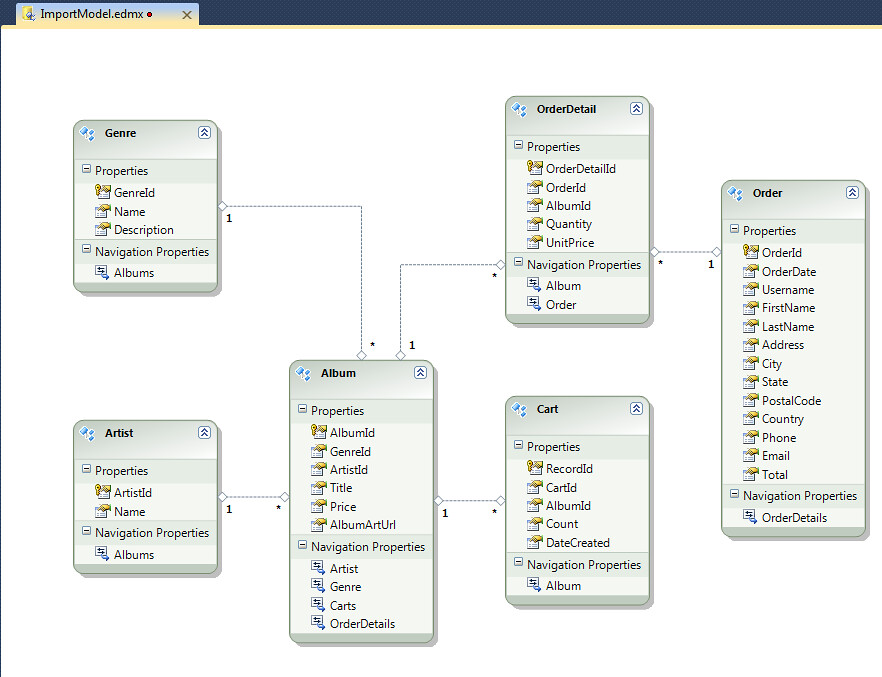
Step Two: Add the DbContext Generator
Like most code generation systems in Visual Studio lately, Entity Framework uses T4 templates which allow for some control over how the code is generated. K Scott Allen wrote a detailed article on T4 Templates and the Entity Framework on MSDN recently, if you'd like to know more. Fortunately for us, there's already a template that does just what we need without any customization.
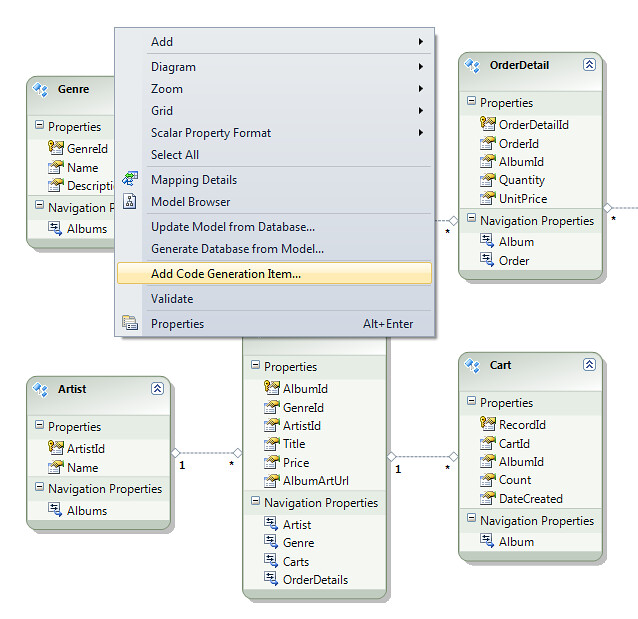
Right-click a blank space in the Entity Framework model surface and select "Add Code Generation Item..."
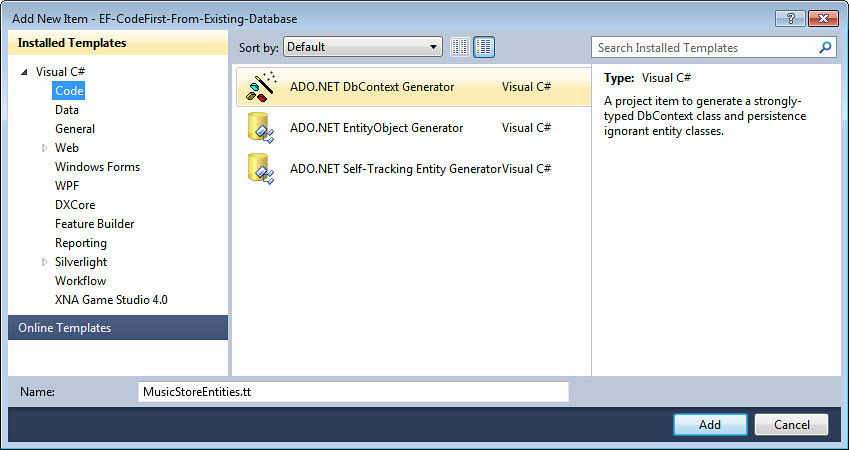
Select the Code groupt in the Installed Templates section and pick the ADO.NET DbContext Generator. If you don't see this listed, make sure you've got EF 4 CTP 5 installed and that you're looking at the Code templates group. Note that the DbContext Generator template is similar to the EF POCO template which came out last year, but with "fix up" code (unnecessary in EF Code First) removed.
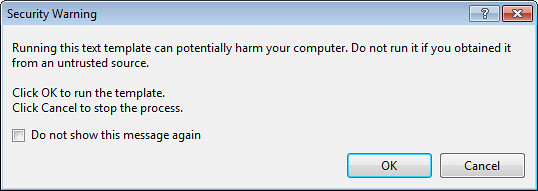
As soon as you do this, you'll two terrifying Security Warnings - unless you click the "Do not show this message again" checkbox the first time. It will also be displayed (twice) every time you rebuild the project, so I checked the box and no immediate harm befell my computer (fingers crossed!).
Here's the payoff: two templates (filenames ending with .tt) have been added to the project, and they've generated the code I needed.
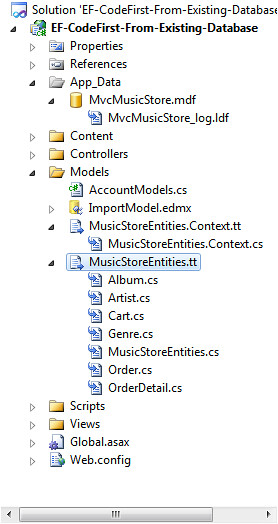
The "MusicStoreEntities.Context.tt" template built a DbContext class which holds the entity collections, and the "MusicStoreEntities.tt" template build a separate class for each table I selected earlier. We'll customize them in the next step.
I recommend copying all the generated .cs files into your application at this point, since accidentally rebuilding the generation project will overwrite your changes if you leave them there.
Step Three: Modify and use your POCO entity classes
Note: I made a bunch of tweaks to my POCO classes after they were generated. You don't have to do any of this, but I think it's important that you can - they're your classes, and EF Code First respects that. Modify them as you need for your application, or don't.
The Context class derives from DbContext, which is what turns on the EF Code First features. It holds a DbSet for each entity. Think of DbSet as a simple List, but with Entity Framework features turned on.
?1234567891011121314151617181920212223242526272829//------------------------------------------------------------------------------// <auto-generated>// This code was generated from a template.//// Changes to this file may cause incorrect behavior and will be lost if// the code is regenerated.// </auto-generated>//------------------------------------------------------------------------------ namespaceEF_CodeFirst_From_Existing_Database.Models{ usingSystem; usingSystem.Data.Entity; publicpartialclassEntities : DbContext { publicEntities() : base("name=Entities") { } publicDbSet<Album> Albums { get; set; } publicDbSet<Artist> Artists { get; set; } publicDbSet<Cart> Carts { get; set; } publicDbSet<Genre> Genres { get; set; } publicDbSet<OrderDetail> OrderDetails { get; set; } publicDbSet<Order> Orders { get; set; } }}
It's a pretty lightweight class as generated, so I just took out the comments, set the namespace, removed the constructor, and formatted it a bit. Done.
If I wanted, though, I could have added or removed DbSets, overridden conventions, etc.
?1234567891011121314usingSystem.Data.Entity; namespaceMvcMusicStore.Models{ publicclassMusicStoreEntities : DbContext { publicDbSet<album> Albums { get; set; } publicDbSet<genre> Genres { get; set; } publicDbSet<artist> Artists { get; set; } publicDbSet<cart> Carts { get; set; } publicDbSet<order> Orders { get; set; } publicDbSet<orderdetail> OrderDetails { get; set; } }}</orderdetail></order></cart></artist></genre></album>
Next, it's time to look at the individual classes. Some of mine were pretty simple - for the Cart class, I just need to remove the header and clean up the namespace.
?123456789101112131415161718192021222324252627282930//------------------------------------------------------------------------------// <auto-generated>// This code was generated from a template.//// Changes to this file may cause incorrect behavior and will be lost if// the code is regenerated.// </auto-generated>//------------------------------------------------------------------------------ namespaceEF_CodeFirst_From_Existing_Database.Models{ usingSystem; usingSystem.Collections.Generic; publicpartialclassCart { // Primitive properties publicintRecordId { get; set; } publicstringCartId { get; set; } publicintAlbumId { get; set; } publicintCount { get; set; } publicSystem.DateTime DateCreated { get; set; } // Navigation properties publicvirtualAlbum Album { get; set; } }}
I did a bit more customization on the Album class. Here's what was generated:
?12345678910111213141516171819202122232425262728293031323334353637383940//------------------------------------------------------------------------------// <auto-generated>// This code was generated from a template.//// Changes to this file may cause incorrect behavior and will be lost if// the code is regenerated.// </auto-generated>//------------------------------------------------------------------------------ namespaceEF_CodeFirst_From_Existing_Database.Models{ usingSystem; usingSystem.Collections.Generic; publicpartialclassAlbum { publicAlbum() { this.Carts = newHashSet<cart>(); this.OrderDetails = newHashSet<orderdetail>(); } // Primitive properties publicintAlbumId { get; set; } publicintGenreId { get; set; } publicintArtistId { get; set; } publicstringTitle { get; set; } publicdecimalPrice { get; set; } publicstringAlbumArtUrl { get; set; } // Navigation properties publicvirtualArtist Artist { get; set; } publicvirtualGenre Genre { get; set; } publicvirtualICollection<cart> Carts { get; set; } publicvirtualICollection<orderdetail> OrderDetails { get; set; } }}</orderdetail></cart></orderdetail></cart>
I removed the header, changed the namespace, and removed some of the navigation properties. One nice thing about EF Code First is that you don't have to have a property for each database column or foreign key. In the Music Store sample, for instance, we build the app up using code first and start with just a few columns, adding in fields and navigation properties as the application needs them. EF Code First handles the columsn we've told it about and doesn't complain about the others. Here's the basic class:
?12345678910111213141516171819usingSystem.ComponentModel;usingSystem.ComponentModel.DataAnnotations;usingSystem.Web.Mvc;usingSystem.Collections.Generic;namespaceMvcMusicStore.Models{ publicclassAlbum { publicint AlbumId { get; set; } publicint GenreId { get; set; } publicint ArtistId { get; set; } publicstring Title { get; set; } publicdecimalPrice { get; set; } publicstringAlbumArtUrl { get; set; } publicvirtualGenre Genre { get; set; } publicvirtualArtist Artist { get; set; } publicvirtualList<orderdetail> OrderDetails { get; set; } }}</orderdetail>
It's my class, not Entity Framework's, so I'm free to do what I want with it. I added a bunch of MVC 3 annotations for scaffolding and validation support, as shown below:
?12345678910111213141516171819202122232425262728293031323334353637usingSystem.ComponentModel;usingSystem.ComponentModel.DataAnnotations;usingSystem.Web.Mvc;usingSystem.Collections.Generic; namespaceMvcMusicStore.Models{ [Bind(Exclude = "AlbumId")] publicclassAlbum { [ScaffoldColumn(false)] publicint AlbumId { get; set; } [DisplayName("Genre")] publicint GenreId { get; set; } [DisplayName("Artist")] publicint ArtistId { get; set; } [Required(ErrorMessage = "An Album Title is required")] [StringLength(160)] publicstring Title { get; set; } [Required(ErrorMessage = "Price is required")] [Range(0.01, 100.00, ErrorMessage = "Price must be between 0.01 and 100.00")] publicdecimalPrice { get; set; } [DisplayName("Album Art URL")] [StringLength(1024)] publicstringAlbumArtUrl { get; set; } publicvirtualGenre Genre { get; set; } publicvirtualArtist Artist { get; set; } publicvirtualList<OrderDetail> OrderDetails { get; set; } }}
The end result was that I had working EF Code First model code for the finished application. You can follow along through the tutorial to see how I built up to the finished model classes, starting with simple 2-3 property classes and building up to the full working schema.
http://msdn.microsoft.com/en-us/gg558520
EntityFramework4.1 MODEL代码生成器 database first的更多相关文章
- 提高生产性工具 - Model代码生成器(二)
首先,我想阐述一下我开发这个工具的一个观点. 如果大家做过对日软件的话,很多时候,日方是进行设计的,数据模型是什么样子的,各个字段的类型,需要做什么验证,验证规则,错误信息,都是日方制定的. 外包就是 ...
- 提高生产性工具 - Model代码生成器(NET / JAVA) (一)
原来在上一家公司,整整一年都在做工具,提高生产性,那个项目特别巨大,所以总共为老东家节约了500K左右的美金. (除了表扬之外,我个人什么好处都没有,领导们都升官发财了,郁闷) 到了新公司,也准备开发 ...
- C# model代码生成器
using System.Collections.Generic; using System.Text; public class Class1 { //传递 1.表名 2.列名 3.类型 publi ...
- Entity Framework 在Vs2012下Update Model From DataBase 失败的问题
http://stackoverflow.com/questions/13054212/vs-2012-ef-5-0-update-model-from-database-not-picking-up ...
- .NET Core实战项目之CMS 第十一章 开发篇-数据库生成及实体代码生成器开发
上篇给大家从零开始搭建了一个我们的ASP.NET Core CMS系统的开发框架,具体为什么那样设计我也已经在第十篇文章中进行了说明.不过文章发布后很多人都说了这样的分层不是很合理,什么数据库实体应该 ...
- How to: Update an .edmx File when the Database Changes
https://msdn.microsoft.com/en-us/library/cc716697.aspx In the Model Browser, right-click the .edmx f ...
- ADF_Database Develop系列3_通过UML进行数据库开发之将Database Diagram转为Class Diagram
2013-05-01 Created By BaoXinjian
- ADF_Database Develop系列1_通过UML数据库开发之建Logical UML Class Model
2013-05-01 Created By BaoXinjian
- Database API
Database API Introduction Basic Usage Selects Joins Aggregates Raw Expressions Inserts Updates Delet ...
随机推荐
- Spring+ ApplicationListener
有时候 需要在容器初始化完成后,加载些 代码字典或不常变的信息 放入缓存之类的,这里使用spring 初始化bean,并实例化 1.创建一个ApplicationListener类 import o ...
- 十六、MySQL LIKE 子句
MySQL LIKE 子句 我们知道在 MySQL 中使用 SQL SELECT 命令来读取数据, 同时我们可以在 SELECT 语句中使用 WHERE 子句来获取指定的记录. WHERE 子句中可以 ...
- Linux 下上传下载命令,SCP,SFTP,FTP
scp 帮助命令: man scp scp功能: 下载远程文件或者目录到本地, 如果想上传或者想下载目录,最好的办法是采用tar压缩一下,是最明智的选择. 从远程主机 下载东西到 本地电脑 拷贝文件命 ...
- PHP静态文件缓存
ob_start(); 2 echo 'aaa'; 3 $string = ob_get_contents(); 4 file_put_contents('a.html', $string); 5 o ...
- 【PHP】什么时候使用Try Catch(转)
几条建议: 如果无法处理某个异常,那就不要捕获它. 如果捕获了一个异常,请不要胡乱处理它. 尽量在靠近异常被抛出的地方捕获异常. 在捕获异常的地方将它记录到日志中,除非您打算将它重新抛出. 按 ...
- ZendFramework-2.4 源代码 - ViewManager类图
- 24.VUE学习之-变异方法filter与regexp实现评论搜索功能
<!DOCTYPE html> <html lang="en"> <head> <meta charset="UTF-8&quo ...
- Python9-MySQL-MySQL存储过程-视图-触发器-函数-day45
视图:某个查询语句设置别名,日后方便使用 CREATE VIEW v1 as SELECT * FROM student WHERE sid >10 -创建: create view 视图名称 ...
- Susan Sontag【苏珊·桑塔格】
Sunsan Sontag Sunsan Sontag was one of the most noticeable figures in the world of literature. 苏珊·桑塔 ...
- TS各个表 与 SECTION 的解析 CAS原理
TS流,通过一个个的TS包来传送: TS包可以是传送PSI SI等各表的数据包,也可以是传送节目音视频数据(携带的PES包:音视频基本流包)的包:TS携带 PSI SI等表的数据时,各个表以各表对应的 ...