
springboot-vue-前后端数据交互
前端项目:
pom文件:
<?xml version="1.0" encoding="UTF-8"?>

<project xmlns="http://maven.apache.org/POM/4.0.0"

         xmlns:xsi="http://www.w3.org/2001/XMLSchema-instance"

         xsi:schemaLocation="http://maven.apache.org/POM/4.0.0 http://maven.apache.org/xsd/maven-4.0.0.xsd">

    <modelVersion>4.0.0</modelVersion>

    <groupId>com.tangzhe</groupId>

    <artifactId>springboot-vue-client</artifactId>

    <version>1.0</version>

    <packaging>jar</packaging>

    <name>springboot-vue-client</name>

    <description>this is my springboot vue client</description>

    <parent>

        <groupId>org.springframework.boot</groupId>

        <artifactId>spring-boot-starter-parent</artifactId>

        <version>1.5.10.RELEASE</version>

    </parent>

    <properties>

        <project.build.sourceEncoding>UTF-8</project.build.sourceEncoding>

        <project.reporting.outputEncoding>UTF-8</project.reporting.outputEncoding>

        <java.version>1.8</java.version>

    </properties>

    <dependencies>

        <dependency>

            <groupId>org.springframework.boot</groupId>

            <artifactId>spring-boot-starter-web</artifactId>

        </dependency>

        <dependency>

            <groupId>org.springframework.boot</groupId>

            <artifactId>spring-boot-starter-freemarker</artifactId>

        </dependency>

    </dependencies>

    <build>

        <plugins>

            <plugin>

                <groupId>org.springframework.boot</groupId>

                <artifactId>spring-boot-maven-plugin</artifactId>

            </plugin>

        </plugins>

    </build>

</project>
配置文件:
server:
  port: 8888

spring:
  application:
    name: springboot-vue-client
  profiles:
    active: dev
  freemarker:

    suffix: .html
controller:
@Controller

public class IndexController {

    @GetMapping("/test")

    public String test() {

        return "test";

    }

    @GetMapping("/")

    public String index() {

        return "index";

    }

}
index.html:
<!DOCTYPE html>

<html lang="en" xmlns:v-bind="http://www.w3.org/1999/xhtml">

<head>

    <meta charset="UTF-8">

    <title>index</title>

    <link href="https://cdn.bootcss.com/bootstrap/4.1.1/css/bootstrap.min.css" rel="stylesheet">

    <!-- 生产环境版本,优化了尺寸和速度 -->

    <script src="https://cdn.jsdelivr.net/npm/vue"></script>

    <script src="https://unpkg.com/axios/dist/axios.min.js"></script>

</head>

<body>

    <div id="app" class="table table-striped">

        <table>

            <tr>

                <td>ID</td>

                <td>用户名</td>

                <td>密码</td>

                <td>操作</td>

            </tr>

            <tr v-for="user in users">

                <td>{{user.id}}</td>

                <td>{{user.username}}</td>

                <td>{{user.password}}</td>

                <td><a href="#">删除</a></td>

            </tr>

        </table>

    </div>

    <script type="text/javascript">

        var app = new Vue({

            el: '#app',

            data: {

                users: [

                    {"id":1, "username":"tangzhe", "password":"123456"},

                    {"id":2, "username":"张三", "password":"666666"}

                    ]

            },

            methods: {

                // 发送ajax请求,获取用户列表

                loadData: function() {

                    var that = this;

                    axios.get('http://localhost:8889/user/list')

                        .then(function (response) {

                            var data = response.data;

                            that.users = data;

                        })

                        .catch(function (error) {

                            console.log(error);

                        });

                }

            },

            mounted: function() {

                // 页面加载执行方法

                this.loadData();

            }

        });

    </script>

</body>

</html>
后端项目:
pom.xml:
<?xml version="1.0" encoding="UTF-8"?>

<project xmlns="http://maven.apache.org/POM/4.0.0"

         xmlns:xsi="http://www.w3.org/2001/XMLSchema-instance"

         xsi:schemaLocation="http://maven.apache.org/POM/4.0.0 http://maven.apache.org/xsd/maven-4.0.0.xsd">

    <modelVersion>4.0.0</modelVersion>

    <groupId>com.tangzhe</groupId>

    <artifactId>springboot-vue-server</artifactId>

    <version>1.0</version>

    <packaging>jar</packaging>

    <name>springboot-vue-server</name>

    <description>this is my springboot vue server</description>

    <parent>

        <groupId>org.springframework.boot</groupId>

        <artifactId>spring-boot-starter-parent</artifactId>

        <version>1.5.10.RELEASE</version>

    </parent>

    <properties>

        <project.build.sourceEncoding>UTF-8</project.build.sourceEncoding>

        <project.reporting.outputEncoding>UTF-8</project.reporting.outputEncoding>

        <java.version>1.8</java.version>

    </properties>

    <dependencies>

        <dependency>

            <groupId>org.springframework.boot</groupId>

            <artifactId>spring-boot-starter-web</artifactId>

        </dependency>

        <dependency>

            <groupId>org.springframework.boot</groupId>

            <artifactId>spring-boot-starter-data-jpa</artifactId>

        </dependency>

        <dependency>

            <groupId>mysql</groupId>

            <artifactId>mysql-connector-java</artifactId>

        </dependency>

        <dependency>

            <groupId>com.alibaba</groupId>

            <artifactId>fastjson</artifactId>

            <version>1.2.47</version>

        </dependency>

        <dependency>

            <groupId>com.alibaba</groupId>

            <artifactId>druid</artifactId>

            <version>1.1.10</version>

        </dependency>

        <dependency>

            <groupId>org.apache.commons</groupId>

            <artifactId>commons-lang3</artifactId>

            <version>3.4</version>

        </dependency>

        <dependency>

            <groupId>org.projectlombok</groupId>

            <artifactId>lombok</artifactId>

            <version>1.16.12</version>

        </dependency>

    </dependencies>

    <build>

        <plugins>

            <plugin>

                <groupId>org.springframework.boot</groupId>

                <artifactId>spring-boot-maven-plugin</artifactId>

            </plugin>

        </plugins>

    </build>

</project>
配置文件:
server:

  port: 8889

spring:

  application:

    name: springboot-vue-server

  profiles:

    active: dev

  datasource:

      type: com.alibaba.druid.pool.DruidDataSource

      driver-class-name: com.mysql.jdbc.Driver

      filters: stat

      maxActive: 20

      initialSize: 1

      maxWait: 60000

      minIdle: 1

      timeBetweenEvictionRunsMillis: 60000

      minEvictableIdleTimeMillis: 300000

      validationQuery: select 'x'

      testWhileIdle: true

      testOnBorrow: false

      testOnReturn: false

      poolPreparedStatements: true

      maxOpenPreparedStatements: 20

spring:

  datasource:

    name: test

    url: jdbc:mysql://localhost:3306/test

    username: root

    password: 123456

  jpa:

    show-sql: true
controller:
  @GetMapping("/list")

    public List<User> list() {

        return userService.findAll();

    }
启动前端和后端项目:
localhost:8888
localhost:8889
请求页面:

发现出现了跨域请求问题:
显示的是页面的静态数据,并没有显示后端接口返回的数据
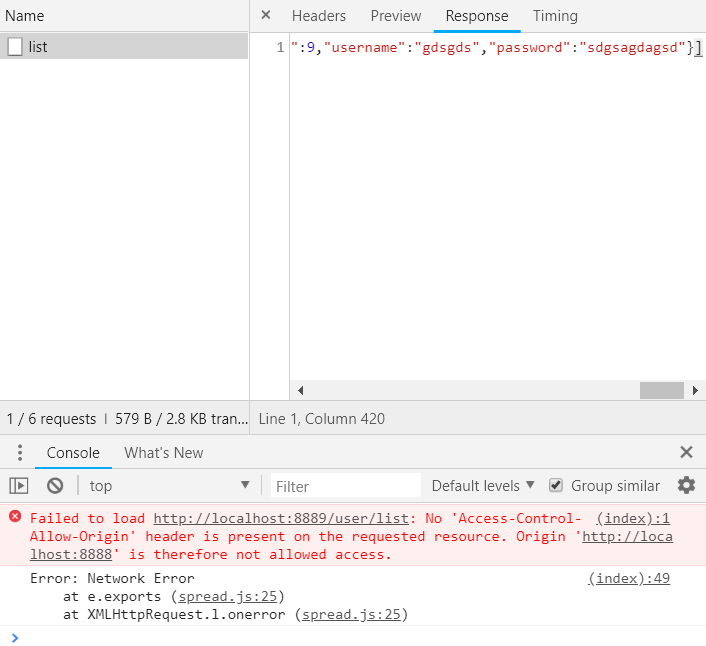
在后端项目中添加下面这个类解决跨域请求问题:
package com.tangzhe.config;

import org.springframework.context.annotation.Configuration;

import org.springframework.web.servlet.config.annotation.CorsRegistry;

import org.springframework.web.servlet.config.annotation.WebMvcConfigurerAdapter;

@Configuration

public class CorsConfig extends WebMvcConfigurerAdapter {

    @Override

    public void addCorsMappings(CorsRegistry registry) {

        registry.addMapping("/**")

                .allowedOrigins("*")

                .allowedHeaders("*")

                .allowCredentials(true)

                .allowedMethods("*")

                .maxAge(3600);

    }

}
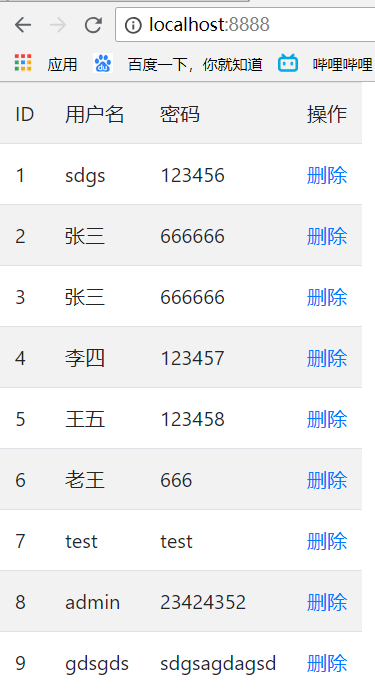
继续访问前端项目,跨域请求成功:
前端
测试添加用户:
    <!-- 添加用户 -->

        <p>姓名:<input v-model="name" /></p>

        <p>密码:<input v-model="pass" /></p>

        <p>年龄:<input v-model="age" /></p>

        <p>手机:<input v-model="mobile" /></p>

        <button @click="save">提交</button>

...
save: function() {
    axios.post('http://localhost:8889/user/save', {
            name: this.name,
            pass: this.pass,
            age: this.age,
            mobile: this.mobile
        })
        .then(function (response) {
            alert(response.data);
        })
        .catch(function (error) {
            console.log(error);
        });
}

后端
@PostMapping("/save")

    public String save(@RequestBody LoginInfo loginInfo) {

        System.out.println(loginInfo);

        return "success";

    }
springboot-vue-前后端数据交互的更多相关文章
- vue 前后端数据交互问题解决
先在vue项目中配置好路由组件路由 然后写相应组件 2 后端 写接口赔路由 第三 解决跨域问题 处理数据交互 这样前端就拿到了数据
- SpringBoot实现前后端数据交互、json数据交互、Controller接收参数的几种常用方式
1.获取参数的集中常见注解 @PathVariable:一般我们使用URI template样式映射使用,即url/{param}这种形式,也就是一般我们使用的GET,DELETE,PUT方法会使用到 ...
- vue-resource的使用,前后端数据交互
vue-resource的使用,前后端数据交互 1:导入vue与vue-resource的js js下载: https://pan.baidu.com/s/1fs5QaNwcl2AMEyp_kUg ...
- SpringBoot+Vue前后端分离,使用SpringSecurity完美处理权限问题
原文链接:https://segmentfault.com/a/1190000012879279 当前后端分离时,权限问题的处理也和我们传统的处理方式有一点差异.笔者前几天刚好在负责一个项目的权限管理 ...
- 对GraphQL-BFF:微服务背景下的前后端数据交互方案的研究-------引用
随着多终端.多平台.多业务形态.多技术选型等各方面的发展,前后端的数据交互,日益复杂. 同一份数据,可能以多种不同的形态和结构,在多种场景下被消费. 在理想情况下,这些复杂性可以全部由后端承担.前端只 ...
- Springboot+vue前后端分离项目,poi导出excel提供用户下载的解决方案
因为我们做的是前后端分离项目 无法采用response.write直接将文件流写出 我们采用阿里云oss 进行保存 再返回的结果对象里面保存我们的文件地址 废话不多说,上代码 Springboot 第 ...
- 两种方法实现asp.net方案的前后端数据交互(aspx文件、html+ashx+ajax)
一个HTML页面只能显示HTML代码信息,不能与数据库进行数据的交互.asp.net方案提供了网页与数据库交互的方法,这里举出两种:①aspx文件 ②ashx文件+ajax技术 一.创建数据库 这里以 ...
- 前后端数据交互处理基于原生JS模板引擎开发
json数据错误处理,把json文件数据复制到----> https://www.bejson.com/ 在线解析json 这样能直观的了解到是否是json数据写错,在控制台打断点,那里错误打那 ...
- web前后端数据交互
前后端数据交互是每一名web程序员必须熟悉的过程,前后端的数据交互重点在于前端是如何获取后端返回的数据,毕竟后端一般情况下只需要将数据封装到一个jsonMap,然后return就完了.下面通过一个li ...
- 前后端数据交互利器--Protobuf
Protobuf 介绍 Protocol Buffers(又名 protobuf)是 Google 的语言中立.平台中立.可扩展的结构化数据序列化机制. https://github.com/prot ...
随机推荐
- MyBatis配置文件之properties属性
MyBatis提供3个方式使用properties: 1.property子元素. 2.properties文件. 3.程序代码传递. properties属性系给系统配置一些运行参数,一般放在XML ...
- Dubbo 使用rest协议发布http服务
演示用GitHub地址:https://github.com/suyin58/dubbo-rest-example 1 Dubbo_rest介绍 Dubbo自2.6.0版本后,合并了dub ...
- @vue/cli 3.x项目脚手架 webpack 配置
@vue/cli 是一个基于 Vue.js 进行快速开发的完整系统. @vue/cli 基于node服务 需要8.9以上版本 可以使用 nvm等工具来控制node版本 构建于 webpack ...
- Rest_framework之版本控制、响应器和分页器
一.访问频率补充 频率: 自定义: 1 定义一个类MyThrottles allow_request(频率限制的逻辑) ==>这两个函数都是派生出来的,继承的类里面封装的. wait(返回一个数 ...
- 洛谷 CF1148A Another One Bites The Dust
Another One Bites The Dust CF的题目在你谷上难度虚高似乎已成常态 不过这道题相比于愚人节的那几道相对好得多,没有被评成紫题. 这道题题面意思比较清楚,就是对于给定数量的'a ...
- 洛谷 P1200 [USACO1.1]你的飞碟在这儿Your Ride Is Here
你的飞碟在这儿 难度:☆ Code: #include<iostream> #include<cstring> #include<cstdio> using nam ...
- 3285 转圈游戏 2013年NOIP全国联赛提高组
3285 转圈游戏 2013年NOIP全国联赛提高组 时间限制: 1 s 空间限制: 128000 KB 题目等级 : 钻石 Diamond 题目描述 Description n 个小伙伴 ...
- android dialog style属性设置
<!--最近做项目,用到alertDialog,用系统自带的style很难看,所以查了资料自己定义了个style. res/value/style.xml内增加以下代码:--> <s ...
- [Oracle 视图] ALL_OBJECTS
ALL_OBJECTS ALL_OBJECTS describes all objects accessible to the current user. ALL_OBJECTS描述当前用户的可访问的 ...
- MySQL查询优化方法总结
1.应尽量避免在 where 子句中使用!=或<>操作符,否则将引擎放弃使用索引而进行全表扫描. 2.对查询进行优化,应尽量避免全表扫描,首先应考虑在 where 及 order by 涉 ...