
winfrom项目的打印
自己可以下一个PDF打印机(例如下载64位office虚拟打印文档)
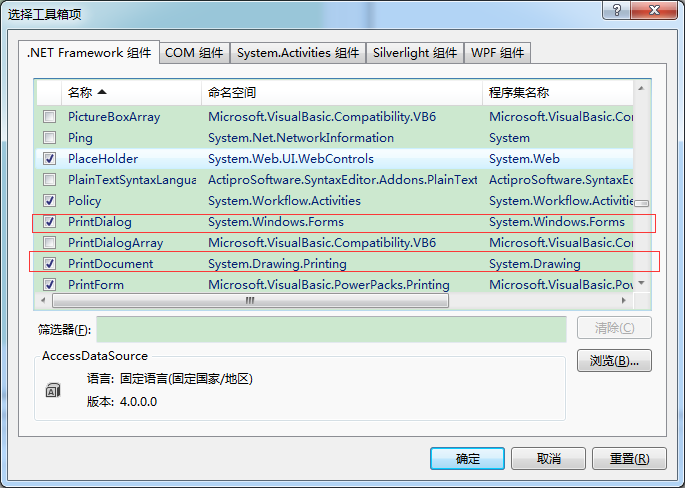
首先要添加控件
1、添加打印的选项卡,并命名为打印
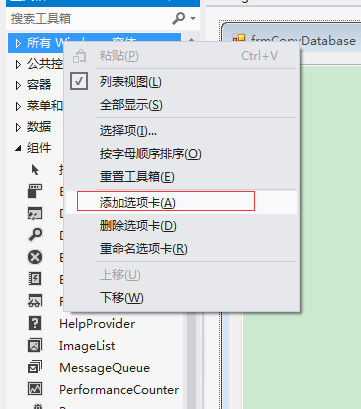
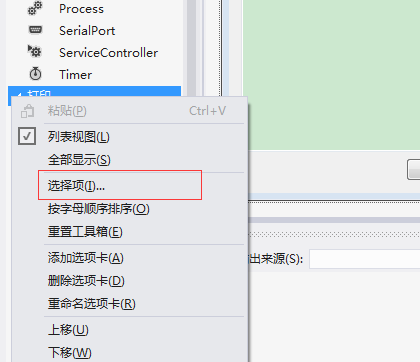
2、点击打印选项卡,右击鼠标,选择选择项
using System;
using System.Xml;
using System.Collections;
using System.Data;
using System.Drawing;
using System.Drawing.Printing;
namespace PubLibrary
{
/// <summary>
/// PrinterClass 的摘要说明。
/// 需要两个控件
/// </summary>
public class PrinterClass
{
public int _CNCount = 15;//打印中文时换行
public int _ENCount = 10;//打印英文时换行
private SolidBrush drawBrush = new SolidBrush(Color.Black); //颜色
private ArrayList _ItemList = null; //所打印的字段列表信息
public PrinterClass()
{
//
// TODO: 在此处添加构造函数逻辑
//
}
/// <summary>
/// 对所打印的字段列表信息进行初始化
/// </summary>
/// <param name="billName">所打印单证名称</param>
/// <param name="s_File">XML文件路径</param>
public void InitPrinter(string billName, string s_File)
{
this._ItemList = new ArrayList();
XmlDocument xDoc = new XmlDocument();
xDoc.Load(s_File);
XmlElement root = xDoc.DocumentElement;
XmlNode node = root.SelectSingleNode("/rootNode/subNode"); //打印单证名称列表节点
foreach (XmlNode billNode in node.ChildNodes)
{
string s_BillName = billNode.Attributes["name"].Value;
if (s_BillName == billName) //打印单名
{
foreach (XmlNode fieldNode in billNode.ChildNodes)
{
if (fieldNode.Attributes == null)
{
continue;
}
PrintItem pItem = new PrintItem();
try
{
pItem.s_Name = fieldNode.Attributes["name"].Value;
pItem.s_Color = fieldNode.Attributes["color"].Value;
pItem.i_Size = Convert.ToInt32(fieldNode.Attributes["size"].Value);
pItem.i_X = Convert.ToInt32(fieldNode.Attributes["pixX"].Value);
pItem.i_Y = Convert.ToInt32(fieldNode.Attributes["pixY"].Value);
pItem.bol_IsPrint = Convert.ToBoolean(fieldNode.Attributes["IsPrint"].Value);
//if (fieldNode.Attributes["value"] != null)
//{
// pItem.s_Value = fieldNode.Attributes["value"].Value;
//}
//--
this._ItemList.Add(pItem);
}
catch
{
MsgBox.ShowError(pItem.s_Name);
}
}
}
}
}
public void InitPrinterNew(string billName, string s_File)
{
this._ItemList = new ArrayList();
XmlDocument xDoc = new XmlDocument();
xDoc.Load(s_File);
XmlElement root = xDoc.DocumentElement;
XmlNode node = root.SelectSingleNode("/rootNode/subNode"); //打印单证名称列表节点
foreach (XmlNode billNode in node.ChildNodes)
{
string s_BillName = billNode.Attributes["name"].Value;
if (s_BillName == billName) //打印单名
{
foreach (XmlNode fieldNode in billNode.ChildNodes)
{
if (fieldNode.Attributes == null)
{
continue;
}
PrintItem pItem = new PrintItem();
try
{
pItem.s_Name = fieldNode.Attributes["name"].Value;
pItem.s_Color = fieldNode.Attributes["color"].Value;
pItem.i_Size = Convert.ToInt32(fieldNode.Attributes["size"].Value);
pItem.i_X = Convert.ToInt32(fieldNode.Attributes["pixX"].Value);
pItem.i_Y = Convert.ToInt32(fieldNode.Attributes["pixY"].Value);
pItem.bol_IsPrint = Convert.ToBoolean(fieldNode.Attributes["IsPrint"].Value);
if (fieldNode.Attributes["value"] != null)
{
pItem.s_Value = fieldNode.Attributes["value"].Value;
}
//--
this._ItemList.Add(pItem);
}
catch
{
MsgBox.ShowError(pItem.s_Name);
}
}
}
}
}
/// <summary>
/// 将打印字段列表信息一一打印出来
/// </summary>
/// <param name="e"></param>
public void Printer(System.Drawing.Printing.PrintPageEventArgs e)
{
Font drawFont = null;
for (int i = 0; i < this._ItemList.Count; i++)
{
PrintItem pI = (PrintItem)this._ItemList[i];
if (pI.bol_IsPrint)
{
//drawFont = new Font(string.Empty, pI.i_Size, FontStyle.Bold);
drawFont = new Font(pI.s_FontName, pI.i_Size, pI.fStye);
e.Graphics.DrawString(pI.s_Value.ToString(), drawFont, drawBrush, pI.i_X, pI.i_Y);
}
}
}
/// <summary>
/// 打印表格线条
/// </summary>
/// <param name="sP"></param>
/// <param name="eP"></param>
/// <param name="e"></param>
public void DrawLine(PrintItem sP, PrintItem eP, System.Drawing.Printing.PrintPageEventArgs e)
{
if (sP == null)
{
MsgBox.ShowError(sP.s_Name + "不存在!");
return;
}
if (eP == null)
{
MsgBox.ShowError(eP.s_Name + "不存在!");
return;
}
e.Graphics.DrawLine(new Pen(Brushes.Black, 1), new Point(sP.i_X, sP.i_Y), new Point(eP.i_X, eP.i_Y));
}
public void DrawLine(PrintItem sP, PrintItem eP, int LineBold, System.Drawing.Printing.PrintPageEventArgs e)
{
if (sP == null)
{
MsgBox.ShowError(sP.s_Name + "不存在!");
return;
}
if (eP == null)
{
MsgBox.ShowError(eP.s_Name + "不存在!");
return;
}
e.Graphics.DrawLine(new Pen(Brushes.Black, LineBold), new Point(sP.i_X, sP.i_Y), new Point(eP.i_X, eP.i_Y));
}
/// <summary>
/// 根据字段名称,获取该字段信息
/// </summary>
/// <param name="s_Name">字段名称</param>
/// <returns></returns>
public PrintItem getPrintItem(string s_Name)
{
PrintItem pI = null;
for (int i = 0; i < this._ItemList.Count; i++)
{
pI = (PrintItem)this._ItemList[i];
if (s_Name == pI.s_Name)
{
return pI;
}
}
return null;
}
/// <summary>
/// 获取换行后的字符串
/// </summary>
/// <param name="s_Text"></param>
/// <param name="i_Count">如果为中文则为15,英文则为10</param>
/// <param name="i_Width"></param>
/// <returns></returns>
public string GetPrintText(string s_Text, int i_Count, int i_Width)
{
string s_Result = string.Empty;
int i_Len = 0;
foreach (char c in s_Text)
{
s_Result += c.ToString();
i_Len++;
if (i_Len * i_Count > i_Width)
{
s_Result += "\r\n";
i_Len = 0;
}
}
return s_Result;
}
/// <summary>
/// 获取换行后的字符串
/// </summary>
/// <param name="s_Text"></param>
/// <param name="i_Count">如果为中文则为15,英文则为10</param>
/// <param name="i_Width"></param>
/// <returns></returns>
public string GetPrintTextSim(string s_Text, int i_Count, int i_Width)
{
string s_Result = string.Empty;
int i_Len = 0;
foreach (char c in s_Text)
{
s_Result += c.ToString();
i_Len++;
if (i_Len * i_Count > i_Width)
{
s_Result += "..";
break;
}
}
return s_Result;
}
/// <summary>
/// 打印表格字符
/// </summary>
/// <param name="sP"></param>
/// <param name="eP"></param>
/// <param name="e"></param>
public void DrawText(PrintItem pI, System.Drawing.Printing.PrintPageEventArgs e)
{
Font drawFont = null;
if (pI == null)
{
MsgBox.ShowError(pI.s_Name + "不存在!");
return;
}
if (pI == null)
{
MsgBox.ShowError(pI.s_Name + "不存在!");
return;
}
drawFont = new Font(string.Empty, pI.i_Size, FontStyle.Bold);
e.Graphics.DrawString(pI.s_Value.ToString(), drawFont, drawBrush, pI.i_X, pI.i_Y);
// drawFont = new Font(string.Empty, pI.i_Size, FontStyle.Bold);
//e.Graphics.DrawString((new Pen(Brushes.Black, 1), new Point(sP.i_X, sP.i_Y), new Point(eP.i_X, eP.i_Y));
}
/// <summary>
/// 获取换行后的字符串
/// </summary>
/// <param name="s_Text"></param>
/// <param name="eP"></param>
/// <param name="sP"></param>
/// <returns></returns>
public string GetPrintText(string s_Text, PrintItem eP, PrintItem sP, System.Drawing.Printing.PrintPageEventArgs e)
{
string s_Result = string.Empty;
string s_curRowText = string.Empty;
Font curFont = new Font(string.Empty, eP.i_Size, FontStyle.Bold);
int i_RowWidth = eP.i_X - sP.i_X;
int i_Position = 0;
foreach (char c in s_Text)
{
s_curRowText += c.ToString();
int i_Length = (int)e.Graphics.MeasureString(s_curRowText, curFont).Width;
if (i_Length > i_RowWidth)
{
s_Result += s_curRowText.Substring(0, i_Position) + "\r\n";
s_curRowText = c.ToString();
i_Position = 0;
}
i_Position++;
}
s_Result += s_curRowText;
return s_Result;
}
/// <summary>
/// 获取换行后的字符串
/// </summary>
/// <param name="s_Text"></param>
/// <param name="eP"></param>
/// <param name="sP"></param>
/// <returns></returns>
public string GetPrintText(string s_Text, int i_Width, System.Drawing.Printing.PrintPageEventArgs e)
{
string s_Result = string.Empty;
string s_curRowText = string.Empty;
Font curFont = new Font(string.Empty, 8, FontStyle.Bold);
int i_RowWidth = i_Width;
int i_Position = 0;
foreach (char c in s_Text)
{
s_curRowText += c.ToString();
int i_Length = (int)e.Graphics.MeasureString(s_curRowText, curFont).Width;
if (i_Length > i_RowWidth)
{
s_Result += s_curRowText.Substring(0, i_Position) + "\r\n";
s_curRowText = c.ToString();
i_Position = 0;
}
i_Position++;
}
s_Result += s_curRowText;
return s_Result;
}
public void ClearPrintItem()
{
for (int i = 0; i < this._ItemList.Count; i++)
{
PrintItem pI = (PrintItem)this._ItemList[i];
if (pI.bol_IsPrint)
{
pI.s_Value = string.Empty;
}
}
}
public void PrintImage(Image img, PrintItem pI, float w, float h, System.Drawing.Printing.PrintPageEventArgs e)
{
if (pI == null)
{
MsgBox.ShowError(pI.s_Name + "不存在!");
return;
}
//e.Graphics.DrawImageUnscaled(img, pI.i_X, pI.i_Y);
e.Graphics.DrawImage(img, pI.i_X, pI.i_Y, w, h);
}
/// <summary>
/// 获取格子的宽度
/// </summary>
/// <param name="sP"></param>
/// <param name="eP"></param>
/// <returns></returns>
public int GetCellWidth(PrintItem eP, PrintItem sP)
{
return eP.i_X - sP.i_X;
}
#region Ext test function
public bool _isChgPos = false;
public void PrinterEx(string itemName, System.Drawing.Printing.PrintPageEventArgs e)
{
Font drawFont = null;
for (int i = 0; i < this._ItemList.Count; i++)
{
PrintItem pI = (PrintItem)this._ItemList[i];
if ((pI.bol_IsPrint) && (pI.s_Name == itemName))
{
drawFont = new Font(string.Empty, pI.i_Size, FontStyle.Bold);
if (this._isChgPos)
e.Graphics.DrawString(pI.s_Value.ToString(), drawFont, drawBrush, pI.i_X, pI.realY);
else
e.Graphics.DrawString(pI.s_Value.ToString(), drawFont, drawBrush, pI.i_X, pI.i_Y);
break;
}
}
}
#endregion
}
/// <summary>
/// 打印信息
/// </summary>
public class PrintItem
{
public string s_Name = string.Empty; //字段名称
public string s_Value = string.Empty;//字段值
public string s_Color = string.Empty;//颜色
public int i_Size = -1;//字体大小
public int i_X = -1; //位置坐标X值
public int i_Y = -1; //位置会标Y值
// public int realX = -1;
public int realY = -1;
public bool bol_IsPrint = true; //是否将该字段打印出来
public string s_FontName = string.Empty; //字体名称
public FontStyle fStye = FontStyle.Bold; //字体风格
}
}
winfrom项目的打印的更多相关文章
- web项目局部打印
window.print()方法是打印整个body,若想打印局部区域,网上出现了各种解决办法,我觉得都挺好的.我最推荐jquery.PrintArea.js插件形式 点击上述链接首先下载下来,我的是版 ...
- flutter 项目中打印原生安卓的log信息
因为项目的需要 在flutter 中调用安卓的方法 再用安卓的方法去调用c写的so包 方法 如果当前项目下面没有android stduio 自带的logcat 那就利用下面的方法 在安卓代码中引入 ...
- Java实验项目二——打印某年某月日历
Program:打印万年历(输入年份,月份,输出该月的日历,已知1900年1月1日是星期一), 要 求: (1)编写一个方法判断闰年: (2)编写一个方法判断某年某月有多少天: (3)编写一个方法计算 ...
- OA项目之打印
打印 若此页有一个打印按钮: <input type="button" id="btnPrint" class="button_sm7" ...
- [置顶] 如何vs在cocos2dx项目中打印中文
一开始不是很理解,查了半天资料,终于找到解决方法,但是有部分中文还是不能打印出来,如 会出现部分的中文, 一开始都是问号的解决方法是 点击高级保存选项 设置成Unicode(UTF-8无签名) 这样就 ...
- 适用于vue项目的打印插件(转载)
出处:https://www.cnblogs.com/lvyueyang/p/9847813.html // 使用时请尽量在nickTick中调用此方法 //打印 export default (re ...
- 适用于vue项目的打印插件
此方法只适用于现代浏览器,IE10以下就别用了 // 使用时请尽量在nickTick中调用此方法 //打印 export default (refs, cb) => { let cloneN i ...
- springboot项目大量打印debug日志问题
目前,java下应用最广泛的日志系统主要就是两个系列: log4j和slf4j+logback . 其中,slf4j只包含日志的接口,logback只包括日志的具体实现,两者加起来才是一个完整的日志系 ...
- 开源免费且稳定实用的.NET PDF打印组件itextSharp(.NET组件介绍之八)
在这个.NET组件的介绍系列中,受到了很多园友的支持,一些园友(如:数据之巅. [秦时明月]等等这些大神 )也给我提出了对应的建议,我正在努力去改正,有不足之处还望大家多多包涵.在传播一些简单的知识的 ...
随机推荐
- mysql 数据库电脑间迁移
应用实例: database1(简称DB1)保存在PC1中的MySQL中,需要将DB1迁移到PC2中的MySQL中 环境: win7 MySQL5.7.13 参考: http://stackoverf ...
- Opencv— — Bias and Gain
// define head function #ifndef PS_ALGORITHM_H_INCLUDED #define PS_ALGORITHM_H_INCLUDED #include < ...
- 让Spinner中的文字居中
如果套用simple_spinner_item或是simple_spinner_dropdown_item,然后直接在Spinner中用 android:gravity="center&qu ...
- SPOJcot2 Count on a tree II (树上莫队)
You are given a tree with N nodes. The tree nodes are numbered from 1 to N. Each node has an integer ...
- 【USACO】Dining
[题目链接] [JZXX]点击打开链接 [caioj]点击打开链接 [算法] 拆点+网络流 [代码] #include<bits/stdc++.h> using namespace std ...
- HDU2844(多重部分和)
Coins Time Limit: 2000/1000 MS (Java/Others) Memory Limit: 32768/32768 K (Java/Others)Total Submi ...
- leetcode 395 至少有K个重复字符的最长子串
找到给定字符串(由小写字符组成)中的最长子串 T , 要求 T 中的每一字符出现次数都不少于 k .输出 T 的长度. 示例 1: 输入: s = "aaabb", k = 3 输 ...
- 用Merge存储引擎中间件实现MySQL分表
觉得一个用Merge存储引擎中间件来实现MySQL分表的方法不错. 可以看下这个博客写的很清楚--> http://www.cnblogs.com/xbq8080/p/6628034.html ...
- 前端学习之——js解析json数组
** 前端学习之——js解析json数组** 解析json数组即对JSONArray的遍历 一.对于标准的json数组如: var result=[{"flag":1," ...
- CF-831A
A. Unimodal Array time limit per test 1 second memory limit per test 256 megabytes input standard in ...