
docker下使用caffe的命令记录
- 查看所有的images
sudo docker images
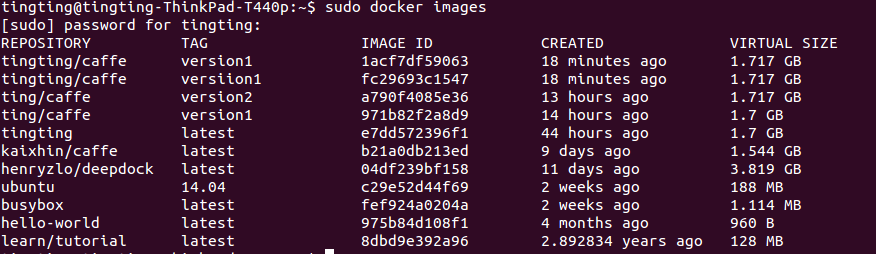
- 利用某个image生成container
sudo docker run -it --net=host -v /home/tingting/Dropbox/code/craterDetection/docker:/root/workspace tingting/caffe:version1 bash

- 打开jupyter notebook
jupyter notebook

在浏览器中输入:localhost:8890
这里一定要注意,有时因为打开多个containers,新的container的jupyter notebook的接口是不同的,之前因为以为所有的接口窦唯8888,所以直接输入了8888,但其实这样打开的是8888那个接口对应的container
- 将prototxt文件生成网络结构图
 # Load the module

 import caffe

 import caffe.draw

 from caffe.proto import caffe_pb2

 from google.protobuf import text_format

 # Set the parameters

 netName = 'test_net'

 input_net_proto_file = netName + '.prototxt'

 output_image_file =  netName + '.jpg'

 rankdir ='LR'

 '''

 # net configuration file

 input_net_proto_file = 'test_net.prototxt'

 # output configuration image file name

 output_image_file ='test_net.jpg'

 # net arrange method, which is in ['LR'、'TB'、'RL']

 rankdir ='LR'

 '''

 # Read the net

 net = caffe_pb2.NetParameter()

 text_format.Merge(open(input_net_proto_file).read(), net)

 # Draw the net

 print('Drawing net to %s' % output_image_file)

 caffe.draw.draw_net_to_file(net, output_image_file, rankdir)

 print('done...')
- 利用一个新的terminal打开正在运行的container
# watch the containers which are running
sudo dockers ps
# go into one conainer
sudo docker exec -it sharp_ardinghelli bash


docker下使用caffe的命令记录的更多相关文章
- docker 下运行 postgresql 的命令
postgresql docker下启动的命令 docker run --name pgdata -p : -e POSTGRES_PASSWORD=Test6530 -v /pgdata:/var/ ...
- docker下安装caffe
1.安装docker 2.下载caffe docker镜像 docker pull bvlc/caffe:gpu 可以去https://hub.docker.com/search/?q=SSD%20c ...
- docker下centos安装ping命令
https://blog.csdn.net/king_gun/article/details/78423115 [问题] 从docker hub上拉取到则镜像centos:6.7在执行ping命令是报 ...
- Linux下常用的shell命令记录1
硬件篇 CPU相关 lscpu #查看的是cpu的统计信息. cat /proc/cpuinfo #查看CPU信息详细信息,如每个CPU的型号,主频等 内存相关 free -m #概要查看内存情况 ...
- Linux下常用的shell命令记录
硬件篇 CPU相关 lscpu #查看的是cpu的统计信息. cat /proc/cpuinfo #查看CPU信息详细信息,如每个CPU的型号,主频等 内存相关 free -m #概要查看内存情况 ...
- docker下ubutun没有ifconfig命令问题
解决: apt-get update #更新apt-get apt install net-tools # ifconfig apt install iputils-ping # ...
- Docker下使用daocloud镜像加速(基于Centos6)
Docker加速器使用时不需要任何额外操作.就像这样下载官方Ubuntu镜像 实际操作(添加镜像源):在 /etc/sysconfig/docker下添加两条命令 other_args="- ...
- Centos下磁盘管理的常用命令记录(如查找大文件)
Centos下磁盘管理的常用命令记录 查看系统磁盘空间占用,使用命令: df -h 结果: 查看磁盘inode使用情况,如果inode用完了,磁盘就没法写入新的内容了: df -i 结果: 如何查找磁 ...
- ubuntu下编译caffe
Ubuntu下编译caffe 纯粹是个人编译的记录.不用CUDA(笔记本是amd卡,万恶的nvidia):不手动编译依赖包(apt-get是用来干啥的?用来直接装二进制包,以及自动解决依赖项的) ca ...
随机推荐
- MySQL协议分析
MySQL协议分析 标签: mysql 2015-02-27 10:22 1807人阅读 评论(1) 收藏 举报 分类: 数据库(19) 目录(?)[+] 1 交互过程 MySQL客户端与 ...
- zTree下拉菜单多级菜单多选实现
惯例,先上图: 这是在一个项目中,为了满足样式美观.多级菜单以及多选而将zTree插件更改过后的效果. 在实际的开发过程中,本来zTree也是可以满足需求的,但是zTree多选的话需要checkbox ...
- 聊聊Android5.0中的水波纹效果
水波纹效果已经不是什么稀罕的东西了,用过5.0新控件的小伙伴都知道这个效果,可是如果使用一个TextView或者Button或者其它普通控件的话,你是否知道如何给它设置水波纹效果呢?OK,我们今天就来 ...
- Android 自定义View修炼-仿360手机卫士波浪球进度的实现
像360卫士的波浪球进度的效果,一般最常用的方法就是 画线的方式,先绘sin线或贝塞尔曲线,然后从左到右绘制竖线,然后再裁剪圆区域. 今天我这用图片bitmap的方式,大概的方法原理是: (1)首先用 ...
- 基于anyrtc的sdk实现直播连麦互动
基于anyrtc的sdk实现直播连麦互动 前言 1.由于粘贴了较大的代码,造成内容比较长,可能会花费您较长的时间. 2.项目里面没有做权限判断,所以如果发现有页面发生崩溃可能是权限没有打开,请打开权限 ...
- Hashtable和HashMap类
Hashtable和HashMap类有三个重要的不同之处. 第一个不同主要是历史原因.Hashtable是基于陈旧的Dictionary类的,HashMap是Java 1.2引进的Map接口的一个实现 ...
- JavaMail组件实现邮件功能
实现邮件收发功能需要3个jar包: 1.JavaMail组件保内的mail.jar和smtp.jar包 2.JAF组件包里的activition.jar. 复制到WebRoot/WEB-INF/lib ...
- ios PromiseKit
简介: 高级开发是高度异步的,PromiseKit收集了一些帮助函数,让我们开发过程中使用的典型异步模式更加令人愉悦. 1.通过pod安装promisekit: 2. promise.h介绍 @imp ...
- 直播类送礼动画<豪华礼物+小礼物>
直播类送礼动画<豪华礼物+小礼物>:代码会持续更新,现直播的app里内有太多的动画,由于时间关系不能一次共享所有动画聘为,这次先共享几个比较火爆的动画. 支持真机和模拟器上运行,最低支持i ...
- iOS 制作发布证书,发布到App Store
---恢复内容开始--- 1.登陆 iOS Dev Center 选择进入iOS Provisioning Portal. 2.在 iOS Provisioning Portal中,点击App IDs ...