
Android(java)学习笔记146:Bundle和Intent类使用和交互
1. Bundle 和 Intent:
Bundle只是一个信息的载体 将内部的内容以键值对组织 ,Intent负责Activity之间的交互自己是带有一个Bundle的。Intent.putExtras(Bundle bundle)直接将Intent的内部Bundle设置为参数里的bundle,Intent.getExtras()直接可以获取Intent带有的Bundle.
Intent携带了Bundle数据,Bundle是一种数据包裹(打包数据),利用Intent机制通过Bundle数据进行不同Activity通信。
两个activity之间的通讯可以通过bundle类来实现,做法就是:
(1)新建一个bundle类
Bundle mBundle = new Bundle();
(2)bundle类中加入数据(key -value的形式,另一个activity里面取数据的时候,就要用到key,找出对应的value)
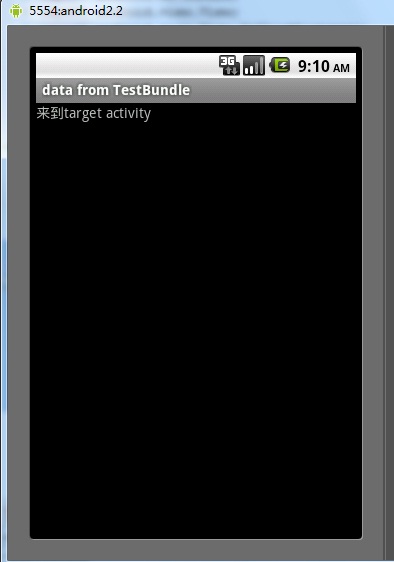
mBundle.putString("Data", "data from TestBundle");
(3)新建一个intent对象,并将该bundle加入这个intent对象
Intent intent = new Intent();

intent.setClass(TestBundle.this, Target.class);

intent.putExtras(mBundle);
完整代码如下:
AndroidManifest.xml如下:
<?xml version="1.0" encoding="utf-8"?>

<manifest xmlns:android="http://schemas.android.com/apk/res/android"

      package="com.tencent.test"

      android:versionCode="1"

      android:versionName="1.0">

    <application android:icon="@drawable/icon" android:label="@string/app_name">

        <activity android:name=".TestBundle"

                  android:label="@string/app_name">

            <intent-filter>

                <action android:name="android.intent.action.MAIN" />

                <category android:name="android.intent.category.LAUNCHER" />

            </intent-filter>

        </activity>

    <activity android:name=".Target"></activity>

    </application>

    <uses-sdk android:minSdkVersion="7" />

</manifest>
两个类如下:intent从TestBundle类发起,到Target类。
类1:TestBundle类:
import android.app.Activity;

import android.content.Intent;

import android.os.Bundle;

import android.view.View;

import android.view.View.OnClickListener;

import android.widget.Button;

public class TestBundle extends Activity {

    private Button button1;

    private OnClickListener cl;

    public void onCreate(Bundle savedInstanceState) {

        super.onCreate(savedInstanceState);

        setContentView(R.layout.main);

        button1 = (Button) findViewById(R.id.button1);

        cl = new OnClickListener(){

            @Override

            public void onClick(View arg0) {

                // TODO Auto-generated method stub

                Intent intent = new Intent();

                intent.setClass(TestBundle.this, Target.class);

                Bundle mBundle = new Bundle();

                mBundle.putString("Data", "data from TestBundle");//压入数据

                intent.putExtras(mBundle);

                startActivity(intent);

            }

        };

        button1.setOnClickListener(cl);

    }

}
类2: Target
import android.app.Activity;

import android.os.Bundle;

public class Target extends Activity{

    public void onCreate(Bundle savedInstanceState) {

        super.onCreate(savedInstanceState);

        setContentView(R.layout.target);

        <span style="color:#ff6600;">Bundle bundle = getIntent().getExtras();   </span> //得到传过来的bundle

        String data = bundle.getString("Data");//读出数据

        setTitle(data);

    }

}
布局文件main.xml:
<?xml version="1.0" encoding="utf-8"?>

<LinearLayout xmlns:android="http://schemas.android.com/apk/res/android"

    android:orientation="vertical"

    android:layout_width="fill_parent"

    android:layout_height="fill_parent"

    >

<TextView

    android:layout_width="fill_parent"

    android:layout_height="wrap_content"

    android:text="@string/hello"

    />

<Button

    android:layout_width="fill_parent"

    android:layout_height="wrap_content"

    android:text="@string/button"

    android:id = "@+id/button1"

    />

</LinearLayout>
target.xml:
<?xml version="1.0" encoding="utf-8"?>

<LinearLayout xmlns:android="http://schemas.android.com/apk/res/android"

    android:orientation="vertical"

    android:layout_width="fill_parent"

    android:layout_height="fill_parent"

    >

<TextView

    android:layout_width="fill_parent"

    android:layout_height="wrap_content"

    android:text="@string/target"

    />

</LinearLayout>
String.xml:
<?xml version="1.0" encoding="utf-8"?>

<resources>

    <string name="hello">Hello World, TestBundle!</string>

    <string name="app_name">测试Bundle用法</string>

    <string name="button">点击跳转</string>

    <string name="target">来到target activity</string>

</resources>
结果:
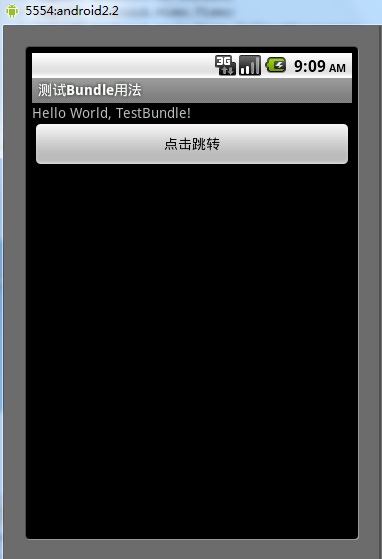
跳转结果:
Android(java)学习笔记146:Bundle和Intent类使用和交互的更多相关文章
- Android(java)学习笔记89:Bundle和Intent类使用和交互
1. Bundle 和 Intent: Bundle只是一个信息的载体 将内部的内容以键值对组织 ,Intent负责Activity之间的交互自己是带有一个Bundle的.Intent.putE ...
- 疯狂java学习笔记之面向对象(一) - 定义类、方法、构造器
Java面向对象 1.定义类 2.创建对象.调用方法 类和对象: 某一类对象的概念定义. 比如:人类 - 抽象出来的概念(不特指某个人) 对象 - 在类的概念下产生的一个实例,它就是一个对象了. ja ...
- java学习笔记(三):类和对象
创建对象 构造器 每一个类都有一个构造器. 如果我们不单独为一个类编写构造器那么 Java 的编译器将会给这个类建立一个默认的构造器. 每当一个新的对象被创建,至少一个构造器将会被调用. 构造器的一 ...
- Java学习笔记(七)——获取类中方法的信息,java的LinkedList
[前面的话] 在实际项目中学习知识总是最快和最有效的,既能够较好的掌握知识,又能够做出点东西,还是简单的知识总结,最近一直在总结笔记,写的东西还是比较水,希望慢慢可以写出一些干货. 学习过程中的小知识 ...
- java学习笔记37(sql工具类:JDBCUtils)
在之前的内容中,我们发现,当我们执行一条语句时,每新建一个方法,就要重新连接一次数据库,代码重复率很高,那么能不能把这些重复代码封装成一个类呢,我们学习方法时,就学习到方法就是为了提高代码的利用率,所 ...
- java学习笔记(五):公共类
什么是公共类,公共类就是和源文件名同名的类,举例来说:类的名称是 public class aaa{},那么源文件就应该是 aaa.java. 每个源文件中只能有一个公共类. 每个源文件可以有很多非公 ...
- Java学习笔记49(DBUtils工具类二)
上一篇文章是我们自己模拟的DBUtils工具类,其实有开发好的工具类 这里使用commons-dbutils-1.6.jar 事务的简单介绍: 在数据库中应用事务处理案例:转账案例 张三和李四都有有自 ...
- Java学习笔记48(DBUtils工具类一)
上一篇的例子可以明显看出,在增删改查的时候,很多的代码都是重复的, 那么,是否可以将增删改查封装成一个类,方便使用者 package demo; /* * 实现JDBC的工具类 * 定义方法,直接返回 ...
- Java学习笔记_22_Set接口的实现类
22.Set接口的实现类: Set接口存放的元素是无序的且不包括反复元素. 1>实现类HashSet: HashSet类依据元素的哈希码进行存放,取出时也能够依据哈希码高速找到.HashSet不 ...
随机推荐
- WCF - Windows Service Hosting
WCF - Windows Service Hosting The operation of Windows service hosting is a simple one. Given below ...
- jdk1.7升级到jdk1.8后出错: [ERROR] javadoc: warning - Multiple sources of package comments found for package
from: http://blog.joda.org/2014/02/turning-off-doclint-in-jdk-8-javadoc.html [ERROR] javadoc: warnin ...
- 用Remastersys定制自己的Ubuntu安装光盘
这两天因为要做Ubuntu的平台移植,一直在给自己电脑上的Ubuntu系统装各种软件,其间几次将内核破坏,导致不得不重装系统,经过几次痛苦的等待,痛定思痛,决定试一试能不能将自己的Ubuntu系统定制 ...
- 利用 Dolby® Digital Plus 提供优质音频体验
John Deutscher Azure媒体服务首席项目经理 随着媒体设备的增多,一项日益增长的需求是,视频流服务能够向用户提供超高音频质量和具有 5.1 环绕音响的优质内容.通过 Azure媒体 ...
- .net文件压缩和解压及中文文件夹名称乱码问题
/**************************注释区域内为引用http://www.cnblogs.com/zhaozhan/archive/2012/05/28/2520701.html的博 ...
- C#创建https请求并使用pfx证书
常规情况下创建Web请求,并获取请求数据的代码如下: WebRequest req = WebRequest.Create(url); req.Timeout = 15000; WebResponse ...
- [摘]selenium-ide编辑命令
----//编辑命令 selenium为我们录制的脚本不是100%符合我们的需求的,所以,编辑录制的脚本是必不可少的工作. 1. 编辑一行命令或注释. 在Table标签下选中某一行命令,命令由com ...
- org.apache.hadoop.io.LongWritable cannot be cast to org.apache.hadoop.io.Text
代码缺少这一行:job.setInputFormatClass(KeyValueTextInputFormat.class);
- 转(NLP必读)
如果你刚接触自然语言处理并对她感兴趣,最好读几本这方面的书籍,除了能让你知道自然语言处理各个领域是干什么的外,还能培养一下NLP的感觉.以下四本书是我读研期间阅读和接触过的,如果您还有好书推荐,欢迎补 ...
- allegro
ALLEGRO5的渲染部分低层使用了opengl或d3d加速.