
android ConnectivityManager 检查是否有网络
一. ConnectivityManager
概要
ConnectivityManager是网络连接相关的管理器,它主要用于查询网络状态并在网络发生改变时发出状态变化通知。这个类主要负责的下列四个方面:
1. 监控网络状态(包括WiFi, GPRS, UMTS等)。
2. 当网络连接改变时发送广播Intent。
3. 当一种网络断开时,试图连接到另一种网络进行故障处理。
4. 提供一系列接口让应用程序查询可获得的网络的粗粒度和细粒度状态。
比较重要的几个类常量
|
int |
TYPE_BLUETOOTH |
The Bluetooth data connection. 蓝牙数据连接 |
|
int |
TYPE_ETHERNET |
The Ethernet data connection. 以太网数据连接 |
|
int |
TYPE_MOBILE |
The Mobile data connection. 移动数据链接 |
|
int |
TYPE_WIFI |
The WIFI data connection. wifi链接 |
|
String |
CONNECTIVITY_ACTION |
网络连接发生改变 |
|
int |
DEFAULT_NETWORK_PREFERENCE |
默认网络连接偏好,建议在config.xml中进行配置.并通过调用 |
|
String |
EXTRA_EXTRA_INFO |
The lookup key for a string that provides optionally supplied extra information about the network state.查询关键字,提供关于网络状态的信息 |
|
String |
EXTRA_NETWORK_INFO |
建议使用 |
|
String |
EXTRA_NETWORK_TYPE |
触发 |
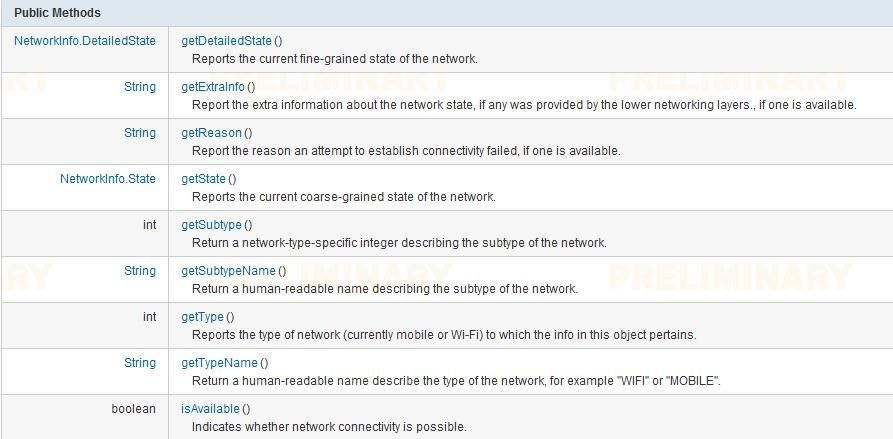
比较重要的方法
|
NetworkInfo |
getActiveNetworkInfo() 获取当前连接可用的网络 |
|
NetworkInfo[] |
getAllNetworkInfo() 获取设备支持的所有网络类型的链接状态信息。 |
|
NetworkInfo |
getNetworkInfo(int networkType) 获取特定网络类型的链接状态信息 |
|
int |
getNetworkPreference() 获取当前偏好的网络类型。 |
|
boolean |
isActiveNetworkMetered() Returns if the currently active data network is metered. |
|
static boolean |
isNetworkTypeValid(int networkType) 判断给定的数值是否表示一种网络 |
|
boolean |
requestRouteToHost(int networkType, int hostAddress) Ensure that a network route exists to deliver traffic to the specified host via the specified network interface. |
|
void |
setNetworkPreference(int preference) Specifies the preferred network type. |
|
int |
startUsingNetworkFeature(int networkType, String feature) Tells the underlying networking system that the caller wants to begin using the named feature. |
|
int |
stopUsingNetworkFeature(int networkType, String feature) Tells the underlying networking system that the caller is finished using the named feature. |
最后奉上一点点干货:
创建一个项目 我的项目名(testnet-note)
com.example.testnet_note下创建一个Btu1Listener.java 完成 onClick事件
/testNet-note/src/com/example/testnet_note/Btu1Listener.java
package com.example.testnet_note;

import android.app.Activity;

import android.content.Context;

import android.net.ConnectivityManager;

import android.net.NetworkInfo;

import android.net.NetworkInfo.State;

import android.view.View;

import android.view.View.OnClickListener;

import android.widget.TextView;

/**

 * ConnectivityManager ConnectivityManager主要管理和网络连接相关的操作

 * 相关的TelephonyManager则管理和手机、运营商等的相关信息;WifiManager则管理和wifi相关的信息。 想访问网络状态,首先得添加权限

 * NetworkInfo类包含了对wifi和mobile两种网络模式连接的详细描述,

 * 通过其getState()方法获取的State对象则代表着连接成功与否等状态。

 *

 */

public class Btu1Listener implements OnClickListener {

    private Context conntxt; // 上下文

    private TextView tv1; // 文本控件

    private ConnectivityManager cm; // 主要管理和网络连接相关的操作

    private NetworkInfo netInfo;

    private String netStatus;

    private int color1;

    public Btu1Listener(Context conntxt) {

        this.conntxt = conntxt;

    }

    public void onClick(View v) {

        try {

            Activity c = (Activity) conntxt;

            tv1 = (TextView) c.findViewById(R.id.textView1);

            cm = (ConnectivityManager) c

                    .getSystemService(Context.CONNECTIVITY_SERVICE);

            // 获取代表联网状态的NetWorkInfo对象

            netInfo = cm.getActiveNetworkInfo(); // getActiveNetworkInfo()

            if (netInfo == null) { // 提示没有网络

                netStatus = c.getResources().getString(R.string.netStatus0); // 提示文字

                color1 = c.getResources().getColor(R.color.red); // 背景颜色

            } else { // 网络已连接

            // netStatus = c.getResources().getString(R.string.netStatus1);

            // color1 = c.getResources().getColor(R.color.green);

                // 获得当前连接的网络类型。

                // TYPE_MOBILE GPRS网络

                if (State.CONNECTED == cm.getNetworkInfo(ConnectivityManager.TYPE_MOBILE).getState()) {

                    netStatus = c.getResources().getString(R.string.netStatus2);

                    color1 = c.getResources().getColor(R.color.rosybrown);

                }

                // TYPE_WIFI WIFI网络

                if (State.CONNECTED == cm.getNetworkInfo(ConnectivityManager.TYPE_WIFI).getState()) {

                    netStatus = c.getResources().getString(R.string.netStatus3);

                    color1 = c.getResources().getColor(R.color.lavender);

                }

            }

        } catch (Exception e) {

            e.printStackTrace();

        } finally {

            tv1.setText(netStatus);

            tv1.setBackgroundColor(color1);

        }

    }

}
/testNet-note/res/layout/activity_main.xml 配制
<RelativeLayout xmlns:android="http://schemas.android.com/apk/res/android"

    xmlns:tools="http://schemas.android.com/tools"

    android:layout_width="match_parent"

    android:layout_height="match_parent"

    android:paddingBottom="@dimen/activity_vertical_margin"

    android:paddingLeft="@dimen/activity_horizontal_margin"

    android:paddingRight="@dimen/activity_horizontal_margin"

    android:paddingTop="@dimen/activity_vertical_margin"

    tools:context="com.example.testnet_note.MainActivity" >

    <TextView

        android:id="@+id/textView1"

        android:layout_width="wrap_content"

        android:layout_height="wrap_content"

        android:height="40dp"

        android:maxHeight="90dp"

        android:text="@string/hello_world"

        android:textSize="29sp" />

    <Button

        android:id="@+id/tstNetwrkBtn"

        android:layout_width="wrap_content"

        android:layout_height="wrap_content"

        android:layout_below="@+id/textView1"

        android:layout_centerHorizontal="true"

        android:layout_marginTop="10dp"

        android:text="@string/btnShow" />

</RelativeLayout>
/testNet-note/res/values/styles.xml 配制
<?xml version="1.0" encoding="utf-8"?>

<resources>

    <string name="app_name">testNet-note</string>

    <string name="hello_world">网络测试</string>

    <string name="btnShow">网络测试</string>

    <string name="netStatus0">网络不可用</string>

    <string name="netStatus1">当前的网络连接可用</string>

    <string name="netStatus2">GPRS网络已连接</string>

    <string name="netStatus3">WIFI网络已连接</string>

    <string name="action_settings">Settings</string>

</resources>
/testNet-note/res/values/colors.xml 配制
<?xml version="1.0" encoding="utf-8"?>

<resources>

 <!-- 淡紫色 -->

    <color name="orchid">#DA70D6</color>

 <!-- 褐玫瑰红 -->

    <color name="rosybrown">#BC8F8F</color>

 <!-- 红色 -->

    <color name="red">#FF0000</color>

 <!-- 绿色 -->

    <color name="green">#008000</color>

</resources>
现在代码写完了 运行有错误 是权限问题

加两个权限就好了
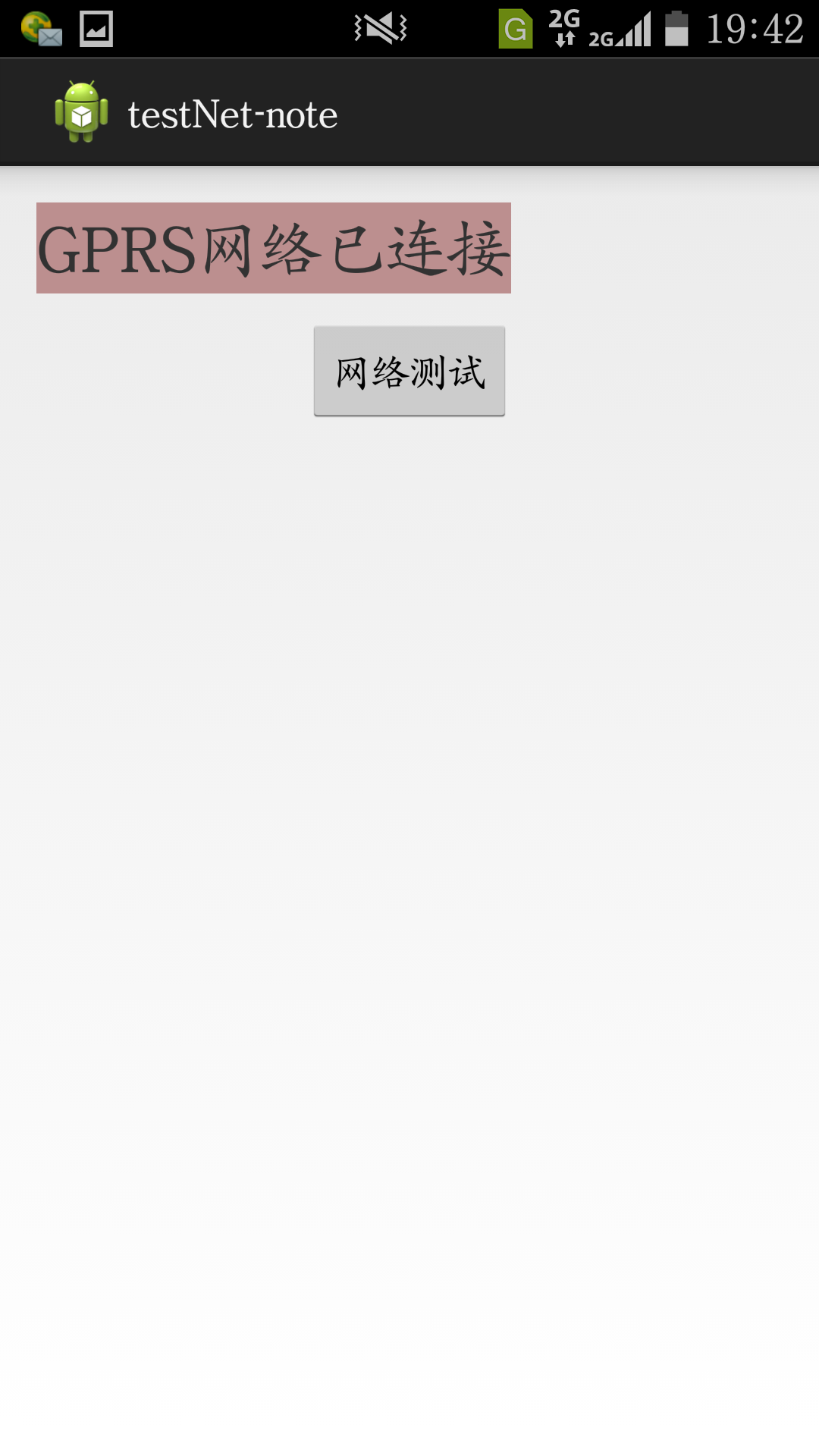
效果图:
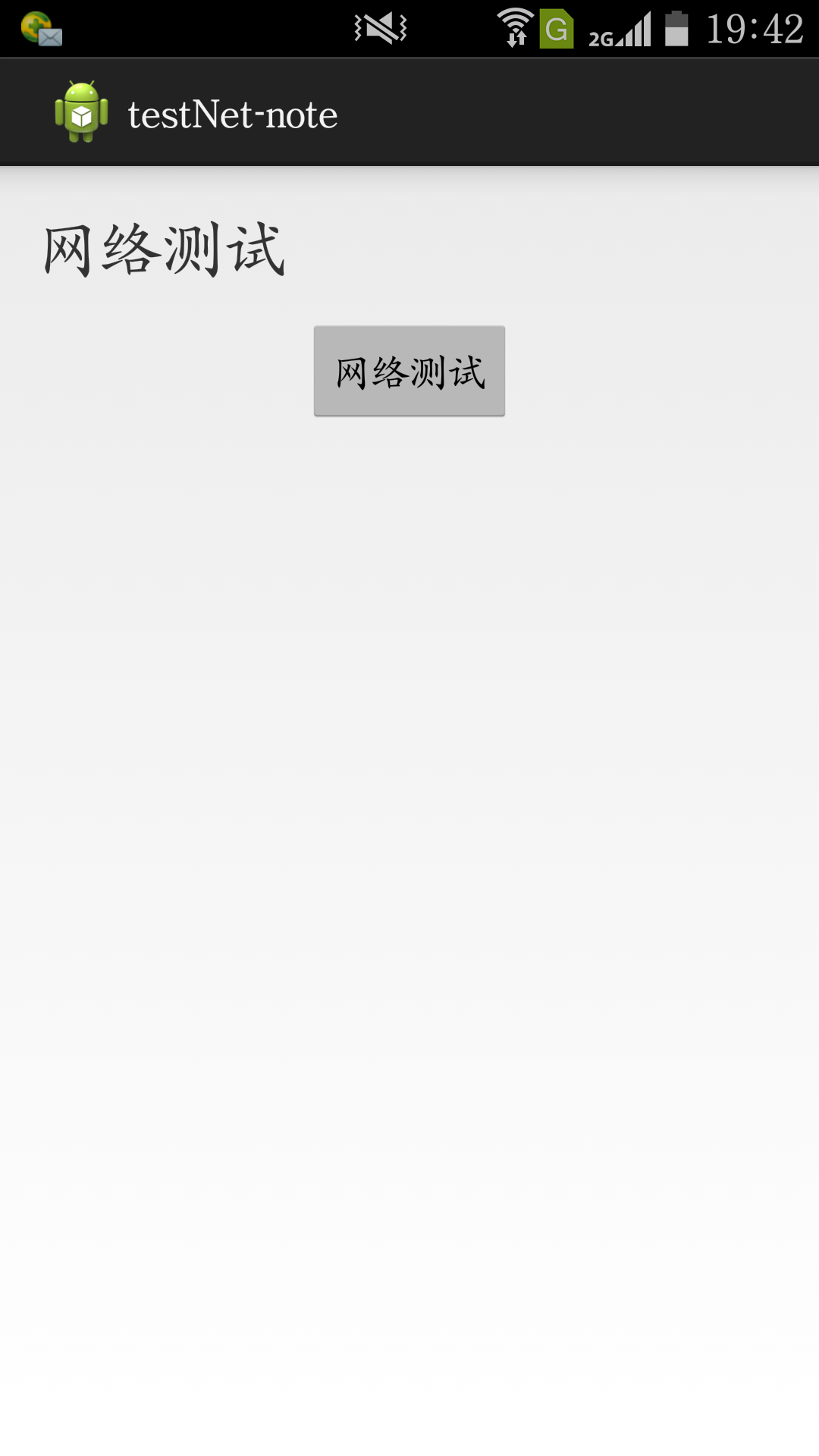
WiFi ╭(╯^╰)╮

开了 数据 2G/(ㄒoㄒ)/~~
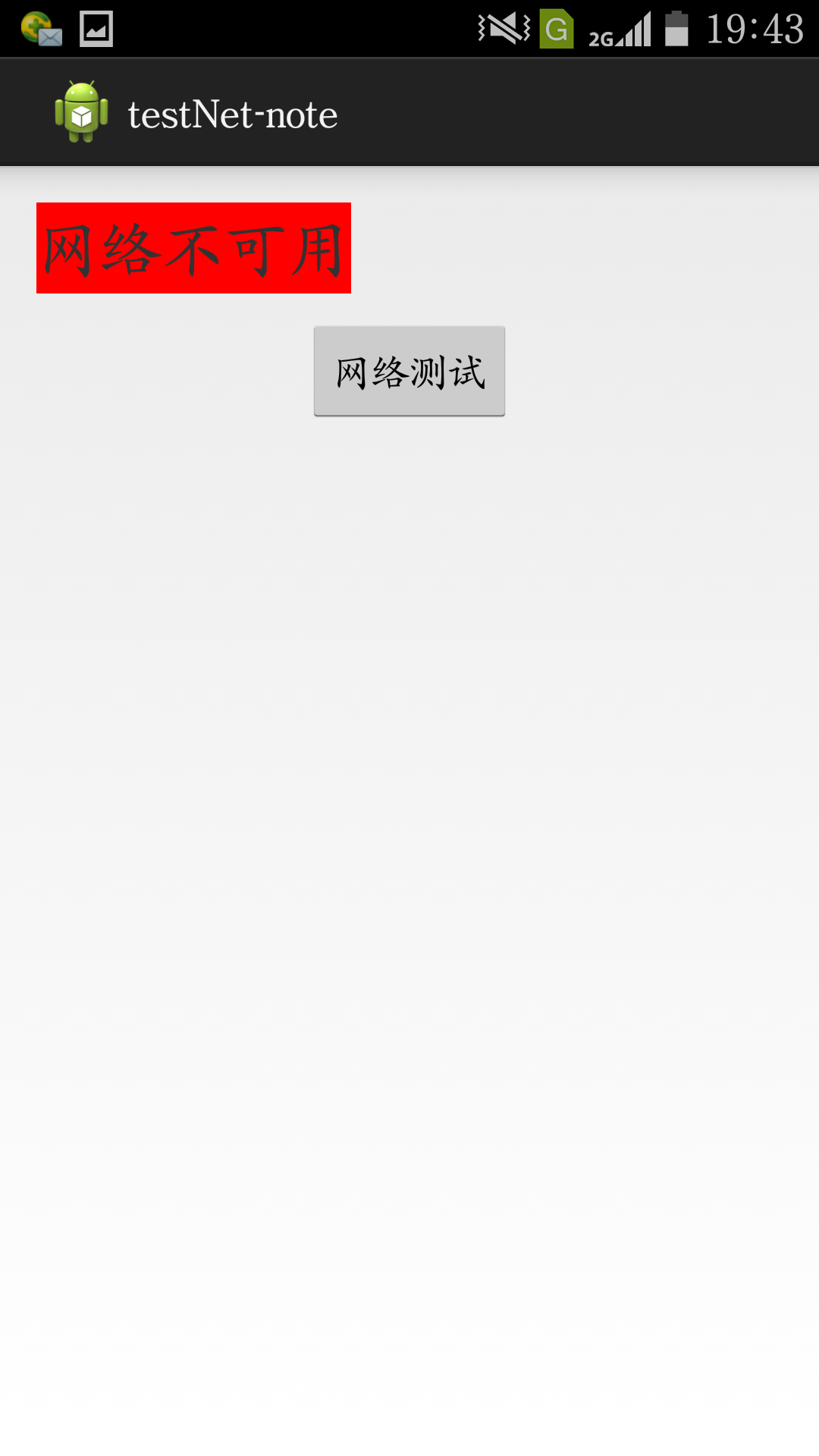
感觉有bug WiFi 数据 都关了 它才是 网络不可用
android ConnectivityManager 检查是否有网络的更多相关文章
- 5、android ConnectivityManager获取网络状态
? 1 2 3 4 5 6 7 8 9 10 11 12 13 14 15 16 17 18 19 20 21 22 23 24 25 26 27 28 29 30 31 32 33 34 35 36 ...
- Android Volley和Gson实现网络数据加载
Android Volley和Gson实现网络数据加载 先看接口 1 升级接口 http://s.meibeike.com/mcloud/ota/cloudService POST请求 参数列表如下 ...
- Android训练课程(Android Training) - 使用Volley传输网络数据(Transmitting Network Data Using Volley)
使用Volley传输网络数据(Transmitting Network Data Using Volley) Volley 是一个 HTTP 库,它使得在Android应用程序中操作网络更容易,是重要 ...
- Android 监听 Android中监听系统网络连接打开或者关闭的实现代码
本篇文章对Android中监听系统网络连接打开或者关闭的实现用实例进行了介绍.需要的朋友参考下 很简单,所以直接看代码 复制代码 代码如下: package xxx; import android.c ...
- Android 判断wifi和4G网络是否开启
public boolean isWifiAvailable() { ConnectivityManager connectivityManager = (ConnectivityManager) g ...
- Android公共库——图片缓存 网络缓存 下拉及底部更多ListView 公共类
Android公共库——图片缓存 网络缓存 下拉及底部更多ListView 公共类 转载自http://www.trinea.cn/android/android-common-lib/ 介绍总结的一 ...
- Android 内存检查
Android 内存检查 本文简单介绍了如何使用 DDMS 和 MAT 工具来对 android 进行内存检查,了解 android 内存的具体占用情况. 步骤1. 使用 DDMS 观察内存的使用情况 ...
- Android开发学习之路--网络编程之xml、json
一般网络数据通过http来get,post,那么其中的数据不可能杂乱无章,比如我要post一段数据,肯定是要有一定的格式,协议的.常用的就是xml和json了.在此先要搭建个简单的服务器吧,首先呢下载 ...
- Android 获取系统时间和网络时间
有些时候我们的应用中只能使用网络时间,而不能使用系统的时间,这是为了避免用户关闭了使用网络时间的功能后所产生的误差. 直接上代码. 1.清单文件中网络添加权限. <!-- 访问Internet资 ...
随机推荐
- Foundation Data Structure
LinkedList : /** * 考虑的比较的周全,并且包含了全部的情况,代码也不乱<b></b> * * @param index * 插入的位置 * @param c ...
- Java学习日记-2.2 增强后的switch-case
switch-case语句的基本格式 switch(expression){ case condition1: ... break; case condition2: ... break; case ...
- Matchers and assertthat
assertThat的一般句型为: assertThat([value],[matcher statement]); 这种断言的优点有: 1.更具有可读性:该语法允许我们以“主谓宾”的方式来思考(as ...
- 使用XSLT实现Word下载
Xslt是Extensible Stylesheet Language Transformations的缩写,用来将XML 文档转换到其它文档类型.XSLT的使用包括两个输入文件: – 包含实际数据的 ...
- java笔记9之switch
switch语句的注意事项: A:case后面只能是常量,不能是变量,而且,多个case后面的值不能出现相同的 B:default可以省略吗? 可以省 ...
- 【web开发问题】HTTP请求POSTDATA中包含多层对象如何获取?
postdata如下: TravelerID=&ChineseName=***&PhoneNumber=&IDNumber=&IsCommonUse=&Gues ...
- django 执行原始SQL
二.知识点总结 When the model query APIs don’t go far enough, you can fall back to writing raw SQL. go far ...
- [Angular 2] Using Two Reducers Together
Add another reducer: export const SECOND = "SECOND"; export const HOUR = "HOUR"; ...
- Android BroadcastReceiver实例Demo(有序广播的发送)
上一篇简介了广播的发送,这篇主要介绍下,有序广播的发送. 设置完相关属性的时候,广播就会依照有序的方式进行发送: 发送顺序: 先发送第二条广播: 再发送第一条广播: 最后发送第三条广播. 代码例如以下 ...
- Garbage Collectors - Serial vs. Parallel vs. CMS vs. G1 (and what's new in Java 8)--转
The 4 Java Garbage Collectors - How the Wrong Choice Dramatically Impacts Performance The year is 20 ...