
修改withdraw 方法
修改withdraw 方法
练习目标-使用有返回值的方法:在本练习里,将修改withdraw方法以返回一个布尔值来指示交易是否成功。
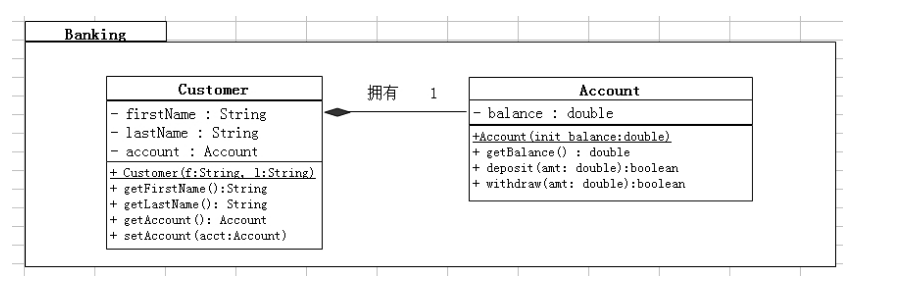
任务
1. 修改Account类
- 修改deposit 方法返回true(意味所有存款是成功的)。
- 修改withdraw方法来检查提款数目是否大于余额。如果amt小于balance,则从余额中扣除提款数目并返回true,否则余额不变返回false。
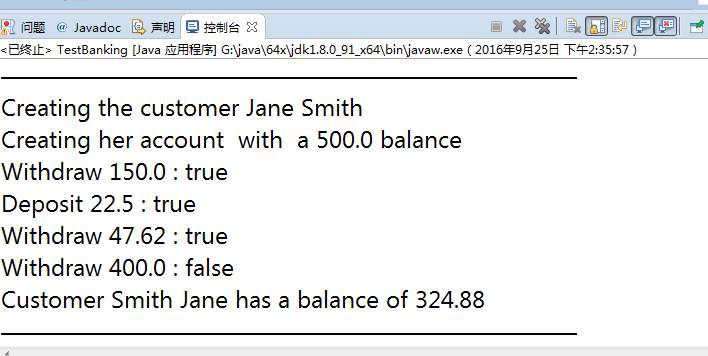
2. 在exercise2主目录编译并运行TestBanking程序,将看到下列输出;
Creating the customer Jane Smith.
Creating her account with a 500.00 balance.
Withdraw 150.00: true
Deposit 22.50: true
Withdraw 47.62: true
Withdraw 400.00: false
Customer [Smith, Jane] has a balance of 324.88
package banking;

public class Account

{

    //成员属性

    private double balance ;//余额

    // 无参构造

    public Account()

    {

    }

    // 有参构造

    public Account(double balance)

    {

        this.balance = balance;

    }

    // set  get

    public double getBalance()

    {

        return balance;

    }

    public void setBalance(double balance)

    {

        this.balance = balance;

    }

    public boolean withdraw1( double amt )

    {

        if(amt>&&amt<balance==true)

        {

            balance -= amt ;

            System.out.print("Withdraw " + amt+" : ");

            return true ;

        }

        else

        {

            System.out.print("Withdraw " + amt+" : ");

            return false ;

        }

    }

    public boolean deposit1( double amt )

    {

        if(amt<)

        {

            System.out.print("Deposit " + amt+" : " );

            return false ;

        }

        else

        {

            balance += amt ;

            System.out.print("Deposit " + amt +" : ");

            return true ;

        }

    }

}
    Customer cr1 = new Customer( ) ;

        cr1.setFirstName("Jane");

        cr1.setLastName("Smith");

        cr1.setBalance();

        System.out.println("Creating the customer "+cr1.getFirstName() +" "+cr1.getLastName());

        System.out.println("Creating her account  with  a " +cr1.getBalance()+" balance");

        System.out.println(cr1.withdraw1() );

        System.out.println(cr1.deposit1(22.5));

        System.out.println(cr1.withdraw1(47.62));

        System.out.println(cr1.withdraw1());

        System.out.println("Customer "+cr1.getLastName()+" "+cr1.getFirstName()+

                                            " has a balance of "+cr1.getBalance());
修改withdraw 方法的更多相关文章
- 练习3:修改withdraw 方法
练习目标-使用有返回值的方法:在本练习里,将修改withdraw方法以返回一个布尔值来指示交易是否成功. 任务 1.修改Account类 a.修改deposit 方法返回true(意味所有存款是成功的 ...
- 练习3:修改withdraw 方法 练习目标-使用有返回值的方法:在本练习里,将修改withdraw方法以返回一个布尔值来指示交易是否成功。
boolean withdraw(double get){ if(get<=balance) { System.out.println("取钱"+get+"元,当余 ...
- Spring Aop 修改目标方法参数和返回值
一.新建注解 @Target({ElementType.METHOD, ElementType.TYPE}) @Retention(RetentionPolicy.RUNTIME) @Document ...
- Django的内置登录、退出、修改密码方法
Django中内置的登录.退出.修改密码方法. 1.url.py中使用django.contrib.auth中的views函数,django.views.generic中的TemplateView函数 ...
- ecshop2.73修改密码方法|ecshop2.73修改密码方法
ecshop2.73修改密码方法|ecshop2.73修改密码方法 ECSHOP教程/ ecshop教程网(www.ecshop119.com) 2012-09-09 ecshop2.73正式版后 ...
- JS高级. 06 缓存、分析解决递归斐波那契数列、jQuery缓存、沙箱、函数的四种调用方式、call和apply修改函数调用方法
缓存 cache 作用就是将一些常用的数据存储起来 提升性能 cdn //-----------------分析解决递归斐波那契数列<script> //定义一个缓存数组,存储已经计算出来 ...
- Mac修改hosts方法
总有各种各样的原因需要修改hosts文件,那么就来简介下怎么修改.terminal中打开hosts: sudo vim /private/etc/hosts 打开文件后I开启插入模式,在最后一行添加你 ...
- 【VS开发】VS2010 MFC中控件、对话框等背景颜色动态修改的方法
[VS开发]VS2010 MFC中控件.对话框等背景颜色动态修改的方法 标签(空格分隔):[VS开发] 声明:引用请注明出处http://blog.csdn.net/lg1259156776/ 说明: ...
- .net 4.0 以下HttpWebRequest Header 修改hosts方法
.net 4.0 以下HttpWebRequest Header 修改hosts方法 特此记录 public class CusteredHeaderCollection : WebHeaderCol ...
随机推荐
- postgresql数据库部署
运维开发技术交流群欢迎大家加入一起学习(QQ:722381733) 一.postgresql数据库部署 1.前往postgresql安装包的目录(这里我部署的是10.5的版本) [root@web1 ...
- Excel 绘制正态概率图-正态性检验
- 00.用 yield 实现 Python 协程
来源:Python与数据分析 链接: https://mp.weixin.qq.com/s/GrU6C-x4K0WBNPYNJBCrMw 什么是协程 引用官方的说法: 协程是一种用户态的轻量级线程,协 ...
- TensorFlow 学习笔记(1)----线性回归(linear regression)的TensorFlow实现
此系列将会每日持续更新,欢迎关注 线性回归(linear regression)的TensorFlow实现 #这里是基于python 3.7版本的TensorFlow TensorFlow是一个机器学 ...
- Java基础学习总结(69)——匿名内部类与Lambda表达式
前言 Java Labmda表达式的一个重要用法是简化某些匿名内部类(Anonymous Classes)的写法.实际上Lambda表达式并不仅仅是匿名内部类的语法糖,JVM内部是通过invokedy ...
- 磁盘阵列 RAID 技术原理详解
RAID一页通整理所有RAID技术.原理并配合相应RAID图解,给所有存储新人提供一个迅速学习.理解RAID技术的网上资源库,本文将持续更新,欢迎大家补充及投稿.中国存储网一如既往为广大存储界朋友提供 ...
- 使用MySQLMigrationToolkit快速将Oracle数据导入MySQL
使用MySQL Migration Toolkit快速将Oracle数据导入MySQL 上来先说点废话 本人最近在学习一些数据库方面的知识,之前接触过Oracle和MySQL,最近又很流行MongoD ...
- C. Vladik and Memorable Trip DP
C. Vladik and Memorable Trip time limit per test 2 seconds memory limit per test 256 megabytes input ...
- eclipse上导入import git项目
1.左上角File->import->git eclipse 可以从很多来源处import项目,项目来源可以使git/maven/general等. import来源可以看下面 2.点击g ...
- Android颜色透明度数值一览
100% — FF 95% — F2 90% — E6 85% — D9 80% — CC 75% — BF 70% — B3 65% — A6 60% — 99 55% — 8C 50% — 80 ...