
Setting up multi nodes live migration in Openstack Juno with devstack
Setting up multi nodes live migration in Openstack Juno with devstack
Summary
Live migration overview
- Setup Openstack with devstack: one controller node, two compute nodes
- Configure migrations
- Live migration test
- Issue summary
Live migration Overview
Migration enables an administrator to move a virtual-machine instance from one compute host to another. This feature is useful when a compute host requires maintenance. Migration can also be useful to redistribute the load when many VM instances are running on a specific physical machine.
The migration types are:
Non-live migration (sometimes referred to simply as 'migration'). The instance is shut down for a period of time to be moved to another hypervisor. In this case, the instance recognizes that it was rebooted.
Live migration (or 'true live migration'). Almost no instance downtime. Useful when the instances must be kept running during the migration. The different types of live migration are:
Shared storage-based live migration. Both hypervisors have access to shared storage.
Block live migration. No shared storage is required. Incompatible with read-only devices such as CD-ROMs and Configuration Drive (config_drive).
Volume-backed live migration. Instances are backed by volumes rather than ephemeral disk, no shared storage is required, and migration is supported (currently only available for libvirt-based hypervisors
This page's live migration uses block live migration which does not need shared storage.
Setup Openstack with devstack: one controller node, two compute nodes
Prepare three servers with ubuntu installed. One server is worked as control node, the other two are compute nodes(Note: please named three servers with different hostnames.) and get updates and install git
sudo apt-get update
sudo apt-get install git
Configure controller node
- Git devstack Juno release: git clone https://github.com/openstack-dev/devstack.git -b stable/juno
Add localrc under devstack and add content to it as following
HOST_IP=your configured IP address

MULTI_HOST=

FIXED_RANGE=10.0.0.0/

FIXED_NETWORK_SIZE=

ADMIN_PASSWORD=

MYSQL_PASSWORD=

RABBIT_PASSWORD=

SERVICE_PASSWORD=

SERVICE_TOKEN=

SCREEN_LOGDIR=/home/stack/log/screen

LOGFILE=/home/stack/log/stack.log

LOGDAYS=

PUBLIC_INTERFACE=eth0 #actual name of your network interface

FLAT_INTERFACE=eth0- Run devstack to install openstack: ./stack.sh
Configure compute node
- Git devstack Juno release: git clone https://github.com/openstack-dev/devstack.git -b stable/juno
Add localrc under devstack and add content as done in controller node. and also add following to it.
SERVICE_HOST=your controller ip

HOST_IP=host ip

MULTI_HOST=

 FIXED_RANGE=10.0.0.0/

FIXED_NETWORK_SIZE=

 ADMIN_PASSWORD=

MYSQL_PASSWORD=

RABBIT_PASSWORD=

SERVICE_PASSWORD=

SERVICE_TOKEN=

SCREEN_LOGDIR=/home/stack/log/screen

LOGFILE=/home/stack/log/stack.log

LOGDAYS=

#PUBLIC_INTERFACE=eth0

FLAT_INTERFACE=eth0

DATABASE_TYPE=mysql

Q_HOST=$SERVICE_HOST

MYSQL_HOST=$SERVICE_HOST

RABBIT_HOST=$SERVICE_HOST

GLANCE_HOSTPORT=$SERVICE_HOST:

KEYSTONE_AUTH_HOST=$SERVICE_HOST

KEYSTONE_SERVICE_HOST=$SERVICE_HOST

ENABLED_SERVICES=n-cpu,n-net,n-api,c-sch,c-api,c-vol
Add some variables which would use during install openstack
Copy following info to a shell file:#!/bin/bash export OS_AUTH_URL=http://controller'ip:5000/v2.0
export OS_TENANT_ID=69eaaebc44174418956d4dd104f2be76
export OS_TENANT_NAME="admin" export OS_USERNAME="admin"
export OS_PASSWORD=
export OS_VOLUME_API_VERSION=Update the OS_AUTH_URL with your controller node ip. And use command:mysql -uroot -p123456 -e "select * from keystone.project;" to get OS_TENANT_ID and update it, then run this shell
- Run devstack to install openstack: ./stack.sh
Configure migrations
Host name configuration
Add three server's host names to /etc/hosts to be sure that every node can ping successful to othersserver's IP server's host name
Configure /etc/sysconfig/iptables file to allow libvirt listen on TCP port 16509 and add a record accepting KVM communication on TCP port within the range from 49152 to 49261
Note: ubuntu does not have sysconfig folder under etc, need create it manually.-A INPUT -p tcp -m multiport --ports -m comment --comment "libvirt" -j ACCEPT -A INPUT -p tcp -m multiport --ports : -m comment --comment "migration" -j ACCEPT
Configuration libvirt
Enable libvirt listen flag at /etc/sysconfig/libvirtd file: addLIBVIRTD_ARGS="-listen"
Configure /etc/libvirt/libvirtd.conf:
listen_tls =

listen_tcp =

auth_tcp = "none"
Configure /etc/init/libvirt-bin.conf, modify exec /usr/sbin/libvirtd to exec /usr/sbin/libvirtd -l
Configure /etc/libvirt/qemu.conf, modify security_driver="none"Restart libvirt, after executing the command, ensure that libvirt is successfully restarted: sudostop libvirt-bin && sudo start libvirt-bin
ps -ef |grep libvirt

Nova configuration
Modify:force_config_drive = None(value from always to None)Add:live_migration_flag=VIR_MIGRATE_UNDEFINE_SOURCE,VIR_MIGRATE_PEER2PEER,VIR_MIGRATE_LIVE (under default)
- Restart service on each node
screen -s stack -X quit
./rejoin-stack.sh
Live migration test
Before start live migration test, to be sure that the nova compute service are ready


- create instance and attach volume
nova boot --flavor=flavor_id --image=image_id instance_name
nova volume-attach vm_id volume_id auto+----------+--------------------------------------+
| Property | Value |
+----------+--------------------------------------+
| device | /dev/vdb |
| id | 3deb171f-8d61-4df9-8e6e-29d86575e78e |
| serverId | bb12f3b0-c17e-49f7-b482-255258931eb4 |
| volumeId | 3deb171f-8d61-4df9-8e6e-29d86575e78e |
+----------+--------------------------------------+ - How to mount the volume which attached to the instance
1> execute command to ssh to the instance, for example: ssh cirros@10.0.0.2
2> execute command to list the partition tables for the installed devices: sudo fdisk -l
see:Disk /dev/vdb......
3> create a filesystem on the device: sudo mkfs.ext4 /dev/vdb
4> create a dictionary and mount the volume:
sudo mkdir /data
sudo mount /dev/vdb /data/
5> then we can create folder or file on it - nova show instance_id
- nova live-migration --block_migrate vm_id target_server_hostname
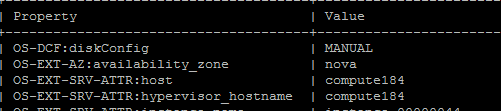
- check the host before and after migration

Issue summary
1. n-api could not start when install openstack with devstack
Solution: Restart controller node and rejoin the service, then run unstack and stack on compute node
2. Get error:libvirtError: operation failed: Failed to connect to remote libvirt URI qemu+tcp://computer247/system: Unable to resolve address 'computer247' service '16509': Name or service not known
Solution: check the iptables in configure migration step 2.
3. Live Migration failure: Invalid value '4-7,12-15' for 'cpuset.cpus': Invalid argument
Solution: Check the CPU info in your compute nodes, if there have different architecture of cpus, it would be fail to migrate
4. Compute node's nova-cpu service could not enable:

Solution: Check the libvirt settings in configure migration section, and restart libvirt-bin service, then run command in both compute node and controller node:
screen -s stack -X quit
./rejoin-stack.sh
5. Get error:

Solution: It's about nova configuration, check /etc/nova/nova.conf:
Modify:force_config_drive = None(value from always to None) Add:live_migration_flag=VIR_MIGRATE_UNDEFINE_SOURCE,VIR_MIGRATE_PEER2PEER,VIR_MIGRATE_LIVE (under default)
then rejoin stack in compute node
6. Getting error:screen-n-cpu.2015-06-02-184950.log:2015-06-04
00:16:45.797 ERROR nova.virt.libvirt.driver [-] [instance:
d1b56987-4691-4259-897f-ba4ce3e71260] Live Migration failure: Failed to
open file '/dev/disk/by-path/ip-9.115.246.45:3260-iscsi-iqn.1986-03.com.ibm:2145.v7k41.node1-lun-4': No such file or directory
Solution: No solution currently by me, it is a bug and would be fixed
7. Gettting
error when rejoin stack:2015-06-09 14:02:33.154 TRACE
cinder.openstack.common.threadgroup ArgumentError: Could not parse
rfc1738 URL from string ''"

Solution:
modify the node sql_connection in /etc/cinder/cinder.conf and
/etc/nova/nova.conf with( It has no value as default): take following as
example
/etc/cinder/cinder.conf: sql_connection = mysql://root:123456@9.115.246.185/cinder?charset=utf8
/etc/nova/nova.conf: sql_connection = mysql://root:123456@9.115.246.185/nova?charset=utf8
Setting up multi nodes live migration in Openstack Juno with devstack的更多相关文章
- Deploying Cloud Foundry on OpenStack Juno and XenServer (Part I)
link http://rabbitstack.github.io/deploying-cloud-foundry-on-openstack-juno-and-xenserver-part-i/ Cl ...
- 使用openshit在ubuntu14.04下一键部署openstack(juno版本)
一.基本介绍 本实验是在vmware workstation上虚拟机ubuntu14.04(64bit,desktop)上部署openstack(Juno版本).采用的工具是openshit.open ...
- openStack juno for ubuntu12-04
<一,preinstall basic conf,pre Env> 1,pwgen(openssl rand -hex 10) some Open-Stack services add a ...
- OpenStack Juno 版本发布——支持Spark和NFV[转]
作者:郑晨,OpenStack中国社区,转载请注明出处 美国时间2014年10月16日,OpenStack Juno版本正式发布,这是OpenStack开源云计算项目自2010年创立以来的第10个版本 ...
- 一键安装openstack juno 之controller node.
原文名称: OpenStack Juno Scripted Installation on CentOS 7 Step I: 本机信息配置 CONTROLLER_IP=192.168.173.133 ...
- [openStack]使用Fuel安装OpenStack juno的fuel_master
安装OpenStack是一件很复杂的事情,特别是在想目中,如果一个组件一个组件,一台一台的coding部署,估计太消耗时间,而且出错的概率很高,所以使用工具推送部署的效率就很高了,而且必须得可靠.mi ...
- vmware vms migration to openstack
Converting a VMware Workstation virtual machine to KVM Leave a commentPosted by rbgeek on August 13, ...
- VMware migration to openstack kvm
- Centos7 install Openstack Juno (RDO) (转载)
原文地址:http://www.hdume.com/centos-7-0%E5%AE%89%E8%A3%85openstack/ 1.安装系统,Centos7镜像采用CentOS-7.0-1406-x ...
随机推荐
- 如何通过submit提交form表单获取后台传来的返回值
版权声明:本文为博主原创文章,未经博主允许不得转载. https://blog.csdn.net/qq_34651764/article/details/76373846 小伙伴是不是遇到过这样的问题 ...
- vuex的简单例子和vue model组件
好久没用过vuex了,vuex官方示例的计算器counter是用的webpack打包了单文件组件,不方便回顾,今天把代码改成了html引人的方式,方便回顾 <!DOCTYPE html> ...
- 【50.49%】【codeforces 731B】Coupons and Discounts
time limit per test1 second memory limit per test256 megabytes inputstandard input outputstandard ou ...
- window.url.createobjecturl 兼容多种浏览器(IE,google,360,Safari,firefox)
<script type="text/javascript"> function setImagePreview() { var docObj = document.g ...
- MinGW安装和使用(不是mingw-w32)
MinGW全称Minimalist GNU For Windows,是个精简的Windows平台C/C++.ADA及Fortran编译器,相比Cygwin而言,体积要小很多,使用较为方便.MinGW提 ...
- 使用JScript脚本批量修改VC工程设置
作者:朱金灿 来源:http://blog.csdn.net/clever101 很多时候升级了第三方库,需要对很多工程修改设置.在VS中按住Ctrl键确实可以多选工程,但通过这样做也有麻烦的地方:一 ...
- centos下载安装mysql,并设置远程访问
思路 获取安装文件→配置好路径→安装→设置权限→处理常见的问题. 1.下载 先建议去官网看看https://dev.mysql.com/,然后根据自己的常识找到下载路径.同时也找到最新版本. 下载方式 ...
- 堆(stack) 之 c 和 c++模板实现(空类默认成员函数 初谈引用 内联函数)
//stack 的基本操作 #include <iostream> using namespace std; const int maxn = 3; typedef struct Stac ...
- EMES信息化制造系统的概念
EMES是指,信息化制造系统.它由五个功能子系统构成,分别是:企业信息平台子系统(EIP),物料实时信息系统(MRI).能源实时信息系统(PRI).设备实时信息系统(EMR).质量实时信息系统(QRI ...
- rabbitmq集群 + Mirror Queue + 使用C#
搭建高可用的rabbitmq集群 + Mirror Queue + 使用C#驱动连接 我们知道rabbitmq是一个专业的MQ产品,而且它也是一个严格遵守AMQP协议的玩意,但是要想骚,一定需要拿出高 ...