
vue移动端在线签名
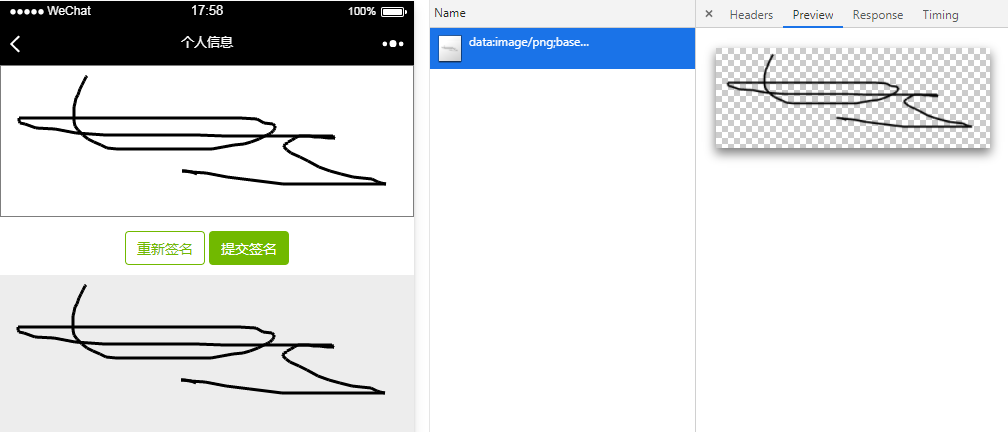
<template>

<section class="signature">

  <div class="signatureBox">

      <div class="canvasBox" ref="canvasHW">

          <canvas ref="canvasF"

            @touchstart='touchStart'

            @touchmove='touchMove'

            @touchend='touchEnd'

            @mousedown="mouseDown"

            @mousemove="mouseMove"

            @mouseup="mouseUp"

          >

          </canvas>

          <div class="btnBox">

              <button @click="overwrite">重新签名</button>

              <button @click="commit">提交签名</button>

          </div>

      </div>

  </div>

          <img class="imgCanvas" :src="imgUrl">

      </section>

</template>

<script>

  export default {

    data() {

      return {

        stageInfo:'',

        imgUrl:'',

        client: {},

        points: [],

        canvasTxt: null,

        startX: 0,

        startY: 0,

        moveY: 0,

        moveX: 0,

        endY: 0,

        endX: 0,

        w: null,

        h: null,

        isDown: false,

        // isViewAutograph: this.$route.query.isViews > 0,

        // contractSuccess: this.$route.query.contractSuccess

      }

    },

    mounted() {

      let canvas = this.$refs.canvasF

      canvas.height = this.$refs.canvasHW.offsetHeight - 500

      canvas.width = this.$refs.canvasHW.offsetWidth - 2

      this.canvasTxt = canvas.getContext('2d')

      this.stageInfo = canvas.getBoundingClientRect()

      this.canvasTxt.lineWidth = 3; // 线条宽度

    },

    methods: {

      //mobile

      touchStart(ev) {

        ev = ev || event

        ev.preventDefault()

        if (ev.touches.length == 1) {

          let obj = {

            x: ev.targetTouches[0].clientX,

            y: ev.targetTouches[0].clientY,

          }

          this.startX = obj.x

          this.startY = obj.y

          this.canvasTxt.beginPath()

          this.canvasTxt.moveTo(this.startX, this.startY)

          this.canvasTxt.lineTo(obj.x, obj.y)

          this.canvasTxt.stroke()

          this.canvasTxt.closePath()

          this.points.push(obj)

        }

      },

      touchMove(ev) {

        ev = ev || event

        ev.preventDefault()

        if (ev.touches.length == 1) {

          let obj = {

            x: ev.targetTouches[0].clientX - this.stageInfo.left,

            y: ev.targetTouches[0].clientY - this.stageInfo.top

          }

          this.moveY = obj.y

          this.moveX = obj.x

          this.canvasTxt.beginPath()

        //   strokeStyle = 'blue';

          this.canvasTxt.moveTo(this.startX, this.startY)

          this.canvasTxt.lineTo(obj.x, obj.y)

          this.canvasTxt.stroke()

          this.canvasTxt.closePath()

          this.startY = obj.y

          this.startX = obj.x

          this.points.push(obj)

        }

      },

      touchEnd(ev) {

        ev = ev || event

        ev.preventDefault()

        if (ev.touches.length == 1) {

          let obj = {

            x: ev.targetTouches[0].clientX - this.stageInfo.left,

            y: ev.targetTouches[0].clientY - this.stageInfo.top

          }

          this.canvasTxt.beginPath()

          this.canvasTxt.moveTo(this.startX, this.startY)

          this.canvasTxt.lineTo(obj.x, obj.y)

          this.canvasTxt.stroke()

          this.canvasTxt.closePath()

          this.points.push(obj)

        }

      },

      //pc

      mouseDown(ev) {

        ev = ev || event

        ev.preventDefault()

        if (1) {

          let obj = {

            x: ev.offsetX,

            y: ev.offsetY

          }

          this.startX = obj.x

          this.startY = obj.y

          this.canvasTxt.beginPath()

          this.canvasTxt.moveTo(this.startX, this.startY)

          this.canvasTxt.lineTo(obj.x, obj.y)

          this.canvasTxt.stroke()

          this.canvasTxt.closePath()

          this.points.push(obj)

          this.isDown = true

        }

      },

      mouseMove(ev) {

        ev = ev || event

        ev.preventDefault()

        if (this.isDown) {

          let obj = {

            x: ev.offsetX,

            y: ev.offsetY

          }

          this.moveY = obj.y

          this.moveX = obj.x

          this.canvasTxt.beginPath()

          this.canvasTxt.moveTo(this.startX, this.startY)

          this.canvasTxt.lineTo(obj.x, obj.y)

          this.canvasTxt.stroke()

          this.canvasTxt.closePath()

          this.startY = obj.y

          this.startX = obj.x

          this.points.push(obj)

        }

      },

      mouseUp(ev) {

        ev = ev || event

        ev.preventDefault()

        if (1) {

          let obj = {

            x: ev.offsetX,

            y: ev.offsetY

          }

          this.canvasTxt.beginPath()

          this.canvasTxt.moveTo(this.startX, this.startY)

          this.canvasTxt.lineTo(obj.x, obj.y)

          this.canvasTxt.stroke()

          this.canvasTxt.closePath()

          this.points.push(obj)

          this.points.push({x: -1, y: -1})

          this.isDown = false

        }

      },

      //重写

      overwrite() {

        this.canvasTxt.clearRect(0, 0, this.$refs.canvasF.width, this.$refs.canvasF.height)

        this.points = []

      },

      //提交签名

      commit() {

        this.imgUrl=this.$refs.canvasF.toDataURL();

        console.log(this.$refs.canvasF.toDataURL()) //签名img回传后台

      }

    }

  }

</script>

<style scoped>

  .signatureBox {

    width: 100%;

    height: calc(100% - 50px);

    box-sizing: border-box;

    overflow: hidden;

    background: #fff;

    z-index: 100;

    display: flex;

    flex-direction: column;

  }

  .canvasBox {

    box-sizing: border-box;

    flex: 1;

  }

  .canvasBox canvas {

    border: 1px solid #7d7d7d;

  }

  .btnBox {

    padding: 10px;

    text-align: center;

  }

  .btnBox button:first-of-type {

    background: transparent;

    border-radius: 4px;

    height: 34px;

    width: 80px;

    font-size: 14px;

    color: #71b900;

    border: 1px solid #71b900;

  }

  .btnBox button:last-of-type {

    background: #71b900;

    color: #fff;

    border-radius: 4px;

    height: 34px;

    width: 80px;

    border: none;

    font-size: 14px;

  }

  </style>
vue移动端在线签名的更多相关文章
- Egg + Vue 服务端渲染工程化实现
在实现 egg + vue 服务端渲染工程化实现之前,我们先来看看前面两篇关于Webpack构建和Egg的文章: 在 Webpack工程化解决方案easywebpack 文章中我们提到了基于 Vue ...
- Vue PC端框架
Vue PC端框架 1. Element 中文文档:http://element-cn.eleme.io/#/zh-CN github地址:https://github.com/ElemeFE/ele ...
- Odoo : 门店订货及在线签名免费开源方案
引言 Odoo是欧洲开发的,世界排名第一的开源免费ERP系统.该系统从2002开始研发,经过十几年的发展,去年下半年发布了12.0版.该软件因为免费下载,源代码开放,吸引了世界范围很多人参与使用及开发 ...
- Vue移动端项目模板
一个集成移动端开发插件的Vue移动端模板包含1.css: 使用stylus开发css 集成reset样式文件 修改UI组件文件 统一样式处理(如主题色等)2.UI组件 使用热门的vant与mint-u ...
- 用pdf.js实现在移动端在线预览pdf文件
用pdf.js实现在移动端在线预览pdf文件1.下载pdf.js 官网地址:https://mozilla.github.io/pdf.js/ 2.配置 下载下来的文件包,就是一个demo ...
- 创建您的 ActiveReports Web端在线报表设计器
概述 ActiveReports Web端在线报表设计器已经正式上线!看到它这么帅气.实用,你是不是也想自己动手创建一个? 现在我们就来教您,如何创建一个简单的 ActiveReports Web端在 ...
- vue移动端金融UI组件库滴滴MandMobile面向金融场景设计附功能思维导图
vue移动端金融UI组件库滴滴MandMobile面向金融场景设计附功能思维导图 Mand Mobile是面向金融场景设计的移动端组件库,基于Vue.js实现.目前已实际应用于滴滴四大金融业务板块的1 ...
- vue移动端h5页面根据屏幕适配的四种方案
最近做了两个关于h5页面对接公众号的项目,不得不提打开微信浏览器内置地图导航的功能确实有点恶心.下次想起来了的话,进行总结分享一下如何处理.在vue移动端h5页面当中,其中适配是经常会遇到的问题,这块 ...
- 阿里云OSS-web直传---在服务端c#签名,浏览器直传
OSS web直传---在服务端php签名,浏览器直传 本文:OSS web直传---在服务端c#签名,浏览器直传 其他语言的范例地址:https://help.aliyun.com/document ...
- vue服务端渲染axios预取数据
首先是要参考vue服务端渲染教程:https://ssr.vuejs.org/zh/data.html. 本文主要代码均参考教程得来.基本原理如下,拷贝的原文教程. 为了解决这个问题,获取的数据需要位 ...
随机推荐
- Hyper-v 安装openwrt
安装注意事项: 1.只能选一代,网卡可以使用新版2.网卡高级设置,MAC地址欺骗一定要选上,不选外部交换机不能上网.3.防火墙做wan口转发4.防火墙wan口,两个reject改为 accept . ...
- Characterizing possible failure modes in physics-informed neural network
NeurIPS 2021 表征PINN中可能的失败模式.本文的思路也比较简单,通过对PINN的优化域进行观察,发现导致PINN训练的原因并不是因为神经网络的表达力不足,而是由于PINN中引入了基于PD ...
- linux命令添加至环境变量
vim /etc/profile 最后一行添加 /usr/local/nginx/sbin/ 命令目录 export PATH="/usr/local/nginx/sbin/:$PATH& ...
- VBoxNetAdpCtl: Error while adding new interface: failed to open /dev/vboxnetctl: No such file or directory.
macOS VirtualBox Bridged Adapter 不能用 I'm running macOS High Sierra 10.13.1 and VirtualBox 5.2.2. Thi ...
- /usr/bin/install: cannot create regular file `/usr/local/jpeg6/include/jconfig.h'
出现下列异常: /usr/bin/install -c -m 644 jconfig.h /usr/local/jpeg6/include/jconfig.h /usr/bin/install: ca ...
- 我和Java这些年的故事(六)
从2006年开始,我就在建设自己的网站,从2008年到2011年,我托管了四年自己的服务器,那时阿里云还没有兴起,只能自己买服务器,放到托管商机房里去,他们给你一个IP.机器全部是自己运维. IBM内 ...
- 像MIUI一样做Zabbix二次开发(3)——Zabbix深度定制的意义
深度定制的意义 综合来讲,Zabbix是一个非常强大的监控平台,简单拿来完成监控一些Hosts,没有什么问题,而且,目前国内大部分客户都是这么做的,基本上是安装完后,网上找到一些相关模板,配置后把Ho ...
- JMM(Java内存模型)笔记
JMM介绍1.什么是JMM?2.JMM的三大特性:1.原子性2.可见性3.有序性3.关于同步的规定:4.解释说明JMM中的八种操作:1.什么是JMM? JMM 是Java内存模型( Java Mem ...
- windows下git bash不显示中文问题解决
问题: 在git bash下输入git log,查看log记录的时候中文显示不出来 解决方案: 网上查了很多解决方法,逐个尝试 1.尝试 git config --global core.quotep ...
- 处理code中代码格式化与eslint冲突
在结尾去掉分号 让字符串格式化之后用单引号表示 去掉格式化后自动给末尾加的逗号 在根目录下新建一个文件prettierrc 输入如下 函数名与()之间取消空格 打开eslintrc.js 输入如下代码 ...