
Android第十一、十二周作业
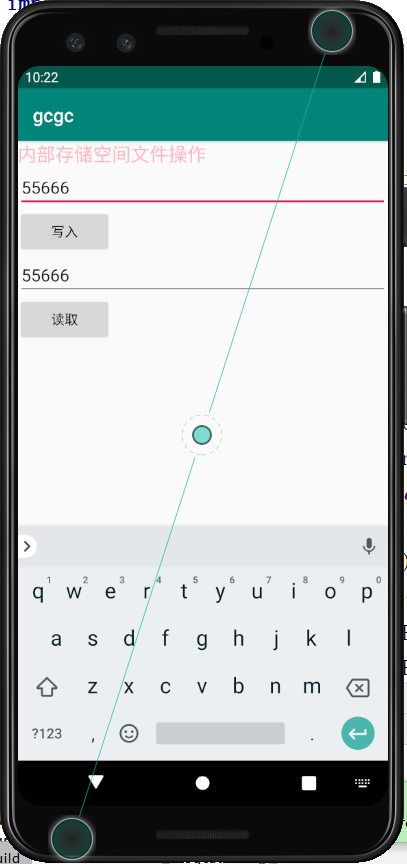
图片一 用内部存储实现文件写入和读取功能
<?xml version="1.0" encoding="utf-8"?>

<LinearLayout xmlns:android="http://schemas.android.com/apk/res/android"

    xmlns:app="http://schemas.android.com/apk/res-auto"

    xmlns:tools="http://schemas.android.com/tools"

    android:layout_width="match_parent"

    android:layout_height="match_parent"

    tools:context=".MainActivity"

    android:orientation="vertical">

    <TextView

        android:layout_width="match_parent"

        android:layout_height="wrap_content"

        android:text="内部存储空间文件操作"

        android:textSize="20sp"

        android:textColor="#FFB6C1"/>

    <EditText

        android:id="@+id/a1"

        android:layout_width="match_parent"

        android:layout_height="wrap_content"

        android:hint="输入你想要写入的内容" />

<Button

    android:id="@+id/b1"

    android:layout_width="100sp"

    android:layout_height="wrap_content"

    android:text="写入"

    android:textColor="#000000"

    android:onClick="click1"/>

    <EditText

        android:id="@+id/a2"

        android:layout_width="match_parent"

        android:layout_height="wrap_content"

        android:hint="显示读取的内容" />

    <Button

        android:id="@+id/b2"

        android:layout_width="100sp"

        android:layout_height="wrap_content"

        android:text="读取"

        android:textColor="#000000"

        android:onClick="click2"/>

</LinearLayout>
package com.example.gcgc;

import androidx.appcompat.app.AppCompatActivity;

import android.annotation.SuppressLint;

import android.view.View;

import android.os.Bundle;

import android.widget.EditText;

import android.widget.Toast;

import java.io.FileInputStream;

import java.io.FileNotFoundException;

import java.io.FileOutputStream;

import java.io.IOException;

public class MainActivity extends AppCompatActivity {

    @Override

    protected void onCreate(Bundle savedInstanceState) {

        super.onCreate(savedInstanceState);

        setContentView(R.layout.activity_main);

    }

    @SuppressLint("WrongConstant")

    public void click1(View view){

        EditText a1=findViewById(R.id.a1);

        EditText a2=findViewById(R.id.a2);

        String fileName ="data.txt";

        String content =a1.getText().toString();

        FileOutputStream fos =null;

        try{

            fos = openFileOutput(fileName,MODE_PRIVATE);

            fos.write(content.getBytes());

        }catch(Exception e){

            e.printStackTrace();

        }finally {

            try{

                if (fos!=null){

                    fos.close();

                }

            }catch(IOException e){

                e.printStackTrace();

            }

        }

        Toast.makeText(this,"保存成功",0).show();

    }

    @SuppressLint("WrongConstant")

    public void click2(View view){

        EditText a2 =findViewById(R.id.a2);

        String content="";

        FileInputStream fis =null;

        try{

            fis = openFileInput("data.txt");

            byte[] buffer =new byte[fis.available()];

            fis.read(buffer);

            content = new String(buffer);

        } catch (Exception e) {

            e.printStackTrace();

        }finally {

            try{

                if (fis!=null){

                    fis.close();

                }

            }    catch (IOException e) {

                e.printStackTrace();

            }

            a2.setText(content);

        }

    }

}
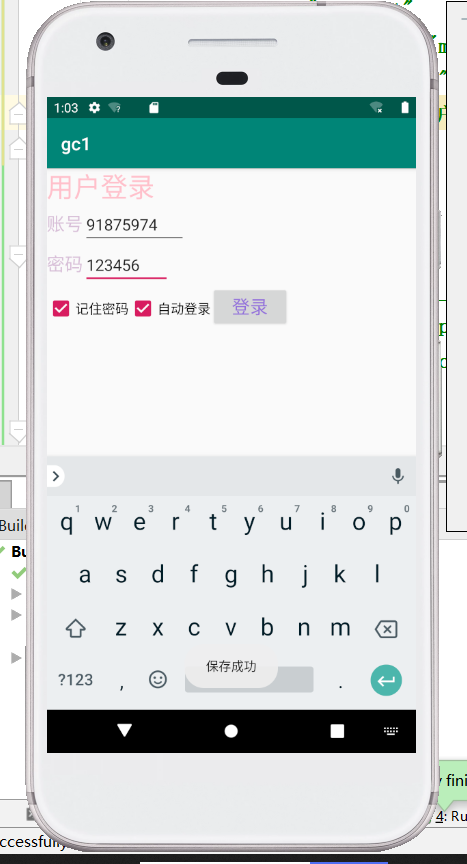
图片二 使用sharedpreference实现记住密码功能
<?xml version="1.0" encoding="utf-8"?>

<LinearLayout xmlns:android="http://schemas.android.com/apk/res/android"

    xmlns:app="http://schemas.android.com/apk/res-auto"

    xmlns:tools="http://schemas.android.com/tools"

    android:layout_width="match_parent"

    android:layout_height="match_parent"

    tools:context=".MainActivity"

    android:orientation="vertical">

    <TextView

        android:layout_width="wrap_content"

        android:layout_height="wrap_content"

        android:text="用户登录"

        android:textColor="#FFC0CB"

        android:textSize="30dp"/>

    <LinearLayout

        android:layout_width="wrap_content"

        android:layout_height="wrap_content"

        android:orientation="horizontal">

        <TextView

            android:layout_width="wrap_content"

            android:layout_height="wrap_content"

            android:text="账号"

            android:textColor="#D8BFD8"

            android:textSize="20dp"/>

        <EditText

            android:id="@+id/a1"

            android:layout_width="match_parent"

            android:layout_height="wrap_content"

            android:hint="请输入用户名" />

    </LinearLayout>

    <LinearLayout

        android:layout_width="wrap_content"

        android:layout_height="wrap_content"

        android:orientation="horizontal">

        <TextView

            android:layout_width="wrap_content"

            android:layout_height="wrap_content"

            android:text="密码"

            android:textColor="#D8BFD8"

            android:textSize="20dp"/>

        <EditText

            android:id="@+id/a2"

            android:layout_width="match_parent"

            android:layout_height="wrap_content"

            android:hint="请输入密码" />

    </LinearLayout>

<LinearLayout

    android:layout_width="wrap_content"

    android:layout_height="wrap_content"

    android:orientation="horizontal">

    <CheckBox

        android:id="@+id/b1"

        android:layout_width="wrap_content"

        android:layout_height="wrap_content"

        android:text="记住密码"

        android:textSize="15dp" />

<CheckBox

    android:id="@+id/b2"

    android:layout_width="wrap_content"

    android:layout_height="wrap_content"

    android:text="自动登录"

    android:textSize="15dp" />

    <Button

        android:id="@+id/c1"

        android:layout_width="wrap_content"

        android:layout_height="wrap_content"

        android:text="登录"

        android:textSize="20dp"

        android:textColor="#9370DB"/>

</LinearLayout>

</LinearLayout>
package com.example.gc1;

import androidx.appcompat.app.AppCompatActivity;

import android.content.Context;

import android.content.SharedPreferences;

import android.os.Bundle;

import android.os.SharedMemory;

import android.text.TextUtils;

import android.view.View;

import android.widget.Button;

import android.widget.EditText;

import android.widget.TableLayout;

import android.widget.Toast;

import java.io.FileInputStream;

import java.util.HashMap;

import java.util.Map;

public class MainActivity extends AppCompatActivity implements View.OnClickListener {

private EditText a1;//账号输入框

private EditText a2;//密码输入框

private Button c1;//登录按钮

    @Override

    protected void onCreate(Bundle savedInstanceState) {

        super.onCreate(savedInstanceState);

        setContentView(R.layout.activity_main);

        initView();

        Map<String,String>userInfo = SPSaveQQ.getUserInfo(this);

        if (userInfo!=null){

            a1.setText(userInfo.get("account"));

            a2.setText(userInfo.get("pssword"));

        }

    }

    private void initView() {

        a1=(EditText)findViewById(R.id.a1);

        a2=(EditText)findViewById(R.id.a2);

        c1=(Button)findViewById(R.id.c1);

        c1.setOnClickListener(this);

    }

    public void onClick(View view){

        switch (view.getId()){

            case R.id.c1:

                String account =a1.getText().toString().trim();

                String password =a2.getText().toString();

                if (TextUtils.isEmpty(account)){

                    Toast.makeText(this,"请输入账号",Toast.LENGTH_SHORT).show();

                    return;

                }

                if (TextUtils.isEmpty(password)){

                    Toast.makeText(this,"请输入密码",Toast.LENGTH_SHORT).show();

                    return;

                }

                Toast.makeText(this,"登陆成功",Toast.LENGTH_SHORT).show();

                boolean isSaveSuccess =SPSaveQQ.saveUserInfo(this,account,password);

                if (isSaveSuccess){

                    Toast.makeText(this,"保存成功", Toast.LENGTH_SHORT).show();

                }else

                {

                    Toast.makeText(this,"保存失败",Toast.LENGTH_SHORT).show();

                }

                break;

        }

    }

    public static class SPSaveQQ{

        public static boolean saveUserInfo(Context context,String account,String password){

            SharedPreferences sp =context.getSharedPreferences("data",Context.MODE_PRIVATE);

            SharedPreferences.Editor edit =sp.edit();

            edit.putString("userName",account);

            edit.putString("pwd",password);

            edit.commit();

            return true;

        }

        public static Map<String,String> getUserInfo(Context context){

            SharedPreferences sp =context.getSharedPreferences("data",Context.MODE_PRIVATE);

            String account =sp.getString("userName",null);

            String password =sp.getString("pwd",null);

            Map<String,String> userMap =new HashMap<String, String>();

            userMap.put("account",account);

            userMap.put("password",password);

            return userMap;

        }

    }

}
Android第十一、十二周作业的更多相关文章
- 2017-2018-1 《Linux内核原理与设计》第十二周作业
<linux内核原理与设计>第十二周作业 Sql注入基础原理介绍 分组: 和20179215袁琳完成实验 一.实验说明 SQL注入攻击通过构建特殊的输入作为参数传入Web应用程序,而这 ...
- 2019-2020-1 20199329《Linux内核原理与分析》第十二周作业
<Linux内核原理与分析>第十二周作业 一.本周内容概述: 通过编程理解 Set-UID 的运行机制与安全问题 完成实验楼上的<SET-UID程序漏洞实验> 二.本周学习内容 ...
- 第十二周作业_PSP总结报告
回顾1 (1)回想一下你曾经对计算机专业的畅想 当初你是如何做出选择计算机专业的决定的?经过一个学期,你的看法改变了么,为什么? 你认为过去接触到的课程是否符合你对计算机专业的期待,为什么?经过一个学 ...
- 2019春第十二周作业Compile Summarize
这个作业属于那个课程 C语言程序设计II 这个作业要求在哪里 这里 我在这个课程的目标是 能按自己的想法解出题目 这个作业在那个具体方面帮助我实现目标 能朝着软件工程师方向发展 参考文献与网址 C语言 ...
- C语言第十二周作业
这个作业属于那个课程 C语言程序设计II 这个作业要求在哪 https://edu.cnblogs.com/campus/zswxy/computer-scienceclass3-2018/h ...
- 20169212《Linux内核原理及分析》第十二周作业
格式化字符串漏洞实验 格式化字符串漏洞是由像 printf(user_input) 这样的代码引起的,其中 user_input 是用户输入的数据,具有 Set-UID root 权限的这类程序在运行 ...
- 201521123027 <java程序设计>第十二周作业总结
1.本周学习总结 1.1 以你喜欢的方式(思维导图或其他)归纳总结多流与文件相关内容. 2.书面作业 将Student对象(属性:int id, String name,int age,double ...
- python第六十八天--第十二周作业
主题: 需求: 用户角色,讲师\学员, 用户登陆后根据角色不同,能做的事情不同,分别如下讲师视图 管理班级,可创建班级,根据学员qq号把学员加入班级 可创建指定班级的上课纪录,注意一节上课纪录对应多条 ...
- 2017-2018-1 20179202《Linux内核原理与分析》第十二周作业
C语言实现Linux网络嗅探器 一.知识准备 1.一般情况下,网络上所有的机器都可以"听"到通过的流量,但对不属于自己的数据包则不予响应.如果某个工作站的网络接口处于混杂模式,那么 ...
随机推荐
- vue学习过程总结(05) - vue的重要插件vue-router
vue-router的中文文档:https://router.vuejs.org/zh/installation.html(基于文档的摘抄) 1.vue中的组件与插件 转载:https://blog. ...
- Rust-Sqlx极简教程
简介 sqlx 是 rust 中的一个数据库访问工具.具有以下特点: 异步:原生就支持异步,在并发性高的场合能够得到更好的支持 编译时检查查询:sqlx可以在 cargo build 的时候检查执行s ...
- java面向对象思想之封装
一.什么是封装 菜鸟教程对封装的解释是"在面向对象程式设计方法中,封装(英语:Encapsulation)是指一种将抽象性函式接口的实现细节部分包装.隐藏起来的方法.".简单来说就 ...
- 【编程教室】Python绘制冬奥吉祥物“冰墩墩”
大家好,欢迎来到 Crossin的编程教室 ! 这两天,随着北京冬奥会的开幕,吉祥物"冰墩墩"可是火出了圈,多少人排长队都买不到.据说甚至有人把价格炒到了几千元. 就连昨天的&qu ...
- zookeeper 负载均衡和 nginx 负载均衡区别 ?
zk 的负载均衡是可以调控,nginx 只是能调权重,其他需要可控的都需要自己写插件:但是 nginx 的吞吐量比 zk 大很多,应该说按业务选择用哪种方式.
- Java并发机制(1)--线程状态与方法(转)
Java并发编程:Thread类的使用 个人总结:参考:博客园-海子-http://www.cnblogs.com/dolphin0520/p/3920357.html 参考:https://blog ...
- 在 centos6 安装 MySQL5.7 官方文档
Adding the MySQL Yum Repository First, add the MySQL Yum repository to your system's repository list ...
- scrapy框架初识及使用
一.什么是Scrapy? Scrapy是一个为了爬取网站数据,提取结构性数据而编写的应用框架,非常出名,非常强悍.所谓的框架就是一个已经被集成了各种功能(高性能异步下载,队列,分布式,解析,持久化等) ...
- Matplotlib is currently using agg, which is a non-GUI backend 和 ImportError: No module named 'Tkinter' [closed]
跑maskrcnn报错:UserWarning: Matplotlib is currently using agg, which is a non-GUI backend, so cannot sh ...
- canvas系列教程03-柱状图项目1
弄了一堆线方块和函数,感觉挺玄乎,然并卵.我们直接写个项目看看. canvas一个比较拽的应用就是图表和游戏,我们从浅入深,先玩图表,图表我们今天说一个最简单柱状图. 柱状图很多人用百度的echars ...