
Pytest Fixture(三)
name: name参数表示可以对fixture的名称进行重命名:
注意:通过name重命名后,继续使用以前的名字调用会报错。
import pytest

@pytest.fixture(name='anjing')

def login():

    print('\n登录操作')

    yield

    print('\n退出登录!')

class TestLogin:

    def test_01(self, anjing):

        print('---用例01---')

    def test_02(self):

        print('---用例02---')

if __name__ == '__main__':

    pytest.main(['-vs'])
params:参数化
假设现在有一批 API 需要测试对不同数据库的支持情况(对所有数据库进行相同操作),最简单的方法就是针对每个数据库编写一个测试用例,但这包含大量重复代码,如数据库的连接、关闭,查询等。
使用固件抽离出数据库的通用操作,每个 API 都能复用这些数据库固件,同时可维护性也得到提升。
import pytest

@pytest.fixture(params=[

    ('redis', '6379'),

    ('elasticsearch', '9200')

])

def param(request):

    print(f"数据库的配置:{request.param}")

    return request.param

@pytest.fixture(autouse=True)

def db(param):

    print(f'数据库连接了{param}')

    yield

    print(f'数据库关闭了{param}')

def test_api():

    assert 1 == 1
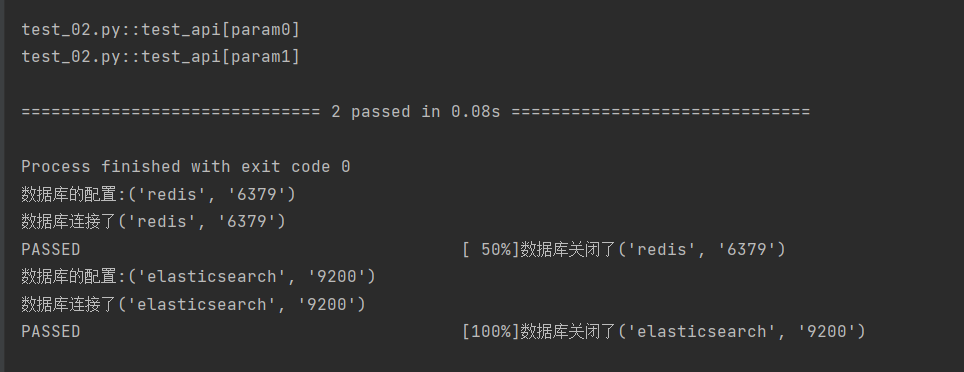
执行结果
import pytest

data = ['anjing', 'test', 'admin']

@pytest.fixture(params=data, ids=['user=anjing', 'user=test', 'user=admin'])

def login(request):

    print('登录功能')

    yield request.param

    print('退出登录')

class TestCase:

    def test_01(self, login):

        print('---用例01---')

        print(f'登录的用户名{login}')

    def test_02(self):

        print('---用例02---')

if __name__ == '__main__':

    pytest.main(['-vs'])
Pytest Fixture(三)的更多相关文章
- Pytest测试框架(三):pytest fixture 用法
xUnit style 结构的 fixture用于初始化测试函数, pytest fixture是对传统的 xUnit 架构的setup/teardown功能的改进.pytest fixture为测试 ...
- Pytest fixture及conftest详解
前言 fixture是在测试函数运行前后,由pytest执行的外壳函数.fixture中的代码可以定制,满足多变的测试需求,包括定义传入测试中的数据集.配置测试前系统的初始状态.为批量测试提供数据源等 ...
- pytest.fixture和普通函数调用
普通函数嗲用def one(): a="aaaaaaaaaaa" return a def test_one(): s=one() print (s) test_one() pyt ...
- pytest 用 @pytest.mark.usefixtures("fixtureName")或@pytest.fixture(scope="function", autouse=True)装饰,实现类似setup和TearDown的功能
conftest.py import pytest @pytest.fixture(scope="class") def class_auto(): print("&qu ...
- pytest fixture 利用 params参数实现用例集合
@pytest.fixture有一个params参数,接受一个列表,列表中每个数据都可以作为用例的输入.也就说有多少数据,就会形成多少用例.如下面例子,就形成3条用例 test_parametrizi ...
- pytest fixture中scope试验,包含function、module、class、session、package
上图是试验的目录结构 conftest.py:存放pytest fixture的文件 import uuid import pytest @pytest.fixture(scope="mod ...
- python单元测试框架pytest——fixture函数(类似unitest的setup和teardown)
pytest的setup和teardown函数(曾被一家云计算面试官问到过). pytest提供了fixture函数用以在测试执行前和执行后进行必要的准备和清理工作.与python自带的unitest ...
- 学习-Pytest(三)setup/teardown
1. 用例运行级别 模块级(setup_module/teardown_module)开始于模块始末,全局的 函数级(setup_function/teardown_function)只对函数用例生效 ...
- pytest封神之路第三步 精通fixture
首先放一句"狠话". 如果你不会fixture,那么你最好别说自己会pytest. (只是为了烘托主题哈,手上的砖头可以放下了,手动滑稽) fixture是什么 看看源码 def ...
- 『德不孤』Pytest框架 — 13、Pytest中Fixture装饰器(三)
目录 9.ids参数说明 10.name参数说明 11.scope参数说明 (1)scope="function" (2)scope="class" (3)sc ...
随机推荐
- 使用win10 wsl中的Debian编译lean 的 lede
安装Debian发行版 启用windows 适用于linux 的 windows子系统 安装Debian 参考p3terx的文章把debian装到非系统盘上: https://p3terx.com/a ...
- 性能测试-IO密集型-直接会话可能会断了,命令执行不了
1.IO密集型模拟命令 该命令会开启1个worker不停的读写临时文件,同时启动6个workers不停的调用sync系统调用提交缓存 stress-ng -i 6 --hdd 1 --timeout ...
- Linux装cudnn
https://stackoverflow.com/questions/66977227/could-not-load-dynamic-library-libcudnn-so-8-when-runni ...
- js中,作用域与作用域链的概念
1 作用域 声明的一个变量只在一段代码范围内是有效的,并不是总有效的.例如 : function father(){ // 声明变量 var val = "作用域内"; // 定义 ...
- Spring boot 无法加载css样式,image解决办法
Spring boot 无法加载css样式,image解决办法 最近在 给公司做一个系统,使用了springboot框架,同时也遇到了一些大坑 在网上找到了一个好看的模版的,(非前后端的分离)但是 ...
- iOS MacOS 系统时间(时间戳)格式化
#pragma mark -原始数据是20220608155116,加工成2022/06/08 15:51:16 -(NSString *)timeString:(NSString *)toIndex ...
- uniapp 中获取微信小程序的原生导航栏高度
const custom = wx.getMenuButtonBoundingClientRect() // console.log(custom) that.yuansheng= custom.he ...
- R语言MCMC-GARCH、风险价值VaR模型股价波动分析上证指数时间序列
全文链接:http://tecdat.cn/?p=31717 原文出处:拓端数据部落公众号 分析师:Ke Liu 随着金融市场全球化的发展,金融产品逐渐受到越来越多的关注,而金融产品的风险度量成为投资 ...
- Ubuntu 18.04 安装基本应用
Ubuntu 谷歌浏览器下载:第一步打开终端,在终端输入下载命令wget https://dl.google.com/linux/direct/google-chrome-stable_current ...
- Outlook网页版怎么设置自动回复?节假日怎么设置邮件自动回复?
在页面顶部,选择 设置> 查看所有 Outlook 设置 选择邮件>撰写和答复. 在答复或全部答复下,选择当您从阅读窗格中答复时的默认响应: 答复: 您的答复仅发送给发件人. 全部答复: ...