
tp6微信公众号开发者模式基础消息
官方文档
https://developers.weixin.qq.com/doc/offiaccount/Message_Management/Receiving_standard_messages.html
1:结合上篇继续再services目录下的WechatService.php继续封装
https://www.cnblogs.com/xiaoyantongxue/p/15803334.html
<?php

namespace app\services;

use think\Log;

class WechatService

{

    protected static $_token_key = 'wxdev:wechat:token';

    /*

     * 微信公众号获取access_token

     * */

    public static function getToken()

    {

        $accessToken = cache(self::$_token_key);

        if (!$accessToken) {

            $accessTokenUrl = sprintf(config('wechat.access_token_url'), config('wechat.appid'), config('wechat.appsecret'));

            $accessTokenArr = json_decode(file_get_contents($accessTokenUrl), true);

            if (isset($accessTokenArr['errcode'])) {

//                记录日记

                Log::info($accessTokenArr['errmsg']);

                return false;

            } else {

                $accessToken = $accessTokenArr['access_token'];

                cache(self::$_token_key, $accessToken, $accessTokenArr['expires_in'] - 200);

            }

        }

        return $accessToken;

    }

    /*

     * 基础消息能力-文本消息

     * */

    public static function testReplay($postObj)

    {

        $fromUsername = $postObj->FromUserName;

        $toUsername = $postObj->ToUserName;

        $msgType = $postObj->MsgType;

        $keyword = trim((string)$postObj->Content);

        $time = time();

        if ($keyword == '你好') {

            $replyContent = "欢迎来到我的公众号!";

        } else {

            $replyContent = "厉害了,我的哥!!!!!";

        }

        $sendXml = "<xml>

                            <ToUserName><![CDATA[%s]]></ToUserName>

                             <FromUserName><![CDATA[%s]]></FromUserName>

                            <CreateTime>%s</CreateTime>

                            <MsgType><![CDATA[%s]]></MsgType>

                            <Content><![CDATA[%s]]></Content>

                            <FuncFlag>0</FuncFlag>

                            </xml>";

        $sendBackXml = sprintf($sendXml, $fromUsername, $toUsername, $time, $msgType, $replyContent);

        return $sendBackXml;

    }

    /*

  * 基础消息能力-图片消息

  * */

    public static function imageReplay($postObj)

    {

        $fromUsername = $postObj->FromUserName;

        $toUsername = $postObj->ToUserName;

        $time = time();

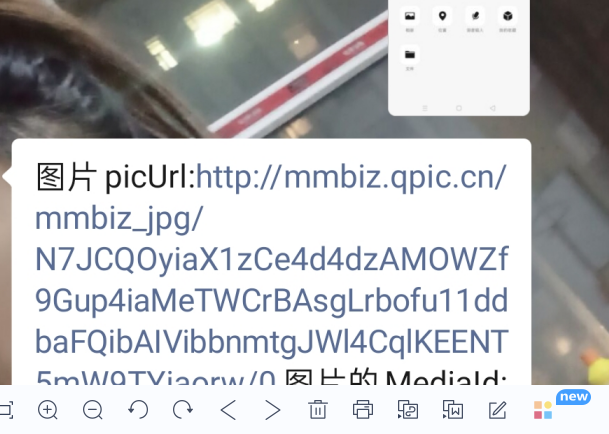
        $replyContent = "图片picUrl:{$postObj->PicUrl},图片的MediaId:{$postObj->MediaId}";

        $sendXml = "<xml>

                            <ToUserName><![CDATA[%s]]></ToUserName>

                             <FromUserName><![CDATA[%s]]></FromUserName>

                            <CreateTime>%s</CreateTime>

                            <MsgType><![CDATA[%s]]></MsgType>

                            <Content><![CDATA[%s]]></Content>

                            </xml>";

        $sendBackXml = sprintf($sendXml, $fromUsername, $toUsername, $time, 'text', $replyContent);

        return $sendBackXml;

    }

    /*

     * 掌握基础消息能力-语音消息

     * */

    public static function voiceReplay($postObj)

    {

        $fromUsername = $postObj->FromUserName;

        $toUsername = $postObj->ToUserName;

        $time = time();

        $replyContent = "语音消息MediaId为:{$postObj->MediaId}'具体内容为:{$postObj->Recognition}";

        $sendXml = "<xml>

                            <ToUserName><![CDATA[%s]]></ToUserName>

                             <FromUserName><![CDATA[%s]]></FromUserName>

                            <CreateTime>%s</CreateTime>

                            <MsgType><![CDATA[%s]]></MsgType>

                            <Content><![CDATA[%s]]></Content>

                            </xml>";

        $sendBackXml = sprintf($sendXml, $fromUsername, $toUsername, $time, 'text', $replyContent);

        return $sendBackXml;

    }

    /*

   * 基础消息能力-视频消息

   * */

    public static function videoReplay($postObj)

    {

        $fromUsername = $postObj->FromUserName;

        $toUsername = $postObj->ToUserName;

        $time = time();

        $replyContent = "视频消息MediaId为:{$postObj->MediaId}'体文件下载接口拉取数据:{$postObj->ThumbMediaId}";

        $sendXml = "<xml>

                            <ToUserName><![CDATA[%s]]></ToUserName>

                             <FromUserName><![CDATA[%s]]></FromUserName>

                            <CreateTime>%s</CreateTime>

                            <MsgType><![CDATA[%s]]></MsgType>

                            <Content><![CDATA[%s]]></Content>

                            </xml>";

        $sendBackXml = sprintf($sendXml, $fromUsername, $toUsername, $time, 'text', $replyContent);

        return $sendBackXml;

    }

    /*

* -地理位置消息

* */

    public static function locationReplay($postObj)

    {

        $fromUsername = $postObj->FromUserName;

        $toUsername = $postObj->ToUserName;

        $time = time();

        $replyContent = "经度为:{$postObj->Location_Y}'维度:{$postObj->Location_X},具体地址:{$postObj->Label}";

        $sendXml = "<xml>

                            <ToUserName><![CDATA[%s]]></ToUserName>

                             <FromUserName><![CDATA[%s]]></FromUserName>

                            <CreateTime>%s</CreateTime>

                            <MsgType><![CDATA[%s]]></MsgType>

                            <Content><![CDATA[%s]]></Content>

                            </xml>";

        $sendBackXml = sprintf($sendXml, $fromUsername, $toUsername, $time, 'text', $replyContent);

        return $sendBackXml;

    }

    /*

* -基础消息能力-链接消息

* */

    public static function linkReplay($postObj)

    {

        $fromUsername = $postObj->FromUserName;

        $toUsername = $postObj->ToUserName;

        $time = time();

        $replyContent = "消息的标题为:{$postObj->Title},描述:{$postObj->Description}";

        $sendXml = "<xml>

                            <ToUserName><![CDATA[%s]]></ToUserName>

                             <FromUserName><![CDATA[%s]]></FromUserName>

                            <CreateTime>%s</CreateTime>

                            <MsgType><![CDATA[%s]]></MsgType>

                            <Content><![CDATA[%s]]></Content>

                            </xml>";

        $sendBackXml = sprintf($sendXml, $fromUsername, $toUsername, $time, 'text', $replyContent);

        return $sendBackXml;

    }

}
2:控制器进行调用:

<?php

declare (strict_types=1);

namespace app\controller;

use app\BaseController;

use app\services\WechatService;

use think\Request;

class Wechat extends BaseController

{

    /*

     * 域名解析首方法

     * */

    public function valid()

    {

        //获取随机字符串

        $echoStr = input("echostr");

        if ($echoStr) {

// 验证接口的有效性,由于接口有效性的验证必定会传递echostr 参数

            if ($this->checkSignature()) {

                echo $echoStr;

                exit;

            }

        } else {

            return $this->responseMsg();

        }

    }

    /*

     * 解析文本、图片、语音.视频、地理、链接

     * */

    private function responseMsg()

    {

        $postStr = file_get_contents('php://input');

        libxml_disable_entity_loader(true);

        $postObj = simplexml_load_string($postStr, 'SimpleXMLElement', LIBXML_NOCDATA);

        switch ($postObj->MsgType) {

//            如果发过来的信息是文本,调用WechatService的testReplay方法

            case 'text':

                $sendBackXml = WechatService::testReplay($postObj); return $sendBackXml; break;

//            如果发过来的信息是图片,调用WechatService的imgReplay方法

            case 'image':

                $sendBackXml = WechatService::imageReplay($postObj); return $sendBackXml; break;

//           如果发过来的信息是语音,调用WechatService的voiceReplay方法

            case 'voice':

                $sendBackXml = WechatService::voiceReplay($postObj); return $sendBackXml; break;

 //           如果发过来的信息是视屏,调用WechatService的videoReplay方法

            case 'video':

                $sendBackXml = WechatService::videoReplay($postObj); return $sendBackXml; break;

  //           如果发过来的信息是地理位置消息,调用WechatService的videoReplay方法

            case 'location':

                $sendBackXml = WechatService::locationReplay($postObj); return $sendBackXml; break;

 //           如果发过来的信息是地理位置消息,调用WechatService的videoReplay方法

            case 'link':

                $sendBackXml = WechatService::linkReplay($postObj); return $sendBackXml; break;

        }

    }

    /*

     *  获取token

     * */

    protected function checkSignature()

    {

// 微信加密签名

        $signature = input("signature");

        $timestamp = input("timestamp");//时间戳

        $nonce = input("nonce");//随机数

        $token = "yanbing"; //token值,必须和你设置的一样

        $tmpArr = array($token, $timestamp, $nonce);

        sort($tmpArr, SORT_STRING);

        $tmpStr = implode($tmpArr);

        $tmpStr = sha1($tmpStr);

        if ($tmpStr == $signature) {

            return true;

        } else {

            return false;

        }

    }

    /*

     * 获取access_token

     * */

    public function getToken()

    {

        $accessToken = WechatService::getToken();

        echo $accessToken;

    }

}
3:效果图:
tp6微信公众号开发者模式基础消息的更多相关文章
- tp6微信公众号开发者模式token认证
微信公众号开发完整教程(一) PHP7.0版本,TP5.0框架 技术标签: 微信公众号开发 因为工作的需要,这一两年对微信公众号和小程序,项目制作的比较多.所以我才打算写一篇全面的 ...
- tp6微信公众号开发者模式自定义菜单
1,参考上篇博客,获取access_token https://www.cnblogs.com/xiaoyantongxue/p/15803334.html 2:控制器写以下代码 /* * 获取普通a ...
- tp6微信公众号开发者模式获取access_token
1:config 文件下新建一个文件wechat.php,将个人id和秘钥写入配置文件 网址: https://developers.weixin.qq.com/doc/offiaccount/Bas ...
- php 开启微信公众号开发者模式
php 开启微信公众号开发者模式<pre><?php/** * wechat php test */header('Content-type:text');//define your ...
- 微信公众号开发者模式自定义菜单 node
纯属分享 var config = require('./admin/wx/config/config'); var API = require('wechat-api'); var api = ne ...
- 微信公众号发送客服消息提示errcode":45015,"errmsg":"response out of time limit or subscription is canceled hint:解决办法【已解决】
微信公众号发送客服消息提示errcode":45015,"errmsg":"response out of time limit or subscription ...
- PHP开发微信公众号(二)消息接受与推送
上一篇文章我们知道怎么获取二维码,这样别人就可以扫描二维码来关注我们,但是别人关注后,发送消息,我们怎么进行相关处理? 这里我们就来学习下怎么处理处理这些消息,以及推送消息. 学习之前首先你需要有一个 ...
- Java微信公众号开发----关键字自动回复消息
在配置好开发者配置后,本人第一个想要实现的是自动回复消息的功能,说明以下几点: 1. url 仍然不变,还是开发配置里的url 2. 微信采用 xml 格式传输数据 3.微信服务器传给我们的参数主要有 ...
- 解决升级PHP7后 微信公众号收不到消息
服务器配置Linux+Nginx+PHP5.5+mysql index方法配置微信的关注回复.菜单事件.多客服.自动回复等 public function actionIndex() { if (is ...
随机推荐
- Uwl.Admin.Core开源框架(二) 使用QuartzNet
Uwl.Admin.Core中使用QuartzNet定时任务模块: 本文负责讲解RabbitMQ的使用 Uwl.Admin.Core使用的技术有: *.Async和Await 异步编程 *.Repos ...
- Java协变、逆变、类型擦除
协变.逆变 定义 Java中String类型是继承自Object的,姑且记做String ≦ Object,表示String是Object的子类型,String的对象可以赋给Object的对象.而Ob ...
- Volatile关键字和ThreadLocal变量的简单使用
原创:转载需注明原创地址 https://www.cnblogs.com/fanerwei222/p/11812459.html package thread; /** * volatile关键字和T ...
- spring property标签中的 ref属性和ref 标签有什么不同
spring的配置文件可能会有多个<property name="a" ref="b" />就是找当前配置文件里的bean 也就是b <ref ...
- Docker之LNMP分布式容器部署
Docker之LNMP分布式容器部署 目录 Docker之LNMP分布式容器部署 一.项目模拟 1. 项目环境 2. 服务器环境 3. 任务需求 二.Linux系统基础镜像 三.Nginx 1. 建立 ...
- 使用rsync+inotify实现/www目录实时同步
一.实现bak-server 1.1安装rsync # yum -y install rsync 1.2修改配置文件 # vi /etc/rsyncd.conf #添加下面内容 uid=test gi ...
- 小程序"errcode":41002错误问题如何解决?
我的问题是:小程序在本地测试的时候是没有问题的,但是当我扫开发者中的项目中的二维码手机浏览测试的时候发现是没有数据的,然后调试工具中出现: {"errcode":41002,&qu ...
- systemverilog中奇怪的语法
1.->运算符 expression_a->expression_b其实等效于(!expression_a || expression_b),systemverilog中利用 || 运算的 ...
- php使用CURL进行模拟登录采集数据
<?php $cookie_path = './'; //设置cookie保存路径 //-----登录要提交的表单数据--------------- $vars['username'] = '张 ...
- Spring高级特性之四:FactoryBean和BeanFactory
FactoryBean和BeanFactory两只是两个单词顺序不同但是内容大不相同.落脚点在后面一个单词,前面一个单词是其功能描述:FactoryBean--工厂bean,一个建工厂的bean?Be ...