
[工具/Maven]Maven工程目录结构 | Maven自动构建骨架(maven-archetype)中quickstart与webapp的区别

1 maven-archetype-quickstart
1.1 IDEA中的前期准备
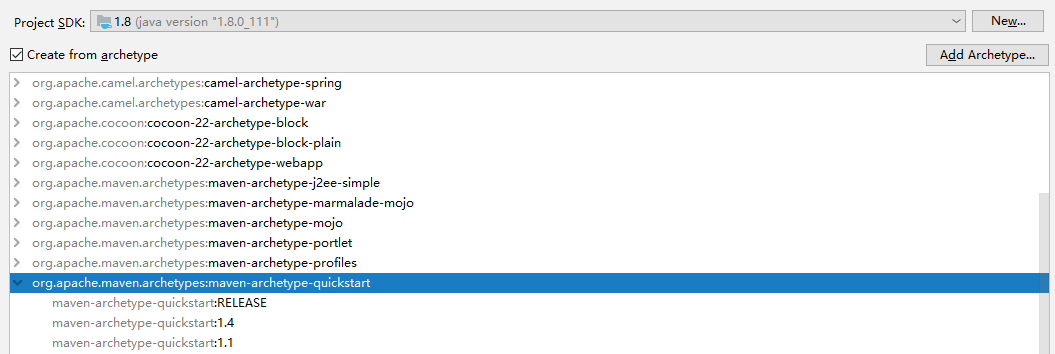
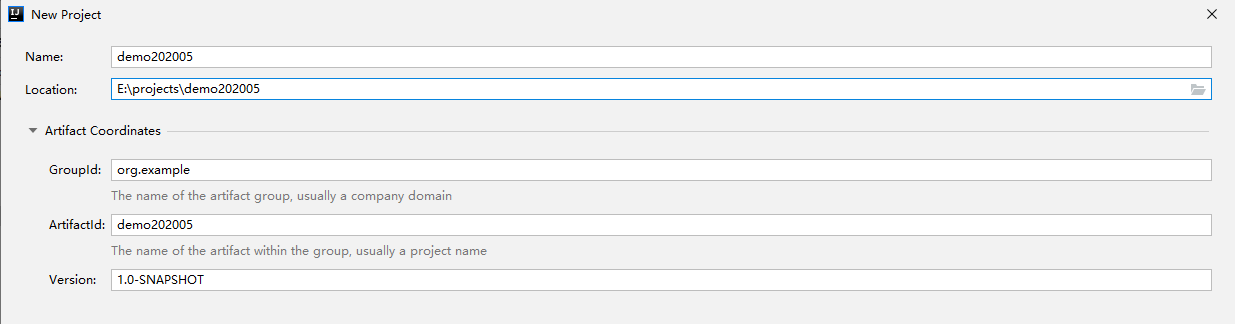
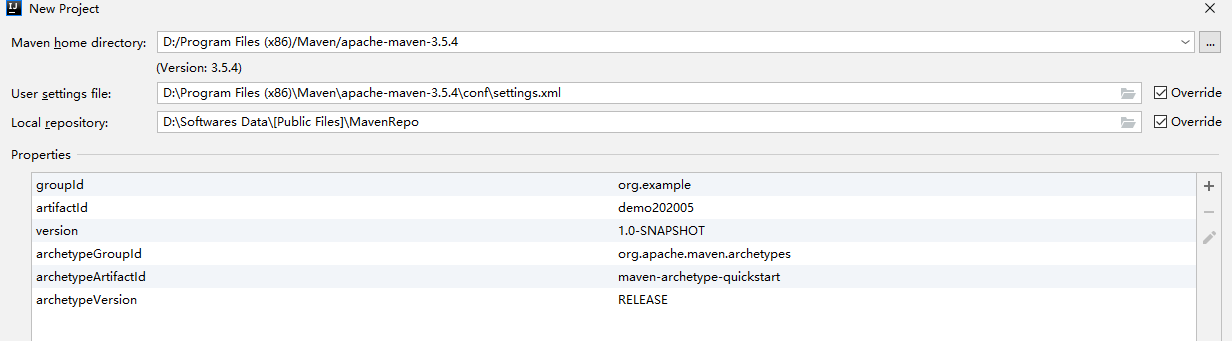
1.2 自动构建后
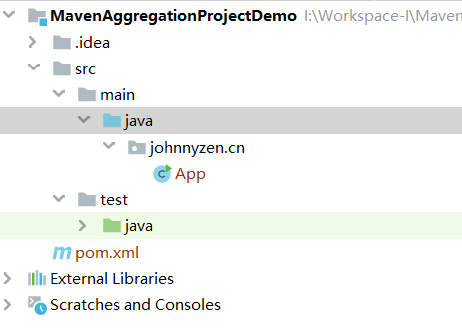
↓pom.xml↓
<?xml version="1.0" encoding="UTF-8"?>

<project xmlns="http://maven.apache.org/POM/4.0.0" xmlns:xsi="http://www.w3.org/2001/XMLSchema-instance"

  xsi:schemaLocation="http://maven.apache.org/POM/4.0.0 http://maven.apache.org/xsd/maven-4.0.0.xsd">

  <modelVersion>4.0.0</modelVersion>

  <groupId>johnnyzen.cn</groupId>

  <artifactId>MavenAggregationProjectDemo</artifactId>

  <version>1.0-SNAPSHOT</version>

  <name>MavenAggregationProjectDemo</name>

  <!-- FIXME change it to the project's website -->

  <url>http://www.example.com</url>

  <properties>

    <project.build.sourceEncoding>UTF-8</project.build.sourceEncoding>

    <maven.compiler.source>1.7</maven.compiler.source>

    <maven.compiler.target>1.7</maven.compiler.target>

  </properties>

  <dependencies>

    <dependency>

      <groupId>junit</groupId>

      <artifactId>junit</artifactId>

      <version>4.11</version>

      <scope>test</scope>

    </dependency>

  </dependencies>

  <build>

    <pluginManagement><!-- lock down plugins versions to avoid using Maven defaults (may be moved to parent pom) -->

      <plugins>

        <!-- clean lifecycle, see https://maven.apache.org/ref/current/maven-core/lifecycles.html#clean_Lifecycle -->

        <plugin>

          <artifactId>maven-clean-plugin</artifactId>

          <version>3.1.0</version>

        </plugin>

        <!-- default lifecycle, jar packaging: see https://maven.apache.org/ref/current/maven-core/default-bindings.html#Plugin_bindings_for_jar_packaging -->

        <plugin>

          <artifactId>maven-resources-plugin</artifactId>

          <version>3.0.2</version>

        </plugin>

        <plugin>

          <artifactId>maven-compiler-plugin</artifactId>

          <version>3.8.0</version>

        </plugin>

        <plugin>

          <artifactId>maven-surefire-plugin</artifactId>

          <version>2.22.1</version>

        </plugin>

        <plugin>

          <artifactId>maven-jar-plugin</artifactId>

          <version>3.0.2</version>

        </plugin>

        <plugin>

          <artifactId>maven-install-plugin</artifactId>

          <version>2.5.2</version>

        </plugin>

        <plugin>

          <artifactId>maven-deploy-plugin</artifactId>

          <version>2.8.2</version>

        </plugin>

        <!-- site lifecycle, see https://maven.apache.org/ref/current/maven-core/lifecycles.html#site_Lifecycle -->

        <plugin>

          <artifactId>maven-site-plugin</artifactId>

          <version>3.7.1</version>

        </plugin>

        <plugin>

          <artifactId>maven-project-info-reports-plugin</artifactId>

          <version>3.0.0</version>

        </plugin>

      </plugins>

    </pluginManagement>

  </build>

</project>
2 maven-archetype-webapp
2.1 IDEA中的前期准备
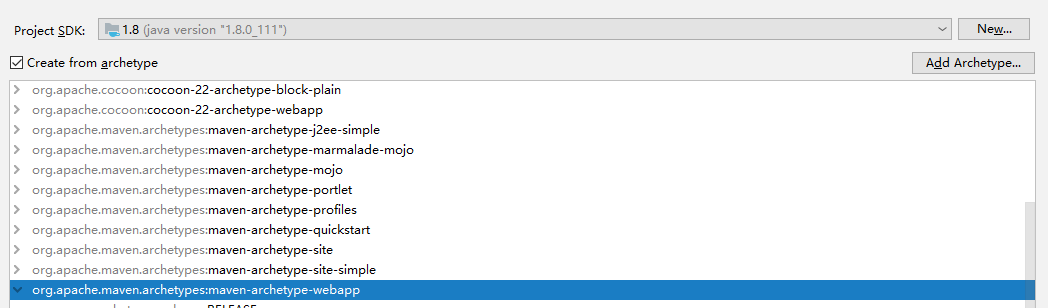
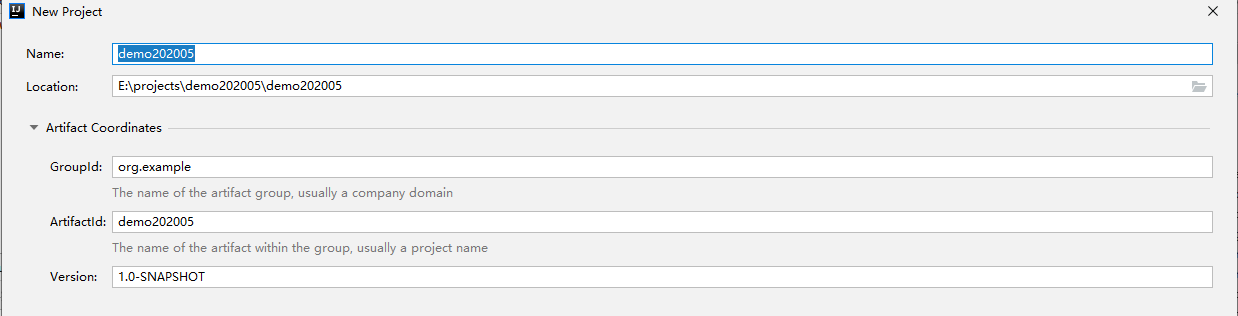
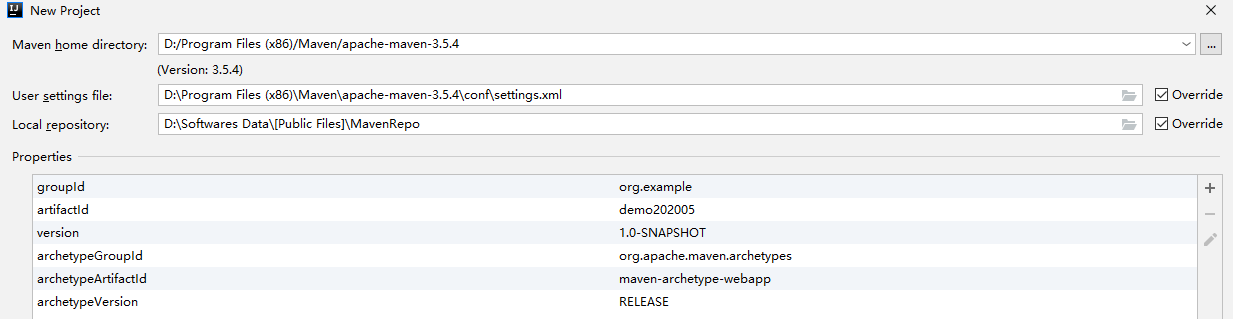
2.2 自动构建后
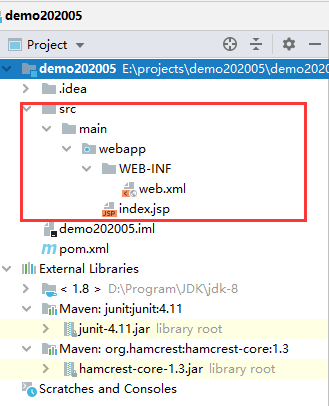
↓pom.xml↓
<?xml version="1.0" encoding="UTF-8"?>

<project xmlns="http://maven.apache.org/POM/4.0.0" xmlns:xsi="http://www.w3.org/2001/XMLSchema-instance"

  xsi:schemaLocation="http://maven.apache.org/POM/4.0.0 http://maven.apache.org/xsd/maven-4.0.0.xsd">

  <modelVersion>4.0.0</modelVersion>

  <groupId>org.example</groupId>

  <artifactId>demo202005</artifactId>

  <version>1.0-SNAPSHOT</version>

  <packaging>war</packaging>

  <name>demo202005 Maven Webapp</name>

  <!-- FIXME change it to the project's website -->

  <url>http://www.example.com</url>

  <properties>

    <project.build.sourceEncoding>UTF-8</project.build.sourceEncoding>

    <maven.compiler.source>1.7</maven.compiler.source>

    <maven.compiler.target>1.7</maven.compiler.target>

  </properties>

  <dependencies>

    <dependency>

      <groupId>junit</groupId>

      <artifactId>junit</artifactId>

      <version>4.11</version>

      <scope>test</scope>

    </dependency>

  </dependencies>

  <build>

    <finalName>demo202005</finalName>

    <pluginManagement><!-- lock down plugins versions to avoid using Maven defaults (may be moved to parent pom) -->

      <plugins>

        <plugin>

          <artifactId>maven-clean-plugin</artifactId>

          <version>3.1.0</version>

        </plugin>

        <!-- see http://maven.apache.org/ref/current/maven-core/default-bindings.html#Plugin_bindings_for_war_packaging -->

        <plugin>

          <artifactId>maven-resources-plugin</artifactId>

          <version>3.0.2</version>

        </plugin>

        <plugin>

          <artifactId>maven-compiler-plugin</artifactId>

          <version>3.8.0</version>

        </plugin>

        <plugin>

          <artifactId>maven-surefire-plugin</artifactId>

          <version>2.22.1</version>

        </plugin>

        <plugin>

          <artifactId>maven-war-plugin</artifactId>

          <version>3.2.2</version>

        </plugin>

        <plugin>

          <artifactId>maven-install-plugin</artifactId>

          <version>2.5.2</version>

        </plugin>

        <plugin>

          <artifactId>maven-deploy-plugin</artifactId>

          <version>2.8.2</version>

        </plugin>

      </plugins>

    </pluginManagement>

  </build>

</project>
3 maven-archetype-site-simple
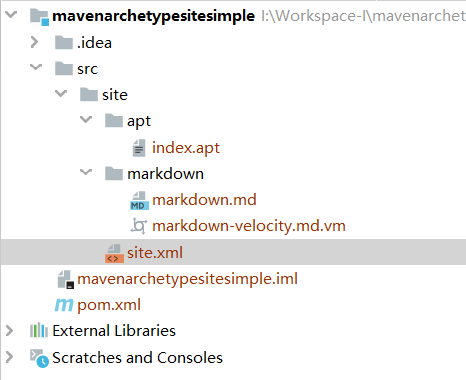
<?xml version="1.0" encoding="UTF-8"?>

<project xmlns="http://maven.apache.org/POM/4.0.0" xmlns:xsi="http://www.w3.org/2001/XMLSchema-instance"

  xsi:schemaLocation="http://maven.apache.org/POM/4.0.0 http://maven.apache.org/xsd/maven-4.0.0.xsd">

  <modelVersion>4.0.0</modelVersion>

  <groupId>johnnyzen.cn</groupId>

  <artifactId>maven-archetype-site-simple</artifactId>

  <version>1.0-SNAPSHOT</version>

  <packaging>pom</packaging>

  <!-- FIXME change it to the project's website -->

  <url>http://www.example.com</url>

  <distributionManagement>

    <site>

      <id>website</id>

      <url>scp://webhost.company.com/www/website</url>

    </site>

  </distributionManagement>

  <dependencies>

    <dependency>

      <groupId>org.apache.maven.plugins</groupId>

      <artifactId>maven-project-info-reports-plugin</artifactId>

      <version>3.0.0</version>

    </dependency>

  </dependencies>

  <properties>

    <project.build.sourceEncoding>UTF-8</project.build.sourceEncoding>

  </properties>

  <build>

    <pluginManagement><!-- lock down plugins versions to avoid using Maven defaults (may be moved to parent pom) -->

      <plugins>

        <plugin>

          <artifactId>maven-clean-plugin</artifactId>

          <version>3.1.0</version>

        </plugin>

        <plugin>

          <artifactId>maven-site-plugin</artifactId>

          <version>3.7.1</version>

        </plugin>

        <plugin>

          <artifactId>maven-project-info-reports-plugin</artifactId>

          <version>3.0.0</version>

        </plugin>

      </plugins>

    </pluginManagement>

  </build>

  <reporting>

    <plugins>

      <plugin>

        <artifactId>maven-project-info-reports-plugin</artifactId>

      </plugin>

    </plugins>

  </reporting>

</project>
4 maven-archetype-site
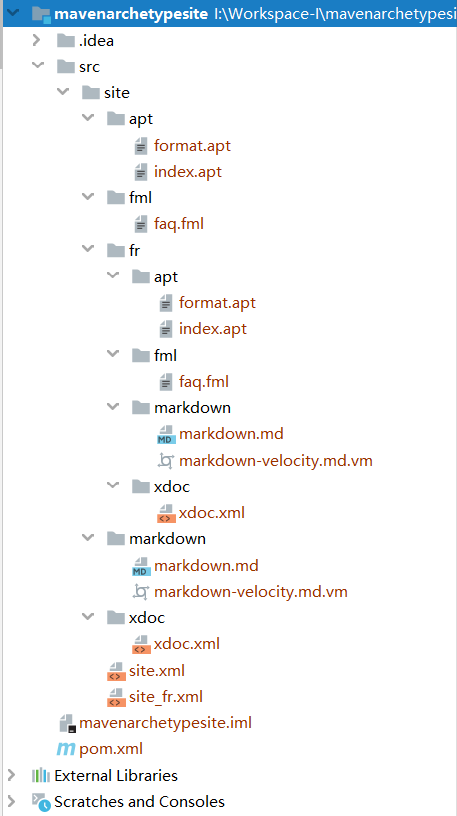
<?xml version="1.0" encoding="UTF-8"?>

<project xmlns="http://maven.apache.org/POM/4.0.0" xmlns:xsi="http://www.w3.org/2001/XMLSchema-instance"

  xsi:schemaLocation="http://maven.apache.org/POM/4.0.0 http://maven.apache.org/xsd/maven-4.0.0.xsd">

  <modelVersion>4.0.0</modelVersion>

  <groupId>cn.johnnyzen</groupId>

  <artifactId>maven-archetype-site</artifactId>

  <version>1.0-SNAPSHOT</version>

  <name>Maven</name>

  <!-- FIXME change it to the project's website -->

  <url>http://maven.apache.org/</url>

  <inceptionYear>2001</inceptionYear>

  <distributionManagement>

    <site>

      <id>website</id>

      <url>scp://webhost.company.com/www/website</url>

    </site>

  </distributionManagement>

  <properties>

    <project.build.sourceEncoding>UTF-8</project.build.sourceEncoding>

  </properties>

  <build>

    <pluginManagement><!-- lock down plugins versions to avoid using Maven defaults (may be moved to parent pom) -->

      <plugins>

        <plugin>

          <artifactId>maven-clean-plugin</artifactId>

          <version>3.1.0</version>

        </plugin>

        <plugin>

          <artifactId>maven-site-plugin</artifactId>

          <version>3.7.1</version>

        </plugin>

        <plugin>

          <artifactId>maven-project-info-reports-plugin</artifactId>

          <version>3.0.0</version>

        </plugin>

      </plugins>

    </pluginManagement>

    <plugins>

      <plugin>

        <groupId>org.apache.maven.plugins</groupId>

        <artifactId>maven-site-plugin</artifactId>

        <configuration>

          <locales>en,fr</locales>

        </configuration>

      </plugin>

    </plugins>

  </build>

  <reporting>

    <plugins>

      <plugin>

        <artifactId>maven-project-info-reports-plugin</artifactId>

      </plugin>

    </plugins>

  </reporting>

</project>
5 cocoon-22-archetype-webapp
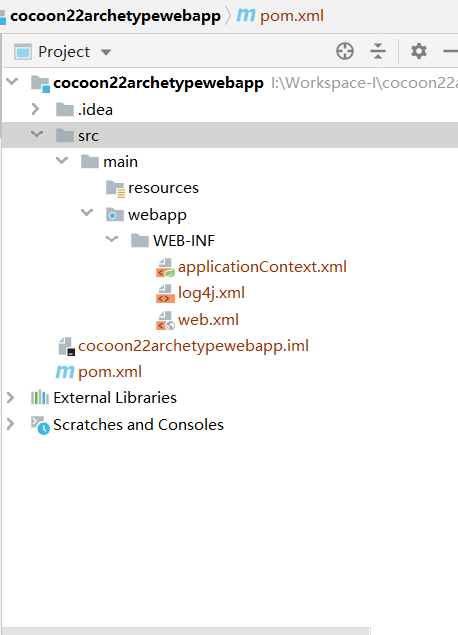
<?xml version="1.0" encoding="UTF-8"?>

<!--

  Licensed to the Apache Software Foundation (ASF) under one

  or more contributor license agreements.  See the NOTICE file

  distributed with this work for additional information

  regarding copyright ownership.  The ASF licenses this file

  to you under the Apache License, Version 2.0 (the

  "License"); you may not use this file except in compliance

  with the License.  You may obtain a copy of the License at

   http://www.apache.org/licenses/LICENSE-2.0

  Unless required by applicable law or agreed to in writing,

  software distributed under the License is distributed on an

  "AS IS" BASIS, WITHOUT WARRANTIES OR CONDITIONS OF ANY

  KIND, either express or implied.  See the License for the

  specific language governing permissions and limitations

  under the License.

-->

<!-- $Id: pom.xml 642118 2008-03-28 08:04:16Z reinhard $ -->

<project xmlns="http://maven.apache.org/POM/4.0.0" xmlns:xsi="http://www.w3.org/2001/XMLSchema-instance" xsi:schemaLocation="http://maven.apache.org/POM/4.0.0 http://maven.apache.org/maven-v4_0_0.xsd">

  <modelVersion>4.0.0</modelVersion>

  <packaging>war</packaging>

  <name>cocoon-22-archetype-webapp</name>

  <groupId>cn.johnnyzen</groupId>

  <artifactId>cocoon-22-archetype-webapp</artifactId>

  <version>1.0-SNAPSHOT</version>

  <build>

    <plugins>

      <plugin>

        <groupId>org.mortbay.jetty</groupId>

        <artifactId>maven-jetty-plugin</artifactId>

        <version>6.1.7</version>

        <configuration>

          <connectors>

            <connector implementation="org.mortbay.jetty.nio.SelectChannelConnector">

              <port>8888</port>

              <maxIdleTime>30000</maxIdleTime>

            </connector>

          </connectors>

          <webAppSourceDirectory>${project.build.directory}/${pom.artifactId}-${pom.version}</webAppSourceDirectory>

          <contextPath>/</contextPath>

        </configuration>

      </plugin>

    </plugins>

  </build>

  <dependencies>

    <!--dependency>

      <groupId>cn.johnnyzen</groupId>

      <artifactId>[the artifact id of the block to be mounted]</artifactId>

      <version>1.0-SNAPSHOT</version>

    </dependency-->

  </dependencies>

</project>
Y 默认 Maven 项目
IDEA中,不使用 archtype 创建Maven项目时的目录骨架 (如下图)
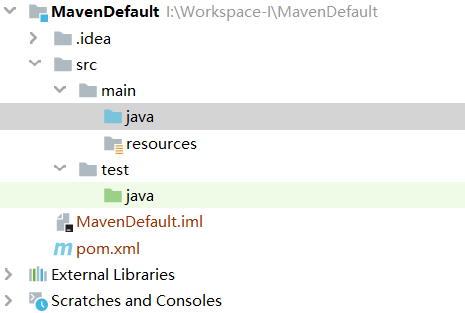
<?xml version="1.0" encoding="UTF-8"?>

<project xmlns="http://maven.apache.org/POM/4.0.0"

         xmlns:xsi="http://www.w3.org/2001/XMLSchema-instance"

         xsi:schemaLocation="http://maven.apache.org/POM/4.0.0 http://maven.apache.org/xsd/maven-4.0.0.xsd">

    <modelVersion>4.0.0</modelVersion>

    <groupId>cn.johnnyzen</groupId>

    <artifactId>MavenDefault</artifactId>

    <version>1.0-SNAPSHOT</version>

</project>
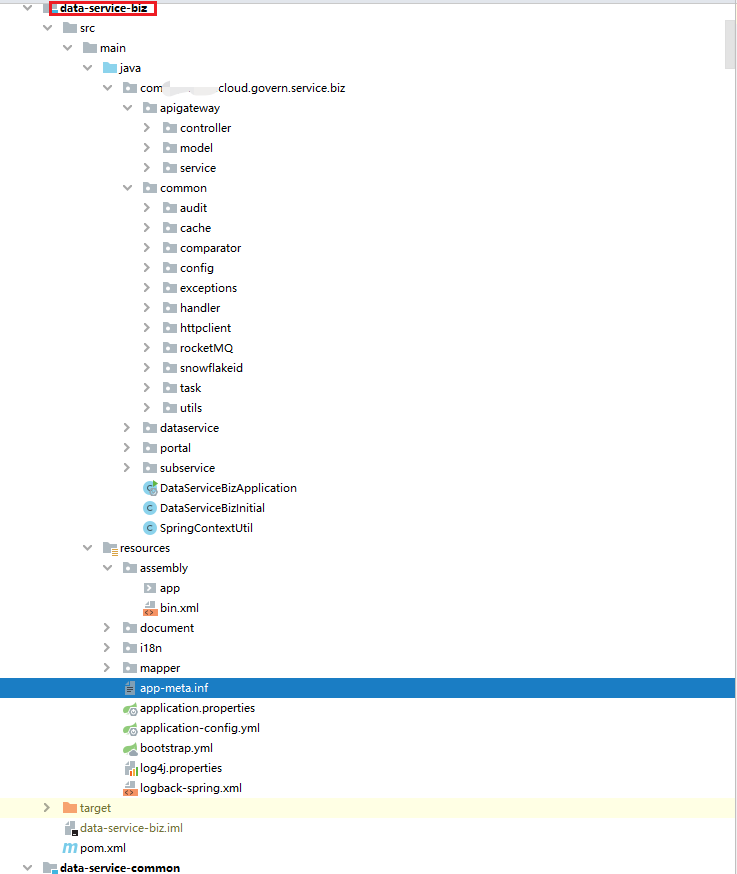
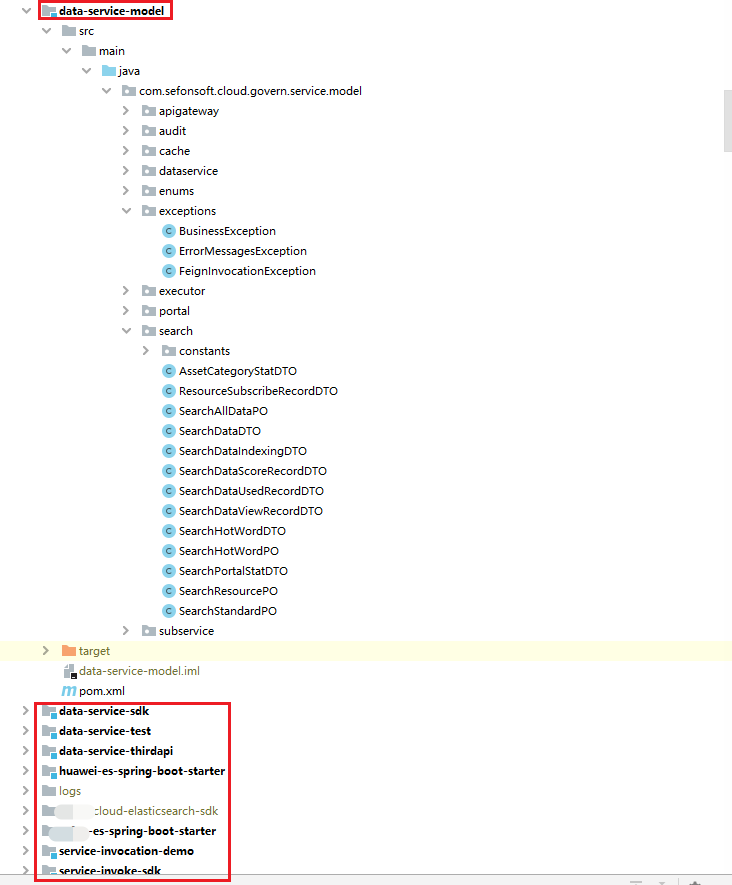
K 实际工程的应用示例
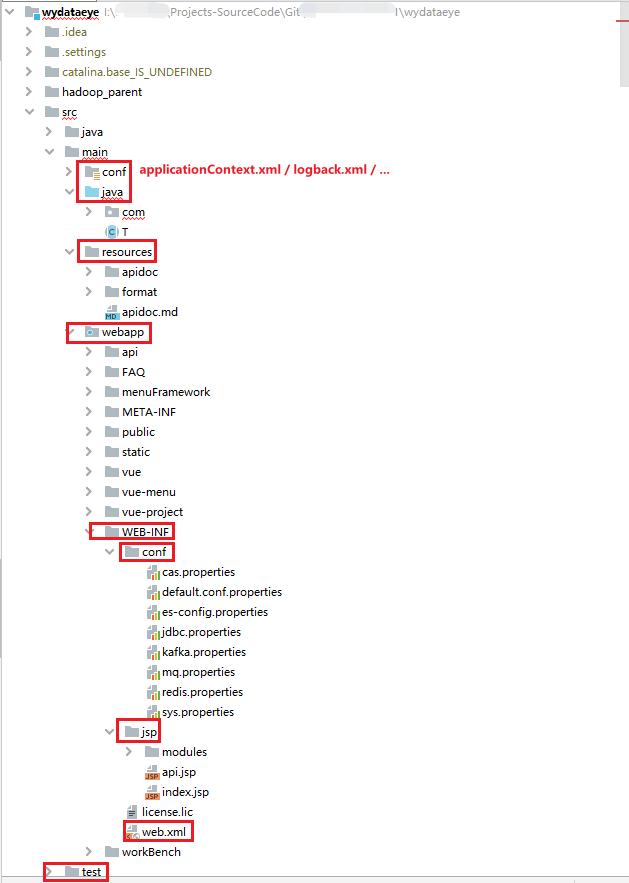
示例1: Web单体工程下的Maven工程目录结构
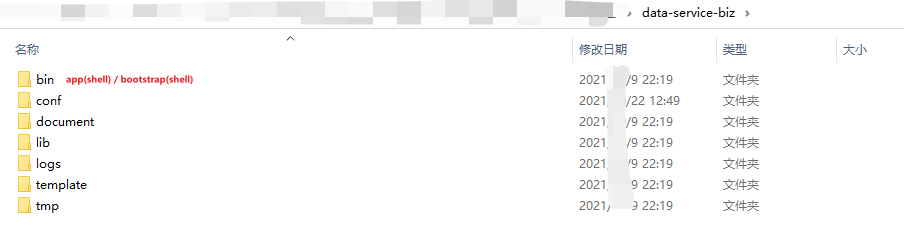
示例2: 微服务工程下的Maven工程目录结构
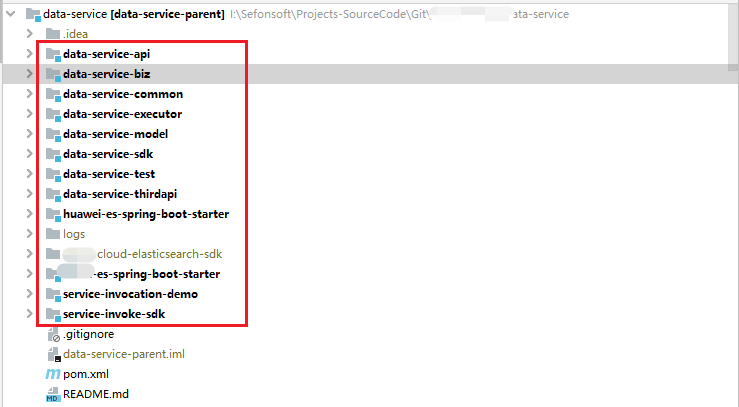
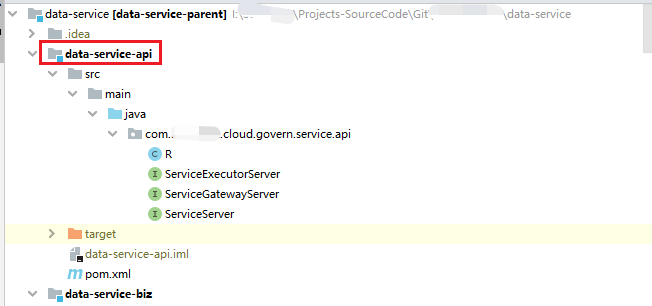
展开如下:
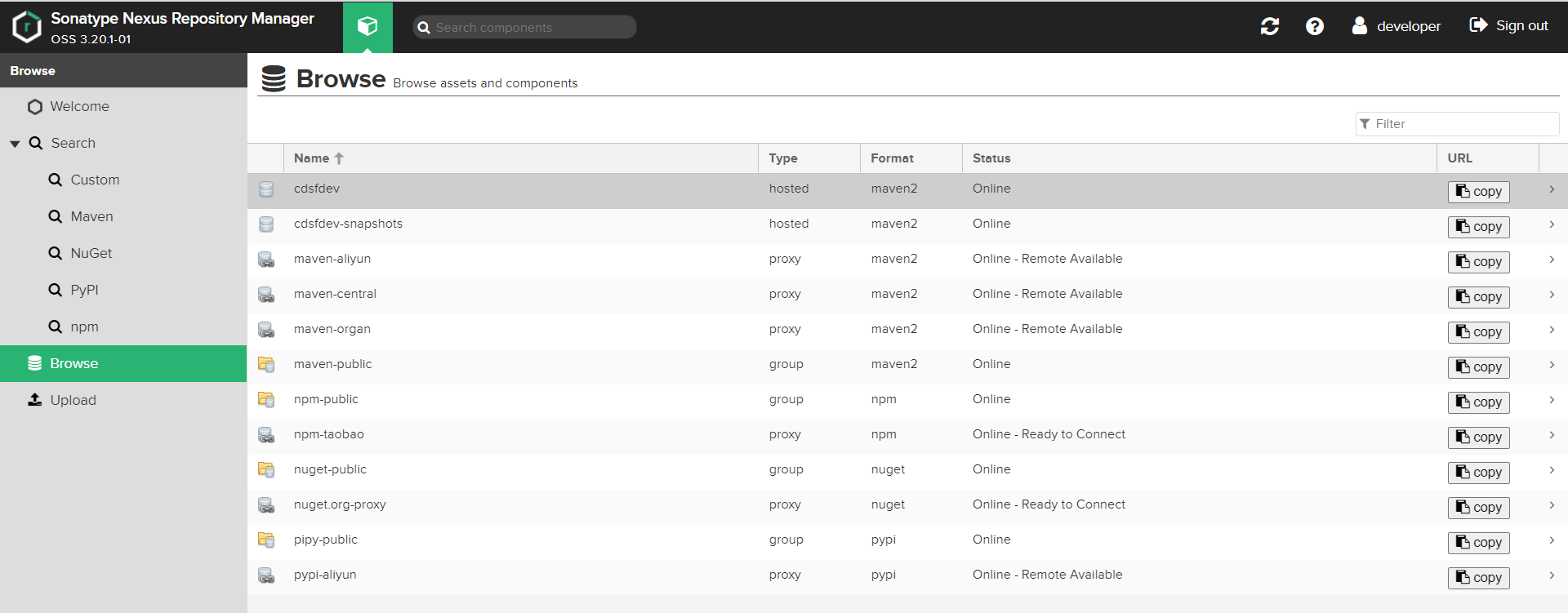
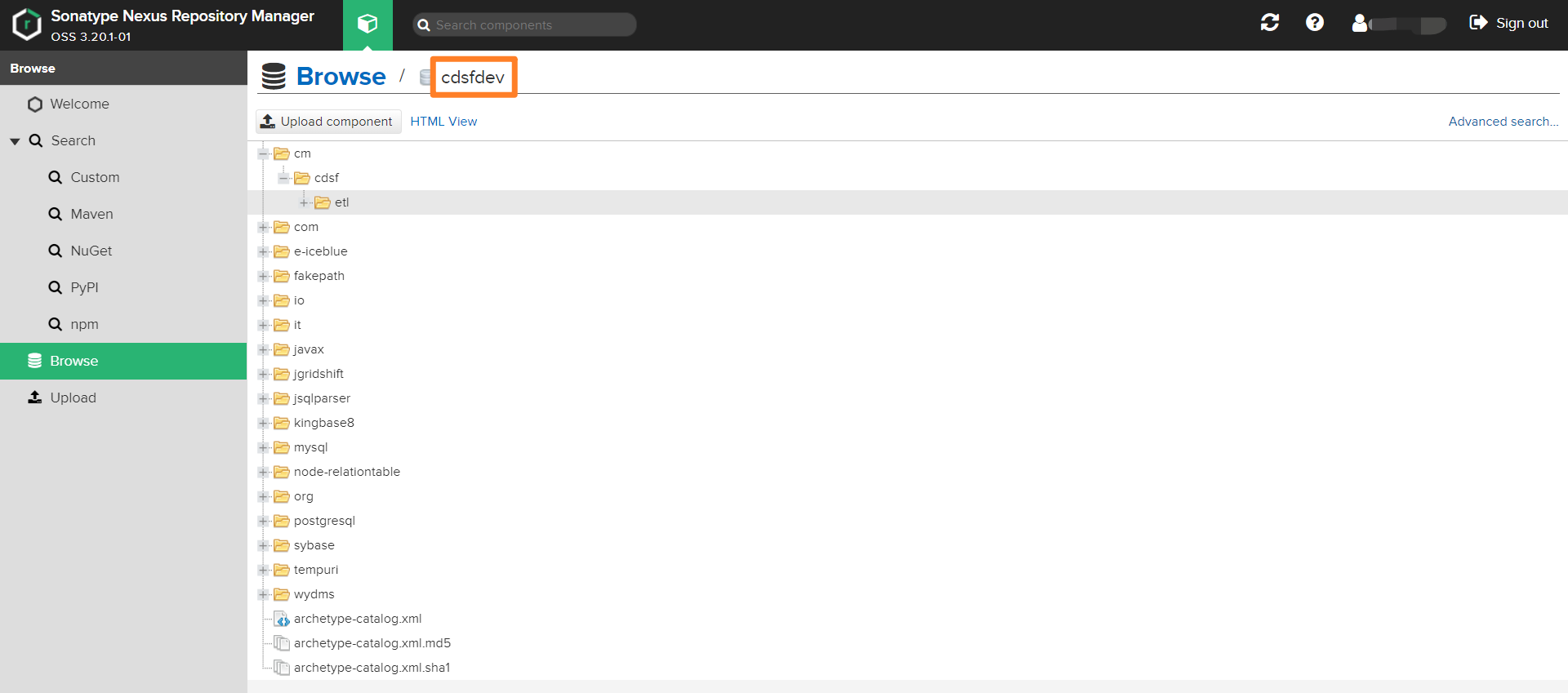
U 私服Nexus
X 推荐文献
- Maven 三种archetype说明 - CSDN
- Maven 自定义archeType - 简书
- Maven - 自定义archetype - 简书
- Maven学习六之利用mvn deploy命令上传包 - CSDN
[工具/Maven]Maven工程目录结构 | Maven自动构建骨架(maven-archetype)中quickstart与webapp的区别的更多相关文章
- Maven项目的目录结构+maven的安装与配置
1.首先下载maven,然后配置环境变量,在MyEclipse里面配置maven 2.配置maven的pom.xml文件 3.下载和更新资源 右击项目,有一个Maven4Myeclipse,里面有三个 ...
- Maven项目目录结构与自动创建maven目录
Maven项目有特定的目录结构: 如图,我们在创建一个maven工程时,在项目根目录下有三大内容:main.test.pom.xml. 其中:main文件夹下是项目的主要源代码,按照包路径来存放 te ...
- Maven项目的目录结构
刚接触Maven没多长时间,实习时在的小公司很不规范,所有web项目都是dynamic web project搭建,没有用到项目构建,管理工具,导致了非常多的重复工作与低效. 先来看看Maven的功能 ...
- Android MAVEN项目标准目录结构
1.标准目录结构: src -main –bin 脚本库 –java java源代码文件 –resources 资源库,会自动复制到classes目录里 –fi ...
- (转)Maven项目标准目录结构
场景:工作中的项目都是使用Maven的目录结构,虽然能够如期的完成开发工作,但是对于一个Maven工程的配置却并不熟悉,这里主要介绍下Maven工程的而目录结构. 1 标准目录结构 src -main ...
- MAVEN项目标准目录结构 ;
http://blog.csdn.net/lengyue_wy/article/details/6718637 版权声明:本文为博主原创文章,未经博主允许不得转载. 1.标准目录结构: src ...
- MAVEN项目标准目录结构(转)
转自:http://blog.csdn.net/lengyue_wy/article/details/6718637 版权声明:本文为博主原创文章,未经博主允许不得转载. 1.标准目录结构: s ...
- maven项目eclipse目录结构浅析
maven项目eclipse目录结构浅析 PS:Java Resources是为了方便我们编译,到最后都会编译到 WEB-INF/classes Maven项目的目录结构
- Maven项目标准目录结构
-----------------------siwuxie095 Maven 项目标准目录结构 1.Maven 项目分为两种 (1)Java 项目 (2)Web 项目 2.对于 Java 项目 其中 ...
- Idea中新建maven项目的目录结构
maven项目的目录结构如下所示 pom.xml文件内容如下所示 <?xml version="1.0" encoding="UTF-8"?> &l ...
随机推荐
- 因为更新了ipykernel 导致 VS Code 中Jupyter 一直处于连接状态的 解决办法
重新安装VS Code 当中的Jupyter插件即可(我选择的是upgrade当前的jupyter插件)
- C代码调用C++动态库
最近在工作中遇到了修改C++代码嵌入到C代码中去,C肯定不能直接用C++代码,就需要自己去修改成C代码,所以我就决定在C中调用C++动态库(谁让我懒呢),话不多说,直接上步骤 第一步:编写C++代码 ...
- 实验一 Linux系统与应用课程准备
項目 內容 这个作业属于哪个课程 班级课程主要链接 这个作业的要求在哪里 作业要求链接 学号-姓名 15043109-吴小怀 作业学习目标 学会在博客园社区中学习Linux的使用技巧,熟练使用Typo ...
- Linux命令 之 contrab
crontab 命令是用来在linux平台上执行 定时任务的命令: 默认是在安装完操作系统之后,便会启动此任务的调度 crontab 会在每分钟检查是否有要执行的任务,如果有便会执行该任务:新建的cr ...
- datax-web踩坑记录
实习期间接触了两种ETL工具:kettle.datax 1.datax-web的安装 (跟着文档一步步来就好了) https://github.com/WeiYe-Jing/datax-web/blo ...
- C Ⅷ
数组 int number[100]; //这个数组可以放100个数 int x; int cnt = 0; double sum = 0; scanf("%d", & ...
- 通过右键菜单生成pyd
批处理 @echo off reg add "HKCR\AllFilesystemObjects\shell\构建PYTHON\command" /ve /t REG_SZ /d ...
- 我是如何被我的c++大作业榨干的
手把手教你用git上传项目到GitHub(图文并茂,这一篇就够了),相信你一定能成功!! - 知乎 (zhihu.com) C++ 类对象数组_Slience_Perseverance的博客-CSDN ...
- 红米k40稳定版本刷开发版开启DC调光记录
刷个开发版还要申请资格.要么去淘宝买资格的账号,要么用其他方法: 包21.4.15,直接有有防闪烁功能下载地址:https://bigota.d.miui.com/21.4.15/miui_ALIOT ...
- You need to run build with JDK or have tools.jar on the classpath.If this occures during eclipse build make sure you run eclipse under JDK as well 错误
我打开项目报错是这样的 pom.xml jdk配置什么的都是好的 但是还是报错 解决错误 : 1.打开你eclipse的根目录,找到eclipse.ini 这个文件夹打开 2.打开是这个样子 ...