
在项目中如何直接使用hystrix?
一、背景
最近由于一些背景原因,需要在项目中需要对接口进行限流。所以就考虑到了直接使用Hystrix。但是呢,又不想直接使用SpringCloud,而是直接引入原生,现在发现挺好用的,所以记录下来,分享出来。
二、使用方式
2.1 Jar包引入
<dependency>

  <groupId>com.netflix.hystrix</groupId>

  <artifactId>hystrix-javanica</artifactId>

  <version>1.5.18</version>

</dependency>

<dependency>

  <groupId>com.netflix.hystrix</groupId>

  <artifactId>hystrix-core</artifactId>

  <version>1.5.18</version>

</dependency>
引入两个包,分别是Hystrix核心包,以及直接原生的Java包
2.2 配置文件
在Resources目录下面,放上hystrix.properties文件。配置如下。
hystrix.command.default.execution.isolation.thread.timeoutInMilliseconds=3000

hystrix.command.default.fallback.isolation.semaphore.maxConcurrentRequests=1000

hystrix.command.default.circuitBreaker.requestVolumeThreshold=20

hystrix.command.default.metrics.rollingStats.numBuckets=10

hystrix.command.default.metrics.rollingStats.timeInMilliseconds=10000

hystrix.command.default.circuitBreaker.sleepWindowInMilliseconds=5000

hystrix.command.default.circuitBreaker.errorThresholdPercentage=50

hystrix.command.default.circuitBreaker.forceOpen=false

hystrix.command.default.circuitBreaker.forceClosed=false

hystrix.command.default.requestCache.enabled=false

hystrix.threadpool.default.coreSize=10

hystrix.threadpool.default.maximumSize=10

hystrix.threadpool.default.allowMaximumSizeToDivergeFromCoreSize=true

hystrix.threadpool.default.keepAliveTimeMinutes=1

hystrix.threadpool.default.maxQueueSize=100

hystrix.threadpool.default.queueSizeRejectionThreshold=101

hystrix.threadpool.default.metrics.rollingStats.numBuckets=10

hystrix.threadpool.default.metrics.rollingStats.timeInMilliseconds=10000

#hystrix.timer.threadpool.default.coreSize = 10
这个是一部分配置,如果需要知道更多,可以Click-Github Hystrix Wiki
2.3 设置配置
设置Hystrix的配置
/**

 * <p>熔断器配置</p>

 *

 * @author fattycal@qq.com

 * @since 2022/6/4

 */

@Configuration

public class HystrixConfig implements InitializingBean {

    @Bean

    public HystrixCommandAspect hystrixCommandAspect(){

        // 初始化切面

        return new HystrixCommandAspect();

    }

    @Override

    public void afterPropertiesSet() throws Exception {

        // 初始化熔断器配置

        // 清除配置

        ConfigurationManager.getConfigInstance().clear();

        // 加载配置文件

        ConfigurationManager.loadCascadedPropertiesFromResources("hystrix");

    }

}
HystrixCommandAspect是jar包带的切面,通过切面通知,找去需要熔断的方法,然后进行处理。
@Aspect

public class HystrixCommandAspect {

    //...略

    @Pointcut("@annotation(com.netflix.hystrix.contrib.javanica.annotation.HystrixCommand)")

    public void hystrixCommandAnnotationPointcut() {

    }

  @Pointcut("@annotation(com.netflix.hystrix.contrib.javanica.annotation.HystrixCollapser)")

    public void hystrixCollapserAnnotationPointcut() {

    }

    @Around("hystrixCommandAnnotationPointcut() || hystrixCollapserAnnotationPointcut()")

    public Object methodsAnnotatedWithHystrixCommand(final ProceedingJoinPoint joinPoint) throws Throwable {

        // ... 略

    }

}
ConfigurationManager看看这名字,就知道是配置管理的,也不负众望,的确是用来加载配置的。
2.4 实现代码
/**

 * <p>熔断器测试</p>

 *

 * @author fattycal@qq.com

 * @since 2022/6/4

 */

@RestController

public class HystrixTestController {

    @GetMapping("/hystrix")

    @HystrixCommand(commandKey = "hystrixTestController-getHello", threadPoolKey = "hystrixTestController-getHello",

            fallbackMethod = "getHelloFallback")

    public String getHello(){

        try {

            // 执行太快不便于测试

            Thread.sleep(200);

        } catch (InterruptedException e) {

            e.printStackTrace();

        }

        return "TEST Hystrix";

    }

    public String getHelloFallback(Throwable error){

        // 打印日志

        System.out.println("TEST Hystrix: " + error.getMessage());

        return "TEST Hystrix: " + error.getMessage();

    }

}
代码没有啥花里胡哨的,直接在需要熔断的方法上面加上HystrixCommond。
commandKey和threadPoolKey是自己设置的,可以为这个方法定制线程数、核心线程等配置(在hystrix.properties中添加)。给出示例如下。
#-------------------------------------------------------------------

hystrix.threadpool.hystrixTestController-getHello.coreSize=1

hystrix.threadpool.hystrixTestController-getHello.maximumSize=2

hystrix.threadpool.hystrixTestController-getHello.maxQueueSize=1

hystrix.threadpool.hystrixTestController-getHello.queueSizeRejectionThreshold=2

#-------------------------------------------------------------------
至此,完成了所有的配置和准备,接下来直接测试
三、测试试验
直接从Jmeter官网下载jmeter,拿到跑测试, 具体下载过程就不一样展示了,直接贴出测试结果。
![测试结果]](https://img2022.cnblogs.com/blog/1495071/202206/1495071-20220604154925529-898198001.jpg)
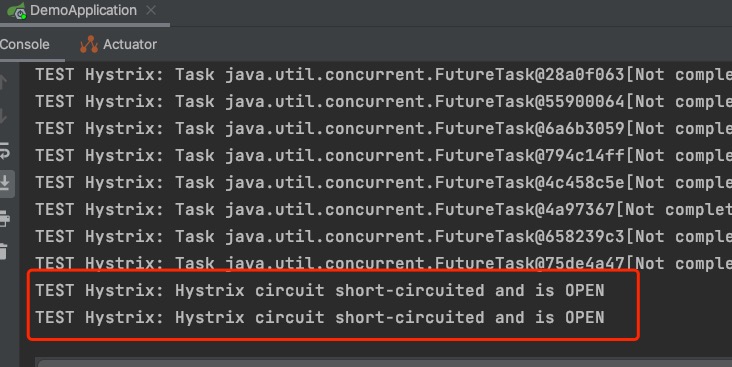
由于为这个方法设置的核心线程数、线程数、队列数都不大,很容易测试出结果。我们可以从console中很明显的看到熔断器打开,说明方法被执行到。
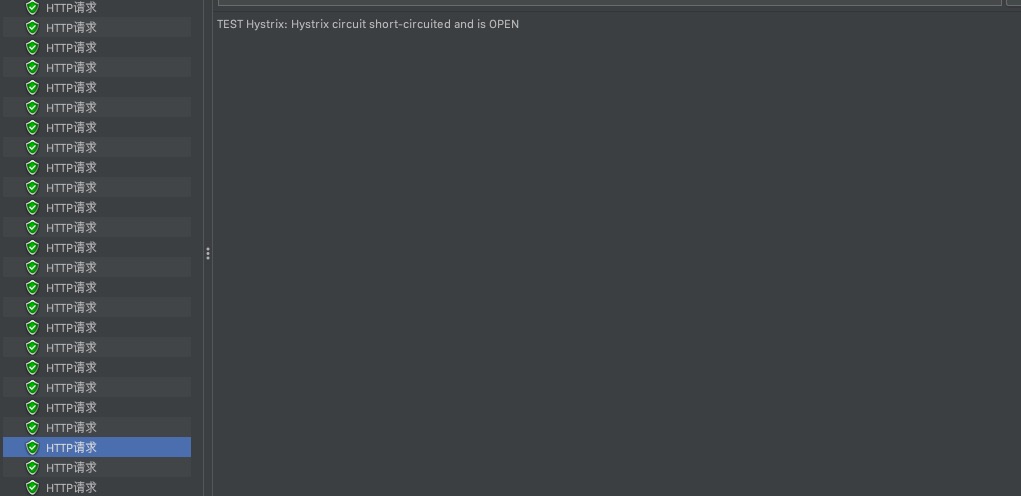
在从Jmeter中查看一下结果,也是可以佐证我们的效果。测试图如下:
四、总结
自此,整个流程是走完了,可以看到效果着实起来了。 Hystrix知识限流熔断中的一种方案,大家可以结合实际情况做出更多的选择。
如果有问题,欢迎指出,谢谢!
在项目中如何直接使用hystrix?的更多相关文章
- Hystrix在项目中实践
Hystrix在项目中实践 https://mp.weixin.qq.com/s/4Fg0COnWRB3rRWfxbJt7gA
- 在dropwizard中使用feign,使用hystrix
前言 用惯了spring全家桶之后,试试dropwizard的Hello World也别有一帆风味.为了增强对外访问API的能力,需要引入open feign.这里简单在dropwizard中使用fe ...
- springboot项目中使用maven resources
maven resource 组件可以把pom的变量替换到相关的resouces目录中的资源文件变量 示例项目:内容中心 (文章管理) 生成jar包,生成docker ,生成k8s文件 1.项目结构 ...
- 网关中加入熔断机制(Hystrix)
网关中加入熔断机制 在网关中加入熔断机制 添加依赖项 spring-cloud-gateway项目POM文件加入spring-cloud-starter-netflix-hystrix <dep ...
- VS项目中使用Nuget还原包后编译生产还一直报错?
Nuget官网下载Nuget项目包的命令地址:https://www.nuget.org/packages 今天就遇到一个比较奇葩的问题,折腾了很久终于搞定了: 问题是这样的:我的解决方案原本是好好的 ...
- ABP项目中使用Swagger生成动态WebAPI
本文是根据角落的白板报的<使用ABP实现SwaggerUI,生成动态webapi>一文的学习总结,感谢原文作者角落的白板报. 1 安装Swashbuckle.core 1.1 选择WebA ...
- iOS 之项目中遇到的问题总结
昨天去一家公司面试,面试官问了我在项目开发中遇到过哪些问题,是什么引起的,怎样解决的? 当时由于有点小紧张只说出了一两点,现在就来好好总结一下. 问题: 1.两表联动 所谓的两表联动就是有左右两个表格 ...
- My97DatePicker时间控件在项目中的应用
一.下载My97DatePicker的压缩包My97DatePicker.rar,解压. 注:My97DatePicker最新版本有开发包,项目中使用时删掉,以便节省空间,提高程序的运行效率. 二.在 ...
- 在项目中同时使用Objective-C和Swift
苹果发布的Swift语言可以和之前的Objective-C语言同时存在于一个项目中. 可能有人会认为是同一个类文件中既可以有Objective-C也可以有Swift,这是不对的.同一个类文件或同一个代 ...
随机推荐
- python的数据库编程
数据库的基础知识 一.数据库的概念 数据库将大量数据按照一定的方式组织并存储起来,是相互关联的数据的集合.数据库中的数据不仅包括描述事物数据的本身,还包括相关数据之间的联系.数据库可以分为关系型数据库 ...
- npm使用淘宝镜像源
npm使用淘宝镜像源 单次使用 npm install koa --registry=https://registry.npm.taobao.org 永久使用 配置淘宝镜像源 npm config s ...
- CPUs Intel 925X/915 Chipset (925X主板芯片组)
这个是2004年的intel产品的设计(主板,主板芯片组,北桥,南桥),结构也比较清晰,主要想看南桥和北桥的设计. 一些英文解释 ECC是一种能够实现"错误检查和纠正"的技术D92 ...
- YOLO系列梳理(一)YOLOv1-YOLOv3
前言 本文是YOLO系列专栏的第一篇,该专栏将会介绍YOLO系列文章的算法原理.代码解析.模型部署等一系列内容.本文系公众号读者投稿,欢迎想写任何系列文章的读者给我们投稿,共同打造一个计算机视觉技 ...
- iOS全埋点解决方案-UITableView和UICollectionView点击事件
前言 在 $AppClick 事件采集中,还有两个比较特殊的控件: UITableView •UICollectionView 这两个控件的点击事件,一般指的是点击 UITableViewCell 和 ...
- JavaScript基础第05天笔记
JavaScript基础第05天笔记 1 - 作用域 1.1 作用域概述 通常来说,一段程序代码中所用到的名字并不总是有效和可用的,而限定这个名字的可用性的代码范围就是这个名字的作用域.作用域的使用提 ...
- bootStrap简要和学习笔记
bootStrap简要和学习笔记前端在学些了html.css.JavaScript三件套后,我们感觉前端变数太多了,需要创造力来设计一些可能经常使用的界面啊.按钮样式啊等,也就有了一些前端的框架,那何 ...
- Java语言学习day35--8月10日
今日内容介绍1.集合2.Iterator迭代器3.增强for循环4.泛型 ###01集合使用的回顾 *A:集合使用的回顾 *a.ArrayList集合存储5个int类型元素 public static ...
- 2021.11.10 fail树
2021.11.10 fail树 https://blog.csdn.net/niiick/article/details/87947160 1. AC自动机与fail树的神奇关系 1.1 AC自动机 ...
- python基础练习题(题目 打印出杨辉三角形前十行。)
day38 --------------------------------------------------------------- 实例061:杨辉三角 题目 打印出杨辉三角形前十行. 分析: ...