
部署k8s的heapster监控
Heapster是容器集群监控和性能分析工具,天然的支持Kubernetes和CoreOS
heapster监控目前官网已经不更新,部署学习使用
heapster: 收集监控数据
influxdb:数据库,存储数据
grafana:web页面展示
1、heapster安装包下载
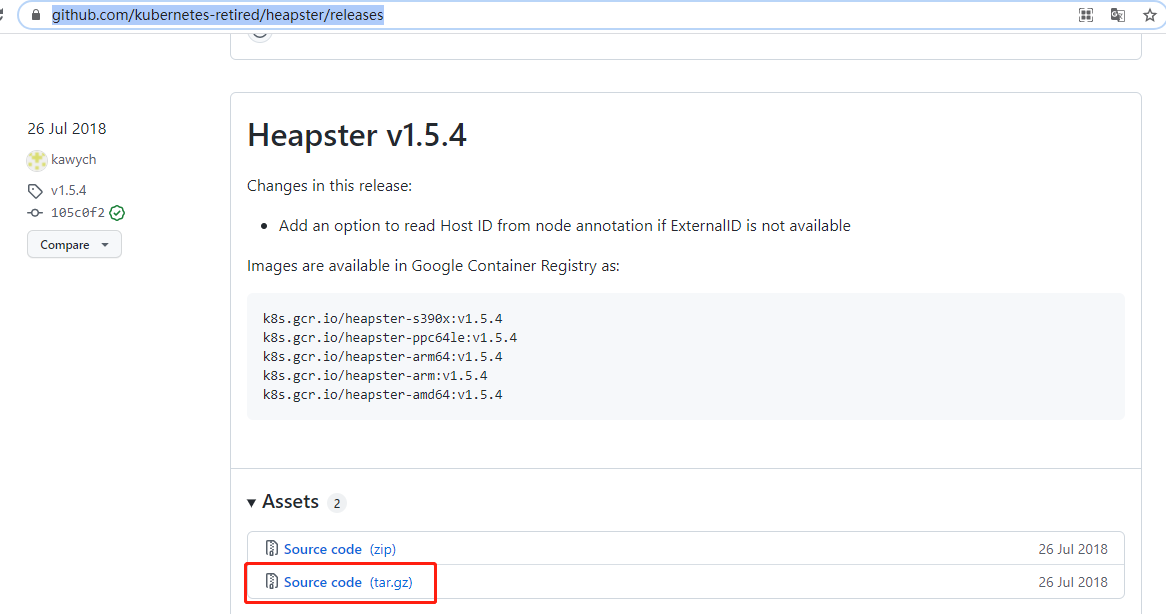
地址:https://github.com/kubernetes-retired/heapster/releases
把对应的tar包下载
解压包,在路径:heapster-1.5.4\heapster-1.5.4\deploy\kube-config\rbac下找到heapster-rbac.yaml

在路径heapster-1.5.4\heapster-1.5.4\deploy\kube-config\influxdb下找到grafana.yaml,heapster.yaml,influxdb.yaml
2、部署influxdb
新版本k8sapi变动,修改Deployment apiVersion为apiVersion: apps/v1
镜像修改为国内镜像源:image: registry.aliyuncs.com/google_containers/heapster-influxdb-amd64:v1.5.2
增加selector选择器
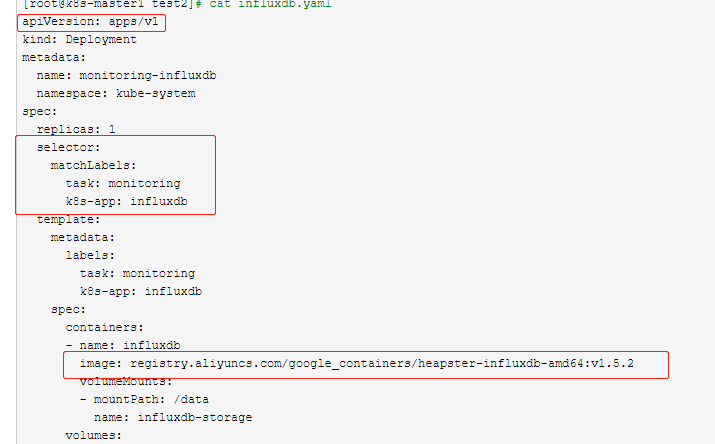
[root@k8s-master1 test2]# cat influxdb.yaml

apiVersion: apps/v1

kind: Deployment

metadata:

  name: monitoring-influxdb

  namespace: kube-system

spec:

  replicas: 1

  selector:

    matchLabels:

      task: monitoring

      k8s-app: influxdb

  template:

    metadata:

      labels:

        task: monitoring

        k8s-app: influxdb

    spec:

      containers:

      - name: influxdb

        image: registry.aliyuncs.com/google_containers/heapster-influxdb-amd64:v1.5.2

        volumeMounts:

        - mountPath: /data

          name: influxdb-storage

      volumes:

      - name: influxdb-storage

        emptyDir: {}

---

apiVersion: v1

kind: Service

metadata:

  labels:

    task: monitoring

    # For use as a Cluster add-on (https://github.com/kubernetes/kubernetes/tree/master/cluster/addons)

    # If you are NOT using this as an addon, you should comment out this line.

    kubernetes.io/cluster-service: 'true'

    kubernetes.io/name: monitoring-influxdb

  name: monitoring-influxdb

  namespace: kube-system

spec:

  ports:

  - port: 8086

    targetPort: 8086

  selector:

    k8s-app: influxdb

 部署influxdb:

 # kubectl apply -f influxdb.yaml
3、部署heapster
新版本k8sapi变动,修改Deployment apiVersion为apiVersion: apps/v1
镜像修改为国内镜像源:image: registry.aliyuncs.com/google_containers/heapster-amd64:v1.5.4
增加selector选择器
source参数修改为:- --source=kubernetes:https://kubernetes.default?kubeletHttps=true&kubeletPort=10250&insecure=true
不修改会提示报错,kubectl logs可以查询到对应报错信息

[root@k8s-master1 test2]# cat heapster.yaml

apiVersion: v1

kind: ServiceAccount

metadata:

  name: heapster

  namespace: kube-system

---

apiVersion: apps/v1

kind: Deployment

metadata:

  name: heapster

  namespace: kube-system

spec:

  replicas: 1

  selector:

    matchLabels:

      task: monitoring

      k8s-app: heapster

  template:

    metadata:

      labels:

        task: monitoring

        k8s-app: heapster

    spec:

      serviceAccountName: heapster

      containers:

      - name: heapster

        image: registry.aliyuncs.com/google_containers/heapster-amd64:v1.5.4

        imagePullPolicy: IfNotPresent

        command:

        - /heapster

        - --source=kubernetes:https://kubernetes.default?kubeletHttps=true&kubeletPort=10250&insecure=true

        - --sink=influxdb:http://monitoring-influxdb.kube-system.svc:8086

---

apiVersion: v1

kind: Service

metadata:

  labels:

    task: monitoring

    # For use as a Cluster add-on (https://github.com/kubernetes/kubernetes/tree/master/cluster/addons)

    # If you are NOT using this as an addon, you should comment out this line.

    kubernetes.io/cluster-service: 'true'

    kubernetes.io/name: Heapster

  name: heapster

  namespace: kube-system

spec:

  ports:

  - port: 80

    targetPort: 8082

  selector:

    k8s-app: heapster
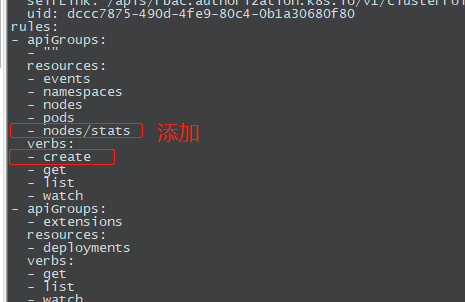
用户权限,默认的没有create权限
# kubectl apply -f heapster-rbac.yaml
重新导出yaml文件,修改rule角色权限
# kubectl get ClusterRole system:heapster -o yaml > heapster_modify.yaml
# kubectl apply -f heapster_modify.yaml
部署heapster
#kubectl apply -f heapster.yaml
查询角色权限,verbs中有了create权限

[root@k8s-master1 test2]# kubectl describe ClusterRole system:heapster

Name:         system:heapster

Labels:       kubernetes.io/bootstrapping=rbac-defaults

Annotations:  rbac.authorization.kubernetes.io/autoupdate: true

PolicyRule:

  Resources               Non-Resource URLs  Resource Names  Verbs

  ---------               -----------------  --------------  -----

  events                  []                 []              [create get list watch]

  namespaces              []                 []              [create get list watch]

  nodes/stats             []                 []              [create get list watch]

  nodes                   []                 []              [create get list watch]

  pods                    []                 []              [create get list watch]

  deployments.extensions  []                 []              [get list watch]
4、部署grafana
新版本k8sapi变动,修改Deployment apiVersion为apiVersion: apps/v1
镜像修改为国内镜像源:image: registry.aliyuncs.com/google_containers/heapster-grafana-amd64:v5.0.4
增加selector选择器
[root@k8s-master1 test2]# cat grafana.yaml

apiVersion: apps/v1

kind: Deployment

metadata:

  name: monitoring-grafana

  namespace: kube-system

spec:

  replicas: 1

  selector:

    matchLabels:

      task: monitoring

      k8s-app: grafana

  template:

    metadata:

      labels:

        task: monitoring

        k8s-app: grafana

    spec:

      containers:

      - name: grafana

        image: registry.aliyuncs.com/google_containers/heapster-grafana-amd64:v5.0.4

        ports:

        - containerPort: 3000

          protocol: TCP

        volumeMounts:

        - mountPath: /etc/ssl/certs

          name: ca-certificates

          readOnly: true

        - mountPath: /var

          name: grafana-storage

        env:

        - name: INFLUXDB_HOST

          value: monitoring-influxdb

        - name: GF_SERVER_HTTP_PORT

          value: "3000"

          # The following env variables are required to make Grafana accessible via

          # the kubernetes api-server proxy. On production clusters, we recommend

          # removing these env variables, setup auth for grafana, and expose the grafana

          # service using a LoadBalancer or a public IP.

        - name: GF_AUTH_BASIC_ENABLED

          value: "false"

        - name: GF_AUTH_ANONYMOUS_ENABLED

          value: "true"

        - name: GF_AUTH_ANONYMOUS_ORG_ROLE

          value: Admin

        - name: GF_SERVER_ROOT_URL

          # If you're only using the API Server proxy, set this value instead:

          # value: /api/v1/namespaces/kube-system/services/monitoring-grafana/proxy

          value: /

      volumes:

      - name: ca-certificates

        hostPath:

          path: /etc/ssl/certs

      - name: grafana-storage

        emptyDir: {}

---

apiVersion: v1

kind: Service

metadata:

  labels:

    # For use as a Cluster add-on (https://github.com/kubernetes/kubernetes/tree/master/cluster/addons)

    # If you are NOT using this as an addon, you should comment out this line.

    kubernetes.io/cluster-service: 'true'

    kubernetes.io/name: monitoring-grafana

  name: monitoring-grafana

  namespace: kube-system

spec:

  # In a production setup, we recommend accessing Grafana through an external Loadbalancer

  # or through a public IP.

  # type: LoadBalancer

  # You could also use NodePort to expose the service at a randomly-generated port

  # type: NodePort

  ports:

  - port: 80

    targetPort: 3000

  selector:

    k8s-app: grafana

  type: NodePort

部署grafana

# kubectl apply -f grafana.yaml
5、查询部署资源
[root@k8s-master1 test2]# kubectl get all -n kube-system | egrep 'heapster|monitor'

pod/heapster-7f6787db47-xjtg2             1/1     Running   2          17h

pod/monitoring-grafana-745bf97858-5484w   1/1     Running   2          18h

pod/monitoring-influxdb-77864d8b5-dlwwz   1/1     Running   2          18h

service/heapster              ClusterIP   10.103.130.255   <none>        80/TCP                   17h

service/monitoring-grafana    NodePort    10.102.137.71    <none>        80:31526/TCP             18h

service/monitoring-influxdb   ClusterIP   10.102.238.82    <none>        8086/TCP                 18h

deployment.apps/heapster              1/1     1            1           17h

deployment.apps/monitoring-grafana    1/1     1            1           18h

deployment.apps/monitoring-influxdb   1/1     1            1           18h

replicaset.apps/heapster-7f6787db47             1         1         1       17h

replicaset.apps/monitoring-grafana-745bf97858   1         1         1       18h

replicaset.apps/monitoring-influxdb-77864d8b5   1         1         1       18h
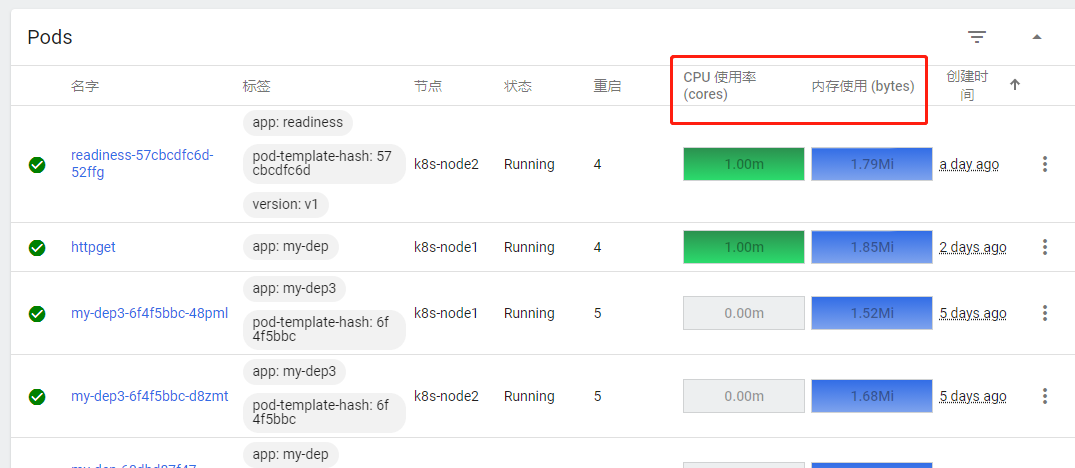
6、可以使用top命令查询node,pod等资源监控数据。这个需要等一段时间才会有数据
[root@k8s-master1 test2]# kubectl top node

NAME          CPU(cores)   CPU%   MEMORY(bytes)   MEMORY%

k8s-master1   125m         6%     1140Mi          29%

k8s-node1     39m          1%     587Mi           15%

k8s-node2     39m          1%     479Mi           12%
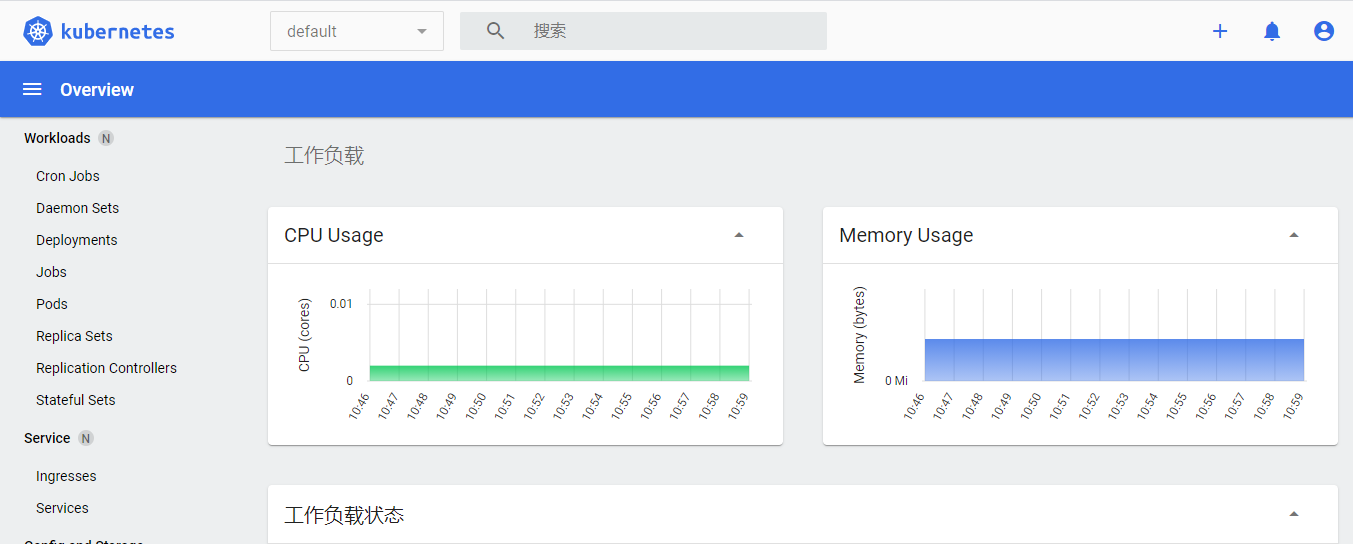
7、 结果展示,在dashboard页面可以看到资源监控数据
部署k8s的heapster监控的更多相关文章
- 部署k8s集群监控Heapster
git clone https://github.com/kubernetes/heapster.gitkubectl apply -f heapster/deploy/kube-config/inf ...
- k8s实战之部署Prometheus+Grafana可视化监控告警平台
写在前面 之前部署web网站的时候,架构图中有一环节是监控部分,并且搭建一套有效的监控平台对于运维来说非常之重要,只有这样才能更有效率的保证我们的服务器和服务的稳定运行,常见的开源监控软件有好几种,如 ...
- 从零开始入门 K8s | 可观测性:监控与日志
作者 | 莫源 阿里巴巴技术专家 一.背景 监控和日志是大型分布式系统的重要基础设施,监控可以帮助开发者查看系统的运行状态,而日志可以协助问题的排查和诊断. 在 Kubernetes 中,监控和日志 ...
- k8s全栈监控之metrics-server和prometheus
一.概述 使用metric-server收集数据给k8s集群内使用,如kubectl,hpa,scheduler等 使用prometheus-operator部署prometheus,存储监控数据 使 ...
- kubeadm构建k8s之Prometheus-operated监控(0.18.1)
介绍: 大家好,k8s的搭建有许多方式,也有许多快速部署的,为了简化部署的复杂度,官方也提供了开源的kubeadm快速部署,最新1.10.x版本已经可以实现部署集群, 如果你对k8s的原理已经非常了解 ...
- 使用kubeadm部署k8s
k8s组件 master,node master中包括apiserver,scheduler,controller.etcd apiserver:负责接收用户请求,并且保存至etcd中. schedu ...
- 部署K8S集群
1.Kubernetes 1.1.概念 kubernetes(通常称为k8s)用于自动部署.扩展和管理容器化应用程序的开源系统.它旨在提供“跨主机集群的自动部署.扩展以及运行应用程序容器的平台”.支持 ...
- 二进制部署k8s
一.二进制部署 k8s集群 1)参考文章 博客: https://blog.qikqiak.com 文章: https://www.qikqiak.com/post/manual-install-hi ...
- lvs+keepalived部署k8s v1.16.4高可用集群
一.部署环境 1.1 主机列表 主机名 Centos版本 ip docker version flannel version Keepalived version 主机配置 备注 lvs-keepal ...
随机推荐
- Visual Studio Installer下载速度为0处理办法
DNS改为:223.5.5.5即可. 223.5.5.5 下载完成后记得改回来.
- 【Spring】事务的执行原理(三)
事务的回滚 如果获取事务属性不为空,并且抛出的异常是RuntimeException或者Error类型,调用事务管理器中的rollback方法进行回滚 如果事务属性为空或者抛出的异常不是Runtime ...
- 理论+案例,带你掌握Angular依赖注入模式的应用
摘要:介绍了Angular中依赖注入是如何查找依赖,如何配置提供商,如何用限定和过滤作用的装饰器拿到想要的实例,进一步通过N个案例分析如何结合依赖注入的知识点来解决开发编程中会遇到的问题. 本文分享自 ...
- 你是否有一个梦想?用JavaScript[vue.js、react.js......]开发一款自定义配置视频播放器
前言沉寂了一周了,打算把这几天的结果呈现给大家.这几天抽空就一直在搞一个自定义视频播放器,为什么会有如此想法?是因为之前看一些学习视频网站时,看到它们做的视频播放器非常Nice!于是,就打算抽空开发一 ...
- SAP 实例 12 List Box with Value List from PBO Module
REPORT demo_dynpro_dropdown_listbox. DATA: name TYPE vrm_id, list TYPE vrm_values, value LIKE LINE O ...
- 史上最全学习率调整策略lr_scheduler
学习率是深度学习训练中至关重要的参数,很多时候一个合适的学习率才能发挥出模型的较大潜力.所以学习率调整策略同样至关重要,这篇博客介绍一下Pytorch中常见的学习率调整方法. import torch ...
- 实时数据引擎系列(五): 关于 SQL Server 与 SQL Server CDC
摘要:在企业客户里, SQL Server 在传统的制造业依然散发着持久的生命力,SQL Server 的 CDC 复杂度相比 Oracle 较低, 因此标准的官方派做法就是直接使用这个 CDC ...
- HashMap存储自定义类型键值和LinkedHashMap集合
HashMap存储自定义类型键值 1.当给HashMap中存放自定义对象时,如果自定义对象是键存在,保证键唯一,必须复写对象的hashCode和equals方法. 2.如果要保证map中存放的key和 ...
- 2022-07-15/16 第一小组 田龙月 管理系统javaSE
JavaSE小项目(基础语法:二分查找:冒泡排序)--还是存在bug:删除一个数组内一组数据后面只有一组后面数据能向前移位 (YY:使用"方法"应该会好很多,代码架构会清晰一点)未 ...
- 【USACO 2012 Open】奶牛赛跑_题解
奶牛赛跑 目录 奶牛赛跑 题目描述 输入格式 输出格式 样例 样例输入#1 样例输出#1 题解 代码 题目描述 约翰有头奶牛,他为这些奶牛准备了一个周长为的环形跑牛场.所有奶牛从起点同时起跑,奶牛在比 ...