
没解决的问题-git连接失败
[parallels@localhost ~]$ ssh-keygen -t rsa -C ‘1012144290@qq.com’
Generating public/private rsa key pair.
Enter file in which to save the key (/home/parallels/.ssh/id_rsa):
/home/parallels/.ssh/id_rsa already exists.
Overwrite (y/n)? y
Enter passphrase (empty for no passphrase):
Enter same passphrase again:
Your identification has been saved in /home/parallels/.ssh/id_rsa.
Your public key has been saved in /home/parallels/.ssh/id_rsa.pub.
The key fingerprint is:
SHA256:Ke2QA9DdBQkezUxbxr2LrUJsvDpp7WowUEmZ87poKtY ‘1012144290@qq.com’
The key's randomart image is:
[root@localhost .ssh]# ssh -T -v git@github.com
OpenSSH_7.4p1, OpenSSL 1.0.2k-fips 26 Jan 2017
debug1: Reading configuration data /etc/ssh/ssh_config
debug1: /etc/ssh/ssh_config line 58: Applying options for *
debug1: Connecting to github.com [13.250.177.223] port 22.
debug1: Connection established.
debug1: permanently_set_uid: 0/0
debug1: identity file /root/.ssh/id_rsa type 1
debug1: key_load_public: No such file or directory
debug1: identity file /root/.ssh/id_rsa-cert type -1
debug1: key_load_public: No such file or directory
debug1: identity file /root/.ssh/id_dsa type -1
debug1: key_load_public: No such file or directory
debug1: identity file /root/.ssh/id_dsa-cert type -1
debug1: key_load_public: No such file or directory
debug1: identity file /root/.ssh/id_ecdsa type -1
debug1: key_load_public: No such file or directory
debug1: identity file /root/.ssh/id_ecdsa-cert type -1
debug1: key_load_public: No such file or directory
debug1: identity file /root/.ssh/id_ed25519 type -1
debug1: key_load_public: No such file or directory
debug1: identity file /root/.ssh/id_ed25519-cert type -1
debug1: Enabling compatibility mode for protocol 2.0
debug1: Local version string SSH-2.0-OpenSSH_7.4
debug1: Remote protocol version 2.0, remote software version babeld-d410d4f8
debug1: no match: babeld-d410d4f8
debug1: Authenticating to github.com:22 as 'git'
debug1: SSH2_MSG_KEXINIT sent
debug1: SSH2_MSG_KEXINIT received
debug1: kex: algorithm: curve25519-sha256
debug1: kex: host key algorithm: rsa-sha2-512
debug1: kex: server->client cipher: chacha20-poly1305@openssh.com MAC: <implicit> compression: none
debug1: kex: client->server cipher: chacha20-poly1305@openssh.com MAC: <implicit> compression: none
debug1: kex: curve25519-sha256 need=64 dh_need=64
debug1: kex: curve25519-sha256 need=64 dh_need=64
debug1: expecting SSH2_MSG_KEX_ECDH_REPLY
debug1: Server host key: ssh-rsa SHA256:nThbg6kXUpJWGl7E1IGOCspRomTxdCARLviKw6E5SY8
debug1: Host 'github.com' is known and matches the RSA host key.
debug1: Found key in /root/.ssh/known_hosts:1
debug1: rekey after 134217728 blocks
debug1: SSH2_MSG_NEWKEYS sent
debug1: expecting SSH2_MSG_NEWKEYS
debug1: SSH2_MSG_NEWKEYS received
debug1: rekey after 134217728 blocks
debug1: SSH2_MSG_EXT_INFO received
debug1: kex_input_ext_info: server-sig-algs=<ssh-ed25519-cert-v01@openssh.com,ecdsa-sha2-nistp521-cert-v01@openssh.com,ecdsa-sha2-nistp384-cert-v01@openssh.com,ecdsa-sha2-nistp256-cert-v01@openssh.com,sk-ssh-ed25519-cert-v01@openssh.com,sk-ecdsa-sha2-nistp256-cert-v01@openssh.com,rsa-sha2-512-cert-v01@openssh.com,rsa-sha2-256-cert-v01@openssh.com,ssh-rsa-cert-v01@openssh.com,ssh-dss-cert-v01@openssh.com,sk-ssh-ed25519@openssh.com,sk-ecdsa-sha2-nistp256@openssh.com,ssh-ed25519,ecdsa-sha2-nistp521,ecdsa-sha2-nistp384,ecdsa-sha2-nistp256,rsa-sha2-512,rsa-sha2-256,ssh-rsa,ssh-dss>
^C
[root@localhost .ssh]#
[root@localhost .ssh]# ssh -i /home/parallels/.ssh/id_rsa.pub. -vT git@github.com
Warning: Identity file /home/parallels/.ssh/id_rsa.pub. not accessible: No such file or directory.
OpenSSH_7.4p1, OpenSSL 1.0.2k-fips 26 Jan 2017
debug1: Reading configuration data /etc/ssh/ssh_config
debug1: /etc/ssh/ssh_config line 58: Applying options for *
debug1: Connecting to github.com [13.229.188.59] port 22.
debug1: Connection established.
debug1: permanently_set_uid: 0/0
debug1: identity file /root/.ssh/id_rsa type 1
debug1: key_load_public: No such file or directory
debug1: identity file /root/.ssh/id_rsa-cert type -1
debug1: key_load_public: No such file or directory
debug1: identity file /root/.ssh/id_dsa type -1
debug1: key_load_public: No such file or directory
debug1: identity file /root/.ssh/id_dsa-cert type -1
debug1: key_load_public: No such file or directory
debug1: identity file /root/.ssh/id_ecdsa type -1
debug1: key_load_public: No such file or directory
debug1: identity file /root/.ssh/id_ecdsa-cert type -1
debug1: key_load_public: No such file or directory
debug1: identity file /root/.ssh/id_ed25519 type -1
debug1: key_load_public: No such file or directory
debug1: identity file /root/.ssh/id_ed25519-cert type -1
debug1: Enabling compatibility mode for protocol 2.0
debug1: Local version string SSH-2.0-OpenSSH_7.4
debug1: Remote protocol version 2.0, remote software version babeld-d410d4f8
debug1: no match: babeld-d410d4f8
debug1: Authenticating to github.com:22 as 'git'
debug1: SSH2_MSG_KEXINIT sent
debug1: SSH2_MSG_KEXINIT received
debug1: kex: algorithm: curve25519-sha256
debug1: kex: host key algorithm: rsa-sha2-512
debug1: kex: server->client cipher: chacha20-poly1305@openssh.com MAC: <implicit> compression: none
debug1: kex: client->server cipher: chacha20-poly1305@openssh.com MAC: <implicit> compression: none
debug1: kex: curve25519-sha256 need=64 dh_need=64
debug1: kex: curve25519-sha256 need=64 dh_need=64
debug1: expecting SSH2_MSG_KEX_ECDH_REPLY
debug1: Server host key: ssh-rsa SHA256:nThbg6kXUpJWGl7E1IGOCspRomTxdCARLviKw6E5SY8
debug1: Host 'github.com' is known and matches the RSA host key.
debug1: Found key in /root/.ssh/known_hosts:1
debug1: rekey after 134217728 blocks
debug1: SSH2_MSG_NEWKEYS sent
debug1: expecting SSH2_MSG_NEWKEYS
debug1: SSH2_MSG_NEWKEYS received
debug1: rekey after 134217728 blocks
debug1: SSH2_MSG_EXT_INFO received
debug1: kex_input_ext_info: server-sig-algs=<ssh-ed25519-cert-v01@openssh.com,ecdsa-sha2-nistp521-cert-v01@openssh.com,ecdsa-sha2-nistp384-cert-v01@openssh.com,ecdsa-sha2-nistp256-cert-v01@openssh.com,sk-ssh-ed25519-cert-v01@openssh.com,sk-ecdsa-sha2-nistp256-cert-v01@openssh.com,rsa-sha2-512-cert-v01@openssh.com,rsa-sha2-256-cert-v01@openssh.com,ssh-rsa-cert-v01@openssh.com,ssh-dss-cert-v01@openssh.com,sk-ssh-ed25519@openssh.com,sk-ecdsa-sha2-nistp256@openssh.com,ssh-ed25519,ecdsa-sha2-nistp521,ecdsa-sha2-nistp384,ecdsa-sha2-nistp256,rsa-sha2-512,rsa-sha2-256,ssh-rsa,ssh-dss>
debug1: SSH2_MSG_SERVICE_ACCEPT received
debug1: Authentications that can continue: publickey
debug1: Next authentication method: publickey
debug1: Offering RSA public key: /root/.ssh/id_rsa
debug1: Authentications that can continue: publickey
debug1: Trying private key: /root/.ssh/id_dsa
debug1: Trying private key: /root/.ssh/id_ecdsa
debug1: Trying private key: /root/.ssh/id_ed25519
debug1: No more authentication methods to try.
Permission denied (publickey).
Permissions 0644 for '/root/.ssh/id_rsa.pub' are too open
WaldeinCheng 2018-11-12 10:27:54 2092 收藏
分类专栏: Bugs 文章标签: Centos git ssh
版权
今天在进行向ssh-agent服务中添加git密钥时,出现下面错误
Permissions 0644 for '/root/.ssh/id_rsa.pub' are too open.
It is required that your private key files are NOT accessible by others.
This private key will be ignored.
1
2
3
根据翻译应该是权限太大,访问太过随意,ssh自身的安全策略把我的操作命令拒绝了
修改把权限降低即可
chmod 0600 ~/.ssh/id_rsa.pub
1
解决,nice!
————————————————
版权声明:本文为CSDN博主「WaldeinCheng」的原创文章,遵循CC 4.0 BY-SA版权协议,转载请附上原文出处链接及本声明。
原文链接:https://blog.csdn.net/qq_34691713/article/details/83987873


git操作常见错误处理
1.Error:The authenticity of host 'github.com (192.30.255.112)' can't be established.
The authenticity of host 'github.com (192.30.255.112)' can't be established.
RSA key fingerprint is SHA256:nThbg6kXUpJWGl7E1IGOCspRomTxdCARLviKY8.
Are you sure you want to continue connecting (yes/no)?1234
直接输入 yes 回车,这时在ssh目录下除id_rsa,id_rsa.pub文件外,还会生成一个know_hosts 文件。
PTY allocation request failed on channel 0
You've successfully authenticated, but GitHub does not provide shell access.
Connection to github.com closed.
ssh -T git@github.com
[root@control-compute00 nova]# ssh-add
Could not open a connection to your authentication agent.
[root@control-compute00 nova]# ssh-agent bash
[root@control-compute00 nova]# ssh-add -l
The agent has no identities.
[root@control-compute00 nova]# ssh-add ~/.ssh/id_rsa
Identity added: /root/.ssh/id_rsa (/root/.ssh/id_rsa)
各文件夹权限均是正确的。经查因seLinux设置问题:
在被远程服务器的seLinux上关闭
getenforce查看当前模式。如果为disabled即是关闭状态。

vi /etc/selinux/config打开selinux配置文件
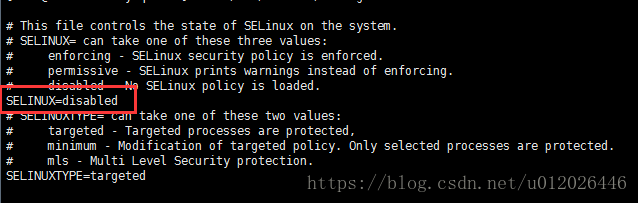
保存即可。

没解决的问题-git连接失败的更多相关文章
- 域账号修改后,导致vs中的git连接失败
域账号修改后,导致vs中的git连接失败, fatal: Authentication failed for https://blog.csdn.net/qq_34665539/article/det ...
- 解决idea中mysql连接失败Could not create connection to database server. Attempted reconnect 3 times. Giving up.
原因是少一个参数,设置时区的. 解决方法: 加一个参数: serverTimezone=UTC jdbc:mysql://localhost:3306/SshProject?useUnicode=t ...
- pip install 提示代理连接失败原因及解决办法
# pip install 提示代理连接失败原因及解决办法 1. 错误提示 在公司电脑上安装Python的虚拟环境时输入命令: pip install virtualenv 系统提示以下异常信息: R ...
- Fiddler抓包连接失败502的解决方法
本篇用户记录,在用Fiddler遇到过的坑,首先, 先上图,遇到的问题,提示主机连接失败.只是打开Fiddler,不会报这个问题,只有当Fiddler和火狐浏览器一起启动的时候,才会报这个错. 尝试去 ...
- 【问题解决方案】git clone失败的分析和解决
参考链接 git_clone资源获取失败解决 使用Git clone代码失败的解决方法 [Git] Clone failed 克隆失败的解决方法 问题描述: 无论是git clone还是pull,均失 ...
- Android HttpURLConnection.connect找不到源 HttpURLConnection连接失败 HttpURLConnection.connect IO异常 解决办法
Android HttpURLConnection.connect找不到源 HttpURLConnection连接失败 HttpURLConnection.connect IO异常 解决办法 以下代 ...
- eclipse marketplace网络连接失败的解决方法
2015-12-04 01:12:33 本想在eclipse上安装一个插件,点进help-EclipseMarketplace却连接失败,错误如下: 在help-instal new software ...
- HBase的Java Api连接失败的问题及解决方法
分布式方式部署的HBase,启动正常,Shell操作正常,使用HBase的Java Api操作时总是连接失败,信息如下: This server is in the failed servers li ...
- 【常见的SQL Server连接失败错误以及解决方法】
[常见的SQL Server连接失败错误以及解决方法] http://blog.csdn.net/feixianxxx/article/details/5523922 ADO连接SQL Server ...
- 在Ubuntu 18.04系统中蓝牙鼠标连接失败问题的解决
2018-08-22 16:00:35作者:谖瓞稿源:linux站 如果你在Ubuntu 18.04操作系统中有蓝牙鼠标连接失败问题,那就参考下面的解决方法处理. 解决方法 首先在系统终端下输入: b ...
随机推荐
- postman连接mysql数据库
转载:https://www.cnblogs.com/pengxiaojie/p/13495237.html 1.安装 2.启动服务 3.执行sql语句 安装: 想要postman连接mysql,需要 ...
- JavaWeb 之 Http
0x01:为什么会有Http? 在 HTTP 建立之初,主要目的就是为了将超文本标记语言(HTML)文档从Web服务器传送到客户端的浏览器 0x02:什么是Http? http是一个简单的,请求-响应 ...
- 【问题】Windows(CR LF)和Unix(LF)
问题描述: 在获取一张JPG图片的信息数组后, 再将这些信息存入新建JPG文件, 却发现新建图片异常. image.jpg为原图 image1.jpg为新建图片 原因: 在Windows环境下, 使用 ...
- vs2019中添加rdlc的报表设计器
在Visual studio 2019中,不会默认安装rdlc的报表设计器,所以需要自行添加. 1. 打开VS2019, 找到扩展-->管理扩展 2. 在扩展管理中,点击"联机&quo ...
- Java面向对象之接口的定义与实现
接口 普通类:只有具体实现 抽象类:具体实现和规范(抽象方法)都有! 接口:只有规范!自己无法写方法.专业的约束!约束和实现分离:面向接口编程 接口就是规范,定义的是一组规则,体现了现实世界中&quo ...
- 如何用adb连接android手机
如何用adb连接android手机 以下为手机"root"情况下操作....手机没root请拉到笔记最后,有解决方法 利用adb来连接手机, 有两种方式: wifi usb 通过w ...
- vue 数组对象深拷贝 并根据某项属性排序
vue 数组对象深拷贝 并根据某项属性 serialNumber 排序 原始数据 navListData: [ { name: '企业速览', isHot: false, isVip: fals ...
- mac使用expect登录跳板机后的机器
两个文档 #!/usr/bin/expect -f #连接文件名字记录 set ip [lindex $argv 0] catch {spawn ssh 1.1.1.1}## ip地址换成自己的 ex ...
- html表白代码
1.在电脑桌面右击鼠标选择新建--文本文档 2.并命名为:biaobai.txt 3.打开并且把一下代码复制并粘贴到biaobai.txt <!DOCTYPE html PUBLIC " ...
- VMware导入ovf报错
如下图所示报错 在网上查找了一些解决方案,大都说是ovftool版本兼容问题,但是我这里好像并不行,最后的解决的办法是对导入的位置默认不做改动. 报错原因:改变了默认路径.