
vue:概要
一、环境
#安装nodejs-官网安装包配置环境变量

node -v

#安装webpack

npm install webpack -g

#安装vue-cli

npm install vue-cli -g

#新建项目

vue init webpack vuedemo

#运行项目

npm run dev
npm install报错的
npm cache clean --force
二、生命周期
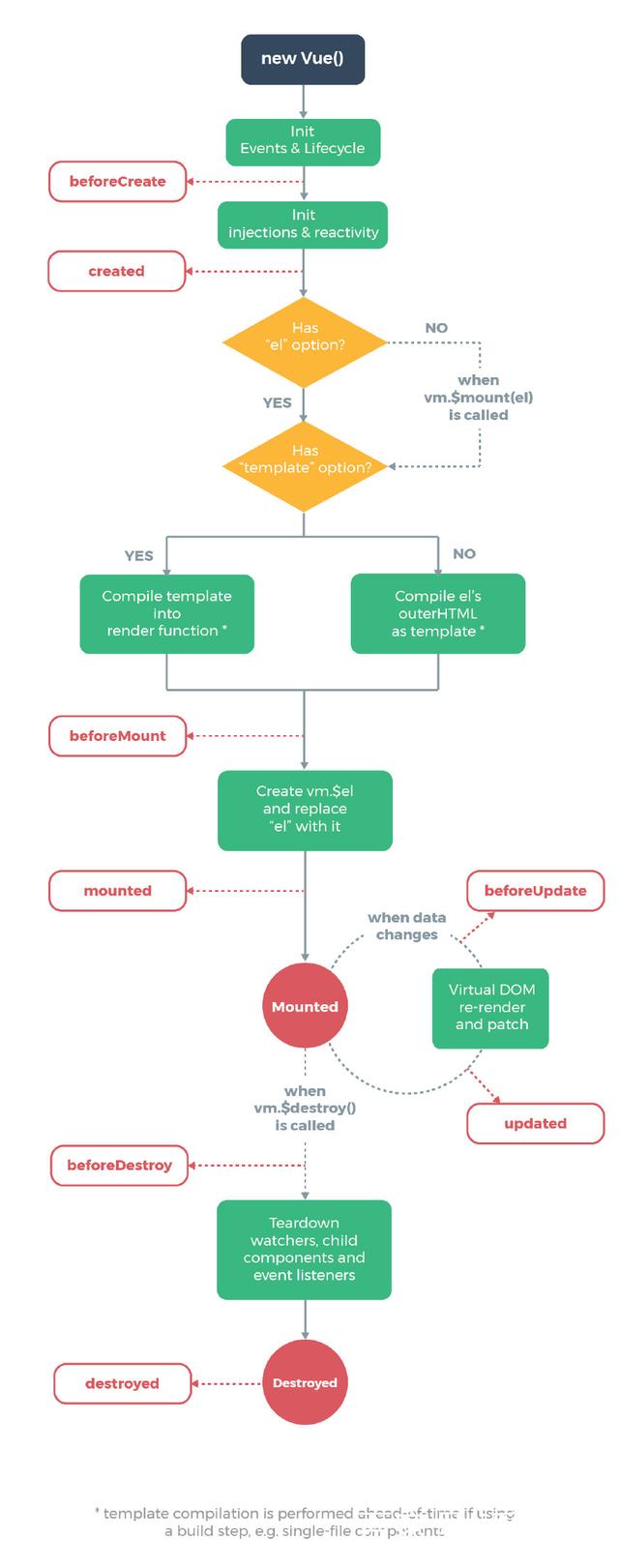
3、部署
npm run build
生成的dist内容直接以静态文件方式部署到服务器就OK;
build参数根据project.json的配置节点scripts确定;比如:npm run build:prod
通过webpack.DefinePlugin切换环境
new webpack.DefinePlugin({

  'process.env': require('../config/xxx.env')

})
分析:
npm run build:prod --report
https://zhuanlan.zhihu.com/p/26710831
资源:
npm常用命令
https://www.cnblogs.com/itlkNote/p/6830682.html
常用插件
https://github.com/varHarrie/varharrie.github.io/issues/10
工具配置
{

  "breadcrumbs.enabled": true,

  "editor.tabSize": ,

  "editor.renderWhitespace": "boundary",

  "editor.cursorBlinking": "smooth",

  "editor.minimap.renderCharacters": false,

  "editor.fontFamily": "'Fira Code', 'Droid Sans Mono', 'Courier New', monospace, 'Droid Sans Fallback'",

  "editor.fontLigatures": true,

  "explorer.confirmDragAndDrop": false,

  "extensions.autoUpdate": false,

  "files.insertFinalNewline": true,

  "git.autofetch": true,

  "git.path": "F:\\Program Files\\Git\\cmd\\git.exe",

  "search.exclude": {

    "**/node_modules": true,

    "**/dist": true

  },

  "typescript.locale": "en",

  "window.titleBarStyle": "custom",

  "window.title": "${dirty}${activeEditorMedium}${separator}${rootName}",

  "window.zoomLevel": ,

  "workbench.activityBar.visible": true,

  "workbench.colorTheme": "Plastic - deprioritised punctuation",

  "workbench.iconTheme": "vscode-great-icons",

  "workbench.startupEditor": "newUntitledFile",

  "eslint.autoFixOnSave": true,

  "eslint.validate": ["javascript", "javascriptreact", "vue"],

  "vsicons.projectDetection.autoReload": true,

  "vsicons.dontShowNewVersionMessage": true,

  "tslint.autoFixOnSave": true,

  "debugwrapper.wrappers": {

    "default": "console.log('$eSEL', $SEL)"

  },

  "prettier.tslintIntegration": true,

  "cSpell.userWords": [

    "Unmount"

  ],

  "jest.autoEnable": false,

}
VSCode
vue:概要的更多相关文章
- Vue 2.6版本基础知识概要(一)
挂载组件 //将 App组件挂载到div#app节点里 new Vue({ render: h => h(App), }).$mount('#app') VueComponent.$mount ...
- vue安装概要以及vue测试工具
一.概述 1.安装node,去node官网 2.新建一个项目,通过npm init命令初始化,即创建一个package.json文件 3.用命令 npm install vue -g 全局安装vue( ...
- vue语法概要二
函数 用途 类别 v-html 用于输出html格式的数据 输出 v-bing 用于输出值 输出 v-model 双向绑定 输入和输出 v-if 逻辑判断 分支语句 v-else 同上 分支语句 v- ...
- vue基本语法概要(一)
先看两种代码,再进行讲解 第一种格式: <template > <div> <div v-for=" item in sites "> < ...
- Vue框架基础概要
Vue.js是什么? Vue.js(读音 /vjuː/,类似于 view 的读音)是一套构建用户界面(user interface)的渐进式框架.与其他重量级框架不同的是,Vue 从根本上采用最小成本 ...
- Vue:Promise概要
1.Promise中then是异步的 2.Promise 的then里面两个回调,默认第一个resolve,第二个reject:不会进入catch:如果只有一个回调则进入catch var p1=ne ...
- 前端MVC学习总结(一)——MVC概要与angular概要、模板与数据绑定
一.前端MVC概要 1.1.库与框架的区别 框架是一个软件的半成品,在全局范围内给了大的约束.库是工具,在单点上给我们提供功能.框架是依赖库的.AngularJS是框架而jQuery则是库. 1.2. ...
- Spring MVC 学习总结(一)——MVC概要与环境配置
一.MVC概要 MVC是模型(Model).视图(View).控制器(Controller)的简写,是一种软件设计规范,用一种将业务逻辑.数据.显示分离的方法组织代码,MVC主要作用是降低了视图与业务 ...
- 前端MVC学习笔记(一)——MVC概要与angular概要、模板与数据绑定
一.前端MVC概要 1.1.库与框架的区别 框架是一个软件的半成品,在全局范围内给了大的约束.库是工具,在单点上给我们提供功能.框架是依赖库的.AngularJS是框架而jQuery则是库. 1.2. ...
随机推荐
- Python-02-基础知识
一.第一个Python程序 [第一步]新建一个hello.txt [第二步]将后缀名txt改为py [第三步]使用记事本编辑该文件 [第四步]在cmd中运行该文件 print("Hello ...
- 从零开始学Flask框架-007
Flash消息 from flask import flash 渲染Flash消息,在基模板base.html中引入get_flashed_messages() {% extends "bo ...
- IServiceBehavior IContractBehavior IEndpointBehavior IOperationBehavior
using System; using System.Collections.ObjectModel; using System.Reflection; using System.ServiceMod ...
- ajax中的事件
blur : 当光标移开时(点击)触发 change : 当光标移开并且文本框中的内容和上一次不一致时(点击)触发
- docker第二章--数据管理
- MySql数据库操作之数据约束
首先数据库的外键是数据库提供的一种完整性约束.在许多数据库的书上也会介绍到,然而对于外键这个完整性性约束究竟应该在数据库端实现,还是在项目业务端实现很多人有着不同的意见. 个人开发(小型应用).数据库 ...
- IO模型之BIO代码详解及其优化演进
一.BIO简介 BIO是java1.4之前唯一的IO逻辑,在客户端通过socket向服务端传输数据,服务端监听端口.由于传统IO读数据的时候如果数据没有传达,IO会一直等待输入传入,所以当有请求过来的 ...
- nginx 之 https 证书配置
HTTPS原理和作用 为什么需要HTTPS 原因:HTTP不安全 传输数据被中间人盗用.信息泄露 数据内容劫持.篡改 HTTPS协议的实现 对传输内容进行加密以及身份验证 对称加密:加密秘钥和解密秘钥 ...
- DBCP连接池原理分析(转载)
DBCP连接池介绍 ----------------------------- 目前 DBCP 有两个版本分别是 1.3 和 1.4. DBCP 1.3 版本需要运行于 JDK 1.4-1.5 ,支持 ...
- Elasticsearch7
elasticsearch 由来 点击进入 elasticsearch 基本概念 点击进入 elasticsearch 安装 点击进入 elasticsearch 增删改查 点击进入 elastics ...