
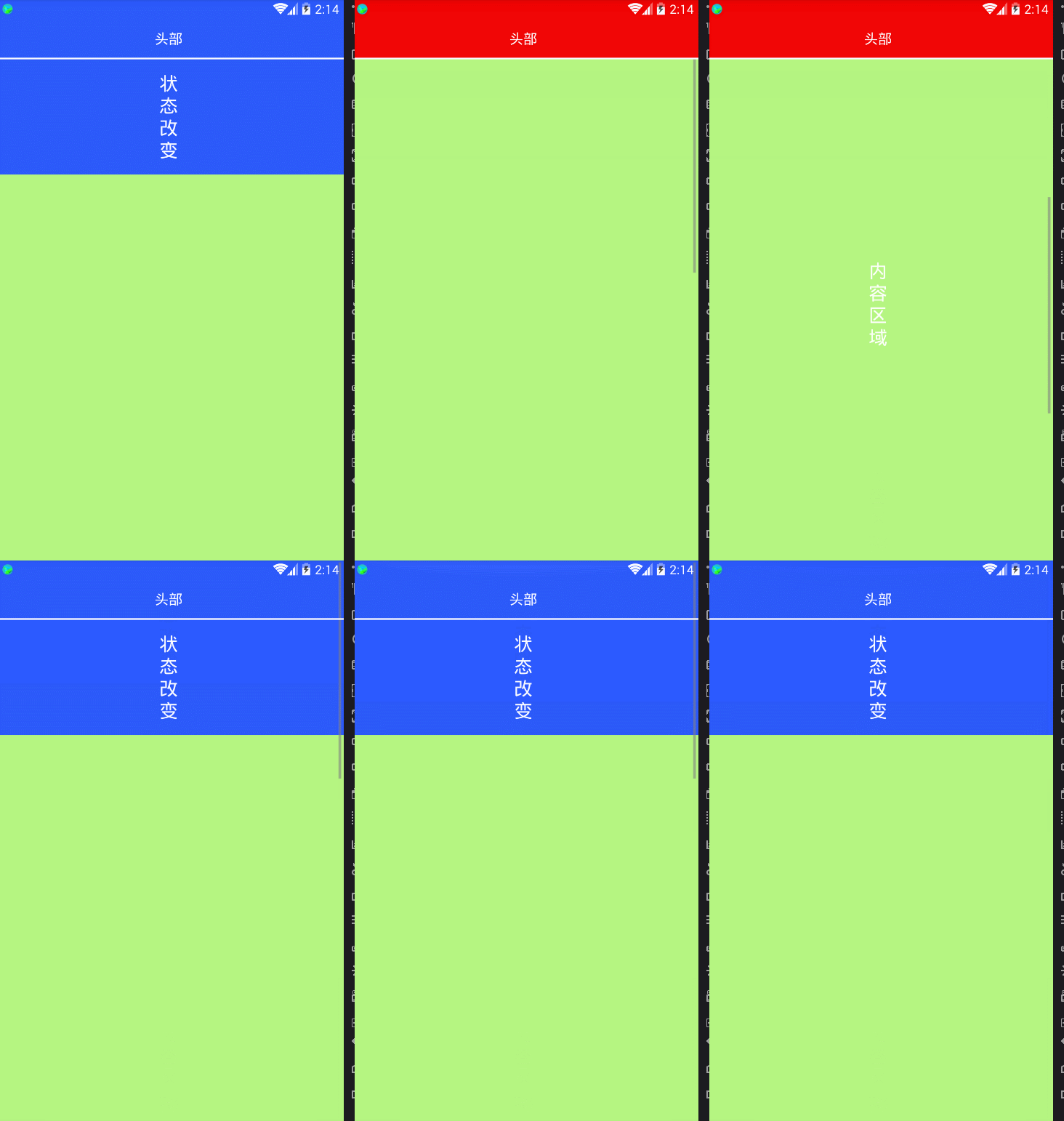
android 上下滑动标题栏和状态栏改变颜色实现
import android.content.Context;

import android.util.AttributeSet;

import android.widget.ScrollView;

public class MyScrollView extends ScrollView {

    private OnScrollistener onScrollistener;

    public OnScrollistener getOnScrollistener() {

        return onScrollistener;

    }

    public void setOnScrollistener(OnScrollistener onScrollistener) {

        this.onScrollistener = onScrollistener;

    }

    public MyScrollView(Context context, AttributeSet attrs, int defStyle) {

        super(context, attrs, defStyle);

    }

    public MyScrollView(Context context, AttributeSet attrs) {

        super(context, attrs);

    }

    public MyScrollView(Context context) {

        super(context);

    }

    public interface OnScrollistener {

        void onScroll(int startY, int endY);

    }

    @Override

    protected void onScrollChanged(int l, int t, int oldl, int oldt) {

        onScrollistener.onScroll(oldt, t);

        super.onScrollChanged(l, t, oldl, oldt);

    }

}
import android.app.Activity;

import android.graphics.Color;

import android.os.Build;

import android.os.Bundle;

import android.support.v7.app.AppCompatActivity;

import android.util.Log;

import android.view.View;

import android.view.ViewGroup;

import android.view.Window;

import android.view.WindowManager;

import android.widget.LinearLayout;

public class MainActivity extends AppCompatActivity {

    private View titleLine;

    private View titleLine1;

    private LinearLayout title;

    private LinearLayout top;

    private MyScrollView scrollView;

    @Override

    protected void onCreate(Bundle savedInstanceState) {

        super.onCreate(savedInstanceState);

        setContentView(R.layout.activity_main);

        initView();

    }

    private void initView() {

        setTranslucentStatus(this, true);

        title = (LinearLayout) findViewById(R.id.ll_title);

        title.getBackground().mutate().setAlpha(0);

        top = (LinearLayout) findViewById(R.id.ll_title_top);

        titleLine1 = findViewById(R.id.v_title_line_1);

        titleLine = findViewById(R.id.v_title_line);

        scrollView = (MyScrollView) findViewById(R.id.sv_content);

        // 设置状态栏高度

        int statusBarHeight = this.getResources().getDimensionPixelSize(this.getResources().getIdentifier("status_bar_height", "dimen", "android"));

        LinearLayout.LayoutParams params = new LinearLayout.LayoutParams(ViewGroup.LayoutParams.MATCH_PARENT, statusBarHeight);

        titleLine.setLayoutParams(params);

        titleLine1.setLayoutParams(params);

        // 设置滑动

        scrollView.setOnScrollistener(new MyScrollView.OnScrollistener() {

            @Override

            public void onScroll(int startY, int endY) {

                //根据scrollview滑动更改标题栏透明度

                changeAphla(startY, endY);

            }

        });

    }

    /**

     * 根据内容窗体的移动改变标题栏背景透明度

     *

     * @param startY scrollview开始滑动的y坐标(相对值)

     * @param endY   scrollview结束滑动的y坐标(相对值)

     */

    private void changeAphla(int startY, int endY) {

        //获取标题高度

        int titleHeight = title.getMeasuredHeight();

        //获取背景高度

        int backHeight = top.getMeasuredHeight();

        //获取控件的绝对位置坐标

        int[] location = new int[2];

        top.getLocationInWindow(location);

        //从屏幕顶部到控件顶部的坐标位置Y

        int currentY = location[1];

        //表示回到原位(滑动到顶部)

        if (currentY >= 0) {

            title.getBackground().mutate().setAlpha(0);

        }

        Log.e("zpan", "=titleHeight=" + titleHeight + "=backHeight=" + backHeight + "=currentY=" + currentY);

        //颜色透明度改变

        if (currentY < titleHeight && currentY >= -(backHeight - titleHeight)) {

            //计算出滚动过程中改变的透明值

            double y = Math.abs(currentY) * 1.0;

            double height = (backHeight - titleHeight) * 1.0;

            int changeValue = (int) (y / height * 255);

            Log.e("zpan", "changeValue=" + changeValue);

            //判断是向上还是向下

            if (endY > startY) {    //向上;透明度值增加,实际透明度减小

                title.getBackground().mutate().setAlpha(changeValue);

            } else if (endY < startY) {     //向下;透明度值减小,实际透明度增加

                title.getBackground().mutate().setAlpha(changeValue);

            }

        }

        //红色背景移除屏幕

        if (currentY < -(backHeight - titleHeight)) {

            title.getBackground().mutate().setAlpha(255);

        }

    }

    /**

     * 设置状态栏透明

     *

     * @param activity

     * @param on

     */

    public void setTranslucentStatus(Activity activity, boolean on) {

        Window win = activity.getWindow();

        if (Build.VERSION.SDK_INT >= Build.VERSION_CODES.LOLLIPOP) {

            win.clearFlags(WindowManager.LayoutParams.FLAG_TRANSLUCENT_STATUS

                    | WindowManager.LayoutParams.FLAG_TRANSLUCENT_NAVIGATION);

            win.getDecorView().setSystemUiVisibility(View.SYSTEM_UI_FLAG_LAYOUT_FULLSCREEN

//                    | View.SYSTEM_UI_FLAG_LAYOUT_HIDE_NAVIGATION //保证华为虚拟键盘能显示

                    | View.SYSTEM_UI_FLAG_LAYOUT_STABLE);

            win.addFlags(WindowManager.LayoutParams.FLAG_DRAWS_SYSTEM_BAR_BACKGROUNDS);

            win.setStatusBarColor(Color.TRANSPARENT);

//            win.setNavigationBarColor(Color.TRANSPARENT); //保证华为虚拟键盘是系统色

        }

        if (Build.VERSION.SDK_INT >= Build.VERSION_CODES.KITKAT && Build.VERSION.SDK_INT < Build.VERSION_CODES.LOLLIPOP) {

            WindowManager.LayoutParams winParams = win.getAttributes();

            final int bits = WindowManager.LayoutParams.FLAG_TRANSLUCENT_STATUS;

            if (on) {

                winParams.flags |= bits;

            } else {

                winParams.flags &= ~bits;

            }

            win.setAttributes(winParams);

        }

    }

}
布局:
<?xml version="1.0" encoding="utf-8"?>

<RelativeLayout xmlns:android="http://schemas.android.com/apk/res/android"

    android:layout_width="match_parent"

    android:layout_height="match_parent">

    <com.loaderman.flutterdemo.MyScrollView

        android:id="@+id/sv_content"

        android:layout_width="match_parent"

        android:layout_height="match_parent"

        android:fillViewport="true">

        <LinearLayout

            android:layout_width="match_parent"

            android:layout_height="match_parent"

            android:orientation="vertical">

            <LinearLayout

                android:id="@+id/ll_title_top"

                android:layout_width="match_parent"

                android:layout_height="wrap_content"

                android:orientation="vertical"

                android:background="#2c5aff">

                <View

                    android:id="@+id/v_title_line"

                    android:layout_width="match_parent"

                    android:layout_height="0dp"/>

                <View

                    android:layout_width="match_parent"

                    android:layout_height="50dp"/>

                <TextView

                    android:layout_width="match_parent"

                    android:layout_height="150dp"

                    android:gravity="center"

                    android:text="状\n态\n改\n变"

                    android:textColor="#ffffff"

                    android:textSize="24sp"/>

            </LinearLayout>

            <TextView

                android:layout_width="match_parent"

                android:layout_height="1600dp"

                android:gravity="center"

                android:background="#b5f581"

                android:text="内\n容\n区\n域"

                android:textColor="#ffffff"

                android:textSize="24sp"/>

        </LinearLayout>

    </com.loaderman.flutterdemo.MyScrollView>

    <LinearLayout

        android:id="@+id/ll_title"

        android:layout_width="match_parent"

        android:layout_height="wrap_content"

        android:orientation="vertical"

        android:background="#f10303">

        <View

            android:id="@+id/v_title_line_1"

            android:layout_width="match_parent"

            android:layout_height="0dp"/>

        <TextView

            android:layout_width="match_parent"

            android:layout_height="50dp"

            android:gravity="center"

            android:text="头部"

            android:textColor="#ffffff"

            android:textSize="18sp"/>

        <View

            android:layout_width="match_parent"

            android:layout_height="2dp"

            android:background="#fff"/>

    </LinearLayout>

</RelativeLayout>
效果:
android 上下滑动标题栏和状态栏改变颜色实现的更多相关文章
- Android——Activity去除标题栏和状态栏
一.在代码中设置 public void onCreate(Bundle savedInstanceState) { super.onCreate(savedInstanceState); //去 ...
- Android Activity去除标题栏和状态栏
一.在代码中设置public void onCreate(Bundle savedInstanceState) { super.onCreate(savedInstanceState); //去除ti ...
- Android 关于expandableListView childrenView 点击改变颜色
1.点击后改变颜色并保持颜色改变状态: <?xml version="1.0" encoding="utf-8"?> <selector xm ...
- 72、android状态栏一体化,状态栏改变颜色
只能在4.4以上版本使用. <LinearLayout xmlns:android="http://schemas.android.com/apk/res/android&q ...
- Android中隐藏标题栏和状态栏
http://www.cnblogs.com/zhuguangwei/archive/2011/01/18/1938276.html 一.隐藏标题栏 //隐藏标题栏 this.requestWindo ...
- Android学习第八弹之改变状态栏的颜色使其与APP风格一体化
公众号:smart_android 作者:耿广龙|loonggg 点击"阅读原文",可查看更多内容和干货 导语:沉浸式状态栏,改变状态栏的颜色使之与APP风格一体化是不是感觉很漂亮 ...
- Android开发技巧——设置系统状态栏颜色
开门见山,先来三张效果图: 然后我们再来讲如何实现以及如何快速地实现. 如何实现 实现设置系统状态栏颜色需要至少在Android 4.4.2(API 19)以上.这是因为,在这个版本以下,没有任何的A ...
- android中自定义view---实现竖直方向的文字功能,文字方向朝上,同时提供接口,判断当前touch的是哪个字符,并改变颜色
android自定义view,实现竖直方向的文字功能,文字方向朝上,同时提供接口,判断当前touch的是哪个字符,并改变颜色. 由于时间比较仓促,因此没有对代码进行过多的优化,功能远远不如androi ...
- Android系统更改状态栏字体颜色
随着时代的发展,Android的状态栏都不是乌黑一片了,在Android4.4之后我们可以修改状态栏的颜色或者让我们自己的View延伸到状态栏下面.我们可以进行更多的定制化了,然而有的时候我们使用的是 ...
随机推荐
- 剖析gcc -v输出
分析gcc -v的详细信息的意义 首先我们需要清楚一点,我们并不能完全弄清楚gcc -v的所有信息,因为毕竟我们并不是GCC编译器集合的实现者,对于这些信息,他们才是最清楚的.由于我们不能将所有的信息 ...
- python-----图像去重(imagededup)
安装库: pip install imagededup 安装可能遇到的问题参考: Cannot uninstall 'wrapt'. It is a distutils installed proje ...
- 50道sql练习题及答案与详细分析
数据表介绍 --1.学生表 Student(SId,Sname,Sage,Ssex) --SId 学生编号,Sname 学生姓名,Sage 出生年月,Ssex 学生性别 --2.课程表 Course( ...
- Java下的tinylog日志打印
做个笔记. 做某个功能时需要DEBUG调试日志,但是直接System.out.println 是打印在终端,有些情况下是看不到输出的,所以需要用日志框架去打印输出值. 经过搜索完以后发现Logback ...
- 使一个div元素上下左右居中
第一种方法 浮动流自我调节 .box{ widht:200px; height:200px; position:relative; } .box .son{ width:100px; height:1 ...
- Spring MVC 学习笔记(二)
6. 视图和视图解析器 ❤ Spring MVC如何解析视图 • 请求处理方法执行完成后,最终返回一个ModelAndView对象 ...
- [ZJOI2009] 硬币游戏(找规律)
题目 洛谷传送门 题解 把1/21/21/2转化成0/10/10/1,所以直接可以异或. 对于长度为nnn的0/10/10/1数列,发现每变换2k(k>1)2^k(k>1)2k(k> ...
- Vue多语言支持
i18n插件实现多语言支持,本文以中英文为例记录一下配置过程. 1.配置 1.1安装:npm install vue-i18n --save 1.2创建中英文配置项文件 src/lang目录下创建以下 ...
- storm 安装配置
1.1.下载安装包 storm.apache.org 配置zookeeper:http://www.cnblogs.com/eggplantpro/p/7120893.html 1.2.解压安装包ta ...
- Mybatis延迟加载, 一级缓存、二级缓存
延迟加载 概念:MyBatis中的延迟加载,也称为懒加载,是指在进行关联查询时,按照设置延迟规则推迟对关联对象的select查询.延迟加载可以有效的减少数据库压力. (注意:MyBatis的延迟加载只 ...