
webdispatch配置
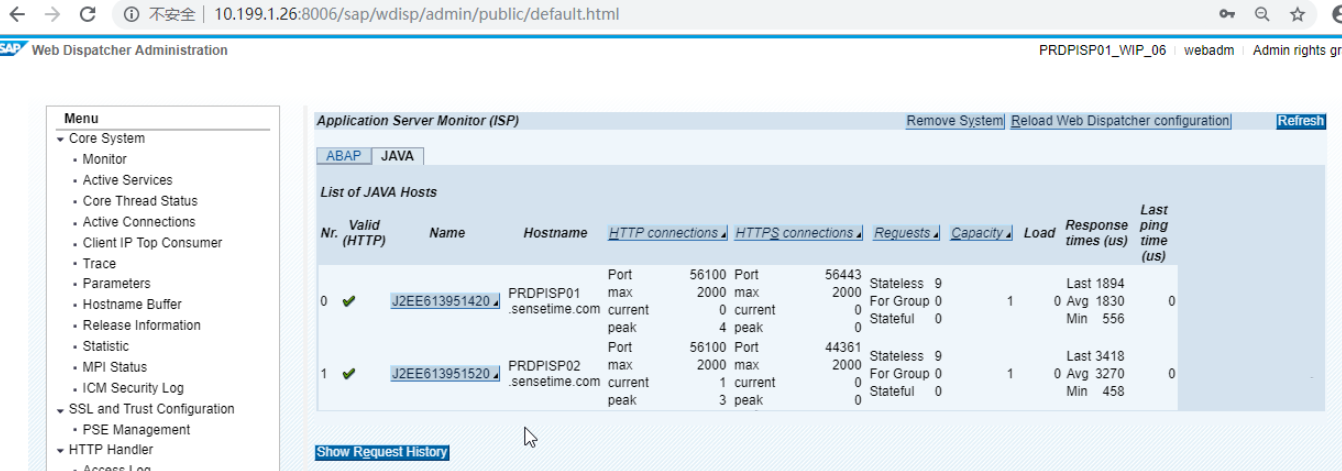
PRDPISP01:/sapmnt/WIP/profile # su - wipadm
PRDPISP01:wipadm 23> cdpro
PRDPISP01:wipadm 24> ls -l
total 8
-rw-r--r-- 1 wipadm sapsys 77 Jun 10 13:17 DEFAULT.PFL
-rw-r--r-- 1 wipadm sapsys 1907 Jun 10 13:37 WIP_W06_PRDPISP01
PRDPISP01:wipadm 25> sapwebdisp -checkconfig pf=WIP_W06_PRDPISP01
Checking SAP Web Dispatcher Configuration
=========================================
maximum number of sockets supported on this host: 5000
Server info will be retrieved from host: PRDPISP01:8160 with protocol: http
Checking connection to message server of system ISP...OK
Retrieving server info from message server...OK
Message Server instance list of system ISP
+---------------------+---------------------+---------+----------+
| instance name | hostname |HTTP port|HTTPS port|
+---------------------+---------------------+---------+----------+
| J2EE613951420 |PRDPISP01.sensetime. | 56100 | 56443 |
| J2EE613951520 |PRDPISP02.sensetime. | 56100 | 56443 |
+---------------------+---------------------+---------+----------+
No server group "!DIAGS" defined for system ISP
Checking ABAP servers with URL "/sap/public/icman/ping":
no ABAP server with HTTP or HTTPS active
Checking J2EE servers with URL "/favicon.ico":
Checking JE22 server https://PRDPISP01.sensetime.com:56443...ERROR: Connection to server PRDPISP01.sensetime.com:56443 failed
WARNING: checking JE22 server failed: Network error (NI)(-8)
Checking JE22 server https://PRDPISP02.sensetime.com:56443...ERROR: Connection to server PRDPISP02.sensetime.com:56443 failed
WARNING: checking JE22 server failed: Network error (NI)(-8)
no J2EE server available
Web Dispatcher configuration for J2EE only system: No server group !DIAG defined
On double stack systems, configure Web Dispatcher to access Message Server of SAP Web AS ABAP
------以上分析由于请了HTTPS的缘故,导致webdispatcher不能正常使用-------------
PRDPISP01:wipadm 27> cat WIP_W06_PRDPISP01
SAPSYSTEMNAME = WIP
SAPSYSTEM = 06
INSTANCE_NAME = W06
DIR_CT_RUN = $(DIR_EXE_ROOT)$(DIR_SEP)$(OS_UNICODE)$(DIR_SEP)linuxx86_64
DIR_EXECUTABLE = $(DIR_CT_RUN)
DIR_PROFILE = $(DIR_INSTALL)$(DIR_SEP)profile
_PF = $(DIR_PROFILE)/WIP_W06_PRDPISP01
SETENV_00 = DIR_LIBRARY=$(DIR_LIBRARY)
SETENV_01 = LD_LIBRARY_PATH=$(DIR_LIBRARY):%(LD_LIBRARY_PATH)
SETENV_02 = SHLIB_PATH=$(DIR_LIBRARY):%(SHLIB_PATH)
SETENV_03 = LIBPATH=$(DIR_LIBRARY):%(LIBPATH)
SETENV_04 = PATH=$(DIR_EXECUTABLE):%(PATH)
-----------------------------------------------------------------------
Back-end system configuration
-----------------------------------------------------------------------
wdisp/system_0 = SID=ISP, MSHOST=PRDPISP01, MSPORT=8160, SSL_ENCRYPT=2
-----------------------------------------------------------------------
Configuration of maximum number of concurrent connections
-----------------------------------------------------------------------
icm/max_conn = 2000
-----------------------------------------------------------------------
SAP Web Dispatcher Ports
-----------------------------------------------------------------------
icm/server_port_0 = PROT=HTTPS,PORT=44306
icm/server_port_1 = PROT=HTTP,PORT=8006
-----------------------------------------------------------------------
SAP Web Dispatcher Administration
-----------------------------------------------------------------------
icm/HTTP/admin_0 = PREFIX=/sap/wdisp/admin,DOCROOT=$(DIR_DATA)$(DIR_SEP)icmandir,AUTHFILE=$(icm/authfile)
-----------------------------------------------------------------------
Start webdispatcher
-----------------------------------------------------------------------
WD = wd.sap$(SAPSYSTEMNAME)$(INSTANCE_NAME)
Execute_00 = local rm -f $(_WD)
Execute_01 = local ln -s -f $(DIR_EXECUTABLE)/sapwebdisp$(FT_EXE) $(_WD)
Restart_Program_00 = local $(_WD) pf=$(_PF)
SETENV_05 = SECUDIR=$(DIR_INSTANCE)/sec
@@@@SAP-10.06.2019 14:57:09
wdisp/system_0 = SID=ISP, MSHOST=PRDPISP01, MSPORT=8160, SSL_ENCRYPT=2

这样HTTPS的就被取消了。
https://PRDPISP01.sensetime.com:56443
在执行以下命令后,会在当前目录下产生一个文件名dev_webdisp_check.
sapwebdisp -checkconfig pf=WIP_W06_PRDPISP01
510007 - Setting up SSL on Application Server ABAP
Configuring the SAP Web Dispatcher to Support SSL
https://help.sap.com/viewer/683d6a1797a34730a6e005d1e8de6f22/7.31.18/en-US/493db10a19341067e10000000a42189c.html
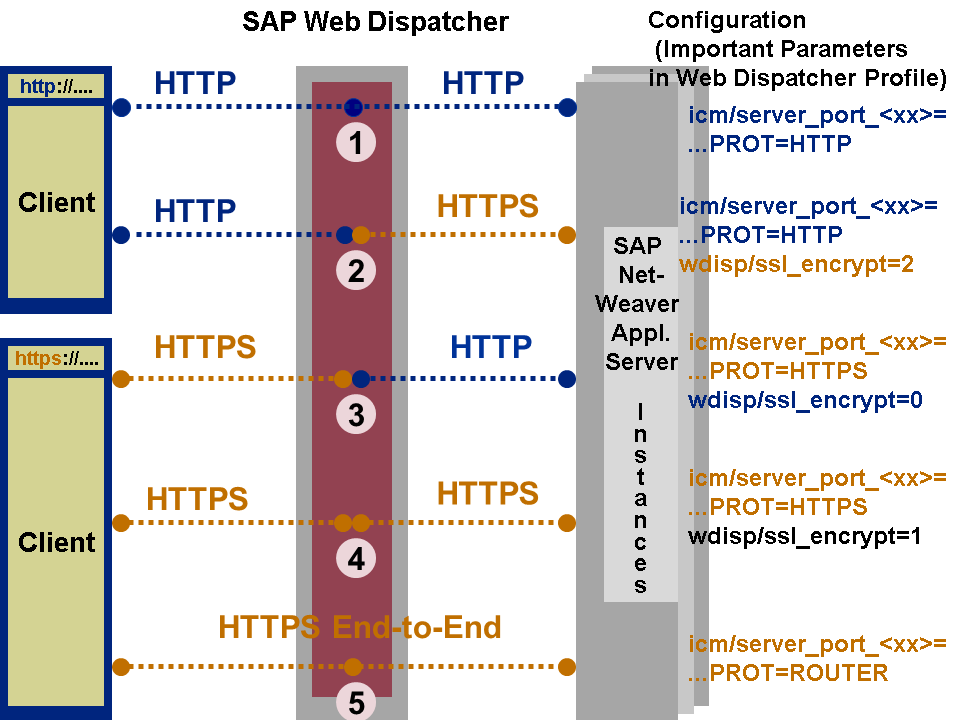
These connection types have the following characteristics:
The first connection type shown above does not use SSL at all. Therefore, you only need to set the port to HTTP. No extra configuration is needed.
For the second connection type, the request is terminated at the SAP Web Dispatcher. The incoming connection uses HTTP and the outgoing connection uses HTTPS. Therefore, you must configure the SAP Web Dispatcher as an SSL client.
For the third connection type, the request is terminated at the SAP Web Dispatcher. The incoming connection uses HTTPS and the outgoing connection uses HTTP. Therefore, you must configure the SAP Web Dispatcher as an SSL server.
For the fourth connection type, the request is terminated at the SAP Web Dispatcher. Both the incoming connection and the outgoing connection use HTTPS. Therefore, you must configure the SAP Web Dispatcher as an SSL server and an SSL client.
For the fifth connection type, the request is passed directly to the back-end server and not terminated at the SAP Web Dispatcher. SSL is used for the entire communication path (end-to-end SSL).
webdispatch配置的更多相关文章
- 配置android sdk 环境
1:下载adnroid sdk安装包 官方下载地址无法打开,没有vpn,使用下面这个地址下载,地址:http://www.android-studio.org/
- Android Studio配置 AndroidAnnotations——Hi_博客 Android App 开发笔记
以前用Eclicps 用习惯了现在 想学学 用Android Studio 两天的钻研终于 在我电脑上装了一个Android Studio 并完成了AndroidAnnotations 的配置. An ...
- react-router 组件式配置与对象式配置小区别
1. react-router 对象式配置 和 组件式配置 组件式配置(Redirect) ----对应---- 对象式配置(onEnter钩子) IndexRedirect -----对应-- ...
- 总结:Mac前端开发环境的搭建(配置)
新年新气象,在2016年的第一天,我入手了人生中第一台自己的电脑(大一时好友赠送的电脑在一次无意中烧坏了主板,此后便不断借用别人的或者网站的).macbook air,身上已无分文...接下来半年的房 ...
- Android Studio 多个编译环境配置 多渠道打包 APK输出配置
看完这篇你学到什么: 熟悉gradle的构建配置 熟悉代码构建环境的目录结构,你知道的不仅仅是只有src/main 开发.生成环境等等环境可以任意切换打包 多渠道打包 APK输出文件配置 需求 一般我 ...
- Virtual Box配置CentOS7网络(图文教程)
之前很多次安装CentOS7虚拟机,每次配置网络在网上找教程,今天总结一下,全图文配置,方便以后查看. Virtual Box可选的网络接入方式包括: NAT 网络地址转换模式(NAT,Network ...
- [linux]阿里云主机的免登陆安全SSH配置与思考
公司服务器使用的第三方云端服务,即阿里云,而本地需要经常去登录到服务器做相应的配置工作,鉴于此,每次登录都要使用密码是比较烦躁的,本着极速思想,我们需要配置我们的免登陆. 一 理论概述 SSH介绍 S ...
- nginx配置反向代理或跳转出现400问题处理记录
午休完上班后,同事说测试站点访问接口出现400 Bad Request Request Header Or Cookie Too Large提示,心想还好是测试服务器出现问题,影响不大,不过也赶紧上 ...
- Swift3.0服务端开发(一) 完整示例概述及Perfect环境搭建与配置(服务端+iOS端)
本篇博客算是一个开头,接下来会持续更新使用Swift3.0开发服务端相关的博客.当然,我们使用目前使用Swift开发服务端较为成熟的框架Perfect来实现.Perfect框架是加拿大一个创业团队开发 ...
随机推荐
- spark.sql.shuffle.partitions和spark.default.parallelism的区别
在关于spark任务并行度的设置中,有两个参数我们会经常遇到,spark.sql.shuffle.partitions 和 spark.default.parallelism, 那么这两个参数到底有什 ...
- datax实例——全量、增量同步
一.全量同步 本文以mysql -> mysql为示例: 本次测试的表为mysql的系统库-sakila中的actor表,由于不支持目的端自动建表,此处预先建立目的表: CREATE TABLE ...
- 【Mybatis】MyBatis之配置自定义数据源(十一)
本例是在[Mybatis]MyBatis之配置多数据源(十)的基础上进行拓展,查看本例请先学习第十章 实现原理 1.扩展Spring的AbstractRoutingDataSource抽象类(该类充当 ...
- jenkins编译时文件存放的位置
1.首先随便打包编译一下 2.查看编译执行的目录 [root@bogon ~]# ls /root/.jenkins/workspace/pipline-test/ CHANGE_LOGS.html ...
- 一次性清除页面上的所有setInterval
参考链接:https://www.cnblogs.com/liujinyu/p/3668575.html
- ubuntu18.04 安装 wps2019
安装包可以从官网下载 linuxidc@linuxidc:~/linuxidc.com$ sudo dpkg -i *.deb [sudo] linuxidc 的密码: 正在选中未选择的软件包 wps ...
- JDK线程池框架Executor源码阅读
Executor框架 Executor ExecutorService AbstractExecutorService ThreadPoolExecutor ThreadPoolExecutor继承A ...
- FutureTask源码阅读
FutureTask功能用法 类结构 源码中详细说明了FutureTask生命周期状态及变化 /** * The run state of this task, initially NEW. The ...
- linux 下mongo 基础配置
配置文件dbpath=/usr/local/mongodb/dblogpath=/usr/local/mongodb/log/mongo.logport=27017fork=truejournal=f ...
- Python 常用包收集
转自:http://www.cnblogs.com/Logic0/archive/2010/09/03/1850382.html 常用的自带类库 常用的外部类库 Tkinter———— P ...