
hadoop-hive的内表和外表
--创建内表
create table if not exists employee(
id int comment 'empoyeeid',
dateincompany string comment 'data come in company',
money float comment 'work money',
mapdatamap array<string>,
arraydata array<int>,
structordata struct<col1:string,col2:string>)
partitioned by (century string comment 'centruycome in company',
year string comment 'come in comany year')
row format delimited fields terminated by ','
collection items terminated by '@'
map keys terminated by '$'
stored as textfile;
数据文件:
[hadoop@master hivetest]$ more employee.txt
1,huawei,1000.2,m1$a,1@2@3@4,c1@c2
装载数据:
hive>LOAD DATA LOCAL INPATH '/home/hadoop/tmp/hivetest/employee.txt' INTO TABLE employee PARTITION(century='zhengzhou', year='20180910');
查询数据:
hive> select * from employee;
OK
1 huawei 1000.2 ["m1$a"] [1,2,3,4] {"col1":"c1","col2":"c2"} zhengzhou 20180910
Time taken: 0.638 seconds, Fetched: 1 row(s)
给出的现象是:
在HDFS上,默认的路径下/user/hive/warehouse/employee生成一个目录,在前台界面,也是一个目录。

删除内表,目录都不存在了。
还可以指定目录(HDFS上)
create table if not exists test1(id int, name string)
row format delimited fields terminated by ',' stored as textfile location '/tmp/data';
> load data inpath '/tmp/test1.txt' into table test1 ;
> select * from test1;
OK
1 zhangwei
Time taken: 0.593 seconds, Fetched: 1 row(s)
/tmp/test1.txt在加载的时候,删除掉了,数据加载到表里,其实就是落成文件到/tmp/data/test1.txt
删除表后,数据都删除了,data目录都删除了。
--创建外表
create external table if not exists test2 (id int,name string)
row format delimited fields terminated by ',' stored as textfile;
会在/user/hive/warehouse/新建一个表目录test2
hive> load data inpath '/tmp/test1.txt' into table test2 ;
Loading data to table default.test2
OK
Time taken: 1.053 seconds
hive> select * from test2;
OK
1 zhangwei
Time taken: 0.281 seconds, Fetched: 1 row(s)
现象: 在load的那一步,会把/tmp/test1.txt文件移动到/user/hive/warehouse/test2这个目录下。
数据的位置发生了变化!
本质是load一个hdfs上的数据时会转移数据!删除表后,数据文件在留在HDFS上。
2、在删除内部表的时候,Hive将会把属于表的元数据和数据全部删掉;而删除外部表的时候,Hive仅仅删除外部表的元数据,数据是不会删除的!
3. 在创建内部表或外部表时加上location 的效果是一样的,只不过表目录的位置不同而已,加上partition用法也一样,只不过表目录下会有分区目录而已,load data local inpath直接把本地文件系统的数据上传到hdfs上,有location上传到location指定的位置上,没有的话上传到hive默认配置的数据仓库中。
外部表相对来说更加安全些,数据组织也更加灵活,方便共享源数据。
那么,应该如何选择使用哪种表呢?在大多数情况没有太多的区别,因此选择只是个人喜好的问题。但是作为一个经验,如果所有处理都需要由Hive完成,那么你应该创建表,否则使用外部表!
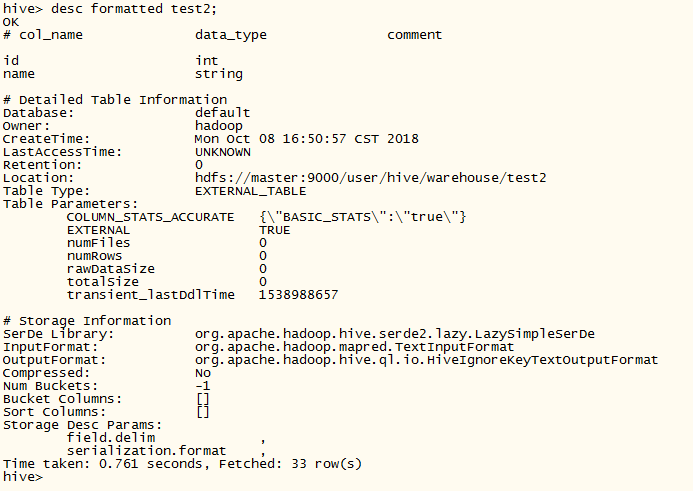
有一个命令:
时光如水,悄然而逝。
hadoop-hive的内表和外表的更多相关文章
- Hive 7、Hive 的内表、外表、分区(22)
Hive 7.Hive 的内表.外表.分区 1.Hive的内表 Hive 的内表,就是正常创建的表,在 http://www.cnblogs.com/raphael5200/p/5208437.h ...
- Hive的内表和外表以及分区表
1. 内表和外表的区别 内表和外表之间是通过关键字EXTERNAL来区分.删除表时: 内表:在删除时,既删除内表的元数据,也删除内表的数据 外表:删除时,仅仅删除外表的元数据. CREATE [EXT ...
- Hive 7、Hive 的内表、外表、分区
1.Hive的内表 Hive 的内表,就是正常创建的表,在 http://www.cnblogs.com/raphael5200/p/5208437.html 中已经提到: 2.Hive的外表 创建H ...
- Hive内表和外表的区别
本文以例子的形式介绍一下Hive内表和外表的区别.例子共有4个:不带分区的内表.带分区的内表.不带分区的外表.带分区的外表. 1 不带分区的内表 #创建表 create table innerTabl ...
- hive内表和外表的创建、载入数据、区别
创建表 创建内表 create table customer( customerId int, firstName string, lastName STRING, birstDay timestam ...
- hadoop Hive 的建表 和导入导出及索引视图
1.hive 的导入导出 1.1 hive的常见数据导入方法 1.1.1 从本地系统中导入数据到hive表 1.创建student表 [ROW FORMAT DELIMITED]关键字,是用来设 ...
- hadoop系列 第二坑: hive hbase关联表问题
关键词: hive创建表卡住了 创建hive和hbase关联表卡住了 其实针对这一问题在info级别的日志下是看出哪里有问题的(为什么只能在debug下才能看见呢,不太理解开发者的想法). 以调试模式 ...
- kylin加载hive表错误:ERROR [http-bio-7070-exec-10] controller.TableController:189 : org/apache/hadoop/hive/conf/HiveConf java.lang.NoClassDefFoundError: org/apache/hadoop/hive/conf/HiveConf 解决办法
一.问题背景 在kylin中加载hive表时,弹出提示框,内容是“oops!org/apache/hadoop/hive/conf/HiveConf”,无法加载hive表,查找kylin的日志时发现, ...
- hive中删除表的错误Error, return code 1 from org.apache.hadoop.hive.ql.exec.DDLTask. MetaException
hive使用drop table 表名删除表时报错,return code 1 from org.apache.hadoop.hive.ql.exec.DDLTask. MetaException 刚 ...
随机推荐
- OriginPro 9.1 科研图标绘制入门
OriginPro 9.1 科研图标绘制入门 目的:1.介绍如何不用编程画出复杂多样的图表2.介绍OriginLab 常用功能3.科研报告时,有效绘图,省却时间 科研发展需求.反映专业形象.满足公司要 ...
- 还原Master数据库后SQLSERVER的服务无法开启
如果还原Master数据库后,SQLSERVER的服务无法开启,请注意是否因为其他的系统数据库在Master备份中记录的路径与现在的路径不一致导致的. 如果是,可以在cmd中执行“NET START ...
- SpringBoot + thymeleaf 实现分页
SpringBoot结合Thymeleaf实现分页,很方便. 效果如下 后台代码 项目结构 1. 数据库Config 由于hibernate自动建表字符集为latin不能插入中文,故需要在applic ...
- python之pip使用技巧
pip 镜像临时使用:pip install -i https://pypi.tuna.tsinghua.edu.cn/simple pyspider永久:直接在user目录中创建一个pip目录:C: ...
- 小林的VB6動態壁紙模擬程序
本項目參考了以下資料[這可能對你理解程序運行有幫助]: https://github.com/Yinmany/WinWallpaper https://blog.csdn.net/breaksoftw ...
- JAVA -----------交互式程序
2.6交互式程序 如果程序能在执行期间交互地从用户输入中读取数据,就可使程序每执行一次时计算出新结果,并且新结果取决于输入数据.这样的程序才具有实用性. 2.6.1 Scanner类 Scanner类 ...
- kubespray 修改配置
1.安装前的修改配置 # [root@slave1 kubespray]# vim inventory/local/group_vars/k8s-cluster.yml kube_network_pl ...
- django中的Form和ModelForm中的问题
django的Form组件中,如果字段中包含choices参数,请使用两种方式实现数据源实时更新 方法一:重写构造方法,在构造方法中重新去获取值 class UserForm(forms.Form): ...
- linux文件权限更改命令chmod及数字权限实践总结
改变权限属性命令chmod chmod 是用来改变文件或目录权限的命令,但只有文件的属主和超级用户root才有这种权限.通过chmod来改变文件或目录的权限有两种方法:一种是通过权限字母和操作符表达 ...
- VUE 1.0
现代开发模式:vue/react. 20%的时间花在了表现层 传统开发模式:jquery. 80%的时间花在了表现层 MVC——数据.表现.行为分离 视图层(表现层)<----->数据层 ...