
KDC添加加密
零售KDC管理的域为TESTA.COM 华为集群管理的域为hadoop.com
(目前测试了hdfs cli,下午在UAT集群测试下distcp)
一、 零售KDC升级支持AES加密算法
1、 修改/usr/local/var/krb5kdc/kdc.conf文件中的realms部分
master_key_type = des3-cbc-sha1
supported_enctypes = des3-cbc-sha1:normal arcfour-hmac-md5:normal camellia256-cts-cmac:normal camellia128-cts-cmac:normal des-cbc-crc:normal des-cbc-md5:normal des-cbc-md4:normal
=》
#master_key_type = des3-cbc-sha1
supported_enctypes = aes256-cts-hmac-sha1-96:normal aes128-cts-hmac-sha1-96:normal des3-cbc-sha1:normal arcfour-hmac-md5:normal camellia256-cts-cmac:normal camellia128-cts-cmac:normal des-cbc-crc:normal des-cbc-md5:normal des-cbc-md4:normal
2、修改/etc/krb5.conf文件
(1) 修改libdefaults部分
permitted_enctypes = des3-cbc-sha1 arcfour-hmac-md5 camellia256-cts-cmac camellia128-cts-cmac des-cbc-crc des-cbc-md5 des-cbc-md4
default_tgs_enctypes = des3-cbc-sha1 arcfour-hmac-md5 camellia256-cts-cmac camellia128-cts-cmac des-cbc-crc des-cbc-md5 des-cbc-md4
default_tkt_enctypes = des3-cbc-sha1 arcfour-hmac-md5 camellia256-cts-cmac camellia128-cts-cmac des-cbc-crc des-cbc-md5 des-cbc-md4
=》
permitted_enctypes = aes256-cts-hmac-sha1-96 aes128-cts-hmac-sha1-96 des3-cbc-sha1 arcfour-hmac-md5 camellia256-cts-cmac camellia128-cts-cmac des-cbc-crc des-cbc-md5 des-cbc-md4
default_tgs_enctypes = aes256-cts-hmac-sha1-96 aes128-cts-hmac-sha1-96 des3-cbc-sha1 arcfour-hmac-md5 camellia256-cts-cmac camellia128-cts-cmac des-cbc-crc des-cbc-md5 des-cbc-md4
default_tkt_enctypes = aes256-cts-hmac-sha1-96 aes128-cts-hmac-sha1-96 des3-cbc-sha1 arcfour-hmac-md5 camellia256-cts-cmac camellia128-cts-cmac des-cbc-crc des-cbc-md5 des-cbc-md4
3、 重启kdckrb和kadmind服务
ps aux |grep krb5kdc|awk '{print $2}' |xargs kill -9
ps aux |grep kadmind|awk '{print $2}' |xargs kill -9
/usr/local/sbin/kadmind
/usr/local/sbin/krb5kdc
4、 删除hadoop/admin@TESTA.COM和krbtgt/TESTA.COM@TESTA.COM
kadmin.local -q "delprinc hadoop/admin@TESTA.COM"
kadmin.local -q "delprinc krbtgt/TESTA.COM@TESTA.COM"
5、 重新添加hadoop/admin@TESTA.COM和krbtgt/TESTA.COM@TESTA.COM
kadmin.local -q "addprinc hadoop/admin@TESTA.COM"
kadmin.local -q "addprinc krbtgt/TESTA.COM@TESTA.COM"
测试:创建任意账户,Kinit是否正常,并且查看支持的算法

二、零售集群配置互信
1、修改/etc/krb5.conf文件
(1) 在realms部分中添加对hadoop.com的识别
HADOOP.COM = {
kdc = 29.2.244.66:21732
admin_server = 29.2.244.66:21730
}
(2)在domain_realm部分中添加对hadoop.com的识别
.hadoop.com = HADOOP.COM
hadoop.com = HADOOP.COM
(3)添加capaths
[capaths]
TESTA.COM = {
HADOOP.COM = .
}
2、创建krbtgt账户
kadmin.local -q 'addprinc +requires_preauth -e "aes256-cts-hmac-sha1-96:normal aes128-cts-hmac-sha1-96:normal" krbtgt/TESTA.COM@HADOOP.COM'
kadmin.local -q 'addprinc +requires_preauth -e "aes256-cts-hmac-sha1-96:normal aes128-cts-hmac-sha1-96:normal" krbtgt/HADOOP.COM@TESTA.COM'
注:华为集群端需要运行一模一样的命令,并且密码也需要一致
3、增加core-site.xml中的配置
<property>
<name>hadoop.rpc.protection</name>
<value>privacy,authentication</value>
</property>
4、由于访问华为集群的账户是使用aes算法,需要更新jdk8的jce_policy
(1)
官网下载jce_policy-8.zip
(2)
将压缩包里的local_policy.jar和US_export_policy.jar复制到$JAVA_HOME/jre/lib/security/下
三、华为集群配置互信,需要武工进行配合
四、测试
1、创建测试账户
kadmin.local -q "addprinc +requires_preauth -randkey huawei"
kadmin.local -q "xst -norandkey -k /tmp/huawei.keytab huawei"
kinit -kt /tmp/huawei.keytab Huawei
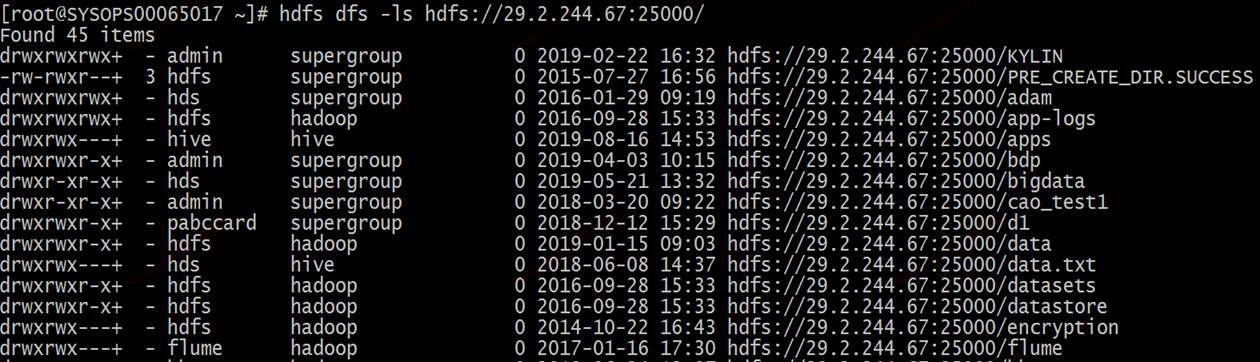
2、测试
KDC添加加密的更多相关文章
- net-snmp源码VS2013编译添加加密支持(OpenSSL)
net-snmp源码VS2013编译添加加密支持(OpenSSL) snmp v3 协议使用了基于用户的安全模型,具有认证和加密两个模块. 认证使用的算法是一般的消息摘要算法,例如MD5/SHA等.这 ...
- net-snmp源码VS2013编译添加加密支持(OpenSSL)(在VS里配置编译OpenSSL)
net-snmp源码VS2013编译添加加密支持(OpenSSL) snmp v3 协议使用了基于用户的安全模型,具有认证和加密两个模块. 认证使用的算法是一般的消息摘要算法,例如MD5/SHA等.这 ...
- 对 sql server 数据库的备份进行加密
原文:对 sql server 数据库的备份进行加密 嗯,最近在研究数据库备份相关的东西,考虑到应该为数据库备份加个密,就准备从网上搜索一下看看有什么好办法,没想到还挺乱... 首先,我从网上搜到的, ...
- (4.22)Microsoft 管理控制台启用 SSL 加密的 SQL Server 实例
如何通过使用 Microsoft 管理控制台启用 SSL 加密的 SQL Server 实例 关键词:MSSQL加密,sql server加密,sql server客户端与服务器传输内容加密 转自:h ...
- TMG 2010 为HTTPS协议添加非标准端口(443)
1.添加加密端口时,编辑脚本addsslports.vbs addsslports.vbs 脚本内容如下: Dim root Dim tpRanges Dim newRange Set root = ...
- Spring Cloud配置中心内容加密
从配置获取的配置默认是明文的,有些像数据源这样的配置需要加密的话,需要对配置中心进行加密处理. 下面使用对称性加密来加密配置,需要配置一个密钥,当然也可以使用RSA非对称性加密,但对称加密比较方便也够 ...
- sqlite3加密
最近因为工作原因,需要使用sqlite数据库.sqlite数据库小并且使用方便,感觉挺不错的.但有一个不足就是没有对数据库进行加密,不过好的是sqlite预留有加密的接口,我们可以直接调用即可.我也是 ...
- keyring源码加密解密函数分析
Encrypt the page data contents. Page type can't be FIL_PAGE_ENCRYPTED, FIL_PAGE_COMPRESSED_AND_ENCRY ...
- Sharding-JDBC使用jasypt3.0及以上版本加密数据库连接密码
本文中介绍的是基于Sharding-JDBC 4.0和jasypt 3.0及其以上版本对数据库连接密码进行加密操作 引入依赖 项目的pom.xml中引入maven依赖 <dependency&g ...
随机推荐
- ADO.NET连接数据库增删查改创建公用类
顺序如下:再web.config中添加数据库的用户名和密码 创建公用类. //添加进web.config中的账号和密码 /*<connectionStrings> <add name ...
- c# redis密码验证笔记
参考博客https://www.cnblogs.com/qukaicheng/p/7514168.html写的 安装教程https://www.redis.net.cn/tutorial/3503.h ...
- JS数组判断,方法
怎么判断一个对象是不是数组? 首先可以用 ES5 提供的 isArray 方法进行判断(注意:Array.isArray是ES 5.1推出的,不支持IE6~8,所以在使用的时候也应注意兼容问题. ) ...
- LLVM使用其他Pass的结果
之前的工作一直集中在clang中,最近有点空闲时间,又重新熟悉了一下Pass的书写过程.(参考LLVM CookBook和http://llvm.org/docs/WritingAnLLVMPass. ...
- Spring web.xml详解
web.xml文件是Java Web项目中的一个配置文件,主要用于配置欢迎页.Filter.Listener.Servlet等,但并不是必须的,一个Java Web项目没有web.xml文件也是照样能 ...
- Spring Cloud(五)断路器监控(Hystrix Dashboard)
在上两篇文章中讲了,服务提供者 Eureka + 服务消费者 Feign,服务提供者 Eureka + 服务消费者(rest + Ribbon),本篇文章结合,上两篇文章中代码进行修改加入 断路器监控 ...
- sql 存储过程笔记3
16:22 2014/1/26一.定义变量--简单赋值declare @a int set @a = 5 print @a --使用select语句赋值declare @user1 nvarchar( ...
- 第一章、Django概述
目录 第一章.Django概述 一.了解软件开发架构 二.HTTP协议 三.响应状态码 四.请求方式 五.基于wsgiref模块 六..动静态网页 七.python三大主流web框架 八.安装Djan ...
- 阿里云Ubuntu下tomcat8.5配置SSL证书
环境 阿里云ubuntu(18.04)服务器 阿里云申请的域名 Tomcat8.5.7 jdk1.8 免费型SSL证书 SSL证书申请 登录阿里云的官网,登录后在菜单中选择SSL证书(应用安全) 进入 ...
- [转载] 关于CI,CD,jenkins
Jenkins入门(一) https://blog.csdn.net/miss1181248983/article/details/82840006