
JavaWeb_(SpringMVC框架)SpringMVC&Spring&MyBatis整合
JavaWeb_(SpringMVC框架)测试SpringMVC&Spring&MyBatis三大整合 传送门
1、整合ssm 3大框架 过程
a)导包 -> spring_Jar整理 -> ssm框架整合包
b)配置 -> web.xml
i.读取spring配置文件;
ii.配置springmvc前端控制器;
c)配置 -> applicationContext.xml
i.读取数据库配置文件;
ii.配置数据源连接池;
iii.开启注解扫描;
iv.配置事务核心管理器;
v.开启注解事务;
vi.配置视图解析器;
vii.配置Mybatis:
1.配置sqlSessionFactory;
2.配置别名;
3.配置mapper工厂;
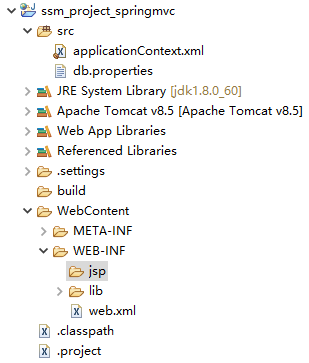
a)导包 -> spring_Jar整理 -> ssm框架整合包
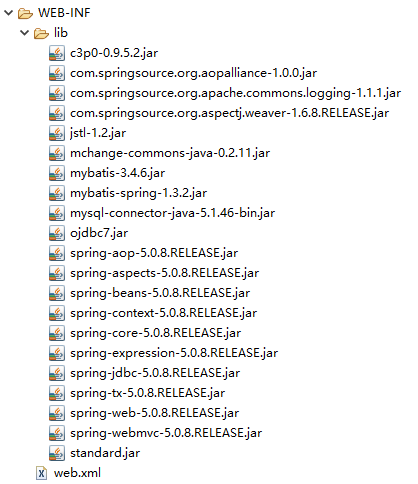
b)配置 -> web.xml
i.读取spring配置文件;
ii.配置springmvc前端控制器;
<!-- 配置springmvc前端控制器 和 读取配置文件 -->

  <servlet>

      <servlet-name>springmvc</servlet-name>

          <servlet-class>org.springframework.web.servlet.DispatcherServlet</servlet-class>

          <init-param>

              <!-- 读取配置文件 -->

              <param-name>contextConfigLocation</param-name>

              <param-value>classpath:applicationContext.xml</param-value>

          </init-param>

  </servlet>

  <servlet-mapping>

      <servlet-name>springmvc</servlet-name>

      <url-pattern>*.do</url-pattern>

  </servlet-mapping>
<?xml version="1.0" encoding="UTF-8"?>

<web-app xmlns:xsi="http://www.w3.org/2001/XMLSchema-instance" xmlns="http://xmlns.jcp.org/xml/ns/javaee" xsi:schemaLocation="http://xmlns.jcp.org/xml/ns/javaee http://xmlns.jcp.org/xml/ns/javaee/web-app_3_1.xsd" id="WebApp_ID" version="3.1">

  <display-name>ssm_project_springmvc</display-name>

  <!-- 配置springmvc前端控制器 和 读取配置文件 -->

  <servlet>

      <servlet-name>springmvc</servlet-name>

          <servlet-class>org.springframework.web.servlet.DispatcherServlet</servlet-class>

          <init-param>

              <!-- 读取配置文件 -->

              <param-name>contextConfigLocation</param-name>

              <param-value>classpath:applicationContext.xml</param-value>

          </init-param>

  </servlet>

  <servlet-mapping>

      <servlet-name>springmvc</servlet-name>

      <url-pattern>*.do</url-pattern>

  </servlet-mapping>

  <welcome-file-list>

    <welcome-file>index.html</welcome-file>

    <welcome-file>index.htm</welcome-file>

    <welcome-file>index.jsp</welcome-file>

    <welcome-file>default.html</welcome-file>

    <welcome-file>default.htm</welcome-file>

    <welcome-file>default.jsp</welcome-file>

  </welcome-file-list>

</web-app>
web.xml
c)配置 -> applicationContext.xml
i.读取数据库配置文件;
ii.配置数据源连接池;
iii.开启注解扫描;
iv.配置事务核心管理器;
v.开启注解事务;
vi.配置视图解析器;
vii.配置Mybatis:
1.配置sqlSessionFactory;
2.配置别名;
3.配置mapper工厂;
db.properties
jdbc.driverClass=com.mysql.jdbc.Driver

jdbc.jdbcUrl=jdbc:mysql://localhost:3306/ssm_springmvc

jdbc.user=root

jdbc.password=123456
jdbc.driverClass=com.mysql.jdbc.Driver

jdbc.jdbcUrl=jdbc:mysql://localhost:3306/ssm_springmvc

jdbc.user=root

jdbc.password=123456
db.properties
applicationContext.xml
    <!-- 读取配置文件 数据库 -->

    <context:property-placeholder location="classpath:db.properties"/>

        <!-- 配置数据源 -->

        <bean name="dataSource" class="com.mchange.v2.c3p0.ComboPooledDataSource">

            <property name="driverClass" value="${jdbc.driverClass}"/>

            <property name="jdbcUrl" value="${jdbc.jdbcUrl}"/>

            <property name="user" value="${jdbc.user}"/>

            <property name="password" value="${jdbc.password}"/>

        </bean>

        <!-- 开启注解扫描 -->

        <context:component-scan base-package="com.Gary"></context:component-scan>

        <!-- 事务核心管理器 -->

        <bean name="transactionManager" class="org.springframework.jdbc.datasource.DataSourceTransactionManager">

            <property name="dataSource" ref="dataSource"/>

        </bean>

        <!-- 开启注解事务 -->

        <tx:annotation-driven/>

        <!-- 配置视图解析器 -->

        <bean class="org.springframework.web.servlet.view.InternalResourceViewResolver">

            <property name="prefix" value="/WEB-INF/jsp/"/>

            <property name="suffix" value=".jsp"/>

        </bean>

        <!-- 配置mybatis -->

        <bean name="sqlSessionFactory" class="org.mybatis.spring.SqlSessionFactoryBean">

            <property name="dataSource" ref="dataSource"/>

            <property name="typeAliasesPackage" value="com.Gary.bean"/>

        </bean>

        <!-- mapper工厂 -->

        <bean class="org.mybatis.spring.mapper.MapperScannerConfigurer">

            <property name="basePackage" value="com.Gary.mapper"/>

        </bean>
<?xml version="1.0" encoding="UTF-8"?>

<beans xmlns="http://www.springframework.org/schema/beans"

    xmlns:xsi="http://www.w3.org/2001/XMLSchema-instance"

    xmlns:context="http://www.springframework.org/schema/context"

    xmlns:aop="http://www.springframework.org/schema/aop"

    xmlns:mvc="http://www.springframework.org/schema/mvc"

    xmlns:tx="http://www.springframework.org/schema/tx"

    xsi:schemaLocation="http://www.springframework.org/schema/mvc http://www.springframework.org/schema/mvc/spring-mvc-4.3.xsd

        http://www.springframework.org/schema/beans http://www.springframework.org/schema/beans/spring-beans-4.3.xsd

        http://www.springframework.org/schema/context http://www.springframework.org/schema/context/spring-context-4.3.xsd

        http://www.springframework.org/schema/aop http://www.springframework.org/schema/aop/spring-aop-4.3.xsd

        http://www.springframework.org/schema/tx http://www.springframework.org/schema/tx/spring-tx-4.3.xsd">

        <!-- 读取配置文件 数据库 -->

        <context:property-placeholder location="classpath:db.properties"/>

        <!-- 配置数据源 -->

        <bean name="dataSource" class="com.mchange.v2.c3p0.ComboPooledDataSource">

            <property name="driverClass" value="${jdbc.driverClass}"/>

            <property name="jdbcUrl" value="${jdbc.jdbcUrl}"/>

            <property name="user" value="${jdbc.user}"/>

            <property name="password" value="${jdbc.password}"/>

        </bean>

        <!-- 开启注解扫描 -->

        <context:component-scan base-package="com.Gary"></context:component-scan>

        <!-- 事务核心管理器 -->

        <bean name="transactionManager" class="org.springframework.jdbc.datasource.DataSourceTransactionManager">

            <property name="dataSource" ref="dataSource"/>

        </bean>

        <!-- 开启注解事务 -->

        <tx:annotation-driven/>

        <!-- 配置视图解析器 -->

        <bean class="org.springframework.web.servlet.view.InternalResourceViewResolver">

            <property name="prefix" value="/WEB-INF/jsp/"/>

            <property name="suffix" value=".jsp"/>

        </bean>

        <!-- 配置mybatis -->

        <bean name="sqlSessionFactory" class="org.mybatis.spring.SqlSessionFactoryBean">

            <property name="dataSource" ref="dataSource"/>

            <property name="typeAliasesPackage" value="com.Gary.bean"/>

        </bean>

        <!-- mapper工厂 -->

        <bean class="org.mybatis.spring.mapper.MapperScannerConfigurer">

            <property name="basePackage" value="com.Gary.mapper"/>

        </bean>

</beans>
applicationContext.xml
JavaWeb_(SpringMVC框架)SpringMVC&Spring&MyBatis整合的更多相关文章
- 3.springMVC+spring+Mybatis整合Demo(单表的增删该查,这里主要是贴代码,不多解释了)
前面给大家讲了整合的思路和整合的过程,在这里就不在提了,直接把springMVC+spring+Mybatis整合的实例代码(单表的增删改查)贴给大家: 首先是目录结构: 仔细看看这个目录结构:我不详 ...
- SpringMVC+Spring+Mybatis整合
SpringMVC+Spring+Mybatis整合 导包 配置jdbc.properties.log4j.properties jdbc.driver=com.mysql.jdbc.Driver j ...
- 整合SpringMVC框架和Spring框架
-------------------------siwuxie095 整合 SpringMVC 框架和 Spring 框架 ...
- Springmvc+Spring+Mybatis整合开发(架构搭建)
Springmvc+Spring+Mybatis整合开发(架构搭建) 0.项目结构 Springmvc:web层 Spring:对象的容器 Mybatis:数据库持久化操作 1.导入所有需要的jar包 ...
- SSM 即所谓的 Spring MVC + Spring + MyBatis 整合开发。
SSM 即所谓的 Spring MVC + Spring + MyBatis 整合开发.是目前企业开发比较流行的架构.代替了之前的SSH(Struts + Spring + Hibernate) 计划 ...
- Spring + mybatis整合方案总结 结合实例应用
Spring + mybatis整合实例应用 项目结构图 (Spring3.0.2 +mybatis3.0.4) 方案一: 通过配置文件整合Spring和mybatis 应用数据库 -- --数据库 ...
- Spring+Mybatis整合时 Failed to read candidate component class,Caused by:IllegalArgumentException
Spring+Mybatis整合时Caused by: java.lang.IllegalArgumentException错误 org.springframework.beans.factory.B ...
- springMVC + Spring + MyBatis 整合
整理下SSM(基于注解)的整合 1. web.xml 配置文件 <?xml version="1.0" encoding="UTF-8"?> < ...
- mybatis学习(十一)——springmvc++spring+mybatis整合
做任何一个项目都以一个需求,这里先定义一下需求:利用三大框架查询酒店列表. 一.搭建开发环境 1.创建一个web项目 我这里用的是 jdk1.8+tomact7.0 2.创建hotel表 CREATE ...
随机推荐
- (一)ORM基础
一.ORM思想解析 要了解学习Hibernate框架,就不得不提到ORM思想,因为Hibernate就是基于ORM思想的一个产品. 1.1 介绍 广义上,ORM指的是面向对象的对象模型和关系型数据库的 ...
- Spring Boot Redis 分布式缓存的使用
一.pom 依赖 <!-- 分布式缓存 --> <dependency> <groupId>org.springframework.boot</groupId ...
- 搭建SSM环境(淘淘商城)
本文用到的资料: 链接:https://pan.baidu.com/s/1Pk_aI_PRbqRFP9i3o9Xodg 提取码:o4o4 1.1. 数据库 1.1.1. 使用navicat创建数据库连 ...
- buffer 与 cache 的区别
Buffer 和 Cache buffer 和 cache 同样作为缓存,他们之间有什么区别呢? 简单来说,buffer 是即将要写入磁盘的缓存,而 cache 是从磁盘中读出来放到缓存的 参考来自: ...
- CUDA 笔记
名词解释 SM :Streaming Multiprocessor 而 Block 大致就是对应到 SM 所有的blocks 按照流水线被送到6个SM中进行计算 在 Compute Ca ...
- PHP常见算法
算法的概念:解决特定问题求解步骤的描述,在计算机中表现为指令的有限序列,并且每条指令表示一个或多个操作.一个问题可以有多种算法,每种算法都不同的效率.一个算法具有的特征:有穷,确切,输入,输出,可行 ...
- c#重写了窗体的OnKeyDown事件,但是不执行
设置下窗体的KeyPreview属性值为True即可 总结:遇到类似这样的问题,比如其他窗体运行没问题,就新建的窗体有问题.应该检查下窗体的属性.
- 嵌套的页面——自适应高度与跨越操作DOM
<div id="myIframeId"> <iframe ref="myIframe" name="odpIframeName&q ...
- oracle排序怎样弄成1 2 3 ,而不是 1 10 100
oracle表字段设置得值不是number,而是Varchar2时排序就会出现这种问题 这个时候排序的时候需要转类型排序: order by to_number(顺序号) asc
- 机器学习(十)—聚类算法(KNN、Kmeans、密度聚类、层次聚类)
聚类算法 任务:将数据集中的样本划分成若干个通常不相交的子集,对特征空间的一种划分. 性能度量:类内相似度高,类间相似度低.两大类:1.有参考标签,外部指标:2.无参照,内部指标. 距离计算:非负性, ...