
C# Parellel.For 和 Parallel.ForEach
简介:任务并行库(Task Parellel Library)是BCL的一个类库,极大的简化了并行编程。
使用任务并行库执行循环
C#当中我们一般使用for和foreach执行循环,有时候我们呢的循环结构每一次的迭代需要依赖以前一次的计算或者行为。但是有时候则不需要。如果迭代之间彼此独立,并且程序运行在多核处理器上,如果能将不同的迭代放到不同的处理器上并行处理,则会获益匪浅。Parallel.For和Parallel.ForEach就是为此而生的。
①使用Parallel.For 声明如下:
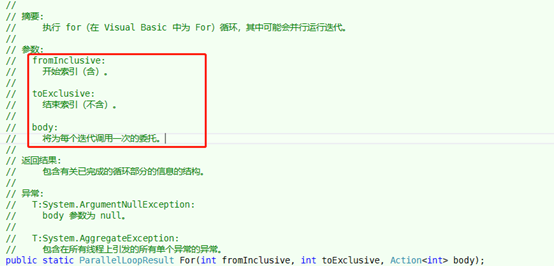
这里可以看到 toExclusive这个参数,它是不含的, 在使用的时候传入参数要注意下。
举个例子:
static void Main(string[] args)

{

    Parallel.For(0, 5, i =>

       {

           //打印平方

           Console.WriteLine("The Square of {0} is {1}", i, i * i);

       }

    );

    Console.ReadKey();

}
执行结果:
The Square of 0 is 0

The Square of 2 is 4

The Square of 1 is 1

The Square of 4 is 16

The Square of 3 is 9
从执行结果上我们可以看到,它不是按顺序执行的。那么问题来了,怎么让结果保持有序?
我们可以通过一个数组来存储执行的结果,例如下面的例子:
static void Main(string[] args)

{

    const int maxValues = 5;

    int[] Squares = new int[maxValues];

    Parallel.For(0, maxValues , i =>Squares[i] = i*i );

    for (int i = 0; i < maxValues; i++) Console.WriteLine("Square of {0} is {1}", i, Squares[i]);

    Console.ReadKey();

}
我们首先定义了一个数组,然后由于数组的下标已经定下来了,所以每次执行都会存入具体的位置,然后遍历结果的数组,就得到了有顺序的结果。
②使用Parallel.ForEach
最简单的实现,声明如下:
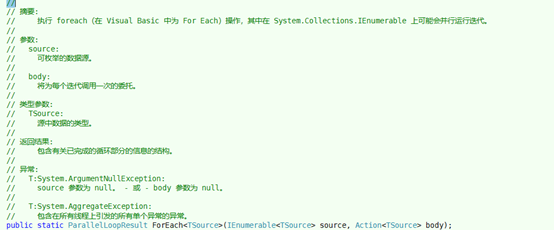
举例:
static void Main(string[] args)

{

    string[] squares = new string[]

        {"We", "hold", "these", "truths", "to", "be", "self-evident", "that", "all", "men", "are", "created", "equal"};

    Parallel.ForEach(squares,

        i => Console.WriteLine(string.Format("'{0}' has {1} letters", i, i.Length)));

    Console.ReadKey();

}
结果:
'We' has 2 letters

'hold' has 4 letters

'these' has 5 letters

'to' has 2 letters

'truths' has 6 letters

'self-evident' has 12 letters

'that' has 4 letters

'be' has 2 letters

'men' has 3 letters

'are' has 3 letters

'created' has 7 letters

'equal' has 5 letters

'all' has 3 letters
这里同样可以看到,不是按顺序遍历的。
C# Parellel.For 和 Parallel.ForEach的更多相关文章
- Parallel.Foreach
随着多核时代的到来,并行开发越来越展示出它的强大威力! 使用并行程序,充分的利用系统资源,提高程序的性能.在.net 4.0中,微软给我们提供了一个新的命名空间:System.Threading.Ta ...
- [译]何时使用 Parallel.ForEach,何时使用 PLINQ
原作者: Pamela Vagata, Parallel Computing Platform Group, Microsoft Corporation 原文pdf:http://download.c ...
- Parallel.ForEach , ThreadPool.QueueUserWorkItem
using System; using System.Collections.Generic; using System.Linq; using System.Text; using System.T ...
- Parallel.ForEach() 并行循环
现在的电脑几乎都是多核的,但在软件中并还没有跟上这个节奏,大多数软件还是采用传统的方式,并没有很好的发挥多核的优势. 微软的并行运算平台(Microsoft’s Parallel Computing ...
- Parallel for-each loops in .NET C# z
An IEnumerable object An Action of T which is used to process each item in the list List<string&g ...
- Parallel.Foreach的并发问题解决方法-比如爬虫WebClient
场景五:线程局部变量 Parallel.ForEach 提供了一个线程局部变量的重载,定义如下: public static ParallelLoopResult ForEach<TSource ...
- Parallel.Foreach的全部知识要点【转】
简介 当需要为多核机器进行优化的时候,最好先检查下你的程序是否有处理能够分割开来进行并行处理.(例如,有一个巨大的数据集合,其中的元素需要一个一个进行彼此独立的耗时计算). .net framewor ...
- C# 使用Parallel并行开发Parallel.For、Parallel.Foreach实例
using System; using System.Collections.Generic; using System.Linq; using System.Text; using System.N ...
- Parallel.ForEach 多线程 声明失败 "未将对象引用设置到对象的实例"
x using System; using System.Collections.Generic; namespace Parallel.ForEach { class Program { //代码结 ...
随机推荐
- python3.7.3安装beautifulsoup4出现版本不兼容的问题
今天想安装一个beautifulsoup4,结果一直出错,好多教程总是有各种坑……找了很多个教程,为了记录方法也为了分享给大家,简单些一个.但是是真真不想再费劲写一遍了……直接贴链接,亲测有效,但是底 ...
- 排序算法三:Shell插入排序
排序算法三:Shell插入排序 声明:引用请注明出处http://blog.csdn.net/lg1259156776/ 引言 在我的博文<"主宰世界"的10种算法短评> ...
- 通过 Spring Session 实现新一代的 Session 管理
长期以来,session 管理就是企业级 Java 中的一部分,以致于我们潜意识就认为它是已经解决的问题,在最近的记忆中,我们没有看到这个领域有很大的革新. 但是,现代的趋势是微服务以及可水平扩展的原 ...
- Python基础系列讲解——时间模块详解大全之time模块
Python中提供处理时间日期相关的内置模块有time.datetime和calendar. time模块中大多数函数调用了所在平台C library 的同名函数,因此更依赖于操作系统层面,所以tim ...
- python学习-22 字符串格式化
格式化包括:百分号方式和format方式 1.百分号 - %s (%.4s 表示截取了4个字符) 传单个值: 例如: print('i am %s sex boy is ljj'%123) 运 ...
- python标准库之collections介绍
collections----容器数据类型 collections模块包含了除list.dict.和tuple之外的容器数据类型,如counter.defaultdict.deque.namedtup ...
- vi 使用系统剪贴板(clipboard)
ref : https://www.jianshu.com/p/771b95e34293 http://www.bubuko.com/infodetail-469867.html 在vi中,如果编译时 ...
- hdu 2844 多重背包的转化问题 以及这个dp状态的确定
在杭电上测试了下 这里的状态转移方程有两个.,. 现在有价值val[1],val[2],…val[n]的n种硬币, 它们的数量分别为num[i]个. 然后给你一个m, 问你区间[1,m]内的所有数目, ...
- (七)装配Bean(1)
针对给接口提供哪一个具体的实现,也就是装配哪一种具体的实现bean,在Spring中提供了多种方式,主要包括3种: 一.隐式的bean发现机制和自动装配(自动化装配bean) 二.在Java类中进行显 ...
- (五)mybatis之一对一关系
一.需求分析 需求:查询订单信息关联查询用户信息 分析:一条订单只能由一个消费者来下单,也就是说从订单的角度来说与消费者是一对一的关系. 二.建数据库表和实体对象 其中订单表中的字段user_id对应 ...