
SMOS数据产品介绍与下载方法
1. SMOS数据介绍
The Soil Moisture and Ocean Salinity (SMOS) 卫星是欧空局发射的一颗以探测地球土壤水含量以及海表盐度为目标的卫星,卫星所搭载的唯一载荷为Microwave Imaging Radiometer using Aperture Synthesis (MIRAS微波成像综合孔径辐射计)。
SMOS的数据体系,目前有以下级别:
(1) Raw data:
SMOS Payload data in their original format (CCSDS packets)
(2) Level 0 data products:
These are SMOS payload data in so-called Source Packets with added Earth Explorer product headers. They are chronologically sorted by Source Packet type: Observation Data and Housekeeping Telemetry.
(3) Level 1 data products:
Level 1A data products: Reformatted and calibrated observation and housekeeping data in engineering units.
Level 1B data products: Output of the image reconstruction of the SMOS observation measurements and consist of Fourier components of brightness temperatures in the antenna polarisation reference frame.
Level 1C data products: Multi-incidence angle brightness temperatures at the top of the atmosphere, geolocated in an equal-area grid system.
(4) Level 1 Near Real Time data products
(5) Level 2 data products
Level 2 soil moisture data product; Level 2 sea surface salinity data product
(6) Level 2 Soil Moisture Near Real Time Neural Network data
(7) Level 3 Sea-ice product
(8) Level 3 and 4 data products
更加详细的数据产品可以在下述网站找到https://earth.esa.int/web/guest/missions/esa-operational-eo-missions/smos/content/-/asset_publisher/t5Py/content/data-types-levels-formats-7631
2. SMOS数据下载
在网站https://eo-sso-idp.eo.esa.int/idp/umsso20/registration注册ESA Earth Observation Users' Single Sign On账号,此账号也可用于下载ESA其他卫星产品以及部分合作机构的数据产品,可下载种类不少,具体种类自行去ESA官网查看,此处不再赘述。下面以Level 2 soil moisture data product为例介绍数据下载方法。以下网站对下载方法做了英文的介绍https://smos-diss.eo.esa.int/smos/faq.html
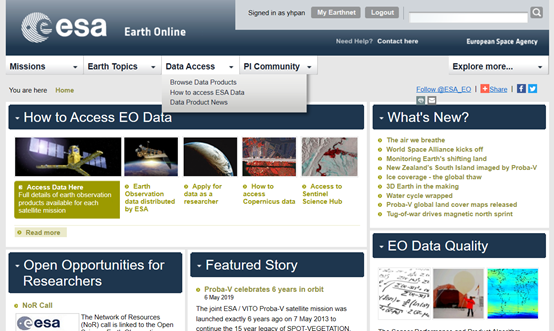
首先打开https://earth.esa.int/web/guest/home,点击Access Data下拉列表的Browse Data Products,进入数据下载页面。
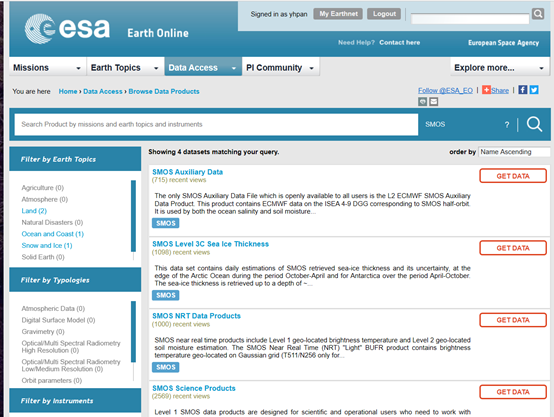
在数据下载界面,可以浏览并下载多种传感器的数据,我们需要SMOS数据,因此选择根据Mission查询,得到网站提供的SMOSS数据集。如下所示。我们需要下载L2级别的数据,因此选择SMOS Science Products数据集,点击GET DATA进入数据分发界面。
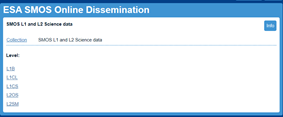
在数据分发界面,首先登录EO-SSO账号,然后点击Collections按钮,进入数据分发界面。

在数据分发界面,点击数据集名称进入数据查询界面。
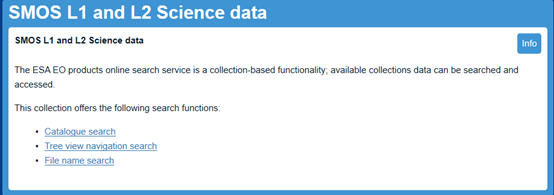
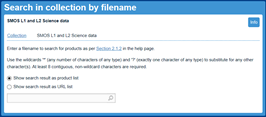
下图展示了后两种查询方法界面。此处我选择第一种查询方法,进行数据查询。
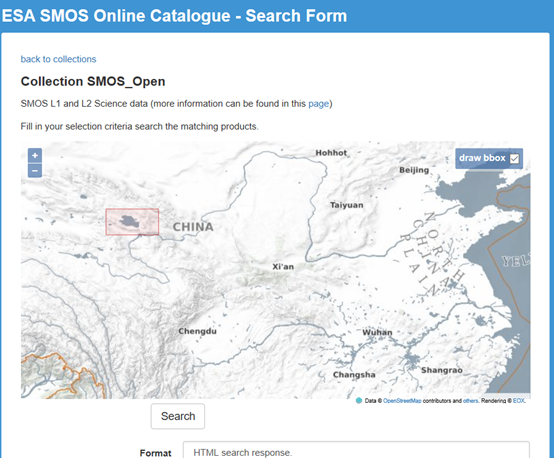
设置数据查询条件(时间范围、区域范围、格式、数据集),Format设置为HTML search response 将展示单个的数据下载链接,如下所示。
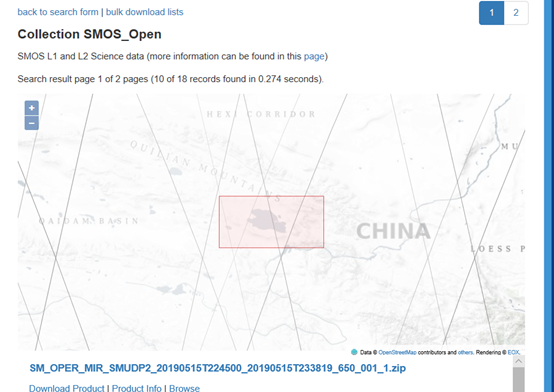
在查询结果界面,可以点击单个文件下载。当Format设置为bulk downloads lists时,可以下载所有的数据下载链接。如下图所示。
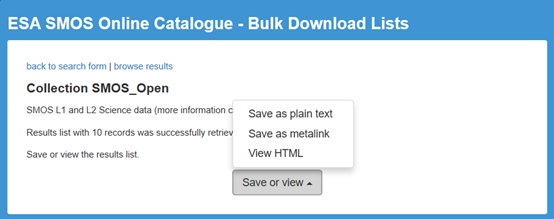
将下载出来的链接,利用下载工具如讯雷等进行批量下载。
此外也可以利用FTP工具进行数据下载。站点smos-diss.eo.esa.int,用户名和密码为注册的EO-SSO账户密码。推荐 Filezilla 软件下载总体感觉所有的方式在国内访问都比较慢。
另外,这一网站https://earth.esa.int/web/guest/software-tools提供了SMOS数据的相关处理工具。
SMOS数据产品介绍与下载方法的更多相关文章
- SMAP数据产品介绍与下载方法
1 SMAP(Soil Moisture Active and Passive)数据介绍 SMAP baseline science data products在下面的表格中展示,这些数据产品可以从两 ...
- NOAA数据下载方法
NOAA OneStop https://data.noaa.gov/onestop/about NOAA 数据搜索平台,在一个地方同时搜索NOAA的 Geophysical, oceans, coa ...
- EB-SAM9G45裸机程序下载方法
开发板:EB-SAM9G45 这里提供一种裸程序下载的方法. 在官方提供的下载方法中有手动下载和自动下载,它们都离不开SAM-BA软件,而该软件使用比较麻烦,而且操作不当很容易导致电脑蓝屏,还有一个很 ...
- Java构造和解析Json数据的两种方法详解二
在www.json.org上公布了很多JAVA下的json构造和解析工具,其中org.json和json-lib比较简单,两者使用上差不多但还是有些区别.下面接着介绍用org.json构造和解析Jso ...
- STM32下载方法
一.JLINK下载方法 1.硬件设置 Boot0,Boot1 = 0,*(测试通过) Boot0,Boot1 = 1,0或者0,1(未测试) 2.软件设置 MDK设置 ① 选择Project -> ...
- PHP批量下载方法
PHP批量下载方法 界面: $.get(“< ?php echo url::base(true);?>inventory/report/buildCsv”, //后台路径 {‘para ...
- 第十二节,TensorFlow读取数据的几种方法以及队列的使用
TensorFlow程序读取数据一共有3种方法: 供给数据(Feeding): 在TensorFlow程序运行的每一步, 让Python代码来供给数据. 从文件读取数据: 在TensorFlow图的起 ...
- 学习下新塘M0芯片的下载方法
编程方式多种多样,解释这几种方式的原理,方便做后续的回答: 一.脱机 脱机的意思就是脱离PC机,有很多芯片必须连接PC才能烧录,比如某些FPGA芯片.MCU芯片.NAND Flash芯片等.脱机和在线 ...
- Java构造和解析Json数据的两种方法详解二——org.json
转自:http://www.cnblogs.com/lanxuezaipiao/archive/2013/05/24/3096437.html 在www.json.org上公布了很多JAVA下的jso ...
随机推荐
- HTML 001 入门介绍
HTML 教程- (HTML5 标准) 超文本标记语言(英语:HyperText Markup Language,简称:HTML)是一种用于创建网页的标准标记语言. 您可以使用 HTML 来建立自己的 ...
- 学到了武沛齐讲的Day12-5
字节为8个位为单位 而计算机存储是位为单位储存.(有点意思) 开始老美用的是ascii码(1个字节), utf8: 3字节 gbk : 2字节 目前的用于实用的 Unicode 版本对 ...
- Python多线程笔记(一)
Python中使用threading模块来实现多线程 threading提供一些常用的方法 threading.currentThread() 返回当前的线程变量 threading.enumerat ...
- bzoj 5206
$n$ 点 $m$ 边图的有限制三元环个数 首先将所有左右端点并且属性相同的边的权值相加,合并为一条边 在这只之前得先排序排序之前得先判断是否需要交换左右端点的位置 T_T 然后统计三元环 补充说明按 ...
- Python Tinker学习笔记
一直在简单看看python,这次项目需要做个界面,最好是要跨平台的,之前考虑QT,但是树莓派上QT跨平台编译一直装这有问题,后来发现Python不就可以么? 于是决定用python做个界面,但是做界面 ...
- 一个类中域(field)的首字母不要大写
首先这种写法不规范, 其次,至少在AJAX交互的情况下, 如果首字母大写,会无法与前端相同名称的JSON属性相绑定. 如 data:{'Name':'2017-10-19'} public NameI ...
- [CERC2015]Juice Junctions(边双连通+字符串hash)
做法 考虑边数限制的特殊条件,显然答案仅有\(\{0,1,2,3\}\) 0:不联通 1:连通 2:边双连通 3:任意删掉一条边都为边双连通 考虑每次删边后记录各点的边双染色情况来特判\(3\):是否 ...
- dell如何安装Win10/Ubuntu双系统
原文:https://www.cnblogs.com/askDing/p/10477345.html 测试环境: DELL PRECISION 7510: CPU:Intel Core i5-6300 ...
- 入门cmake,窥探编译过程
https://www.cnblogs.com/hg-love-dfc/p/10242391.html https://www.cnblogs.com/hg-love-dfc/p/10244328.h ...
- vue-qr生成下载二维码
安装vue-qr npm install vue-qr --save 生成二维码实列 <vue-qr ref="Qrcode" :text="qrCodeConfi ...