
BezierCode 工具使用
概要
今天无意间看到一个视频,发现了一款绘画Bezier 图形绘制并自动生成OC代码的神器, 因此马上先记录下。
之前一直很纠结如果程序员自己去绘制图片,久那么使用bezier 自己去画吗? 答案是:其实这样很不现实的。
点击下载地址
制作Bezier图片
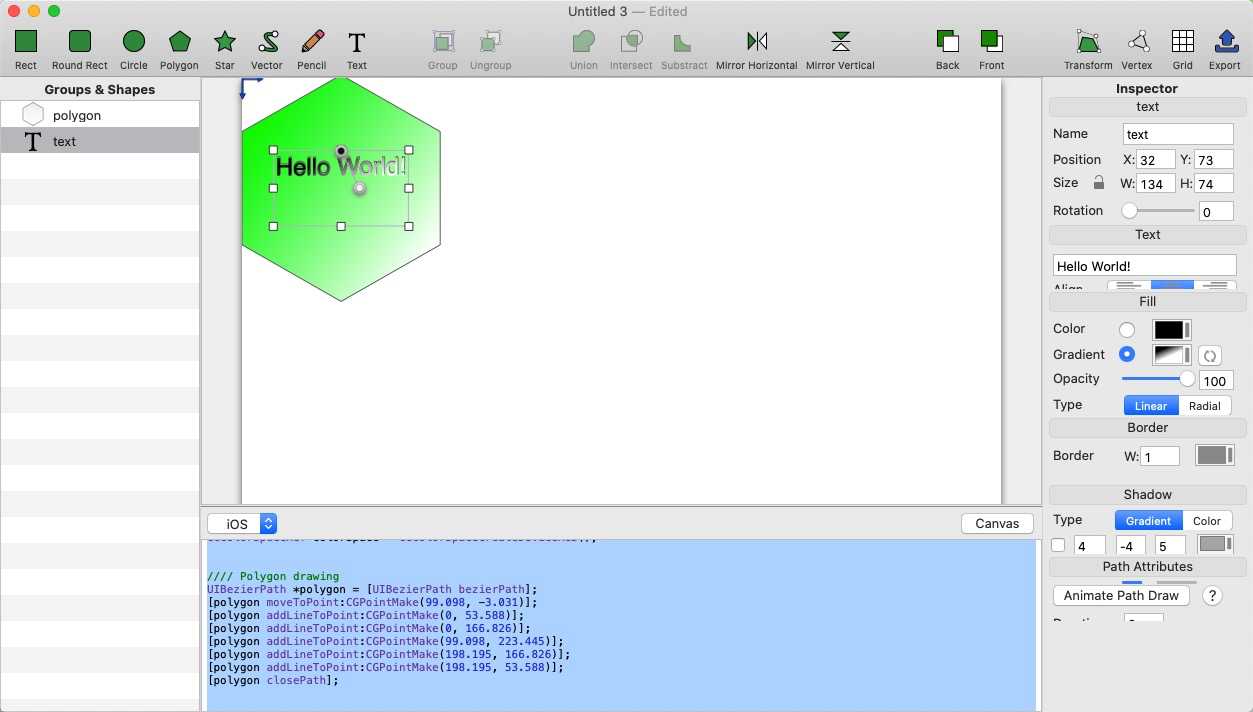
生成的代码如下:
CGContextRef context = UIGraphicsGetCurrentContext();

CGColorSpaceRef colorSpace = CGColorSpaceCreateDeviceRGB();

//// Polygon drawing

UIBezierPath *polygon = [UIBezierPath bezierPath];

[polygon moveToPoint:CGPointMake(99.098, -3.031)];

[polygon addLineToPoint:CGPointMake(0, 53.588)];

[polygon addLineToPoint:CGPointMake(0, 166.826)];

[polygon addLineToPoint:CGPointMake(99.098, 223.445)];

[polygon addLineToPoint:CGPointMake(198.195, 166.826)];

[polygon addLineToPoint:CGPointMake(198.195, 53.588)];

[polygon closePath];

//Polygon gradient declaration

NSArray *polygonGradientColors = @[(id)[UIColor colorWithRed:0.131 green: 1 blue:0.0236 alpha:1].CGColor,

	(id)[UIColor colorWithRed:1 green: 1 blue:1 alpha:1].CGColor];

CGFloat polygonGradientLocations[] = {0.00,1.00};

CGGradientRef polygonGradient = CGGradientCreateWithColors(colorSpace, (__bridge CFArrayRef)polygonGradientColors, polygonGradientLocations);

//Polygon gradient drawing

CGContextSaveGState(context);

{

	[polygon addClip];

	CGContextDrawLinearGradient(context, polygonGradient,

		CGPointMake(22.016, 41.656),

		CGPointMake(195.375, 166.336),

		kCGGradientDrawsBeforeStartLocation | kCGGradientDrawsAfterEndLocation);

}

CGContextRestoreGState(context);

[[UIColor colorWithRed:0.329 green: 0.329 blue:0.329 alpha:1] setStroke];

polygon.lineWidth = 1;

[polygon stroke];

//// Text drawing

NSString* text = @"Hello World!";

CGRect textRect = CGRectMake(32.281, 72.992, 133.633, 74.43);

NSMutableParagraphStyle* textStyle = [[NSMutableParagraphStyle defaultParagraphStyle] mutableCopy];

[textStyle setAlignment:NSTextAlignmentCenter];

NSDictionary* textFontAttribute = @{NSFontAttributeName: [UIFont fontWithName:@"Helvetica" size:24],

	 NSForegroundColorAttributeName: [UIColor blackColor],

	 NSParagraphStyleAttributeName: textStyle};

// Text drawn into textImage to be used as mask

UIGraphicsBeginImageContextWithOptions(textRect.size, NO, 0);

CGContextRef textImageContext = UIGraphicsGetCurrentContext();;

CGContextSaveGState(textImageContext);

CGRect textImageContextRect = CGRectMake(0, 0, 133.633, 74.43);

[text drawInRect:textImageContextRect withAttributes:textFontAttribute];

CGContextRestoreGState(textImageContext);

CGImageRef textImageCG = CGBitmapContextCreateImage(textImageContext);

UIGraphicsEndImageContext();

// Text gradient drawing

CGContextSaveGState(context);

{

	CGContextTranslateCTM(context, 0, 2*CGRectGetMinY(textRect) + CGRectGetHeight(textRect));

	CGContextScaleCTM(context, 1.0, -1.0);

	CGContextClipToMask(context, textRect, textImageCG);

	NSArray *gradientColors = @[(id)[UIColor blackColor].CGColor,

		(id)[UIColor whiteColor].CGColor];

	CGFloat gradientLocations[] = {0.00,1.00};

	CGGradientRef textgradient = CGGradientCreateWithColors(colorSpace, (__bridge CFArrayRef)gradientColors, gradientLocations);

	CGContextDrawLinearGradient(context, textgradient,

		CGPointMake(99.098, 147.422),

		CGPointMake(117.562, 110.574),

		kCGGradientDrawsBeforeStartLocation | kCGGradientDrawsAfterEndLocation);

}

CGContextRestoreGState(context);
然后自己自定义个View 把这段代码放在
KBBezierView.m
- (void)drawRect:(CGRect)rect {

 //上面代码写入

}
完美收工。。。。以后可以画自己很多的绘画了
BezierCode 工具使用的更多相关文章
- Unity3d入门 - 关于unity工具的熟悉
上周由于工作内容较多,花在unity上学习的时间不多,但总归还是学习了一些东西,内容如下: .1 根据相关的教程在mac上安装了unity. .2 学习了unity的主要的工具分布和对应工具的相关的功 ...
- 细说前端自动化打包工具--webpack
背景 记得2004年的时候,互联网开发就是做网页,那时也没有前端和后端的区分,有时一个网站就是一些纯静态的html,通过链接组织在一起.用过Dreamweaver的都知道,做网页就像用word编辑文档 ...
- 应用工具 .NET Portability Analyzer 分析迁移dotnet core
大多数开发人员更喜欢一次性编写好业务逻辑代码,以后再重用这些代码.与构建不同的应用以面向多个平台相比,这种方法更加容易.如果您创建与 .NET Core 兼容的.NET 标准库,那么现在比以往任何时候 ...
- .NetCore中的日志(2)集成第三方日志工具
.NetCore中的日志(2)集成第三方日志工具 0x00 在.NetCore的Logging组件中集成NLog 上一篇讨论了.NetCore中日志框架的结构,这一篇讨论一下.NetCore的Logg ...
- dll文件32位64位检测工具以及Windows文件夹SysWow64的坑
自从操作系统升级到64位以后,就要不断的需要面对32位.64位的问题.相信有很多人并不是很清楚32位程序与64位程序的区别,以及Program Files (x86),Program Files的区别 ...
- Java基础Map接口+Collections工具类
1.Map中我们主要讲两个接口 HashMap 与 LinkedHashMap (1)其中LinkedHashMap是有序的 怎么存怎么取出来 我们讲一下Map的增删改查功能: /* * Ma ...
- 渗透测试工具BurpSuite做网站的安全测试(基础版)
渗透测试工具BurpSuite做网站的安全测试(基础版) 版权声明:本文为博主原创文章,未经博主允许不得转载. 学习网址: https://t0data.gitbooks.io/burpsuite/c ...
- CorelDRAW X8 如何破解激活(附国际版安装包+激活工具) 2016-12-15
之前有位搞平面的好友“小瘦”说CDR X8无法破解,只能用X7.呃……呃……呃……好像是的 其实CDR8难激活主要在于一个点“没有离线激活了,只可以在线激活”,逆天不是专供逆向的,当然没能力去破解,这 ...
- Web Api 入门实战 (快速入门+工具使用+不依赖IIS)
平台之大势何人能挡? 带着你的Net飞奔吧!:http://www.cnblogs.com/dunitian/p/4822808.html 屁话我也就不多说了,什么简介的也省了,直接简单概括+demo ...
随机推荐
- 获取ThinkPHP
获取ThinkPHP的方式很多,官方网站(http://thinkphp.cn)是最好的下载和文档获取来源. 官网提供了稳定版本的下载:http://thinkphp.cn/down/framewor ...
- bzoj1012题解
[解题思路] 强制在线线段树/树状数组,没什么好说的..复杂度O(mlog2m)(线段树)或O(mlog22m)(树状数组). [参考代码] (还naive的时候写的zkw真是翔..) #includ ...
- NX二次开发-UFUN替换组件UF_ASSEM_substitute_component
NX9+VS2012 #include <uf.h> #include <uf_ui.h> #include <uf_assem.h> #include <u ...
- Spring-Security (学习记录六)--采用ehcache缓存UserDetails
目录 1. spring-security提供了缓存UserDetails的UserDetailsService实现类. 2. 通过配置来完成缓存 UserDetails (使用ehcache) 3. ...
- 一幅图解决R语言绘制图例的各种问题
一幅图解决R语言绘制图例的各种问题 用R语言画图的小伙伴们有木有这样的感受,"命令写的很完整,运行没有报错,可图例藏哪去了?""图画的很美,怎么总是图例不协调?" ...
- 【csp】2017-9
1.打酱油 题目: 题意:如上. 题解:经典问题.看代码吧.qwq 代码: #include<iostream> #include<cstdio> #include<al ...
- [笔记]Android开发环境配置及HelloWorld程序
Android的开发须要下面四个工具: 1.JDK 2.Eclipse 3.Android SDK 4.ADT 具体功能: 1.JDK.JDK即Java Development Kit(Java开 ...
- IRP FLAGS
IRP所有标识位的含义,是 _IRP . flags 这个成员 IRP_NOCACHE 0x00000001 //表示I/O请求从存储的媒介而不是高速缓存中读取数据 IRP_PAGING_IO 0x0 ...
- CSS代码命名惯例语义化的方法
CSS代码的命名惯例一直是大家热门讨论的话题.今天暴风彬彬想通过分析一个流行三栏布局中的必要元素,来为大家讲解关于使用语义化方法替代结构化方法来命名CSS类的建议和指导. 您还可以参考彬Go的相关文章 ...
- Java语言支持的变量类型有
Java语言支持的变量类型有: 类变量:独立于方法之外的变量,用 static 修饰. 实例变量:独立于方法之外的变量,不过没有 static 修饰. 局部变量:类的方法中的变量.