
SpringCloud 融入 Python - Tornado
前言
该篇文章分享如何将Python Web服务融入到Spring Cloud微服务体系中,并调用其服务,Python Web框架用的是Tornado
构建Python web服务
- 引入
py-eureka-client客户端
pip install py_eureka_client
manage.py
import tornado.httpserver

import tornado.ioloop

import tornado.options

import tornado.web

import py_eureka_client.eureka_client as eureka_client

from tornado.options import define, options

from time import sleep

define("port", default=3000, help="run on the given port", type=int)

class IndexHandler(tornado.web.RequestHandler):

    def get(self):

        username = self.get_argument('username', 'Hello')

        self.write(username + ', Administrator User!')

    def post(self):

        username = self.get_argument('username', 'Hello')

        self.write(username + ', Administrator User!')

class MainHandler(tornado.web.RequestHandler):

    def get(self):

        username = self.get_argument('username', 'Hello')

        self.write(username + ', Coisini User!')

    def post(self):

        username = self.get_argument('username', 'Hello')

        self.write(username + ', Coisini User!')

def main():

    tornado.options.parse_command_line()

    # 注册eureka服务

    eureka_client.init_registry_client(eureka_server="http://localhost:31091/eureka/,http://localhost:8761/eureka/",

                                       app_name="tornado-server",

                                       instance_port=3000)

    app = tornado.web.Application(handlers=[(r"/test", IndexHandler), (r"/main", MainHandler)])

    http_server = tornado.httpserver.HTTPServer(app)

    http_server.listen(options.port)

    tornado.ioloop.IOLoop.instance().start()

if __name__ == '__main__':

    main()
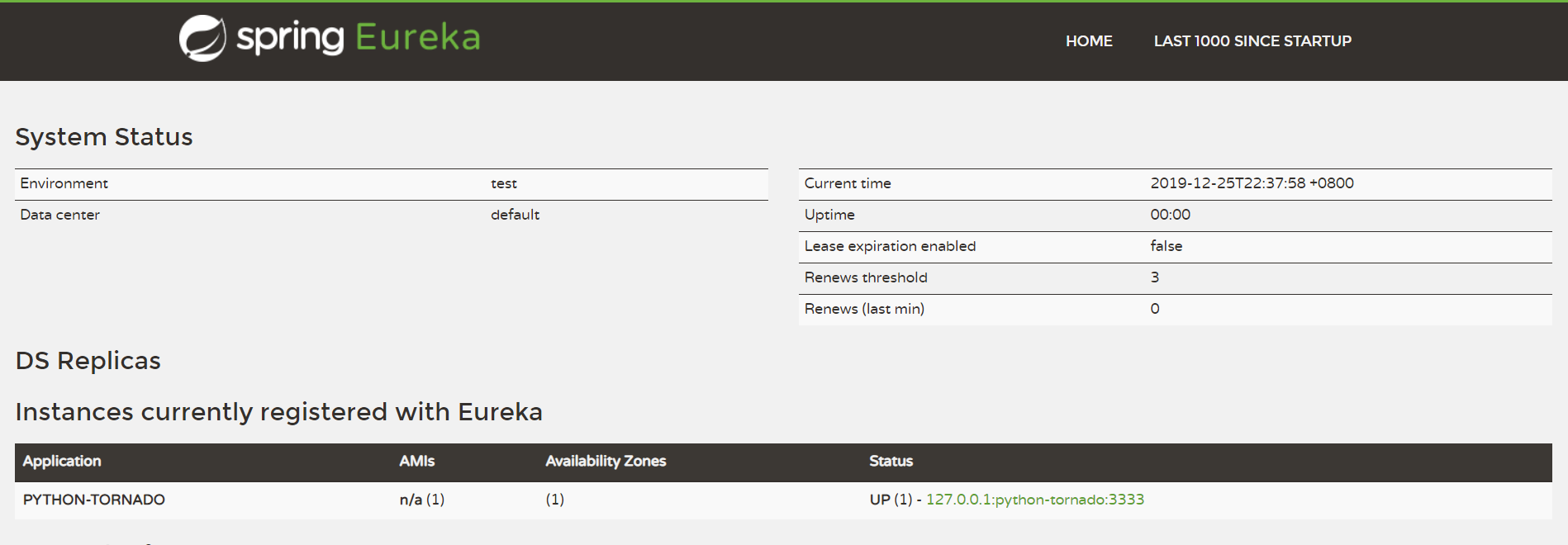
大致说下上述代码,向端口为31091的注册中心注册服务名为tornado-server的服务,端口为3000,提供两个请求方式为GET和POST,接口路径为/test和/main的外部调用接口
- 启动python服务(在此之前要创建一个Eureka服务注册中心)
python manage.py runserver
- 运行结果

服务调用 - consumer-server工程
pom.xml
<dependencies>

		<dependency>

			<groupId>org.springframework.cloud</groupId>

			<artifactId>spring-cloud-starter-eureka-server</artifactId>

		</dependency>

		<dependency>

			<groupId>org.springframework.cloud</groupId>

			<artifactId>spring-cloud-starter-hystrix</artifactId>

		</dependency>

		<!-- Feign Client -->

		<dependency>

			<groupId>org.springframework.cloud</groupId>

			<artifactId>spring-cloud-starter-feign</artifactId>

		</dependency>

		<dependency>

			<groupId>io.github.openfeign.form</groupId>

			<artifactId>feign-form</artifactId>

			<version>3.4.1</version>

		</dependency>

		<dependency>

			<groupId>io.github.openfeign.form</groupId>

			<artifactId>feign-form-spring</artifactId>

			<version>3.4.1</version>

		</dependency>

	</dependencies>
ConsumerApplication.java
import org.springframework.boot.SpringApplication;

import org.springframework.cloud.client.SpringCloudApplication;

import org.springframework.cloud.client.loadbalancer.LoadBalanced;

import org.springframework.context.annotation.Bean;

import org.springframework.web.client.RestTemplate;

@SpringCloudApplication

public class ConsumerApplication {

	@Bean

	@LoadBalanced

	RestTemplate restTemplate() {

		return new RestTemplate();

	}

	public static void main(String[] args) {

		SpringApplication.run(ConsumerApplication.class, args);

	}

}
application.yml
spring:

  profiles:

    active: "dev"

  application:

    name: consumer-server

server:

  port: 8325

eureka:

  client:

    healthcheck:

      enabled: true

    service-url:

      defaultZone: http://${registry.host:localhost}:${registry.port:8761}/eureka/

---

spring:

  profiles: dev

registry:

  host: localhost

  port: 31091
TestController.java
import org.springframework.beans.factory.annotation.Autowired;

import org.springframework.web.bind.annotation.*;

import com.coisini.consumer.client.TestAPIClient;

@RestController

public class TestController {

    private TestAPIClient testAPIClient;

    @Autowired

    public TestController(TestAPIClient testAPIClient) {

        this.testAPIClient = testAPIClient;

    }

    @PostMapping("/test")

    public String test(@RequestParam String username) throws Exception {

        return this.testAPIClient.test(username);

    }

    @GetMapping("/test")

    public String test1() throws Exception {

        return this.testAPIClient.test1();

    }

}
TestAPIClient.java
import org.springframework.cloud.netflix.feign.FeignClient;

import org.springframework.web.bind.annotation.GetMapping;

import org.springframework.web.bind.annotation.PostMapping;

import org.springframework.web.bind.annotation.RequestParam;

import com.coisini.consumer.config.FeignConfigure;

@FeignClient(name="tornado-server", configuration = FeignConfigure.class)

public interface TestAPIClient {

    @PostMapping("/test")

    String test(@RequestParam("username") String username);

    @GetMapping("/test")

    String test1();

}
FeignConfigure.java
import feign.Logger;

import feign.codec.Encoder;

import feign.form.spring.SpringFormEncoder;

import org.springframework.beans.factory.ObjectFactory;

import org.springframework.beans.factory.annotation.Autowired;

import org.springframework.boot.autoconfigure.web.HttpMessageConverters;

import org.springframework.cloud.netflix.feign.EnableFeignClients;

import org.springframework.cloud.netflix.feign.support.SpringEncoder;

import org.springframework.context.annotation.Bean;

import org.springframework.context.annotation.Configuration;

@Configuration

@EnableFeignClients(basePackages = "com.coisini")

public class FeignConfigure {

    @Bean

    Logger.Level feignLoggerLevel() {

        return Logger.Level.FULL;

    }

    @Autowired

    private ObjectFactory<HttpMessageConverters> messageConverters;

    @Bean

    public Encoder feignFormEncoder() {

        return new SpringFormEncoder(new SpringEncoder(messageConverters));

    }

}
运行结果


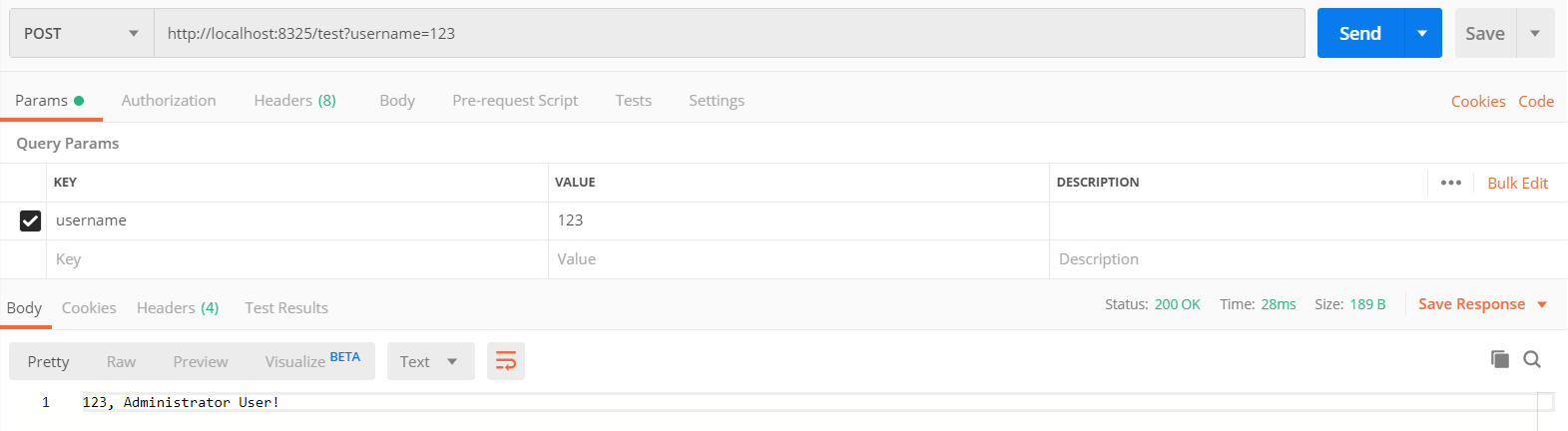
在这里,我们用请求工具Postman来测试一下,可以看出,由TestController调用TestAPIClient再调用Python服务成功,至此,已完成微服务调用Python Web服务
Demo下载
GitHub:SpringCloud 整合 Python - Tornado
Gitee:SpringCloud 整合 Python - Tornado
end
SpringCloud 融入 Python - Tornado的更多相关文章
- python tornado websocket 多聊天室(返回消息给部分连接者)
python tornado 构建多个聊天室, 多个聊天室之间相互独立, 实现服务器端将消息返回给相应的部分客户端! chatHome.py // 服务器端, 渲染主页 --> 聊天室建立web ...
- Python.tornado.0
Tornado https://github.com/facebook/tornado http://www.tornadoweb.org/en/stable/guide/intro.html (A ...
- python tornado 入门
#!/usr/bin/env python # coding:utf-8 import textwrap import tornado.httpserver import tornado.ioloop ...
- Python Tornado
按照http://www.tornadoweb.cn/所提供的方法下载安装后编写如下程序: import tornado.ioloop import tornado.web class MainHan ...
- 使用python + tornado 做项目demo演示模板
很简单,可是却也折腾了不是时间,走了不少弯路.在此备注记录一下,以供后需. # web_server.py #!/usr/bin/env python # coding=utf-8 import os ...
- python tornado+mongodb的使用
tornado tar xvzf tornado-1.2.1.tar.gz cd tornado-1.2.1 python setup.py build sudo python setup.py in ...
- Windows在配置Python+tornado
1,安装Python 2.7.x版本号 地址:https://www.python.org/downloads/release/python-278/ 2,安装python setuptools工具 ...
- python tornado 实现类禅道系统
最近楼主加班 喽, 好久没有更新我的博客了,哎,一言难尽,废话我就不说了,来开始上精华. 背景:目前市面上有很多bug管理工具,但是各有各的特点,最著名,最流行的就是禅道,一个偶然的机会接触到了pyt ...
- Python Tornado篇
Tornado既是一个web server,也是web framework.而它作为web server 采用的是asynchronous IO的网络模型,这是一种很高效的模型. Tornado 和现 ...
随机推荐
- NYOJ--311(完全背包)
题目:http://acm.nyist.net/JudgeOnline/problem.php?pid=311 分析:这里就是一个完全背包,需要注意的就是初始化和最后的输出情况 dp[j ...
- 删除文件夹时提示“You need permission to perform this action。。。”,如何解决?
Win10系统,有时,要删除某个文件夹,却提示“You need permission to perform this action...” 以下是我Google之后找到的解决方案 1.创建一个文本文 ...
- css3之字体@font-face
@font-face能够加载服务器端的字体文件,让浏览器端可以显示用户电脑里没有安装的字体. 浏览器支持 表格中的数字表示支持该属性的第一个浏览器版本号. Firefox, Chrome, Safar ...
- python的functools.partial的应用
functools.partial是类似于创造“可移动”函数的意思,参数的第一个是函数名,其他的是这个函数其他参数,例如: generator_func = functools.partial( tf ...
- 服务器的tomcat调优和jvm调化
下面讲述的是tomcat的优化,及jvm的优化 Tomcat 的缺省配置是不能稳定长期运行的,也就是不适合生产环境,它会死机,让你不断重新启动,甚至在午夜时分唤醒你.对于操作系统优化来说,是尽可能的增 ...
- 语义分割--全卷积网络FCN详解
语义分割--全卷积网络FCN详解 1.FCN概述 CNN做图像分类甚至做目标检测的效果已经被证明并广泛应用,图像语义分割本质上也可以认为是稠密的目标识别(需要预测每个像素点的类别). 传统的基于C ...
- 3、mysql读写性能优化方法
1.当表格特别多的时候,所新建的表格一定注意索引,数据库内部对索引的处理能够很好的优化查询读写性能
- 解决git push至远程仓库失败的问题
产生问题的原因: 远程仓库存在本地不存在的文件, 一个常见的例子是创建repository时勾选了README.md, 但此时本地还没有这个文件, 就会导致本地文件无法同步到远程仓库的问题. 解决方法 ...
- extern关键字及C\C++相互调用
extern关键字主要修饰变量或函数,表示该函数可以跨文件访问,或者表明该变量在其他文件定义,在此处引用. 1.extern修饰变量 (1)如果某变量int m在a.c中定义声明,则其他b.c文件访问 ...
- Windows 下 MQTT 服务器搭建之Apollo
https://blog.csdn.net/wangh0802/article/details/84861226#%EF%BC%881%EF%BC%89%E4%B8%8B%E8%BD%BD%20Apo ...