
postman中如何传数组
方法一:
postman的传参:

java接收:
package com.nps.base.xue.xd.groovyEngine

import com.google.gson.Gson

import com.google.gson.reflect.TypeToken

import com.nps.common.service.NpsApplicationContextHolder

import com.nps.data_api.service.impl.NpsDataApiService

import java.lang.reflect.Type

/*

    * @author XueWeiWei

    * @date 2019/8/9 17:24

*/

class TrainMarshallingUpdateByGKEYGroovy {

    private NpsDataApiService npsDataApiService = NpsApplicationContextHolder.getApplicationContext().getBean("npsDataApiService")

//    public List<Object> execute(Map<Object,Object> param){

//        List<Object> result = new ArrayList<>()

//

//        Map resultMap = new HashMap()

//

//        npsDataApiService.exec(param,"train_marshalling_update_by_gkey")

//

//        resultMap.put("resultCode","success")

//

//        result.add(resultMap)

//        return result

//    }

//    public List<Object> execute(List<Map<Object,Object>> param){

//        List<Object> result = new ArrayList<>()

//

//        Map resultMap = new HashMap()

//

//        for (int i = 0; i < param.size(); i++) {

//            npsDataApiService.exec(param[i],"train_marshalling_update_by_gkey")

//        }

//

//        resultMap.put("result","success")

//        resultMap.put("resultCode","2")

//

//        result.add(resultMap)

//        return result

//    }

    public List<Object> execute(Map<Object,Object> param){

        List<Object> result = new ArrayList<>()

        Map queryMap = new HashMap()

        Map resultMap = new HashMap()

        //获取数组GKEY

        String GKEYList = param.get("GKEY")

        //获取不为空的需要更新的字段

        (param.get("PREARRIVAL_LIST_FK_GKEY1") != null) ? queryMap.put("PREARRIVAL_LIST_FK_GKEY1",param.get("PREARRIVAL_LIST_FK_GKEY1")) : 1 == 1;

        (param.get("PRE_TRAIN_NUMBER") != null) ? queryMap.put("PRE_TRAIN_NUMBER",param.get("PRE_TRAIN_NUMBER")) : 1 == 1;

        (param.get("TRAIN_NUM") != null) ? queryMap.put("TRAIN_NUM",param.get("TRAIN_NUM")) : 1 == 1;

        List<Map<Object,Object>> marshallingGKEYList

        Gson gson = new Gson()

        Type type = new TypeToken<List<Map>>(){}.getType()

        marshallingGKEYList = gson.fromJson(GKEYList,type)

        //更新

        for (int i = 0; i < marshallingGKEYList.size(); i++) {

            Map marshallingMap;

            marshallingMap = (Map)marshallingGKEYList.get(i)

            queryMap.put("GKEY",marshallingMap.get("GKEY"))

            npsDataApiService.exec(queryMap,"train_marshalling_update_by_gkey")

        }

        queryMap.clear()

        resultMap.put("result","success")

        resultMap.put("resultCode","2")

        result.add(resultMap)

        return result

    }

}
方法二:
postman传参方式:
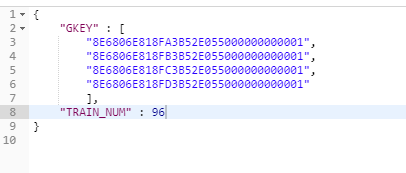
java接收:
package com.nps.base.xue.xd.groovyEngine

import com.google.gson.Gson

import com.google.gson.reflect.TypeToken

import com.nps.common.service.NpsApplicationContextHolder

import com.nps.data_api.service.impl.NpsDataApiService

import java.lang.reflect.Type

/*

    * @author XueWeiWei

    * @date 2019/8/9 17:24

*/

class TrainMarshallingUpdateByGKEYGroovy {

    private NpsDataApiService npsDataApiService = NpsApplicationContextHolder.getApplicationContext().getBean("npsDataApiService")

//    public List<Object> execute(Map<Object,Object> param){

//        List<Object> result = new ArrayList<>()

//

//        Map resultMap = new HashMap()

//

//        npsDataApiService.exec(param,"train_marshalling_update_by_gkey")

//

//        resultMap.put("resultCode","success")

//

//        result.add(resultMap)

//        return result

//    }

//    public List<Object> execute(List<Map<Object,Object>> param){

//        List<Object> result = new ArrayList<>()

//

//        Map resultMap = new HashMap()

//

//        for (int i = 0; i < param.size(); i++) {

//            npsDataApiService.exec(param[i],"train_marshalling_update_by_gkey")

//        }

//

//        resultMap.put("result","success")

//        resultMap.put("resultCode","2")

//

//        result.add(resultMap)

//        return result

//    }

    public List<Object> execute(Map<Object,Object> param){

        List<Object> result = new ArrayList<>()

        Map queryMap = new HashMap()

        Map resultMap = new HashMap()

        //获取数组GKEY

        String GKEYList = param.get("GKEY")

        //获取不为空的需要更新的字段

        (param.get("PREARRIVAL_LIST_FK_GKEY1") != null) ? queryMap.put("PREARRIVAL_LIST_FK_GKEY1",param.get("PREARRIVAL_LIST_FK_GKEY1")) : 1 == 1;

        (param.get("PRE_TRAIN_NUMBER") != null) ? queryMap.put("PRE_TRAIN_NUMBER",param.get("PRE_TRAIN_NUMBER")) : 1 == 1;

        (param.get("TRAIN_NUM") != null) ? queryMap.put("TRAIN_NUM",param.get("TRAIN_NUM")) : 1 == 1;

        List<Object> marshallingGKEYList

        Gson gson = new Gson()

        Type type = new TypeToken<List<Object>>(){}.getType()

        marshallingGKEYList = gson.fromJson(GKEYList,type)

        //更新

        for (int i = 0; i < marshallingGKEYList.size(); i++) {

            queryMap.put("GKEY",marshallingGKEYList.get(i))

            npsDataApiService.exec(queryMap,"train_marshalling_update_by_gkey")

        }

        queryMap.clear()

        resultMap.put("result","success")

        resultMap.put("resultCode","2")

        result.add(resultMap)

        return result

    }

}
postman中如何传数组的更多相关文章
- postman 中get传参数
mybatis中: @RequestMapping(value = "/detail/{id}", method = RequestMethod.GET, produces = & ...
- SSM中前台传数组。后台接受的问题
当时写得时候,忘记考虑json的jar,做个记录. 第一步:先带入jar <dependency> <groupId>com.fasterxml.jackson.core< ...
- 在MyBatis中,前台传数组批量传id处理数据方式
<update id = "dishBatchSaleOrDown"> <if test="ids != null"> <if t ...
- 如何使用postman传数组数据
如何使用postman传数组数据 在我们做api接口数据调试的时候,大部分是会用到postman的,一般请求数据的参数都是字符串,但是特殊情况下我们是需要传一个数组数据的,那么为了实现这种需求,究竟该 ...
- Postman系列三:Postman中post接口实战(上传文件、json请求)
一:接口测试过程中GET请求与POST请求的主要区别 从开发角度我们看get与post的主要区别是:1.Get是用来从服务器上获得数据,而Post是用来向服务器上传递数据:2.Get安全性比Post低 ...
- 『政善治』Postman工具 — 8、Postman中Pre-request Script的使用
目录 1.Pre-request Script介绍 2.常用SNIPPETS(片段)说明 (1)获取变量脚本: (2)设置变量脚本: (3)清空变量脚本: (4)Send a request代码片段 ...
- JavaScript中常见的数组操作函数及用法
JavaScript中常见的数组操作函数及用法 昨天写了个帖子,汇总了下常见的JavaScript中的字符串操作函数及用法.今天正好有时间,也去把JavaScript中常见的数组操作函数及用法总结一下 ...
- Asp.net中后台C#数组与前台Javascript数组交互
摘自:http://blog.csdn.net/a6225301/article/details/20003305 在上一篇<asp.net中javascript与后台c#交互>中实现了前 ...
- C语言中的指针数组
C语言中的指针数组是什么,像 char *a[]={"ddd","dsidd","lll"}; 这里讲一下注意如果我们使用了a也就是首元素的 ...
随机推荐
- hive自定义函数UDF UDTF UDAF
Hive 自定义函数 UDF UDTF UDAF 1.UDF:用户定义(普通)函数,只对单行数值产生作用: UDF只能实现一进一出的操作. 定义udf 计算两个数最小值 public class Mi ...
- iptables对请求的URL作IP访问控制
服务器运行环境是Tomcat,现在要实现的目的是,只允许特定的IP访问某个目录,一种方法是在tomcat配置文件server.conf中,使用RemoteAddrValve对虚拟主机做访问控制.另外一 ...
- angularjs 中使用 service 在controller 之间 share 对象和数据
在做angularjs 的UI 时,我们经常会遇到一个页面之间有几个controller,在controller 之间share 公共的一些数据和方法就变得比较困难,目前推荐的做法是创建一个servi ...
- unittest框架学习笔记五之参数化
例子一: # coding=utf-8'''created:2018/3/29 author:star project:lianxi canshuhua'''from selenium import ...
- Java List T 去掉重复对象-java8
Stream语法详解 Stream当成一个高级版本的Iterator.原始版本的Iterator,用户只能一个一个的遍历元素并对其执行某些操作:高级版本的Stream,用户只要给出需要对其包含的元素执 ...
- 剑指offer——52第一个只出现一次的字符
题目描述 在一个字符串(0<=字符串长度<=10000,全部由字母组成)中找到第一个只出现一次的字符,并返回它的位置, 如果没有则返回 -1(需要区分大小写). 题解: 想复杂了,从头遍历 ...
- pytest_fixture-----conftest共享数据及不同层次共享
场景:你与其他测试工程师合作一起开发时,公共的模块要在不同文件中,要 在大家都访问到的地方. 解决:使用conftest.py 这个文件进行数据共享,并且他可以放在不同位置起 着不同的范围共享作用. ...
- Linux初学习之 rm 命令
现在我们来仔细的学习一下linux的rm命令,这个命令顾名思义(我猜的,嘻嘻,是remove) 命令格式: rm [OPTION]... FILE... Remove (unlink) the FIL ...
- Android studio的ERROR: Unable to resolve dependency for 错误
同事拷贝一份工程给我,在我这里用AS编译的时候出现这个错误.按照网上很多的方法都不行,后来终于可以. 在AS中打开FILE->Setting->gradle->,在右边service ...
- 笔记-ubuntu中/home下中文目录改英文
安装ubuntu后,如果选择的语言是中文,那/home下的文件夹会默认中文,在使用命令行的时候很不方便,此文记录切换成英文的方式,以便日后查看. 将目录重命名为英文 可以使用图形化界面,直接重命名 可 ...