
js图片裁切
js的图片裁切只支持移动和右下拉
html部分
<div id="box" class="box">

            <img class="img1" src="1.jpg"/>

            <div class="main" id="main">

                <div id="left-up" class="minDiv left-up"></div>

                <div id="left" class="minDiv left"></div>

                <div id="left-down" class="minDiv left-down"></div>

                <div id="up" class="minDiv top"></div>

                <div id="right-up" class="minDiv right-up"></div>

                <div id="right" class="minDiv right"></div>

                <div id="right-down" class="minDiv right-down"></div>

                <div id="down" class="minDiv bottom"></div>

            </div>

        </div>

        <div id="preview">

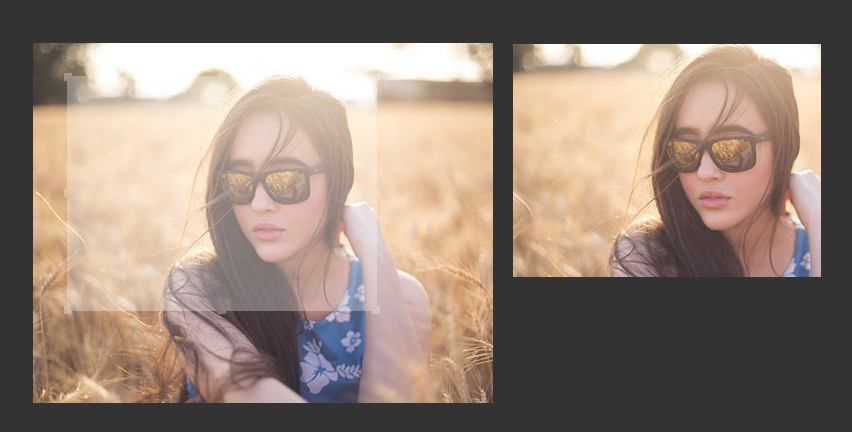
            <img id="img3" class="img3" src="1.jpg" style="top: 0px; left: 0px; clip: rect(0px 202px 202px 0px);" />

        </div>
css部分
body{background: #333;margin:;padding:;}

            .box{position: absolute;top:100px;left:200px;width:460px;height:360px;}

            .main{position: absolute;width: 200px;height: 200px;border:1px solid #fff;z-index:;cursor: move;opacity: .3;background: #fff;}

            .minDiv{width:8px;height:8px;background: #fff;font-size:;position: absolute;}

            .minDiv.left-up{top:-4px;left: -4px;cursor:nw-resize;}

            .minDiv.left{top:50%;margin-top:-4px;left: -4px;cursor:e-resize;}

            .minDiv.left-down{bottom:-4px;left: -4px;cursor:sw-resize;}

            .minDiv.top{top:-4px;left: 50%;margin-left:-4px;cursor:n-resize;}

            .minDiv.right-up{top:-4px;right: -4px;cursor:ne-resize;}

            .minDiv.right{top:50%;margin-top:-4px;right: -4px;cursor:e-resize;}

            .minDiv.right-down{bottom:-4px;right: -4px;cursor:se-resize;}

            .minDiv.bottom{bottom:-4px;left: 50%;margin-left:-4px;cursor:s-resize;}

            img{position: absolute;z-index:}

            .img2{clip:rect(0px,20px,100px,100px);}

            #preview{position: absolute;top:100px;left:680px;width:460px;height:360px;}

            #preview #img3{position: absolute;top:;left:;}
js部分
var main=document.getElementById('main');

        var box=document.getElementById('box');

        var rightdown=document.getElementById('right-down');

        var leftup=document.getElementById('left-up');

        var img3=document.getElementById('img3');

        var cx='';

        var cy='';

        daer(main,main,'yd');//移动

        daer(rightdown,main,'yx');//右下拉

        function daer(obj,main,ws){

            obj.onmousedown=function(e){

            var e=window.event || e;//鼠标按下的坐标

            cx=e.clientX-box.offsetLeft;

            cy=e.clientY-box.offsetTop;

            console.log(cx,cy);

            document.onmousemove=function(e){

                var e=window.event || e;//移动的坐标

                if(ws=='yx'){

                    zcx=e.clientX-box.offsetLeft-main.offsetLeft;

                    zcy=e.clientY-box.offsetTop-main.offsetTop;

                    cx=main.offsetLeft;

                     cy=main.offsetTop;

                    main.style.width=zcx+'px';

                    main.style.height=zcy+'px';

                    img3.style.clip="rect("+cy+"px,"+parseInt(zcx+cx)+"px,"+parseInt(zcy+cy)+"px,"+cx+"px)";//clip裁切属性

                }else if(ws=='yd'){

                    zcx=e.clientX-box.offsetLeft-main.offsetWidth/2;

                    zcy=e.clientY-box.offsetTop-main.offsetHeight/2;

                    cxw=main.offsetWidth;

                    cyh=main.offsetHeight;

                    main.style.top=zcy+'px';

                    main.style.left=zcx+'px';

                    img3.style.top=-zcy+'px';

                    img3.style.left=-zcx+'px';

                    img3.style.clip="rect("+zcy+"px,"+parseInt(cxw+zcx)+"px,"+parseInt(cyh+zcy)+"px,"+zcx+"px)";

                }

            }

            document.onmouseup=function(e){

                var e=window.event || e;//鼠标抬起的坐标

                if(ws=='yx'){

                cx=main.offsetLeft;

                 cy=main.offsetTop;

                }else if(ws=='yd'){

                    cx=e.clientX-box.offsetLeft-main.offsetWidth/2;

                   cy=e.clientY-box.offsetTop-main.offsetHeight/2;

                }

                cxw=main.offsetWidth;

                cyh=main.offsetHeight;

                console.log(cx,cy,cxw,cyh);//cx是x坐标,cy是y坐标,cxw是宽,cyh是高

                document.onmousemove=null;

            }

            stopEvt(e);

          }

        }

        //阻止冒泡

        function stopEvt(e) {

         e = e || window.event;

            if(e.stopPropagation) {

             e.stopPropagation();

             } else {

                 e.cancelBubble = true;

             }

        }
效果图
js图片裁切的更多相关文章
- 兼容好的JS图片上传预览代码
转 : http://www.codefans.net/articles/1395.shtml 兼容好的JS图片上传预览代码 (谷歌,IE11) <html xmlns="http:/ ...
- JS图片自动和可控的轮播切换特效
点击这里查看效果:http://hovertree.com/texiao/js/1.htm HTML文件代码如下: <!DOCTYPE html> <html xmlns=" ...
- Javascript图片裁切
最近浏览了不少网站的图片裁切效果,大部分的做法如下图所示(借用一张脚本之家的图片),通过改变裁切框的大小来选取合适的位置. 但本文介绍的是另外一种裁切方式,裁切框由开发者决定,图片大小由用户决定,通过 ...
- Spring MVC程序中得到静态资源文件css,js,图片
转载自:http://www.blogjava.net/fiele/archive/2014/08/24/417283.html 用 Spring MVC 开发应用程序,对于初学者有一个很头疼的问题, ...
- JS图片延迟加载分析及简单的demo
JS图片延迟加载 图片延迟加载也称 "懒加载",通常应用于图片比较多的网页,比如 "美丽说首页","蘑菇街"等一些导购网站上用的比较多,或者 ...
- Spring MVC程序中得到静态资源文件css,js,图片文件的路径问题总结
上一篇 | 下一篇 Spring MVC程序中得到静态资源文件css,js,图片 文件的路径 问题总结 作者:轻舞肥羊 日期:2012-11-26 http://www.blogjava.net/fi ...
- Android实现图片裁切
介绍 在应用开发中,如果涉及到个人信息,头像一般是不可避免的,类似这种情况,我们就需要用到图片裁切的功能,实现头像裁切,然后上传给服务器. 一般裁切的做法就是图层叠加选取框,然后根据坐标,计算裁切区域 ...
- 图片裁切插件jCrop的使用心得(三)
在这一篇里,我来具体讲讲代码该如何写. 下面是jCrop的初始化代码 //图片裁剪插件Jcrop初始化 function initJcrop() { // 图片加载完成 document.getEle ...
- 图片裁切插件jCrop的使用心得(二)
上一篇简单的介绍了一下开发的背景以及一些学习资料,下面开始介绍如何上手. 一.下载jCrop http://deepliquid.com/content/Jcrop_Download.html 直接去 ...
随机推荐
- Git同平台下多个账号配置
在公司要使用公司和自己的两个账号都往GitHub上面提交,所以整理成笔记 具体配置项 StrictHostKeyChecking no UserKnownHostsFile /dev/null # 为 ...
- Mycat+MySQL 主从复制
一.主从复制搭建(新环境5.6.33)1.设置复制Master配置信息 [mysqld] #repl master库 server \logbin\mysql-bin max_binlog_size= ...
- jmeter参数化之配置元件CSV控件
1. 用badboby进行录制,录制完成后保存,用JMeter格式进行保存,如:登陆.jmx 2. 在jmeter中打开保存的文件登陆.jmx. 3. 对登陆账号和密码进行参数 ...
- Luogu P1967 货车运输(Kruskal重构树)
P1967 货车运输 题面 题目描述 \(A\) 国有 \(n\) 座城市,编号从 \(1\) 到 \(n\) ,城市之间有 \(m\) 条双向道路.每一条道路对车辆都有重量限制,简称限重.现在有 \ ...
- LOJ 6042 跳蚤王国的宰相
LOJ 6042 跳蚤王国的宰相 题意 跳蚤王国爆发了一场动乱,国王在镇压动乱的同时,需要在跳蚤国地方钦定一个人来做宰相. 由于当时形势的复杂性,很多跳蚤都并不想去做一个傀儡宰相,带着宰相的帽子,最后 ...
- TZ_15Spring-Cloud_Eureka-Ribbon-Hystix-Feign-Zuul微服务整合
1.一个微服务框架的基本流程 2.Eureka --Feign-Zuul Eureka:就是服务注册中心(可以是一个集群),对外暴露 ...
- Centos Apache 多站点配置
首先明白APACHE配置文件位置 /etc/httpd/ 系统会自动加载 "/etc/httpd/conf.d" 目录下面的 "*.conf"文件 创建多个 & ...
- 使用jquery封装一个可以复用的提示框
首先在html中 <div class="backcap"> <div class="diolag"> <div class=&q ...
- ubuntu查看并杀死进程
Ubuntu 查看和杀死进程 今天在netbeans中关闭webrick时,发现没有关闭掉,打入localhost:3000 依然显示页面,发现无法从nb中再次关闭 只有进入ubuntu的进程下关闭 ...
- CentOS7 下的 firewall 用法
1.firewalld的基本使用 启动: systemctl start firewalld 查看状态: systemctl status firewalld 停止: systemctl disab ...