
Introduction to 3D Game Programming with DirectX 12 学习笔记之 --- 第二十三章:角色动画
原文:Introduction to 3D Game Programming with DirectX 12 学习笔记之 --- 第二十三章:角色动画
学习目标
- 熟悉蒙皮动画的术语;
- 学习网格层级变换在数学理论,以及如何遍历基于树结构的网格层级;
- 理解顶点混合的想法以及数学理论;
- 学习如何从文件加载动画数据;
- 学习如何在D3D中实现角色动画。
1 框架的层级结构
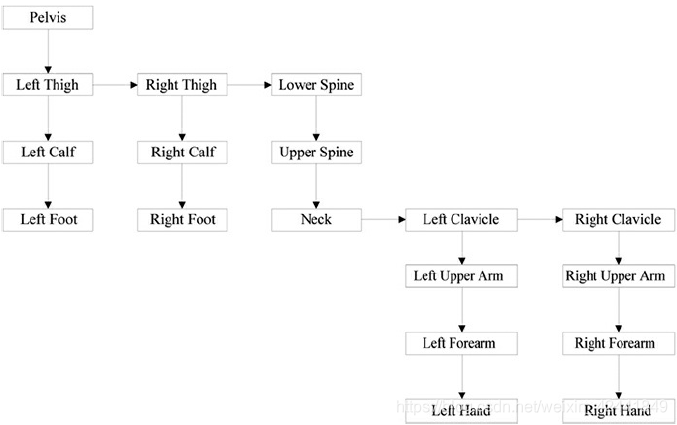
1.1 数学公式
例如,有下面的结构:

每根子骨骼的坐标系都可以跟父骨骼关联,第一根骨骼与世界坐标系关联:
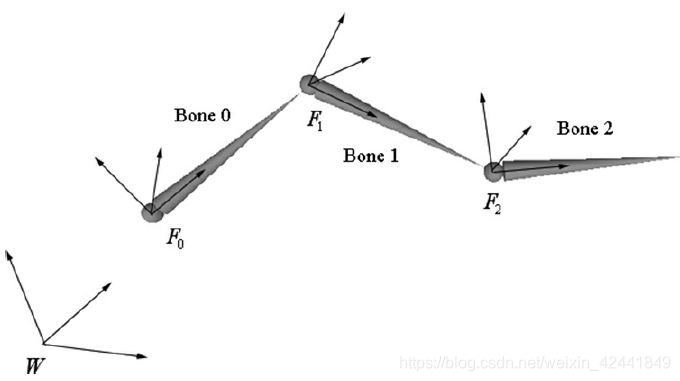
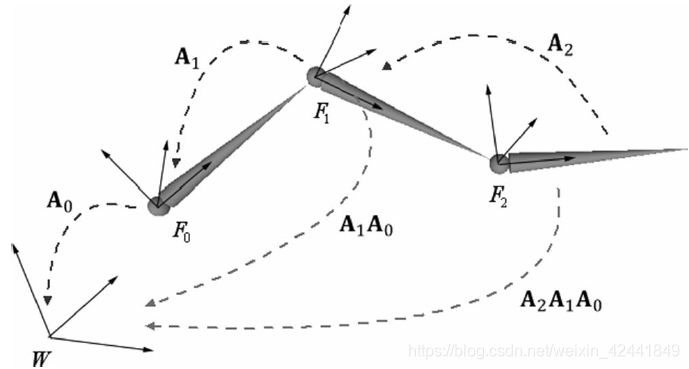
如果矩阵A0是第一根骨骼的世界变换矩阵,A1是第二根骨骼变换到第一根骨骼的矩阵,往后依次类推,那么第i根骨骼变换到世界坐标系的变换矩阵就是:

在我们上述的例子中,M2 = A2A1A0, M1 = A1A0 and M0 = A0,就是每根骨骼对于的世界坐标系变换矩阵:
2 蒙皮网格
2.1 定义
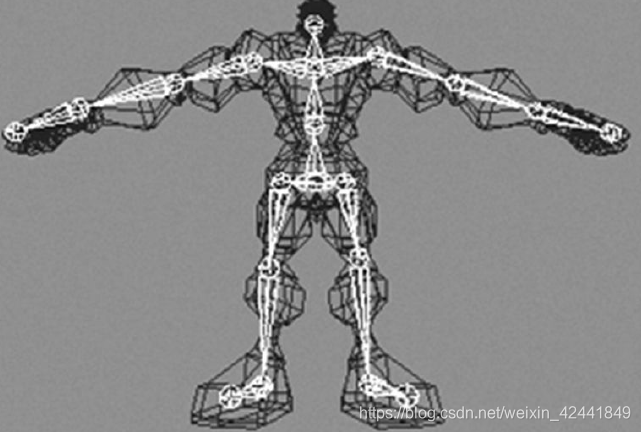
高光的那整条骨骼链叫做骨架(skeleton)。3D几何模型叫做皮肤(skin)。皮肤顶点与绑定空间相关联(整个皮肤相关联的局部坐标系)。每个骨骼影响一系列子皮肤的位置和形状。
2.2 重置骨骼到根空间的变换公式
和上述不同的地方是,把各个骨骼变换到世界坐标系的矩阵拆解开,先找到变换到根空间的矩阵,然后变换到世界坐标系;第二个不同点是从下往上,这样比从上往下更高效。第n根骨骼的变换如下:

这里p是骨骼i的父骨骼的编号,toRootp从p的局部坐标系映射到根局部坐标系。
2.3 抵消变换(Offset Transform)
有一个小问题是,被骨骼影响的顶点并不在骨骼坐标系统中,而是在绑定空间中。所以在应用公式对顶点进行变换之前,我们先要将顶点从绑定空间变换到影响它的骨骼的空间中,所以叫抵消变换(offset transformation)。
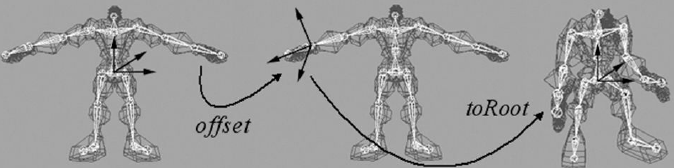
所以现在可以定义一个最终变换:
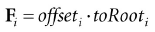
2.4 对骨架进行动画
我们定义了一个骨架动画的类SkinnedData.h/.cpp在Skinned Mesh Demo中。
我们首先对每个骨骼单独在局部坐标系移动,然后考虑其父节点的移动,然后变换到根空间。
我们定义一些列动画的动画片段(animation clip):
///<summary>

/// Examples of AnimationClips are "Walk", "Run", "Attack", "Defend".

/// An AnimationClip requires a BoneAnimation for every bone to form

/// the animation clip.

///</summary>

struct AnimationClip

{

	// Smallest end time over all bones in this clip.

	float GetClipStartTime()const;

	// Largest end time over all bones in this clip.

	float GetClipEndTime()const;

	// Loops over each BoneAnimation in the clip and interpolates

	// the animation.

	void Interpolate(float t, std::vector<XMFLOAT4X4>& boneTransforms)const;

	// Animation for each bone.

	std::vector<BoneAnimation> BoneAnimations;

};
我们可以使用unordered_map保存这些片段:
std::unordered_map<std::string, AnimationClip> mAnimations;

AnimationClip& clip = mAnimations["attack"];
最终,每个骨骼需要抵消变换矩阵,并且需要一个数据结构表示骨架结构。所以我们骨骼动画最终数据结构如下:
class SkinnedData

{

public:

	UINT BoneCount()const;

	float GetClipStartTime(const std::string& clipName)const;

	float GetClipEndTime(const std::string& clipName)const;

	void Set(std::vector<int>& boneHierarchy,

		std::vector<DirectX::XMFLOAT4X4>& boneOffsets,

		std::unordered_map<std::string, AnimationClip>& animations);

	// In a real project, you’d want to cache the result if there was a

	// chance that you were calling this several times with the same

	// clipName at the same timePos.

	void GetFinalTransforms(const std::string& clipName, float timePos,

		std::vector<DirectX::XMFLOAT4X4>& finalTransforms)const;

private:

	// Gives parentIndex of ith bone.

	std::vector<int> mBoneHierarchy;

	std::vector<DirectX::XMFLOAT4X4> mBoneOffsets;

	std::unordered_map<std::string, AnimationClip> mAnimations;

};
2.5 计算最终变换
我们使用一个整形数组模拟骨架层级,第i个元素值是第i个骨骼的父骨骼ID,并且对应第i个offset transform,并且对应骨骼动画中的第i个骨骼的动画:
int parentIndex = mBoneHierarchy[i];

int grandParentIndex = mBoneHierarchy[parentIndex];

XMFLOAT4X4 offset = mBoneOffsets[grandParentIndex];

AnimationClip& clip = mAnimations["attack"];

BoneAnimation& anim = clip.BoneAnimations[grandParentIndex];
所以我们可以这样计算每个骨骼的最终变换:
void SkinnedData::GetFinalTransforms(const std::string& clipName,

	float timePos, std::vector<XMFLOAT4X4>& finalTransforms)const

{

	UINT numBones = mBoneOffsets.size();

	std::vector<XMFLOAT4X4> toParentTransforms(numBones);

	// Interpolate all the bones of this clip at the given time instance.

	auto clip = mAnimations.find(clipName);

	clip->second.Interpolate(timePos, toParentTransforms);

	//

	// Traverse the hierarchy and transform all the bones to the

	// root space.

	//

	std::vector<XMFLOAT4X4> toRootTransforms(numBones);

	// The root bone has index 0. The root bone has no parent, so

	// its toRootTransform is just its local bone transform.

	toRootTransforms[0] = toParentTransforms[0];

	// Now find the toRootTransform of the children.

	for(UINT i = 1; i < numBones; ++i)

	{

		XMMATRIX toParent = XMLoadFloat4x4(&toParentTransforms[i]);

		int parentIndex = mBoneHierarchy[i];

		XMMATRIX parentToRoot = XMLoadFloat4x4(&toRootTransforms[parentIndex]);

		XMMATRIX toRoot = XMMatrixMultiply(toParent, parentToRoot);

		XMStoreFloat4x4(&toRootTransforms[i], toRoot);

	}

	// Premultiply by the bone offset transform to get the final transform.

	for(UINT i = 0; i < numBones; ++i)

	{

		XMMATRIX offset = XMLoadFloat4x4(&mBoneOffsets[i]);

		XMMATRIX toRoot = XMLoadFloat4x4(&toRootTransforms[i]);

		XMStoreFloat4x4(&finalTransforms[i], XMMatrixMultiply(offset, toRoot));

	}

}
当我们遍历骨骼的时候,我们需要查看父节点的to-root变换矩阵:
int parentIndex = mBoneHierarchy[i];

XMMATRIX parentToRoot = XMLoadFloat4x4(&toRootTransforms[parentIndex]);
它需要在访问前,已经创建好相关数据。我们的3D示例程序中的文件已经写好了这些数据:
ParentIndexOfBone0: -1

ParentIndexOfBone1: 0

ParentIndexOfBone2: 0

ParentIndexOfBone3: 2

ParentIndexOfBone4: 3

ParentIndexOfBone5: 4

ParentIndexOfBone6: 5

ParentIndexOfBone7: 6

ParentIndexOfBone8: 5

ParentIndexOfBone9: 8
3 顶点混合
对覆盖在骨架上的皮肤的顶点做动画,叫做顶点混合。
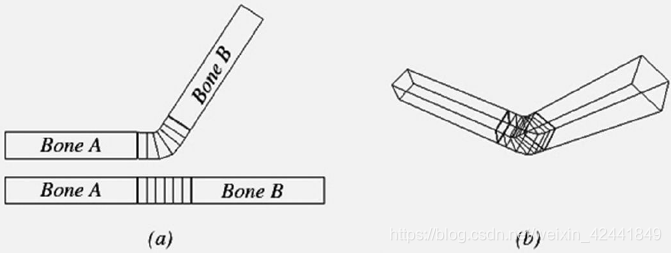
顶点混合的策略是:我们有一个基于骨骼的骨架,但是皮肤是一个连续的网格,并且可能有1个到多个骨骼同时影响一个顶点;最终的变换由多个骨骼影响权重平均后得到,这样就可以在关节处有一个平滑的过渡,它可以让皮肤看起来有弹性,如下图:
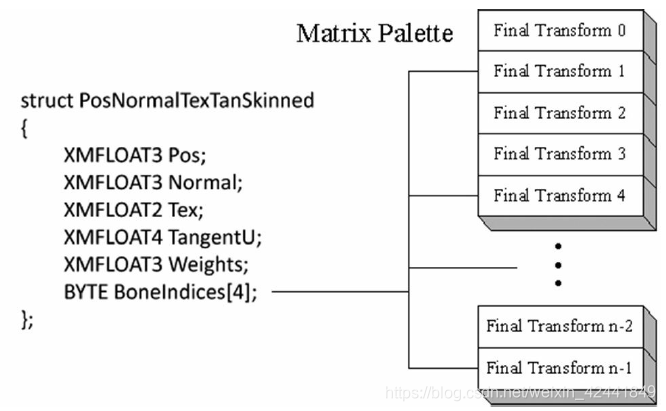
实际应用中,[Möller08]支持,通常情况下我们不需要多余4跟骨骼影响同一个顶点。所以我们的设计会考虑到最多4个骨骼影响同一个顶点。所以为了实现顶点混合,角色网格还是连续的网格,每个顶点包含4个骨骼矩阵画板的索引(指向4个最终变换矩阵);另外每个顶点也包含4个权重对应用每个骨骼的影响权重。所以我们定义下面的顶点结构来实现顶点混合(skinned mesh)。
那么顶点最终的位置就可以通过权重计算如下:

其中w0 + w1 + w2 + w3 = 1,法线和切线的计算也类似:

这里我们假设F矩阵不包含非均匀变换,并且在变换法线的时候我们需要使用逆转置矩阵。
下面的顶点着色器代码片段展示了具有4个最大骨骼影响的顶点混合的主要代码:
cbuffer cbSkinned : register(b1)

{

	// Max support of 96 bones per character.

	float4x4 gBoneTransforms[96];

};

struct VertexIn

{

	float3 PosL : POSITION;

	float3 NormalL : NORMAL;

	float2 TexC : TEXCOORD;

	float4 TangentL : TANGENT;

	#ifdef SKINNED

		float3 BoneWeights : WEIGHTS;

		uint4 BoneIndices : BONEINDICES;

	#endif

};

struct VertexOut

{

	float4 PosH : SV_POSITION;

	float4 ShadowPosH : POSITION0;

	float4 SsaoPosH : POSITION1;

	float3 PosW : POSITION2;

	float3 NormalW : NORMAL;

	float3 TangentW : TANGENT;

	float2 TexC : TEXCOORD;

};

VertexOut VS(VertexIn vin)

{

	VertexOut vout = (VertexOut)0.0f;

	// Fetch the material data.

	MaterialData matData = gMaterialData[gMaterialIndex];

	#ifdef SKINNED

		float weights[4] = { 0.0f, 0.0f, 0.0f, 0.0f };

		weights[0] = vin.BoneWeights.x;

		weights[1] = vin.BoneWeights.y;

		weights[2] = vin.BoneWeights.z;

		weights[3] = 1.0f - weights[0] - weights[1] - weights[2];

		float3 posL = float3(0.0f, 0.0f, 0.0f);

		float3 normalL = float3(0.0f, 0.0f, 0.0f);

		float3 tangentL = float3(0.0f, 0.0f, 0.0f);

		for(int i = 0; i < 4; ++i)

		{

			// Assume no nonuniform scaling when transforming normals, so

			// that we do not have to use the inversetranspose.

			posL += weights[i] * mul(float4(vin.PosL, 1.0f),

				gBoneTransforms[vin.BoneIndices[i]]).xyz;

			normalL += weights[i] * mul(vin.NormalL,

				(float3x3)gBoneTransforms[vin.BoneIndices[i]]);

			tangentL += weights[i] * mul(vin.TangentL.xyz,

				(float3x3)gBoneTransforms[vin.BoneIndices[i]]);

		}

		vin.PosL = posL;

		vin.NormalL = normalL;

		vin.TangentL.xyz = tangentL;

	#endif

	// Transform to world space.

	float4 posW = mul(float4(vin.PosL, 1.0f), gWorld);

	vout.PosW = posW.xyz;

	// Assumes nonuniform scaling; otherwise, need to

	// use inverse-transpose of world matrix.

	vout.NormalW = mul(vin.NormalL, (float3x3)gWorld);

	vout.TangentW = mul(vin.TangentL, (float3x3)gWorld);

	// Transform to homogeneous clip space.

	vout.PosH = mul(posW, gViewProj);

	// Generate projective tex-coords to project SSAO map onto scene.

	vout.SsaoPosH = mul(posW, gViewProjTex);

	// Output vertex attributes for interpolation across triangle.

	float4 texC = mul(float4(vin.TexC, 0.0f, 1.0f), gTexTransform);

	vout.TexC = mul(texC, matData.MatTransform).xy;

	// Generate projective tex-coords to project shadow map onto scene.

	vout.ShadowPosH = mul(posW, gShadowTransform);

	return vout;

}
4 从文件加载动画数据
我们使用的文件格式是.m3d(“model 3D.” 一个text文件),这个格式是用来简化加载和阅读,也不是优化。并且这个格式只用于本书。
4.1 文件头
文件头定义了组成模型的材质,顶点,三角形,骨骼和动画的个数:
***************m3d-File-Header***************

#Materials 3

#Vertices 3121

#Triangles 4062

#Bones 44

#AnimationClips 15
4.2 材质
下一块是一个材质列表,例如:
***************Materials*********************

Name: soldier_head

Diffuse: 1 1 1

Fresnel0: 0.05 0.05 0.05

Roughness: 0.5

AlphaClip: 0

MaterialTypeName: Skinned

DiffuseMap: head_diff.dds

NormalMap: head_norm.dds

Name: soldier_jacket

Diffuse: 1 1 1

Fresnel0: 0.05 0.05 0.05

Roughness: 0.8

AlphaClip: 0

MaterialTypeName: Skinned

DiffuseMap: jacket_diff.dds

NormalMap: jacket_norm.dds
MaterialTypeName参数代表加载哪个着色器代码
4.3 子集合
一个网格有1到多个子集合,一个子集是一组由同一个材质渲染的三角形,比如下面的汽车模型:
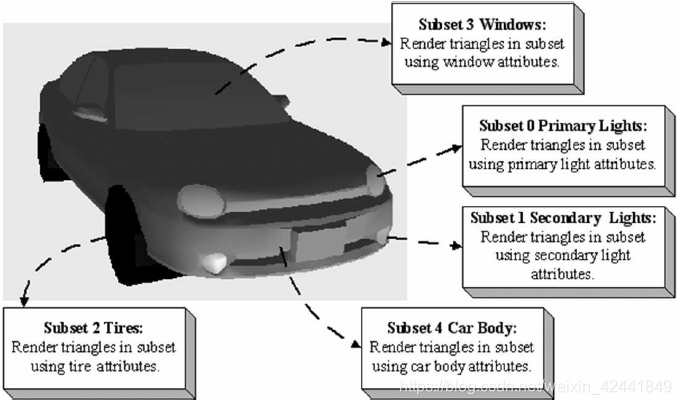
第i个子集对应使用第i个材质:
***************SubsetTable*******************

SubsetID: 0 VertexStart: 0 VertexCount: 3915 FaceStart: 0 FaceCount: 7230

SubsetID: 1 VertexStart: 3915 VertexCount: 2984 FaceStart: 7230 FaceCount: 4449

SubsetID: 2 VertexStart: 6899 VertexCount: 4270 FaceStart: 11679 FaceCount: 6579

SubsetID: 3 VertexStart: 11169 VertexCount: 2305 FaceStart: 18258 FaceCount: 3807

SubsetID: 4 VertexStart: 13474 VertexCount: 274 FaceStart: 22065 FaceCount: 442
4.4 顶点数据和三角形
下面的2个数据块是顶点和索引:
***************Vertices**********************

Position: -14.34667 90.44742 -12.08929

Tangent: -0.3069077 0.2750875 0.9111171 1

Normal: -0.3731041 -0.9154652 0.150721

Tex-Coords: 0.21795 0.105219

BlendWeights: 0.483457 0.483457 0.0194 0.013686

BlendIndices: 3 2 39 34

Position: -15.87868 94.60355 9.362272

Tangent: -0.3069076 0.2750875 0.9111172 1

Normal: -0.3731041 -0.9154652 0.150721

Tex-Coords: 0.278234 0.091931

BlendWeights: 0.4985979 0.4985979 0.002804151 0

BlendIndices: 39 2 3 0

…

***************Triangles*********************

0 1 2

3 4 5

6 7 8

9 10 11

12 13 14

…
4.5 骨骼偏移变换
骨骼偏移变换块,保存每个骨骼的对应的矩阵:
***************BoneOffsets*******************

BoneOffset0 -0.8669753 0.4982096 0.01187624 0

0.04897417 0.1088907 -0.9928461 0

-0.4959392 -0.8601914 -0.118805 0

-10.94755 -14.61919 90.63506 1

BoneOffset1 1 4.884964E-07 3.025227E-07 0

-3.145564E-07 2.163151E-07 -1 0

4.884964E-07 0.9999997 -9.59325E-08 0

3.284225 7.236738 1.556451 1

…
4.6 骨架
骨架数据块保存了骨骼列表,它的整数参数代表父骨骼的索引:
***************BoneHierarchy*****************

ParentIndexOfBone0: -1

ParentIndexOfBone1: 0

ParentIndexOfBone2: 1

ParentIndexOfBone3: 2

ParentIndexOfBone4: 3

ParentIndexOfBone5: 4

ParentIndexOfBone6: 5

ParentIndexOfBone7: 6

ParentIndexOfBone8: 7

ParentIndexOfBone9: 7

ParentIndexOfBone10: 7

ParentIndexOfBone11: 7

ParentIndexOfBone12: 6

ParentIndexOfBone13: 12

…
4.7 动画数据
最后一个数据块是动画片段。每一个动画包含一个可读取的名称,和一个骨架的关键帧列表:
***************AnimationClips****************

AnimationClip run_loop

{

	Bone0 #Keyframes: 18

	{

		Time: 0

		Pos: 2.538344 101.6727 -0.52932

		Scale: 1 1 1

		Quat: 0.4042651 0.3919331 -0.5853591 0.5833637

		Time: 0.0666666

		Pos: 0.81979 109.6893 -1.575387

		Scale: 0.9999998 0.9999998 0.9999998

		Quat: 0.4460441 0.3467651 -0.5356012 0.6276384

		…

	}

	Bone1 #Keyframes: 18

	{

		Time: 0

		Pos: 36.48329 1.210869 92.7378

		Scale: 1 1 1

		Quat: 0.126642 0.1367731 0.69105 0.6983587

		Time: 0.0666666

		Pos: 36.30672 -2.835898 93.15854

		Scale: 1 1 1

		Quat: 0.1284061 0.1335271 0.6239273 0.7592083

		…

	}

	…

}

AnimationClip walk_loop

{

	Bone0 #Keyframes: 33

	{

		Time: 0

		Pos: 1.418595 98.13201 -0.051082

		Scale: 0.9999985 0.999999 0.9999991

		Quat: 0.3164562 0.6437552 -0.6428624 0.2686314

		Time: 0.0333333

		Pos: 0.956079 96.42985 -0.047988

		Scale: 0.9999999 0.9999999 0.9999999

		Quat: 0.3250651 0.6395872 -0.6386833 0.2781091

		…

	}

	Bone1 #Keyframes: 33

	{

		Time: 0

		Pos: -5.831432 2.521564 93.75848

		Scale: 0.9999995 0.9999995 1

		Quat: -0.033817 -0.000631005 0.9097761 0.4137191

		Time: 0.0333333

		Pos: -5.688324 2.551427 93.71078

		Scale: 0.9999998 0.9999998 1

		Quat: -0.033202 -0.0006390021 0.903874 0.426508

		…

	}

	…

}

…
下面的代码展示了我们如何读取这些数据:
void M3DLoader::ReadAnimationClips(std::ifstream& fin,

	UINT numBones,

	UINT numAnimationClips,

	std::unordered_map<std::string,

	AnimationClip>& animations)

{

	std::string ignore;

	fin >> ignore; // AnimationClips header text

	for(UINT clipIndex = 0; clipIndex < numAnimationClips; ++clipIndex)

	{

		std::string clipName;

		fin >> ignore >> clipName;

		fin >> ignore; // {

		AnimationClip clip;

		clip.BoneAnimations.resize(numBones);

		for(UINT boneIndex = 0; boneIndex < numBones; ++boneIndex)

		{

			ReadBoneKeyframes(fin, numBones,

			clip.BoneAnimations[boneIndex]);

		}

		fin >> ignore; // }

		animations[clipName] = clip;

	}

}

void M3DLoader::ReadBoneKeyframes(std::ifstream& fin,

	UINT numBones,

	BoneAnimation& boneAnimation)

{

	std::string ignore;

	UINT numKeyframes = 0;

	fin >> ignore >> ignore >> numKeyframes;

	fin >> ignore; // {

	boneAnimation.Keyframes.resize(numKeyframes);

	for(UINT i = 0; i < numKeyframes; ++i)

	{

		float t = 0.0f;

		XMFLOAT3 p(0.0f, 0.0f, 0.0f);

		XMFLOAT3 s(1.0f, 1.0f, 1.0f);

		XMFLOAT4 q(0.0f, 0.0f, 0.0f, 1.0f);

		fin >> ignore >> t;

		fin >> ignore >> p.x >> p.y >> p.z;

		fin >> ignore >> s.x >> s.y >> s.z;

		fin >> ignore >> q.x >> q.y >> q.z >> q.w;

		boneAnimation.Keyframes[i].TimePos = t;

		boneAnimation.Keyframes[i].Translation = p;

		boneAnimation.Keyframes[i].Scale = s;

		boneAnimation.Keyframes[i].RotationQuat = q;

	}

	fin >> ignore; // }

}
4.8 M3D加载器
加载器的完整代码在LoadM3D.h/.cpp,其中加载函数:
bool M3DLoader::LoadM3d(const std::string& filename,

	std::vector<SkinnedVertex>& vertices,

	std::vector<USHORT>& indices,

	std::vector<Subset>& subsets,

	std::vector<M3dMaterial>& mats,

	SkinnedData& skinInfo)

{

	std::ifstream fin(filename);

	UINT numMaterials = 0;

	UINT numVertices = 0;

	UINT numTriangles = 0;

	UINT numBones = 0;

	UINT numAnimationClips = 0;

	std::string ignore;

	if( fin )

	{

		fin >> ignore; // file header text

		fin >> ignore >> numMaterials;

		fin >> ignore >> numVertices;

		fin >> ignore >> numTriangles;

		fin >> ignore >> numBones;

		fin >> ignore >> numAnimationClips;

		std::vector<XMFLOAT4X4> boneOffsets;

		std::vector<int> boneIndexToParentIndex;

		std::unordered_map<std::string, AnimationClip> animations;

		ReadMaterials(fin, numMaterials, mats);

		ReadSubsetTable(fin, numMaterials, subsets);

		ReadSkinnedVertices(fin, numVertices, vertices);

		ReadTriangles(fin, numTriangles, indices);

		ReadBoneOffsets(fin, numBones, boneOffsets);

		ReadBoneHierarchy(fin, numBones, boneIndexToParentIndex);

		ReadAnimationClips(fin, numBones, numAnimationClips, animations);

		skinInfo.Set(boneIndexToParentIndex, boneOffsets, animations);

		return true;

	}

	return false;

}
5 角色动画Demo
正如在之前的着色器代码中所示,最终骨骼变换矩阵保存在常量缓冲中:
cbuffer cbSkinned : register(b1)

{

	// Max support of 96 bones per character.

	float4x4 gBoneTransforms[96];

};
所以我们需要添加新的常量缓冲:
struct SkinnedConstants

{

	DirectX::XMFLOAT4X4 BoneTransforms[96];

};

std::unique_ptr<UploadBuffer<SkinnedConstants>> SkinnedCB = nullptr;

SkinnedCB = std::make_unique<UploadBuffer<SkinnedConstants>>(

	device, skinnedObjectCount, true);
我们需要对每一个动画角色添加SkinnedConstants,我们定义下面的结构:
struct SkinnedModelInstance

{

	SkinnedData* SkinnedInfo = nullptr;

	// Storage for final transforms at the given time position.

	std::vector<DirectX::XMFLOAT4X4> FinalTransforms;

	// Current animation clip.

	std::string ClipName;

	// Animation time position.

	float TimePos = 0.0f;

	// Call every frame to increment the animation.

	void UpdateSkinnedAnimation(float dt)

	{

		TimePos += dt;

		// Loop animation

		if(TimePos > SkinnedInfo->GetClipEndTime(ClipName))

		TimePos = 0.0f;

		// Called every frame and increments the time position,

		// interpolates the animations for each bone based on

		// the current animation clip, and generates the final

		// transforms which are ultimately set to the effect

		// for processing in the vertex shader.

		SkinnedInfo->GetFinalTransforms(ClipName, TimePos, FinalTransforms);

	}

};
然后我们添加下面的数据到我们的渲染项目(render-item)结构中:
struct RenderItem

{

	[…]

	// Index to bone transformation constant buffer.

	// Only applicable to skinned render-items.

	UINT SkinnedCBIndex = -1;

	// Pointer to the animation instance associated with this render item.

	// nullptr if this render-item is not animated by skinned mesh.

	SkinnedModelInstance* SkinnedModelInst = nullptr;

	[…]

};
每帧我们更新动画角色实例:
void SkinnedMeshApp::UpdateSkinnedCBs(const GameTimer& gt)

{

	auto currSkinnedCB = mCurrFrameResource->SkinnedCB.get();

	// We only have one skinned model being animated.

	mSkinnedModelInst->UpdateSkinnedAnimation(gt.DeltaTime());

	SkinnedConstants skinnedConstants;

	std::copy(std::begin(mSkinnedModelInst->FinalTransforms),

	std::end(mSkinnedModelInst->FinalTransforms), &skinnedConstants.BoneTransforms[0]);

	currSkinnedCB->CopyData(0, skinnedConstants);

}
当我们渲染这些渲染项目的时候,我们绑定关联的最终骨骼变换进去:
if(ri->SkinnedModelInst != nullptr)

{

	D3D12_GPU_VIRTUAL_ADDRESS skinnedCBAddress =

		skinnedCB->GetGPUVirtualAddress() +

		ri->SkinnedCBIndex*skinnedCBByteSize;

	cmdList->SetGraphicsRootConstantBufferView(1, skinnedCBAddress);

}

else

{

	cmdList->SetGraphicsRootConstantBufferView(1, 0);

}
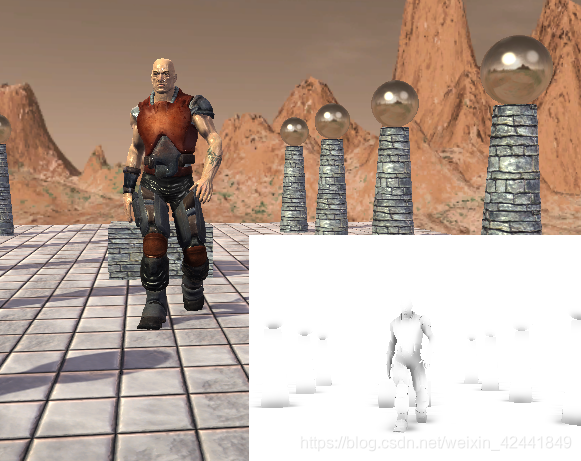
下面是本Demo截图,其中源动画模型和纹理都是取自Direct SDK并转换为.m3d格式:
6 总结
- 骨架是由树状父子结构的骨骼组成;
- 每个骨骼基于自己的局部坐标系运动,每个局部坐标系又与父骨骼的局部坐标系关联;所以我们可以创建一个to-parent矩阵,变换到父骨骼局部坐标系,直到变换到世界坐标系;
- to-root矩阵可以通过toRooti = toParenti计算;
- 骨骼偏移(bone-offset)变换使顶点有绑定空间变换到骨骼空间,它是基于每个骨骼的;
- 对顶点做动画叫顶点混合,每个顶点可以由多个骨骼基于权重影响,最终变换可以由v′ = w0vF0 + w1vF1 + w2vF2 + w3vF3计算,其中w0 + w1 + w2 + w3 = 1,它可以让皮肤动画更自然;
- 为了实现顶点混合,我们将每个骨骼的最终变换矩阵保存在一个列表中,最后放到常量缓冲中;然后对于顶点,保存矩阵索引列表和权重列表即可进行计算。
7 练习
Introduction to 3D Game Programming with DirectX 12 学习笔记之 --- 第二十三章:角色动画的更多相关文章
- Introduction to 3D Game Programming with DirectX 12 学习笔记之 --- 第二十一章:环境光遮蔽(AMBIENT OCCLUSION)
原文:Introduction to 3D Game Programming with DirectX 12 学习笔记之 --- 第二十一章:环境光遮蔽(AMBIENT OCCLUSION) 学习目标 ...
- Introduction to 3D Game Programming with DirectX 12 学习笔记之 --- 第十三章:计算着色器(The Compute Shader)
原文:Introduction to 3D Game Programming with DirectX 12 学习笔记之 --- 第十三章:计算着色器(The Compute Shader) 代码工程 ...
- Introduction to 3D Game Programming with DirectX 12 学习笔记之 --- 第二十二章:四元数(QUATERNIONS)
原文:Introduction to 3D Game Programming with DirectX 12 学习笔记之 --- 第二十二章:四元数(QUATERNIONS) 学习目标 回顾复数,以及 ...
- Introduction to 3D Game Programming with DirectX 12 学习笔记之 --- 第二十章:阴影贴图
原文:Introduction to 3D Game Programming with DirectX 12 学习笔记之 --- 第二十章:阴影贴图 本章介绍一种在游戏和应用中,模拟动态阴影的基本阴影 ...
- Introduction to 3D Game Programming with DirectX 12 学习笔记之 --- 第十七章:拾取
原文:Introduction to 3D Game Programming with DirectX 12 学习笔记之 --- 第十七章:拾取 代码工程地址: https://github.com/ ...
- Introduction to 3D Game Programming with DirectX 12 学习笔记之 --- 第十一章:模板测试
原文:Introduction to 3D Game Programming with DirectX 12 学习笔记之 --- 第十一章:模板测试 代码工程地址: https://github.co ...
- Introduction to 3D Game Programming with DirectX 12 学习笔记之 --- 第七章:在Direct3D中绘制(二)
原文:Introduction to 3D Game Programming with DirectX 12 学习笔记之 --- 第七章:在Direct3D中绘制(二) 代码工程地址: https:/ ...
- Introduction to 3D Game Programming with DirectX 12 学习笔记之 --- 第六章:在Direct3D中绘制
原文:Introduction to 3D Game Programming with DirectX 12 学习笔记之 --- 第六章:在Direct3D中绘制 代码工程地址: https://gi ...
- Introduction to 3D Game Programming with DirectX 12 学习笔记之 --- 第五章:渲染流水线
原文:Introduction to 3D Game Programming with DirectX 12 学习笔记之 --- 第五章:渲染流水线 学习目标 了解几个用以表达真实场景的标志和2D图像 ...
随机推荐
- leyou_07_对数据的操作
1.目标在数据库的两张表中拿到以下数据,并完成状态.搜索和分页功能 实体类Spu(页面需要的数据) 实体类Category(页面需要的数据) name:商品分类 2.分析: 返回的数据在两个实体类中, ...
- js/jquery判断一个对象是否为空
一.js判断一个对象是否为空对象 1)通过JSON自带的.stringify方法来判断 //JSON自带的stringify方法,将json转成json字符串 var c = {}; if(JSON. ...
- jeecms各种标签类(大部分,并没有包含一些其他的如text_cut html_cut之类)
软件包 comjeecms.cms.action.directive 类摘要 ChannelDirective 栏目对象标签 ChannelListDirective 栏目列表标签 ChannelPa ...
- 使用Hilo.JS快速开发Flappy Bird
http://hiloteam.github.io/tutorial/flappybird.html#_9 Flappy Bird是一款前不久风靡世界的休闲小游戏.虽然它难度超高,但是游戏本身却非常简 ...
- 对于ssm过程中的乱码问题的处理
首先是数据库乱码问题: 1.可以先检测一下是否是数据库的问题: 可以先输入查询语句SHOW VARIABLES LIKE 'character_set_%';,查看所有的编码是否是UTF-8. (一般 ...
- Hadoop 伪分布式安装配置
- Leetcode173. Binary Search Tree Iterator二叉搜索树迭代器
实现一个二叉搜索树迭代器.你将使用二叉搜索树的根节点初始化迭代器. 调用 next() 将返回二叉搜索树中的下一个最小的数. 注意: next() 和hasNext() 操作的时间复杂度是O(1),并 ...
- 技术人自己的KPI
为什么需要技术KPI 在业务技术团队,有一个不好的趋势,就是团队越来越业务,越来越没有技术味道.每个人都在谈业务,技术大会上在谈业务,周会上在聊业务,周报里写的是业务项目......唯独少被谈及的是技 ...
- bzoj 3110 [Zjoi2013]K大数查询——线段树套线段树(标记永久化)
题目:https://www.lydsy.com/JudgeOnline/problem.php?id=3110 第一道线段树套线段树! 第一道标记永久化! 为什么为什么写了两个半小时啊…… 本想线段 ...
- 了解真实的『REM』多终端屏幕适配
作者:hbxeagle 链接:github.com/hbxeagle/rem/blob/master/README.md rem 作为一个低调的长度单位,由于手机端网页的兴起,在屏幕适配中得到重用.使 ...