
【CSS3】纯CSS3制作页面切换效果
此前写的那个太复杂了,来点简单的核心
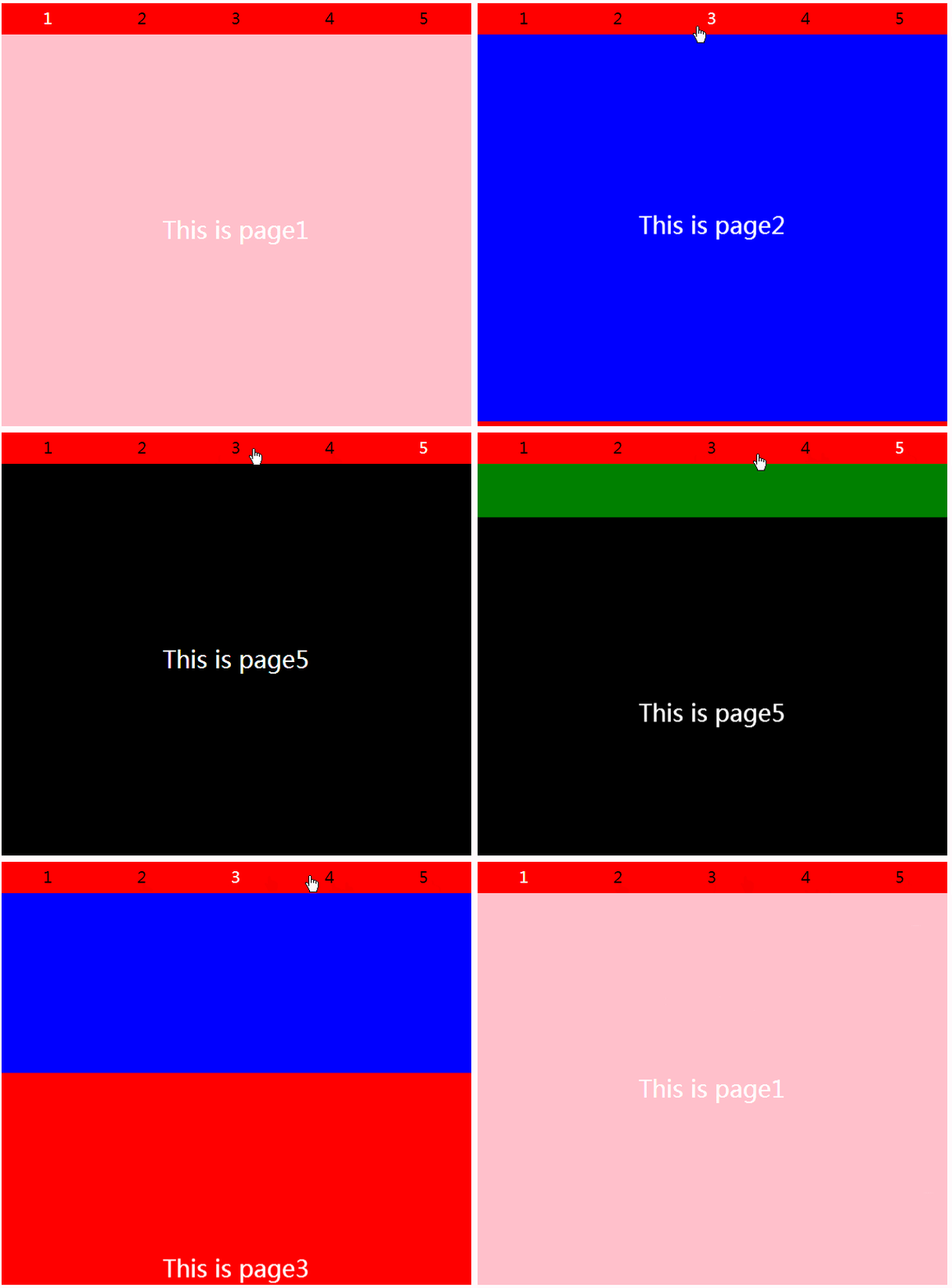
<html>

<head>

    <title></title>

    <style type="text/css">

        * { margin: 0; padding: 0; border: none; }

        .Bl {

            width: 600px;

            height: 540px;

            margin: 0 auto;

            position: relative;

            top: 50%;

            transform: translateY(-50%);

        }

        .Bl > input {

            width: 20%;

            height: 40px;

            position: absolute;

            cursor: pointer;

            opacity: 0;

        }

        .Bl input:nth-of-type(1){ left: 0%; }

        .Bl input:nth-of-type(2){ left: 20%; }

        .Bl input:nth-of-type(3){ left: 40%; }

        .Bl input:nth-of-type(4){ left: 60%; }

        .Bl input:nth-of-type(5){ left: 80%; }

        /*切换效果*/

        .Bl input:nth-of-type(1):checked ~ span:nth-of-type(1) { color: white; }  /* ~ 选择兄弟元素 */

        .Bl input:nth-of-type(2):checked ~ span:nth-of-type(2) { color: white; }

        .Bl input:nth-of-type(3):checked ~ span:nth-of-type(3) { color: white; }

        .Bl input:nth-of-type(4):checked ~ span:nth-of-type(4) { color: white; }

        .Bl input:nth-of-type(5):checked ~ span:nth-of-type(5) { color: white; }

        .Bl input:nth-of-type(1):checked ~ .pagebox > .pages {  }

        .Bl input:nth-of-type(2):checked ~ .pagebox > .pages { transform: translateY(-100%); }

        .Bl input:nth-of-type(3):checked ~ .pagebox > .pages { transform: translateY(-200%); }

        .Bl input:nth-of-type(4):checked ~ .pagebox > .pages { transform: translateY(-300%); }

        .Bl input:nth-of-type(5):checked ~ .pagebox > .pages { transform: translateY(-400%); }

        span {

            display: block;

            width: 20%;

            height: 40px;

            background-color: red;

            float: left;

            text-align: center;

            line-height: 40px;

            font-size: 20px;

        }

        .pagebox,.pages {

            width: 100%;

            height: 500px;

        }

        .pagebox {

            overflow: hidden;

        }

        .pages {

            transition: all 0.5s;

        }

        .page {

            width: 100%;

            height: 100%;

            text-align: center;

            font-family: "微软雅黑";

            font-size: 30px;

            line-height: 500px;

            color: white;

        }

        .page1 { background-color: pink; }

        .page2 { background-color: blue; }

        .page3 { background-color: red; }

        .page4 { background-color: green; }

        .page5 { background-color: black; }

    </style>

</head>

<body>

    <div class="Bl">

        <input type="radio" name="btn" checked ><span>1</span>

        <input type="radio" name="btn"  ><span>2</span>

        <input type="radio" name="btn"  ><span>3</span>

        <input type="radio" name="btn"  ><span>4</span>

        <input type="radio" name="btn"  ><span>5</span>

        <section class="pagebox">

            <div class="pages">

                <div class="page page1">This is page1</div>

                <div class="page page2">This is page2</div>

                <div class="page page3">This is page3</div>

                <div class="page page4">This is page4</div>

                <div class="page page5">This is page5</div>

            </div>

        </section>

    </div>

</body>

</html>
【CSS3】纯CSS3制作页面切换效果的更多相关文章
- Android - FragmentTabHost 与 Fragment 制作页面切换效果
使用 FragmentTabHost 与 Fragment 制作页面切换效果 API 19 TabHost已经不建议使用了.用 FragmentTabHost 来代替TabHost.实际上 Fragm ...
- Android - TabHost 与 Fragment 制作页面切换效果
Android - TabHost 与 Fragment 制作页面切换效果 Android API 19 , API 23 三个标签页置于顶端 效果图: 在文件BoardTabHost.java中定义 ...
- 基于html5和css3响应式全屏滚动页面切换效果
分享一款全屏响应式的HTML5和CSS3页面切换效果.这个页面布局效果对于那些页面要求固定100%高度和宽度的网站和APP来说是十分有用的.效果图如下: 在线预览 源码下载 HTML wrappe ...
- jquery mobile页面切换效果(Flip toggle switch)(注:jQuery移动使用的数据属性的列表。 )
1.页面切换(data-transition)
- html5各种页面切换效果和模态对话框
页面动画:data-transition 属性可以定义页面切换是的动画效果.例如:<a href="index.html" data-transition="pop ...
- WP8 NavigationInTransition实现页面切换效果
NavigationInTransition这个是实现页面切换效果,而且没控件来拖,要自己手动写, 将App.xaml.cs中InitializePhoneApplication()函数里的RootF ...
- 在uwp仿IOS的页面切换效果
有时候我们需要编写一些迎合IOS用户使用习惯的uwp应用,我在这里整理一下仿IOS页面切换效果的代码. 先分析IOS的页面切换.用户使用左右滑动方式进行前进和后退,播放类似于FlipView的切换动画 ...
- [Swift通天遁地]九、拔剑吧-(7)创建旋转和弹性的页面切换效果
★★★★★★★★★★★★★★★★★★★★★★★★★★★★★★★★★★★★★★★★➤微信公众号:山青咏芝(shanqingyongzhi)➤博客园地址:山青咏芝(https://www.cnblogs. ...
- [Swift通天遁地]九、拔剑吧-(8)创建气泡式页面切换效果
★★★★★★★★★★★★★★★★★★★★★★★★★★★★★★★★★★★★★★★★➤微信公众号:山青咏芝(shanqingyongzhi)➤博客园地址:山青咏芝(https://www.cnblogs. ...
随机推荐
- 【洛谷P1204】【USACO1.2】挤牛奶Milking Cows
P1204 [USACO1.2]挤牛奶Milking Cows 题目描述 三个农民每天清晨5点起床,然后去牛棚给3头牛挤奶.第一个农民在300秒(从5点开始计时)给他的牛挤奶,一直到1000秒.第二个 ...
- Katalon系列二十一:用例中语句失败处理
假如有一个用例:1.登陆2.下单3.对历史单评价4.退出 情况一:当第1步执行失败时,我们希望用例不再执行,因为再执行也没有意义了,反而浪费时间:情况二:当第2步执行失败时,我们希望能略过第2步操作, ...
- Web编译器Visual Studio扩展
原文地址:https://marketplace.visualstudio.com/items?itemName=MadsKristensen.WebCompiler 一个Visual Studio扩 ...
- 【水滴石穿】react-native-ble-demo
项目的话,是想打开蓝牙,然后连接设备 点击已经连接的设备,我们会看到一些设备 不过我这边在开启蓝牙的时候报错了 先放作者的项目地址: https://github.com/hezhii/react-n ...
- PLAY2.6-SCALA(十二) 表单的处理
一.表单处理流程如下 1.定义一个表单,在这里表单最多有22个字段 import play.api.data._ import play.api.data.Forms._ //要使用验证和约束 imp ...
- elastic search book [ ElasticSearch book es book]
谁在使用ELK 维基百科, github都使用 ELK (ElasticSearch es book) ElasticSearch入门 Elasticsearch入门,这一篇就够了==>http ...
- Directx11教程(46) alpha blend(3)
原文:Directx11教程(46) alpha blend(3) 现在我们尝试改变box的贴图,使用一张带alpha的dds文件wirefence.dds, 用directx textu ...
- iOS app发布流程
http://www.xuebuyuan.com/1980497.html http://blog.csdn.net/alincexiaohao/article/details/38725367 ap ...
- 每天一个linux命令(2): nl命令
0.学习时间 2014-05-16 1.命令格式 nl [参数] 文件名 (文件名也缺省的情况下, 从标准输入中读入) 2.命令参数 -b t 空行不加行号(默认) -b a 空行也加行号(类似于c ...
- 易位构词EOJ3451【字符串】【思维题】【模拟】
http://acm.ecnu.edu.cn/problem/3451/ 官方题解: 我们可以先考虑字符串有序的情况,比如是 aaabcc,我们只要将字符串右移 3 位,变成 bccaaa,就做完了. ...