
(二)使用CXF开发WebService服务器端接口
CXF作为java领域主流的WebService实现框架,Java程序员有必要掌握它。
CXF主页:http://cxf.apache.org/
简介:百度百科
今天的话,主要是用CXF来开发下WebService服务器端接口,明天写下开发客户端接口;
这里用Maven。
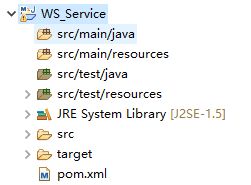
首先建一个Maven的j2se项目;

项目的jre用1.8,因为1.8有webservice的默认实现。不要用1.5 不然下面你用我的代码会有问题,用1.5的话,还需要另外加jar包,这里为了大家省事,要换成1.8;


根据规范,我们先建一个接口类:HelloWorld
package com.wishwzp.webservice;

import javax.jws.WebService;

@WebService

public interface HelloWorld {

    public String say(String str);

}
再建一个具体的实现类:HelloWorldImpl
package com.wishwzp.webservice.impl;

import javax.jws.WebService;

import com.wishwzp.webservice.HelloWorld;

@WebService

public class HelloWorldImpl implements HelloWorld{

    public String say(String str) {

        return "hello" + str;

    }

}
最后建一个发布服务的主类:Server
package com.wishwzp.webservice;

import javax.xml.ws.Endpoint;

import com.wishwzp.webservice.impl.HelloWorldImpl;

public class Server {

    public static void main(String[] args) {

        System.out.println("web service start");

        HelloWorld implementor = new HelloWorldImpl();

        String address = "http://192.168.0.110/helloWorld";

        Endpoint.publish(address, implementor);  // JDK实现   暴露webservice接口

        System.out.println("web service started");

    }

}
这里的Endpoint是Jdk自身实现的WebService。所以到这里我们不需要用到CXF的任何东西。
这里的address,写上自己的本机IP
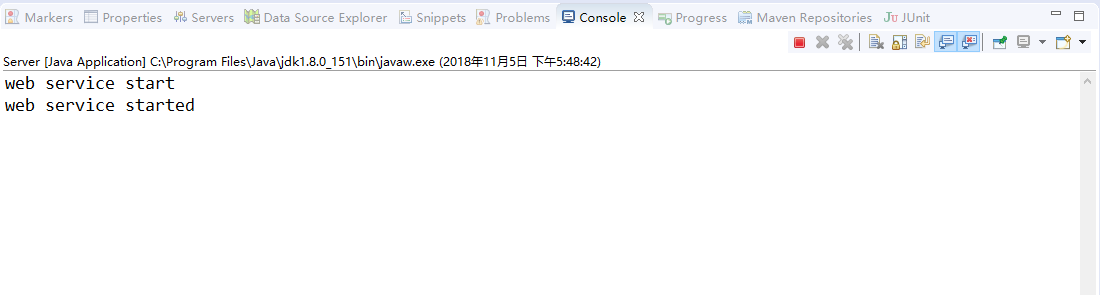
我们运行下Server类:
运行效果如下:
我们在浏览器里访问:http://192.168.0.110/helloWorld?wsdl
效果:

说明已经成功调用了webservice接口;
这里的wsdl 是 Web Services Description Language的缩写,是一个用来描述Web服务和说明如何与Web服务通信的XML语言。WSDL是Web Service的描述语言,用于描述Web Service的服务,接口绑定等,为用户提供详细的接口说明书。
请求后得到的是一个xml规范文档。是一套规范,后面会具体介绍,任何语言平台技术都可以解析。
下面我们介绍使用CXF来实现webservice接口:
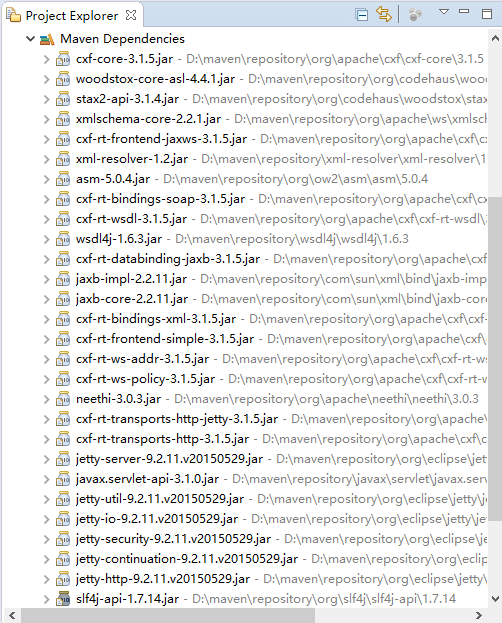
我们先在pom.xml中加入:
<dependency>

        <groupId>org.apache.cxf</groupId>

        <artifactId>cxf-core</artifactId>

        <version>3.1.5</version>

    </dependency>

    <dependency>

        <groupId>org.apache.cxf</groupId>

        <artifactId>cxf-rt-frontend-jaxws</artifactId>

        <version>3.1.5</version>

    </dependency>

    <dependency>

        <groupId>org.apache.cxf</groupId>

        <artifactId>cxf-rt-transports-http-jetty</artifactId>

        <version>3.1.5</version>

    </dependency>
这里要额外加入jetty,作为webservice发布的服务器。jetty是一个内嵌的web服务器;
我们把Server改下。换成CXF实现:
package com.wishwzp.webservice;

import javax.xml.ws.Endpoint;

import org.apache.cxf.jaxws.JaxWsServerFactoryBean;

import com.wishwzp.webservice.impl.HelloWorldImpl;

public class Server {

    public static void main(String[] args) {

        System.out.println("web service start");

        HelloWorld implementor = new HelloWorldImpl();

        String address = "http://192.168.0.110/helloWorld";

        //Endpoint.publish(address, implementor);  // JDK实现   暴露webservice接口

        JaxWsServerFactoryBean factoryBean = new JaxWsServerFactoryBean();

        factoryBean.setAddress(address); // 设置暴露地址

        factoryBean.setServiceClass(HelloWorld.class); // 接口类

        factoryBean.setServiceBean(implementor); // 设置实现类

        factoryBean.create();

        System.out.println("web service started");

        System.out.println("web service started");

    }

}
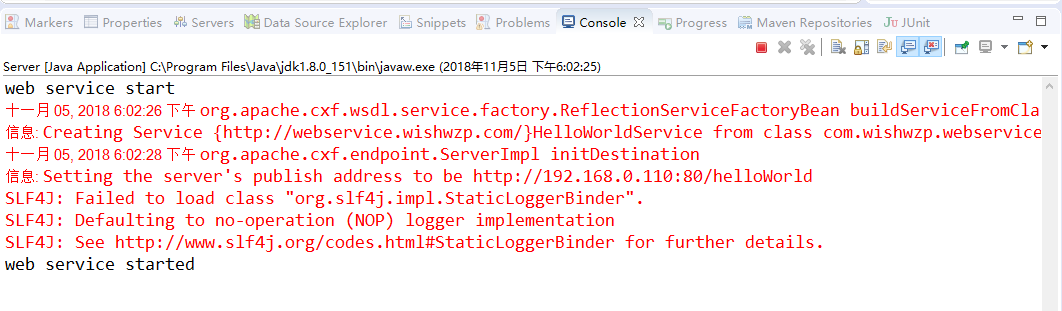
运行效果和刚才一样,这里就不再重复;
(二)使用CXF开发WebService服务器端接口的更多相关文章
- 使用cxf开发webservice接口
项目中经常用到开发webservice接口,及调用webService接口.这里讲解如何使用cxf开发webService接口. 一.webservice介绍及理解 webservice是一种跨平台, ...
- (三)使用CXF开发WebService客户端
前面一讲开发了webservice服务器端接口,今天的话,我们来开发webservice客户端,让大家来体验下过程: 首先建一个Maven项目,项目名字,WS_Client: 然后我们要用CXF给我们 ...
- struts1+spring+myeclipse +cxf 开发webservice以及普通java应用调用webservice的实例
Cxf + Spring+ myeclipse+ cxf 进行 Webservice服务端开发 使用Cxf开发webservice的服务端项目结构 Spring配置文件applicationCont ...
- 【WebService】使用CXF开发WebService(四)
CXF简介 Apache CXF = Celtix + XFire,开始叫 Apache CeltiXfire,后来更名为 Apache CXF 了,以下简称为 CXF.CXF 继承了 Celtix ...
- 使用cxf开发webservice应用时抛出异常
在使用cxf开发webservice应用时,报出了类似下面的错误 JAXB: [javax.xml.bind.UnmarshalException: unexpected element (uri:& ...
- WebService -- Java 实现之 CXF (WebService 服务器端接口)
1. 使用Maven创建一个quickstart项目 2. 引入依赖的Jar包 <dependency> <groupId>org.apache.cxf</groupId ...
- Spring boot+CXF开发WebService
最近工作中需要用到webservice,而且结合spring boot进行开发,参照了一些网上的资料,配置过程中出现的了一些问题,于是写了这篇博客,记录一下我这次spring boot+cxf开发的w ...
- Spring boot+CXF开发WebService Demo
最近工作中需要用到webservice,而且结合spring boot进行开发,参照了一些网上的资料,配置过程中出现的了一些问题,于是写了这篇博客,记录一下我这次spring boot+cxf开发的w ...
- 3.使用CXF开发webService
CXF 简介 关于 Apache CXF Apache CXF = Celtix + XFire,Apache CXF 的前身叫 Apache CeltiXfire,现在已经正式更名为 Apache ...
随机推荐
- django分页功能
采用django自带的Paginator功能 from django.core.paginator import Paginator food = foodInfo.objects.filter(fo ...
- VBScript常用函数
VBScript常用函数 作者:尹正杰 版权声明:原创作品,谢绝转载!否则将追究法律责任. 1.Abs函数 Option Explicit '@author :yinzhengjie 'blog:ht ...
- 标准遗传算法(二进制编码 python实现)
代码地址:https://github.com/guojun007/binary_sga 种群初始化: binary_sga/population_init/population_init.py #种 ...
- 直接用<img> 的src属性显示base64转码后的字符串成图片【原】
直接用<img> 的src属性显示base64转码后的字符串成图片 <img src="data:image/gif;base64,base64转码后的字符串" ...
- luogu P2779 [AHOI2016初中组]黑白序列
传送门 注:本题解中下标从1开始 这题可以想出一个\(O(n^2)\)的dp,只要考虑每个偶数位置可以从前面的哪个位置加上一个"B...W..."转移过来 然而数据范围有5e5,, ...
- [JXOI2018]游戏 (线性筛,数论)
[JXOI2018]游戏 \(solution:\) 这一道题的原版题面实在太负能量了,所以用了修改版题面. 这道题只要仔细读题,我们就可以将题目的一些基本性质分析出来:首先我们定义:对于某一类都可以 ...
- JavaScript学习 - 基础(一)
ECMAscript ECMAscript是一个重要的标准,但它并不是JAVAscript唯一的部分,当然,也不是唯一标准化的部分,实际上,一个完整的JAVAscript实现是由一下3个不同的部分组成 ...
- Python 入门基础13 --模块与包
本节内容: 一.模块及使用 1.模块及使用 2.起别名.from导入 3.自执行与模块 二.包的使用 2.1 包中模块的使用:import 2.2 包的嵌套 2.3 包中模块的使用:from ...i ...
- html 速查表
HTML 速查列表 HTML 速查列表. 你可以打印它,以备日常使用. HTML 基本文档 <!DOCTYPE html> <html> <head> <ti ...
- retrofit 基础使用
1.先导入依赖 加上网络权限 <uses-permission android:name="android.permission.INTERNET" /> 2.创建接口 ...