
(二)使用CXF开发WebService服务器端接口
CXF作为java领域主流的WebService实现框架,Java程序员有必要掌握它。
CXF主页:http://cxf.apache.org/
简介:百度百科
今天的话,主要是用CXF来开发下WebService服务器端接口,明天写下开发客户端接口;
这里用Maven。
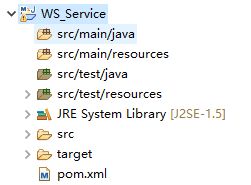
首先建一个Maven的j2se项目;

项目的jre用1.8,因为1.8有webservice的默认实现。不要用1.5 不然下面你用我的代码会有问题,用1.5的话,还需要另外加jar包,这里为了大家省事,要换成1.8;


根据规范,我们先建一个接口类:HelloWorld
package com.wishwzp.webservice;

import javax.jws.WebService;

@WebService

public interface HelloWorld {

    public String say(String str);

}
再建一个具体的实现类:HelloWorldImpl
package com.wishwzp.webservice.impl;

import javax.jws.WebService;

import com.wishwzp.webservice.HelloWorld;

@WebService

public class HelloWorldImpl implements HelloWorld{

    public String say(String str) {

        return "hello" + str;

    }

}
最后建一个发布服务的主类:Server
package com.wishwzp.webservice;

import javax.xml.ws.Endpoint;

import com.wishwzp.webservice.impl.HelloWorldImpl;

public class Server {

    public static void main(String[] args) {

        System.out.println("web service start");

        HelloWorld implementor = new HelloWorldImpl();

        String address = "http://192.168.0.110/helloWorld";

        Endpoint.publish(address, implementor);  // JDK实现   暴露webservice接口

        System.out.println("web service started");

    }

}
这里的Endpoint是Jdk自身实现的WebService。所以到这里我们不需要用到CXF的任何东西。
这里的address,写上自己的本机IP
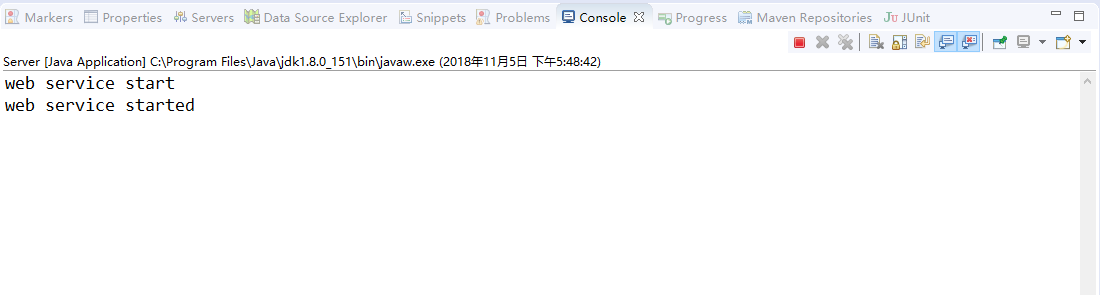
我们运行下Server类:
运行效果如下:
我们在浏览器里访问:http://192.168.0.110/helloWorld?wsdl
效果:

说明已经成功调用了webservice接口;
这里的wsdl 是 Web Services Description Language的缩写,是一个用来描述Web服务和说明如何与Web服务通信的XML语言。WSDL是Web Service的描述语言,用于描述Web Service的服务,接口绑定等,为用户提供详细的接口说明书。
请求后得到的是一个xml规范文档。是一套规范,后面会具体介绍,任何语言平台技术都可以解析。
下面我们介绍使用CXF来实现webservice接口:
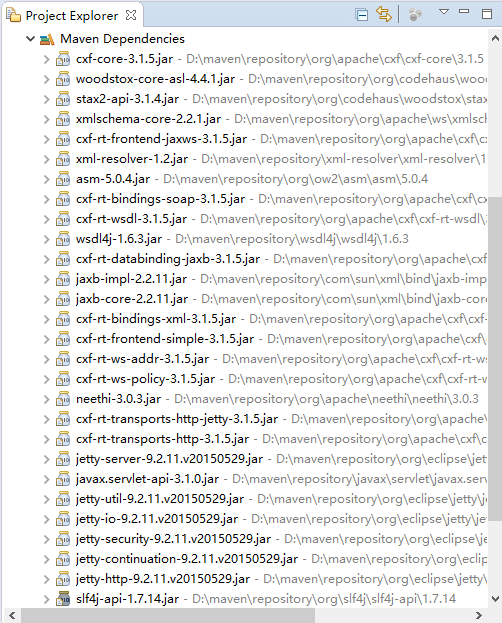
我们先在pom.xml中加入:
<dependency>

        <groupId>org.apache.cxf</groupId>

        <artifactId>cxf-core</artifactId>

        <version>3.1.5</version>

    </dependency>

    <dependency>

        <groupId>org.apache.cxf</groupId>

        <artifactId>cxf-rt-frontend-jaxws</artifactId>

        <version>3.1.5</version>

    </dependency>

    <dependency>

        <groupId>org.apache.cxf</groupId>

        <artifactId>cxf-rt-transports-http-jetty</artifactId>

        <version>3.1.5</version>

    </dependency>
这里要额外加入jetty,作为webservice发布的服务器。jetty是一个内嵌的web服务器;
我们把Server改下。换成CXF实现:
package com.wishwzp.webservice;

import javax.xml.ws.Endpoint;

import org.apache.cxf.jaxws.JaxWsServerFactoryBean;

import com.wishwzp.webservice.impl.HelloWorldImpl;

public class Server {

    public static void main(String[] args) {

        System.out.println("web service start");

        HelloWorld implementor = new HelloWorldImpl();

        String address = "http://192.168.0.110/helloWorld";

        //Endpoint.publish(address, implementor);  // JDK实现   暴露webservice接口

        JaxWsServerFactoryBean factoryBean = new JaxWsServerFactoryBean();

        factoryBean.setAddress(address); // 设置暴露地址

        factoryBean.setServiceClass(HelloWorld.class); // 接口类

        factoryBean.setServiceBean(implementor); // 设置实现类

        factoryBean.create();

        System.out.println("web service started");

        System.out.println("web service started");

    }

}
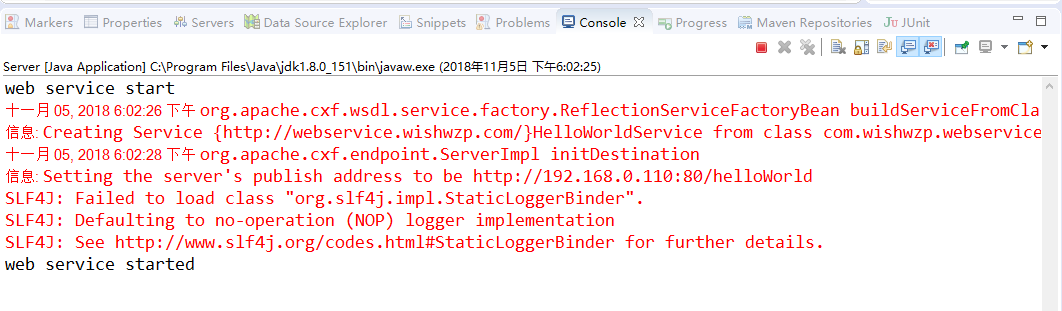
运行效果和刚才一样,这里就不再重复;
(二)使用CXF开发WebService服务器端接口的更多相关文章
- 使用cxf开发webservice接口
项目中经常用到开发webservice接口,及调用webService接口.这里讲解如何使用cxf开发webService接口. 一.webservice介绍及理解 webservice是一种跨平台, ...
- (三)使用CXF开发WebService客户端
前面一讲开发了webservice服务器端接口,今天的话,我们来开发webservice客户端,让大家来体验下过程: 首先建一个Maven项目,项目名字,WS_Client: 然后我们要用CXF给我们 ...
- struts1+spring+myeclipse +cxf 开发webservice以及普通java应用调用webservice的实例
Cxf + Spring+ myeclipse+ cxf 进行 Webservice服务端开发 使用Cxf开发webservice的服务端项目结构 Spring配置文件applicationCont ...
- 【WebService】使用CXF开发WebService(四)
CXF简介 Apache CXF = Celtix + XFire,开始叫 Apache CeltiXfire,后来更名为 Apache CXF 了,以下简称为 CXF.CXF 继承了 Celtix ...
- 使用cxf开发webservice应用时抛出异常
在使用cxf开发webservice应用时,报出了类似下面的错误 JAXB: [javax.xml.bind.UnmarshalException: unexpected element (uri:& ...
- WebService -- Java 实现之 CXF (WebService 服务器端接口)
1. 使用Maven创建一个quickstart项目 2. 引入依赖的Jar包 <dependency> <groupId>org.apache.cxf</groupId ...
- Spring boot+CXF开发WebService
最近工作中需要用到webservice,而且结合spring boot进行开发,参照了一些网上的资料,配置过程中出现的了一些问题,于是写了这篇博客,记录一下我这次spring boot+cxf开发的w ...
- Spring boot+CXF开发WebService Demo
最近工作中需要用到webservice,而且结合spring boot进行开发,参照了一些网上的资料,配置过程中出现的了一些问题,于是写了这篇博客,记录一下我这次spring boot+cxf开发的w ...
- 3.使用CXF开发webService
CXF 简介 关于 Apache CXF Apache CXF = Celtix + XFire,Apache CXF 的前身叫 Apache CeltiXfire,现在已经正式更名为 Apache ...
随机推荐
- Scala进阶之路-尾递归优化
Scala进阶之路-尾递归优化 作者:尹正杰 版权声明:原创作品,谢绝转载!否则将追究法律责任. 递归调用有时候能被转换成循环,这样能节约栈空间.在函数式编程中,这是很重要的,我们通常会使用递归方法来 ...
- Oracle导出数据中的prompt,set feedback 等是什么意思
prompt 显示后面的提示,相当于一般的操作系统命令echo,输出后面的信息Importing table t_testset feedback off 1.set feedback 有三种方式: ...
- vs2017_enterprise正式版离线安装包bt下载
vs2017_enterprise正式版离线安装包bt下载 点击这里下载种子 磁力链接 安装前请先打开certificates目录,安装里面的三个证书 离线下载教程 : https://docs.mi ...
- Study 1 —— Python简介
Python与其他语言的区别C\C++:学习成本高,学习周期长,偏系统底层,在开发硬件驱动.嵌入式.游戏引擎开发等领域有广泛的应用:JAVA:目前使用最广泛的编程语言,第一个跨平台运行的语言,在大型E ...
- UVALive 4254 Processor(二分)
题目链接 题意 有n个任务,每个任务有三个参数ri,di和wi,表示必须在时刻[ri,di]之内执行,工作量为wi.处理器执行速度可以变化,当执行速度为s时,工作量为wi.处理器的速度可以变化,当执行 ...
- Ubuntu(16.04.2)学习笔记(一)如何解决dpkg: error processing install-info
一.服务器安装软件是出现以下的错误信息: www@TinywanAliYun:~$ sudo apt-get install letsencrypt Reading package lists... ...
- angularjs指令中scope参数 true、false、{} 的区别详解
scope 有三个参数 true.false.{} scope 默认是 false,当 scope设置为true时,会从父作用域继承并创建一个新的作用域对象, 按照true .false的反向思维,我 ...
- Zabbix 监控服务
熟悉了解一些 zabbix 基础项目监控 zabbix_get 相关操作 :获取 item 监控数据 基本格式: -s --host: 指定客户端主机名或者IP -p --port:客户端端口,默认 ...
- 设计模式之UML类图六大关系辨析【2】
六大关系:继承(extends).实现(Realization).依赖(use-a).关联(association).聚合(has-a).组合(强聚合)(Composition). 类与类之间的强弱关 ...
- BZOJ 4129 Haruna’s Breakfast
传送门 同样是树上莫队 只不过要求一个集合的mex,这里可以使用分块,可以在根号时间内得出解 /************************************************** P ...