
Hadoop JAVA HDFS客户端操作
JAVA HDFS客户端操作
通过API操作HDFS
org.apache.logging.log4jlog4j-core2.8.2org.apache.hadoophadoop-common${hadoop.version}org.apache.hadoophadoop-hdfs${hadoop.version}org.apache.hadoophadoop-client${hadoop.version} " v:shapes="文本框_x0020_2">配置maven的pom文件
创建第一个java工程
public class HdfsClientDemo1 {
public static void main(String[] args) throws Exception {
// 1 获取文件系统
Configuration configuration = new Configuration();
// 配置在集群上运行
configuration.set("fs.defaultFS", "hdfs://hadoop-001:9000");
FileSystem fileSystem = FileSystem.get(configuration);
// 直接配置访问集群的路径和访问集群的用户名称
// FileSystem fileSystem = FileSystem.get(new URI("hdfs://hadoop-001:9000"),configuration, "hadoop");
// 2 把本地文件上传到文件系统中
fileSystem.copyFromLocalFile(new Path("f:/hello.txt"), new Path("/hello1.copy.txt"));
// 3 关闭资源
fileSystem.close();
System.out.println("over");
}
}
出现下以异常现象

解决访问权限有两种解决方案:
1、 配置vm的参数
-DHADOOP_USER_NAME=hadoop
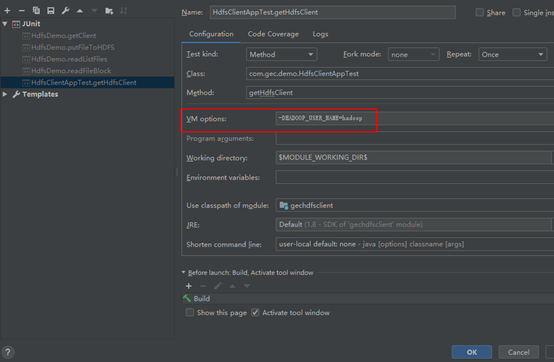
2、 直接在SystemFile.get方法指明用户名

3.2.1 HDFS获取文件系统
1)详细代码
|
@Test public void initHDFS() throws Exception{ // 1 创建配置信息对象 // new Configuration();的时候,它就会去加载jar包中的hdfs-default.xml // 然后再加载classpath下的hdfs-site.xml Configuration configuration = new Configuration(); // 2 设置参数 // 参数优先级: 1、客户端代码中设置的值 2、classpath下的用户自定义配置文件 3、然后是服务器的默认配置 // configuration.set("fs.defaultFS", "hdfs://hadoop102:9000"); configuration.set("dfs.replication", "3"); // 3 获取文件系统 FileSystem fs = FileSystem.get(configuration); // 4 打印文件系统 System.out.println(fs.toString()); } |
2)将core-site.xml拷贝到项目的根目录下
|
<?xml version="1.0" encoding="UTF-8"?> <?xml-stylesheet type="text/xsl" href="configuration.xsl"?> <configuration> <!-- 指定HDFS中NameNode的地址 --> <property> <name>fs.defaultFS</name> <value>hdfs://hadoop102:9000</value> </property> <!-- 指定hadoop运行时产生文件的存储目录 --> <property> <name>hadoop.tmp.dir</name> <value>/opt/module/hadoop-2.7.2/data/tmp</value> </property> </configuration> |
3.2.2 HDFS文件上传
|
@Test public void putFileToHDFS() throws Exception{ // 1 创建配置信息对象 Configuration configuration = new Configuration(); FileSystem fs = FileSystem.get(new URI("hdfs://hadoop102:9000"),configuration, "hadoop"); // 2 创建要上传文件所在的本地路径 Path src = new Path("e:/hello.txt"); // 3 创建要上传到hdfs的目标路径 Path dst = new Path("hdfs://hadoop102:9000/user/hadoop/hello.txt"); // 4 拷贝文件 fs.copyFromLocalFile(src, dst); fs.close(); } |
如何更改副本个数?
1、 在类路径新建hdfs-site.xml文件

2、 直接configuration里面设置键值对象

3、 3.2.3 HDFS文件下载
|
@Test public void getFileFromHDFS() throws Exception{ // 1 创建配置信息对象 Configuration configuration = new Configuration(); FileSystem fs = FileSystem.get(new URI("hdfs://hadoop102:9000"),configuration, "hadoop"); // fs.copyToLocalFile(new Path("hdfs://hadoop102:9000/user/hadoop/hello.txt"), new Path("d:/hello.txt")); // boolean delSrc 指是否将原文件删除 // Path src 指要下载的文件路径 // Path dst 指将文件下载到的路径 // boolean useRawLocalFileSystem 是否开启文件效验 // 2 下载文件 fs.copyToLocalFile(false, new Path("hdfs://hadoop102:9000/user/hadoop/hello.txt"), new Path("e:/hellocopy.txt"), true); fs.close(); } |
3.2.4 HDFS目录创建
|
@Test public void mkdirAtHDFS() throws Exception{ // 1 创建配置信息对象 Configuration configuration = new Configuration(); FileSystem fs = FileSystem.get(new URI("hdfs://hadoop102:9000"),configuration, "hadoop"); //2 创建目录 fs.mkdirs(new Path("hdfs://hadoop102:9000/user/hadoop/output")); } |
3.2.5 HDFS文件夹删除
|
@Test public void deleteAtHDFS() throws Exception{ // 1 创建配置信息对象 Configuration configuration = new Configuration(); FileSystem fs = FileSystem.get(new URI("hdfs://hadoop102:9000"),configuration, "hadoop"); //2 删除文件夹 ,如果是非空文件夹,参数2必须给值true fs.delete(new Path("hdfs://hadoop102:9000/user/hadoop/output"), true); } |
3.2.6 HDFS文件名更改
|
@Test public void renameAtHDFS() throws Exception{ // 1 创建配置信息对象 Configuration configuration = new Configuration(); FileSystem fs = FileSystem.get(new URI("hdfs://hadoop102:9000"),configuration, "hadoop"); //2 重命名文件或文件夹 fs.rename(new Path("hdfs://hadoop102:9000/user/hadoop/hello.txt"), new Path("hdfs://hadoop102:9000/user/hadoop/hellonihao.txt")); } |
3.2.7 HDFS文件详情查看
|
@Test public void readListFiles() throws Exception { // 1 创建配置信息对象 Configuration configuration = new Configuration(); FileSystem fs = FileSystem.get(new URI("hdfs://hadoop102:9000"),configuration, "hadoop"); // 思考:为什么返回迭代器,而不是List之类的容器 RemoteIterator<LocatedFileStatus> listFiles = fs.listFiles(new Path("/"), true); while (listFiles.hasNext()) { LocatedFileStatus fileStatus = listFiles.next(); System.out.println(fileStatus.getPath().getName()); System.out.println(fileStatus.getBlockSize()); System.out.println(fileStatus.getPermission()); System.out.println(fileStatus.getLen()); BlockLocation[] blockLocations = fileStatus.getBlockLocations(); for (BlockLocation bl : blockLocations) { System.out.println("block-offset:" + bl.getOffset()); String[] hosts = bl.getHosts(); for (String host : hosts) { System.out.println(host); } } System.out.println("--------------李冰冰的分割线--------------"); } } |
3.2.8 HDFS文件夹查看
|
@Test public void findAtHDFS() throws Exception, IllegalArgumentException, IOException{ // 1 创建配置信息对象 Configuration configuration = new Configuration(); FileSystem fs = FileSystem.get(new URI("hdfs://hadoop102:9000"),configuration, "hadoop"); // 2 获取查询路径下的文件状态信息 FileStatus[] listStatus = fs.listStatus(new Path("/")); // 3 遍历所有文件状态 for (FileStatus status : listStatus) { if (status.isFile()) { System.out.println("f--" + status.getPath().getName()); } else { System.out.println("d--" + status.getPath().getName()); } } } |
3.3 通过IO流操作HDFS
3.3.1 HDFS文件上传
|
@Test public void putFileToHDFS() throws Exception{ // 1 创建配置信息对象 Configuration configuration = new Configuration(); FileSystem fs = FileSystem.get(new URI("hdfs://hadoop102:9000"),configuration, "hadoop"); // 2 创建输入流 FileInputStream inStream = new FileInputStream(new File("e:/hello.txt")); // 3 获取输出路径 String putFileName = "hdfs://hadoop102:9000/user/hadoop/hello1.txt"; Path writePath = new Path(putFileName); // 4 创建输出流 FSDataOutputStream outStream = fs.create(writePath); // 5 流对接 try{ IOUtils.copyBytes(inStream, outStream, 4096, false); }catch(Exception e){ e.printStackTrace(); }finally{ IOUtils.closeStream(inStream); IOUtils.closeStream(outStream); } } |
3.3.2 HDFS文件下载
|
@Test public void getFileToHDFS() throws Exception{ // 1 创建配置信息对象 Configuration configuration = new Configuration(); FileSystem fs = FileSystem.get(new URI("hdfs://hadoop102:9000"),configuration, "hadoop"); // 2 获取读取文件路径 String filename = "hdfs://hadoop102:9000/user/hadoop/hello1.txt"; // 3 创建读取path Path readPath = new Path(filename); // 4 创建输入流 FSDataInputStream inStream = fs.open(readPath); // 5 流对接输出到控制台 try{ IOUtils.copyBytes(inStream, System.out, 4096, false); }catch(Exception e){ e.printStackTrace(); }finally{ IOUtils.closeStream(inStream); } } |
3.3.3 定位文件读取
1)下载第一块
|
@Test // 定位下载第一块内容 public void readFileSeek1() throws Exception { // 1 创建配置信息对象 Configuration configuration = new Configuration(); FileSystem fs = FileSystem.get(new URI("hdfs://hadoop102:9000"), configuration, "hadoop"); // 2 获取输入流路径 Path path = new Path("hdfs://hadoop102:9000/user/hadoop/tmp/hadoop-2.7.2.tar.gz"); // 3 打开输入流 FSDataInputStream fis = fs.open(path); // 4 创建输出流 FileOutputStream fos = new FileOutputStream("e:/hadoop-2.7.2.tar.gz.part1"); // 5 流对接 byte[] buf = new byte[1024]; for (int i = 0; i < 128 * 1024; i++) { fis.read(buf); fos.write(buf); } // 6 关闭流 IOUtils.closeStream(fis); IOUtils.closeStream(fos); } |
2)下载第二块
|
@Test // 定位下载第二块内容 public void readFileSeek2() throws Exception{ // 1 创建配置信息对象 Configuration configuration = new Configuration(); FileSystem fs = FileSystem.get(new URI("hdfs://hadoop102:9000"), configuration, "hadoop"); // 2 获取输入流路径 Path path = new Path("hdfs://hadoop102:9000/user/hadoop/tmp/hadoop-2.7.2.tar.gz"); // 3 打开输入流 FSDataInputStream fis = fs.open(path); // 4 创建输出流 FileOutputStream fos = new FileOutputStream("e:/hadoop-2.7.2.tar.gz.part2"); // 5 定位偏移量(第二块的首位) fis.seek(1024 * 1024 * 128); // 6 流对接 IOUtils.copyBytes(fis, fos, 1024); // 7 关闭流 IOUtils.closeStream(fis); IOUtils.closeStream(fos); } |
3)读取块信息
|
Configuration configuration = new Configuration(); FileSystem fs = FileSystem.get(new URI("hdfs://hadoop-001:9000"),configuration, "hadoop"); // 2 获取读取文件路径 String filename = "hdfs://hadoop-001:9000/0306_668/hadoop-2.7.2.tar.gz"; // 3 创建读取path Path readPath = new Path(filename); // 4 创建输入流 HdfsDataInputStream hdis= (HdfsDataInputStream) fs.open(readPath); List<LocatedBlock> allBlocks= hdis.getAllBlocks(); for(LocatedBlock block:allBlocks){ ExtendedBlock eBlock= block.getBlock(); System.out.println("------------------------"); System.out.println( eBlock.getBlockId()); System.out.println( eBlock.getBlockName()); System.out.println( block.getBlockSize()); System.out.println( block.getStartOffset()); // 获取当前的数据块所在的DataNode的信息 DatanodeInfo[] locations= block.getLocations(); for(DatanodeInfo info:locations){ System.out.println( info.getIpAddr()); System.out.println( info.getHostName()); } } hdis.close(); fs.close(); |
合并文件指令:type hadoop-2.7.2.tar.gz.part2>>hadoop-2.7.2.tar.gz.part1
代码如下:
package com.gec.demo;

import org.apache.hadoop.conf.Configuration;

import org.apache.hadoop.fs.*;

import org.apache.hadoop.hdfs.client.HdfsDataInputStream;

import org.apache.hadoop.hdfs.protocol.DatanodeInfo;

import org.apache.hadoop.hdfs.protocol.ExtendedBlock;

import org.apache.hadoop.hdfs.protocol.LocatedBlock;

import org.apache.hadoop.io.IOUtils;

import org.junit.Test;

import java.io.File;

import java.io.FileInputStream;

import java.io.FileOutputStream;

import java.io.IOException;

import java.net.URI;

import java.net.URISyntaxException;

import java.util.List;

public class HdfsClientAppTest

{

    @Test

    public void getHdfsClient() throws IOException {

        //如何通过java操作hdfs

        //1、新建Configuration对象

        Configuration configuration=new Configuration();

        configuration.set("fs.defaultFS","hdfs://hadoop-001:9000");

        //2获取FileSystem对象

        FileSystem fileSystem=FileSystem.get(configuration);

        fileSystem.mkdirs(new Path("/100_3"));

        //关闭,释放资源

        fileSystem.close();

    }

    @Test

    public void getHdfsClient2() throws URISyntaxException, IOException, InterruptedException {

        Configuration configuration=new Configuration();

        FileSystem fileSystem=FileSystem.get(

                new URI("hdfs://hadoop-001:9000"),

                configuration,

                "hadoop");

        fileSystem.mkdirs(new Path("/100_2"));

        fileSystem.close();

    }

    /*

    * 实现一个文件上传

    * */

    @Test

    public void putFileToHDFS() throws URISyntaxException, IOException, InterruptedException {

        Configuration configuration=new Configuration();

        FileSystem fileSystem=FileSystem.get(

                new URI("hdfs://hadoop-001:9000"),

                configuration,

                "hadoop");

        //

        // 参数一:Path src:源文件

        // 参数二:Path dst:目标文件

        Path srcPath=new Path("D:\\src\\hello.txt");

        Path destPath=new Path("/100_1/hello.txt");

        fileSystem.copyFromLocalFile(srcPath,destPath);

        fileSystem.close();

    }

    @Test

    public void putFileToHDFS2() throws URISyntaxException, IOException, InterruptedException {

        Configuration configuration=new Configuration();

        FileSystem fileSystem=FileSystem.get(

                new URI("hdfs://hadoop-001:9000"),

                configuration,

                "hadoop");

        //

        // 参数一:Path src:源文件

        // 参数二:Path dst:目标文件

        Path srcPath=new Path("D:\\src\\hello.txt");

        Path destPath=new Path("/100_2/hello.txt");

        fileSystem.copyFromLocalFile(srcPath,destPath);

        fileSystem.close();

    }

    @Test

    public void putFileToHDFS3() throws URISyntaxException, IOException, InterruptedException {

        Configuration configuration=new Configuration();

        configuration.set("dfs.replication","2");

        FileSystem fileSystem=FileSystem.get(

                new URI("hdfs://hadoop-001:9000"),

                configuration,

                "hadoop");

        //

        // 参数一:Path src:源文件

        // 参数二:Path dst:目标文件

        Path srcPath=new Path("D:\\src\\hello.txt");

        Path destPath=new Path("/100_3/hello.txt");

        fileSystem.copyFromLocalFile(srcPath,destPath);

        fileSystem.close();

    }

    //HDFS文件夹删除

    @Test

    public void deleteAtHDFS() throws URISyntaxException, IOException, InterruptedException {

        Configuration configuration=new Configuration();

        configuration.set("dfs.replication","2");

        FileSystem fileSystem=FileSystem.get(

                new URI("hdfs://hadoop-001:9000"),

                configuration,

                "hadoop");

        fileSystem.delete(new Path("/100_3"),true);

        fileSystem.close();

    }

    //修改文件名

    @Test

    public void renameAtHDFS() throws URISyntaxException, IOException, InterruptedException {

        Configuration configuration=new Configuration();

        FileSystem fileSystem=FileSystem.get(

                new URI("hdfs://hadoop-001:9000"),

                configuration,

                "hadoop");

        fileSystem.rename(new Path("/100_2/hello.txt"),new Path("/100_2/hello2.txt"));

        fileSystem.close();

    }

    //查看文件列表

    @Test

    public void readListFiles() throws URISyntaxException, IOException, InterruptedException {

        Configuration configuration=new Configuration();

        FileSystem fileSystem=FileSystem.get(

                new URI("hdfs://hadoop-001:9000"),

                configuration,

                "hadoop");

        RemoteIterator<LocatedFileStatus> iterator=fileSystem.listFiles(new Path("/"),true);

        while (iterator.hasNext())

        {

            LocatedFileStatus filestatus = iterator.next();

            System.out.println("权限="+filestatus.getPermission());

            System.out.println("文件名="+filestatus.getPath().getName());

            System.out.println("文件大小="+filestatus.getLen());

            System.out.println("文件副本数="+filestatus.getReplication());

            //获取块的位置信息

            //

            BlockLocation[] blockLocations = filestatus.getBlockLocations();

            for (BlockLocation blockLocation : blockLocations) {

                System.out.println("块的偏移量="+blockLocation.getOffset());

                System.out.println("块大小="+blockLocation.getLength());

                String hosts[]=blockLocation.getHosts();

                for (String host : hosts) {

                    System.out.println("副本存储的主机位置="+host);

                }

                System.out.println("区别块信息---------------");

            }

            System.out.println("区别文件信息-----------------------------");

        }

        fileSystem.close();

    }

    /*

     * 通过io流实现文件上传到hdfs

     * */

    @Test

    public void putFileToHDFSByIOStream() throws Exception

    {

        Configuration configuration=new Configuration();

        FileSystem fileSystem=FileSystem.get(

                new URI("hdfs://hadoop-001:9000"),

                configuration,

                "hadoop");

        FileInputStream fileInputStream=new FileInputStream("D:\\src\\Ahost.java");

        FSDataOutputStream fsDataOutputStream=fileSystem.create(new Path("/100_1/Ahost.java"));

        IOUtils.copyBytes(fileInputStream,fsDataOutputStream,1024,true);

   /*     fileInputStream.close();

        fsDataOutputStream.close();*/

        fileSystem.close();

    }

    /*

    * 通过io流实现从hdfs下载本地文件

    * */

    @Test

    public void downloadFileByIOStream() throws Exception

    {

        Configuration configuration=new Configuration();

        FileSystem fileSystem=FileSystem.get(

                new URI("hdfs://hadoop-001:9000"),

                configuration,

                "hadoop");

        FSDataInputStream fsDataInputStream=fileSystem.open(new Path("hdfs://hadoop-001:9000/100_1/Ahost.java"));

        IOUtils.copyBytes(fsDataInputStream,System.out,1024,true);

   /*     fileInputStream.close();

        fsDataOutputStream.close();*/

        fileSystem.close();

    }

    @Test

    public void getBlockInfo() throws Exception

    {

        Configuration configuration=new Configuration();

        FileSystem fileSystem=FileSystem.get(

                new URI("hdfs://hadoop-001:9000"),

                configuration,

                "hadoop");

        HdfsDataInputStream hdis= (HdfsDataInputStream) fileSystem.open(new Path("hdfs://hadoop-001:9000/100_1/hadoop-2.7.2.tar.gz"));

        List<LocatedBlock> allBlocks = hdis.getAllBlocks();

        for (LocatedBlock allBlock : allBlocks) {

            ExtendedBlock block = allBlock.getBlock();

            System.out.println("块id="+block.getBlockId());

            System.out.println("块文件名="+block.getBlockName());

            System.out.println("时间="+block.getGenerationStamp());

            DatanodeInfo[] locations = allBlock.getLocations();

            for (DatanodeInfo location : locations) {

                System.out.println("存储datanode的主机名="+location.getHostName());

            }

            System.out.println("---------------------");

        }

        fileSystem.close();

    }

    //下载第一块内容

    @Test

    public void downFirstBlock() throws Exception

    {

        Configuration configuration=new Configuration();

        FileSystem fileSystem=FileSystem.get(

                new URI("hdfs://hadoop-001:9000"),

                configuration,

                "hadoop");

        FSDataInputStream fsinput=fileSystem.open(new Path("hdfs://hadoop-001:9000/100_1/hadoop-2.7.2.tar.gz"));

        FileOutputStream fileOutputStream=new FileOutputStream("D:\\src\\hadoop-2.7.2.tar.gz.part1");

        //128MB

        byte[] buf = new byte[1024];

        for (int i = 0; i < 128 * 1024; i++) {

            fsinput.read(buf);

            fileOutputStream.write(buf);

        }

        fileOutputStream.close();

        fsinput.close();

        fileSystem.close();

    }

    //下载第二块内容

    @Test

    public void downFirstBlock2() throws Exception

    {

        Configuration configuration=new Configuration();

        FileSystem fileSystem=FileSystem.get(

                new URI("hdfs://hadoop-001:9000"),

                configuration,

                "hadoop");

        FSDataInputStream fsinput=fileSystem.open(new Path("hdfs://hadoop-001:9000/100_1/hadoop-2.7.2.tar.gz"));

        FileOutputStream fileOutputStream=new FileOutputStream("D:\\src\\hadoop-2.7.2.tar.gz.part2");

        //定义偏移量为128MB

        fsinput.seek(1024 * 1024 * 128);

        IOUtils.copyBytes(fsinput,fileOutputStream,1024,true);

        fileSystem.close();

    }

}
Hadoop JAVA HDFS客户端操作的更多相关文章
- Hadoop之HDFS客户端操作
1. HDFS 客户端环境准备 1.1 windows 平台搭建 hadoop 2.8.5 2. 创建Maven工程 # pom.xml <dependencies> <depend ...
- Hadoop之HDFS文件操作常有两种方式(转载)
摘要:Hadoop之HDFS文件操作常有两种方式,命令行方式和JavaAPI方式.本文介绍如何利用这两种方式对HDFS文件进行操作. 关键词:HDFS文件 命令行 Java API HD ...
- Hadoop系列007-HDFS客户端操作
title: Hadoop系列007-HDFS客户端操作 date: 2018-12-6 15:52:55 updated: 2018-12-6 15:52:55 categories: Hadoop ...
- Hadoop之HDFS文件操作
摘要:Hadoop之HDFS文件操作常有两种方式.命令行方式和JavaAPI方式.本文介绍怎样利用这两种方式对HDFS文件进行操作. 关键词:HDFS文件 命令行 Java API HD ...
- hadoop的hdfs文件操作实现上传文件到hdfs
这篇文章主要介绍了使用hadoop的API对HDFS上的文件访问,其中包括上传文件到HDFS上.从HDFS上下载文件和删除HDFS上的文件,需要的朋友可以参考下hdfs文件操作操作示例,包括上传文件到 ...
- 【Hadoop】HDFS客户端开发示例
1.原理.步骤 2.HDFS客户端示例代码 package com.ares.hadoop.hdfs; import java.io.FileInputStream; import java.io.F ...
- Hadoop(7)-HDFS客户端的API操作
1 客户端环境准备 根据自己电脑的操作系统拷贝对应的编译后的hadoop jar包到非中文路径 配置HADOOP_HOME的环境变量,并且在path中配置hadoop的bin 重启电脑 2. Hdfs ...
- HDFS客户端操作(JAVA代码)
环境准备 windows需要配置hadoop的windows下的依赖 安装包地址: 链接:https://pan.baidu.com/s/1QtbH-x-S0QytkmaoSosdEw 提取码:2kt ...
- 大数据学习——hdfs客户端操作
package cn.itcast.hdfs; import org.apache.commons.io.IOUtils; import org.apache.hadoop.conf.Configur ...
随机推荐
- SpringSecurity自定义登陆页面和跳转页面
如果我们不用form-login说明登陆界面,springsecurity框架将自动为我们生成登陆界面 现在我们不想用自动生成的登陆界面了,而想使用自定义的漂亮的登陆界面 则需要使用<secur ...
- Kaggle:Home Credit Default Risk 特征工程构建及可视化(2)
博主在之前的博客 Kaggle:Home Credit Default Risk 数据探索及可视化(1) 中介绍了 Home Credit Default Risk 竞赛中一个优秀 kernel 关于 ...
- 【Java】输出目录结构
import java.io.*; import java.io.File; import java.io.IOException; public class FileUtil { public st ...
- 完整的AJAX
$.ajax({url:"请求路径",data:{"key":前端传入后台处理的数据},type:"post", //请求方式dataTyp ...
- jQuery事件委托方法 bind live delegate on
1.bind jquery 1.3之前 定义和用法:主要用于给选择到的元素上绑定特定事件类型的监听函数 语法: bind(type,[data],function(e)); 特点: a.适合页 ...
- Windows下安装pymssql
准备用Python接入Sql Server数据库,因此准备用pymssql模块. 安装有点纠结. 64位win10系统,python3.6 步骤: 首先需要配置一下freetds: 在这里下载:htt ...
- ionic中 ng-repeat下使用ng-model获取不到选中数据问题:
在这种情况下点击了单选框并不能获取$scope.unitcode的值: <ion-list> <ion-radio ng-repeat="item in userInfos ...
- ios-根据单元格里的控件tag值,在方法外获得对应的section与row的值
在cell的代理方法里:cellForRowAtIndexPath btn.tag = indexPath.section *100 + indexPath.row; [cell.exitPerson ...
- 【BZOJ4817】【SDOI2017】树点染色
不算学会lct...... 原题: Bob有一棵n个点的有根树,其中1号点是根节点.Bob在每个点上涂了颜色,并且每个点上的颜色不同.定义一条路 径的权值是:这条路径上的点(包括起点和终点)共有多少种 ...
- CH5701 开车旅行
题意 5701 开车旅行 0x50「动态规划」例题 描述 小A和小B决定利用假期外出旅行,他们将想去的城市从1到N编号,且编号较小的城市在编号较大的城市的西边,已知各个城市的海拔高度互不相同,记城市 ...