
Ubuntu-18.04设置开机启动脚本
参考:https://www.cnblogs.com/defifind/p/9285456.html
http://www.cnblogs.com/airdot/p/9688530.html
systemd 默认读取 /etc/systemd/system 下的配置文件,该目录下的文件会链接/lib/systemd/system/下的文件
打开脚本/lib/systemd/system/rc.local.service 添加末尾几行
[Unit]

Description=/etc/rc.local Compatibility

Documentation=man:systemd-rc-local-generator(8)

ConditionFileIsExecutable=/etc/rc.local

After=network.target

[Service]

Type=forking

ExecStart=/etc/rc.local start

TimeoutSec=0

RemainAfterExit=yes

GuessMainPID=no

[Install]

WantedBy=multi-user.target

elias=rc-local.service
PS:实际测试无需添加最后三行也能实现
最后增加字段[Install]否则在enable的时候可能会报一下错误,虽然报一下错误后开机自启程序还是正常的
The unit files have no installation config (WantedBy, RequiredBy, Also, Alias

settings in the [Install] section, and DefaultInstance for template units).

This means they are not meant to be enabled using systemctl.

Possible reasons for having this kind of units are:

1) A unit may be statically enabled by being symlinked from another unit's

   .wants/ or .requires/ directory.

2) A unit's purpose may be to act as a helper for some other unit which has

   a requirement dependency on it.

3) A unit may be started when needed via activation (socket, path, timer,

   D-Bus, udev, scripted systemctl call, ...).

4) In case of template units, the unit is meant to be enabled with some

   instance name specified.

创建启动文件/etc/rc.local(默认无该文件)
#!/bin/sh -e

touch /tmp/test
增加执行权限
chmod +x /etc/rc.local
PS:需要#!/bin/sh -e否则可能不生效
设置软连接
ln -s /lib/systemd/system/rc.local.service /etc/systemd/system/
重启如果在/tmp目录下面创建了test文件则代表设置开启启动成功
启动服务并设置开启自启动
systemctl start rc-local

systemctl enable rc-local
重启服务器测试,可以通过命令查看自启动状态以及自启动执行时候的报错等信息
systemctl status rc-local
如果启动rc-local报错
journalctl -xe
单元已失败
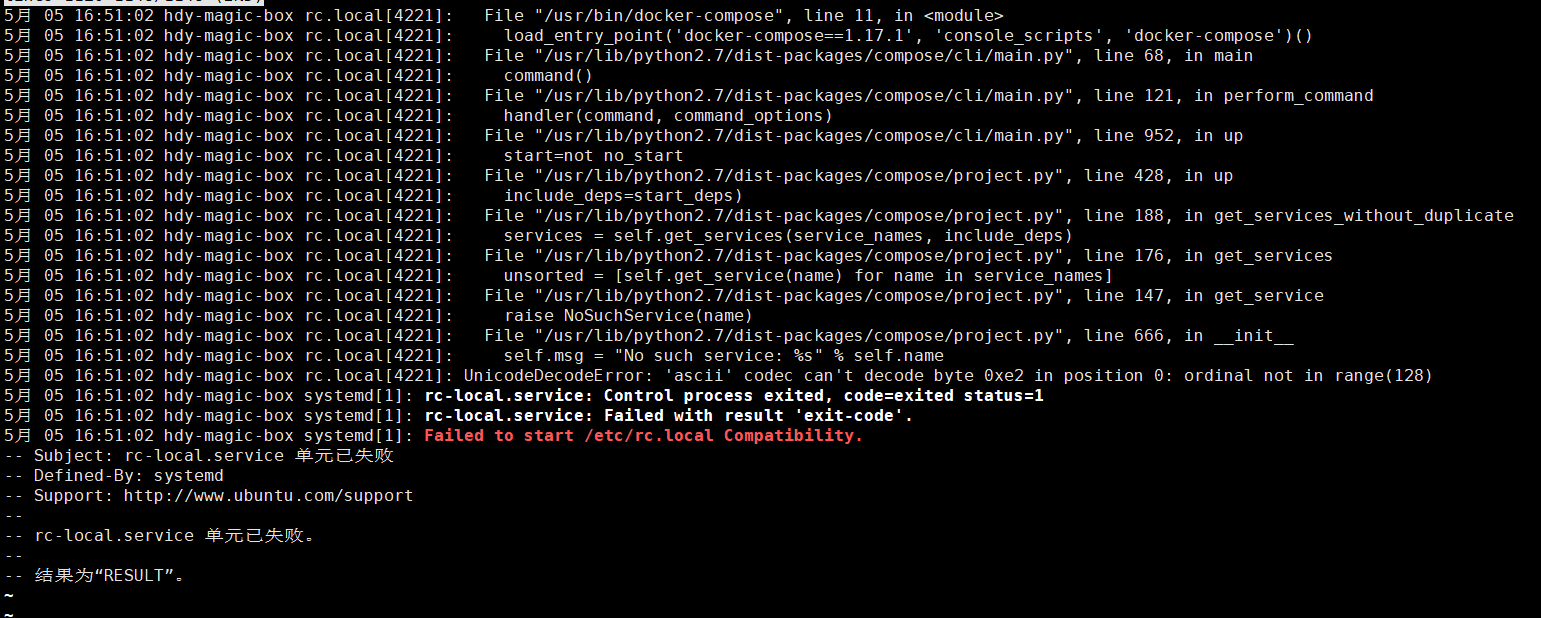
检查/etc/rc.local文件配置,是否有非英文状态输入的字符
Ubuntu-18.04设置开机启动脚本的更多相关文章
- Ubuntu 18.04 设置开机启动脚本 rc.local systemd
ubuntu18.04不再使用initd管理系统,改用systemd. ubuntu-18.04不能像ubuntu14一样通过编辑rc.local来设置开机启动脚本,通过下列简单设置后,可以使rc.l ...
- Ubuntu 16.04设置开机启动脚本的方法
需求:公司卡片机容量太小,只有100G,由于使用的人比较的多,开机使用后有时候就会出现磁盘空间占满数据写不进去的情况,影响工作进度,而且每次使用完都得关掉卡片机,所以就有必要写个清理磁盘的脚本,当卡片 ...
- Ubuntu 14.04设置开机启动脚本的方法
rc.local脚本 rc.local脚本是一个ubuntu开机后会自动执行的脚本,我们可以在该脚本内添加命令行指令.该脚本位于/etc/路径下,需要root权限才能修改. 该脚本具体格式如下: #! ...
- ubuntu-18.04 设置开机启动脚本
ubuntu-18.04 设置开机启动脚本 参阅下列链接 https://askubuntu.com/questions/886620/how-can-i-execute-command-on-sta ...
- ubuntu-18.04 设置开机启动脚本-亲测有效
ubuntu-18.04不能像ubuntu14一样通过编辑rc.local来设置开机启动脚本,通过下列简单设置后,可以使rc.local重新发挥作用. 2.将下列内容复制进rc-local.servi ...
- Ubuntu14.04设置开机启动脚本(转)
原文:https://www.magentonotes.com/ubuntu-config-autostart-shell-script.html 方法一:将脚本添加到文件/etc/rc.local ...
- ubuntu-server-18.04 设置开机启动脚本
ubuntu-16.10 开始不再使用initd管理系统,改用systemd systemd is now used for user sessions. System sessions had al ...
- Ubuntu 16.04设置开机启动应用程序
在终端通过以下命令进行设置,Dash已经搜索不到Startup了: gnome-session-properties 或者直接在Dash中搜索:gnome-session
- ubuntu 18.04设置开机自动挂载移动硬盘
首先在命令行执行df -h指令,可以看到如下结果: zifeiy@zifeiy-PC1:~$ df -h 文件系统 容量 已用 可用 已用% 挂载点 udev 964M 0 964M 0% /dev ...
随机推荐
- VBScript.RegExp 正则表达式excel vba 学习经验
1) 手动引用(前期绑定) 点击VBE编辑器菜单:工具 - 引用,选取: Microsoft VBScript Regular Expressions 5.5 Dim regex As New ...
- Microsoft/Git-Credential-Manager-for-Mac-and-Linux
纠正Mac上的错误: Fatal: java.lang.Error encountered. Details: unexpected errorfatal: credential helper '!/ ...
- MySQL binlog_format (Mixed,Statement,Row)[转]
MySQL 5.5 中对于二进制日志 (binlog) 有 3 种不同的格式可选:Mixed,Statement,Row,默认格式是 Statement.总结一下这三种格式日志的优缺点. MySQL ...
- Ubuntu中保存iptables防火墙规则
Ubuntu中保存iptables防火墙规则的例子 打开防火墙 ufw disableufw statusufw enable ufw allow 22/tcp ufw reload iptables ...
- MySQL -- Innodb的关闭
参数innodb_fast_shutdown控制着innodb的关闭模式,有三种取值: 0: innodb执行slow shutdown,在关闭之前要完成一次full purge和change ...
- 第三部分:Android 应用程序接口指南---第一节:应用程序组件---第一章1-1.Fragment
第1-1章 Fragments 在Activity中的fragment代表的是一种行为或用户界面的一部分.你可以在activity中结合多个fragments创建一个多面板UI,并可以在多个activ ...
- GC调优在Spark应用中的实践[转]
作者:仲浩 出处:<程序员>电子刊5月B 摘要:Spark立足内存计算,常常需要在内存中存放大量数据,因此也更依赖JVM的垃圾回收机制.与此同时,它也兼容批处理和流式处理,对于程序 ...
- openssl实现CA自签证书和颁发数字证书
1. 测试环境准备: CA签署服务器:192.168.2.181 WEB服务器:192.168.2.180 CA安装openssl WEB服务器使用nginx 2. CA生成自签证书: 2.1 为C ...
- MXNET:权重衰减-gluon实现
构建数据集 # -*- coding: utf-8 -*- from mxnet import init from mxnet import ndarray as nd from mxnet.gluo ...
- linux下依赖库的版本问题引起的安装失败:libssl-dev版本问题无法安装 :libssl-dev : 依赖: libssl1.0.0 (= 1.0.1-4ubuntu3) 但是 1.0.1-4ubuntu5.31 正要被安装
依赖库版本问题引起的安装失败解决方法如下有两种: 1.是由于源需要更新,如下操作: libssl-dev : 依赖: libssl0.9.8 (= 0.9.8o-1ubuntu4) 但是 0.9.8o ...