
12. SpringBoot国际化
1)、编写国际化配置文件;
2)、使用ResourceBundleMessageSource管理国际化资源文件
3)、在页面使用fmt:message取出国际化内容
步骤:
1)、编写国际化配置文件,抽取页面需要显示的国际化消息
国际化文件是peroperties文件
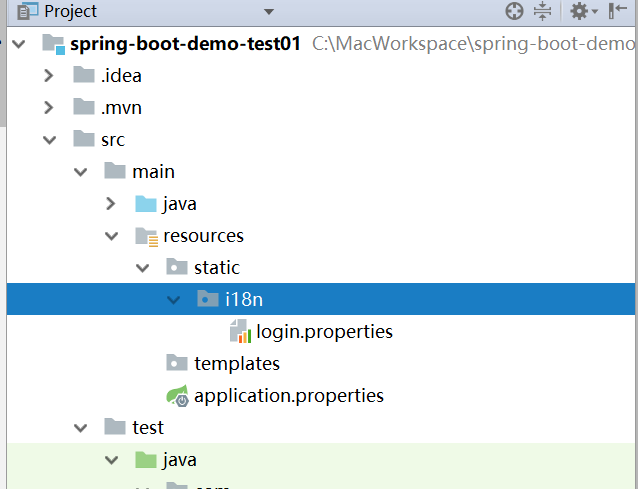
自动识别国际化视图
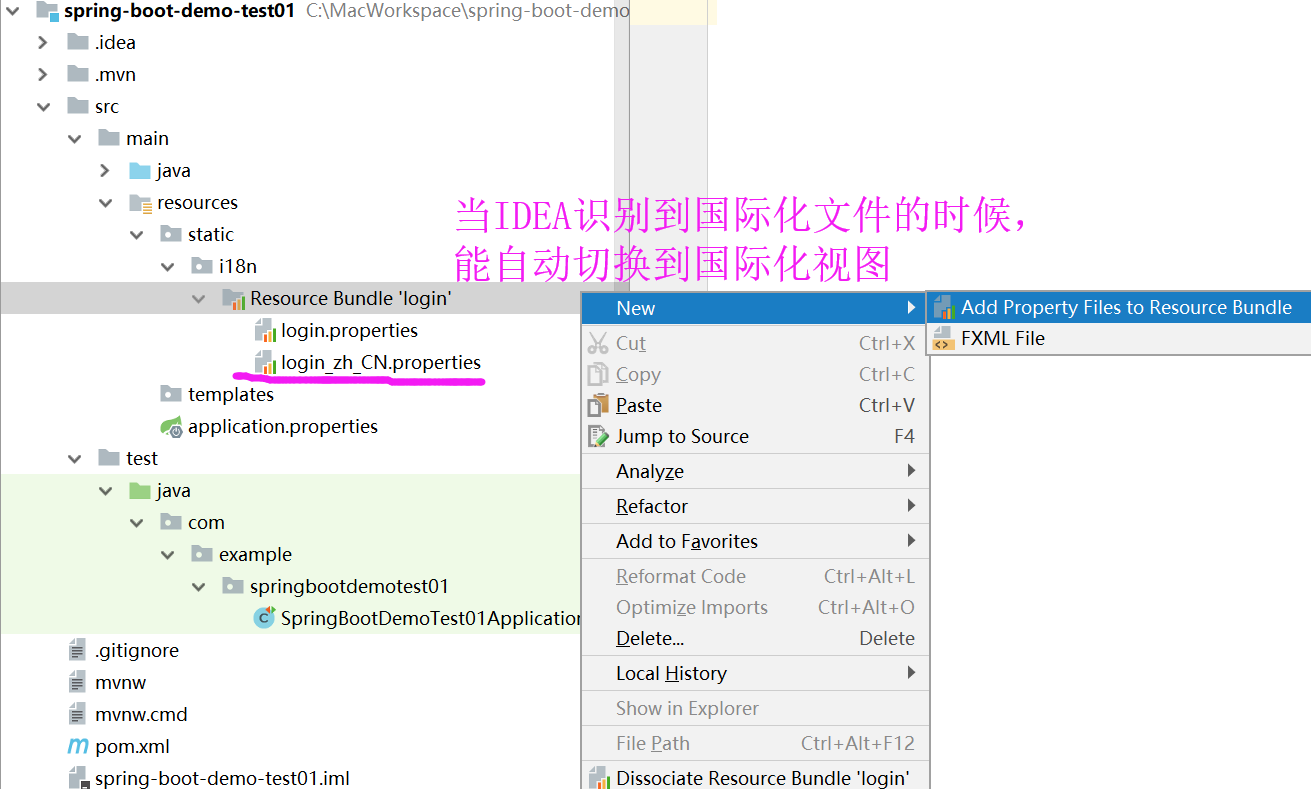
通过国际化视图创建国际化配置文件

同时对比编辑多个配置文件

配置国际化文件路径:
spring.messages.basename=static.i18n.login
@Configuration

@ConditionalOnMissingBean(

    value = {MessageSource.class},

    search = SearchStrategy.CURRENT

)

@AutoConfigureOrder(-2147483648)

@Conditional({MessageSourceAutoConfiguration.ResourceBundleCondition.class})

@EnableConfigurationProperties

public class MessageSourceAutoConfiguration {

    private static final Resource[] NO_RESOURCES = new Resource[0];

    public MessageSourceAutoConfiguration() {

    }

    @Bean

    @ConfigurationProperties(

        prefix = "spring.messages"

    )

    public MessageSourceProperties messageSourceProperties() {

        return new MessageSourceProperties();

    }

    @Bean

    public MessageSource messageSource(MessageSourceProperties properties) {

        ResourceBundleMessageSource messageSource = new ResourceBundleMessageSource();

        if (StringUtils.hasText(properties.getBasename())) {
        //设置国际化文件的基础名称(去掉语言_国家代{zh_CN})的):即默认是message.properties,上图中我们起的名称是login.properties

            messageSource.setBasenames(StringUtils.commaDelimitedListToStringArray(StringUtils.trimAllWhitespace(properties.getBasename())));

        }

        if (properties.getEncoding() != null) {

            messageSource.setDefaultEncoding(properties.getEncoding().name());

        }

        messageSource.setFallbackToSystemLocale(properties.isFallbackToSystemLocale());

        Duration cacheDuration = properties.getCacheDuration();

        if (cacheDuration != null) {

            messageSource.setCacheMillis(cacheDuration.toMillis());

        }

        messageSource.setAlwaysUseMessageFormat(properties.isAlwaysUseMessageFormat());

        messageSource.setUseCodeAsDefaultMessage(properties.isUseCodeAsDefaultMessage());

        return messageSource;

    }

    protected static class ResourceBundleCondition extends SpringBootCondition {

        private static ConcurrentReferenceHashMap<String, ConditionOutcome> cache = new ConcurrentReferenceHashMap();

        protected ResourceBundleCondition() {

        }

        public ConditionOutcome getMatchOutcome(ConditionContext context, AnnotatedTypeMetadata metadata) {
       //自定义的话就用此属性:spring.messages.basename来指定,默认叫message.propertie
       //我们上图的需要指定为:spring.messages.basename=login

            String basename = context.getEnvironment().getProperty("spring.messages.basename", "messages");

            ConditionOutcome outcome = (ConditionOutcome)cache.get(basename);

            if (outcome == null) {

                outcome = this.getMatchOutcomeForBasename(context, basename);

                cache.put(basename, outcome);

            }

            return outcome;

        }

        private ConditionOutcome getMatchOutcomeForBasename(ConditionContext context, String basename) {

            Builder message = ConditionMessage.forCondition("ResourceBundle", new Object[0]);

            String[] var4 = StringUtils.commaDelimitedListToStringArray(StringUtils.trimAllWhitespace(basename));

            int var5 = var4.length;

            for(int var6 = 0; var6 < var5; ++var6) {

                String name = var4[var6];

                Resource[] var8 = this.getResources(context.getClassLoader(), name);//类路径

                int var9 = var8.length;

                for(int var10 = 0; var10 < var9; ++var10) {

                    Resource resource = var8[var10];

                    if (resource.exists()) {

                        return ConditionOutcome.match(message.found("bundle").items(new Object[]{resource}));

                    }

                }

            }

            return ConditionOutcome.noMatch(message.didNotFind("bundle with basename " + basename).atAll());

        }

        private Resource[] getResources(ClassLoader classLoader, String name) {

            String target = name.replace('.', '/');

            try {
          //类路径下的 message.properties 和 messages_zh_CN.properties 或 自己指定的xxxx.properties 、xxxx.preperties

                return (new PathMatchingResourcePatternResolver(classLoader)).getResources("classpath*:" + target + ".properties");

            } catch (Exception var5) {

                return MessageSourceAutoConfiguration.NO_RESOURCES;

            }

        }

    }

}
public class MessageSourceProperties {

    private String basename = "messages";//我们的配置文件可以直接放在类路径下,默认名称叫message.properties

    private Charset encoding;

    @DurationUnit(ChronoUnit.SECONDS)

    private Duration cacheDuration;

    private boolean fallbackToSystemLocale;

    private boolean alwaysUseMessageFormat;

    private boolean useCodeAsDefaultMessage;

    public MessageSourceProperties() {

        this.encoding = StandardCharsets.UTF_8;

        this.fallbackToSystemLocale = true;

        this.alwaysUseMessageFormat = false;

        this.useCodeAsDefaultMessage = false;

    }

    public String getBasename() {

        return this.basename;

    }

    public void setBasename(String basename) {

        this.basename = basename;

    }
......
}


<!-- 中英文切换链接 -->
<a class="btn btn-sm" th:href="@{/index.html(l='zh_CN'}">中文</a>

<a class="btn btn-sm" th:href="@{/index.html(l='en_US')}">English</a>
是根据浏览器的默认语言识别的

不过取出来的中文有乱码
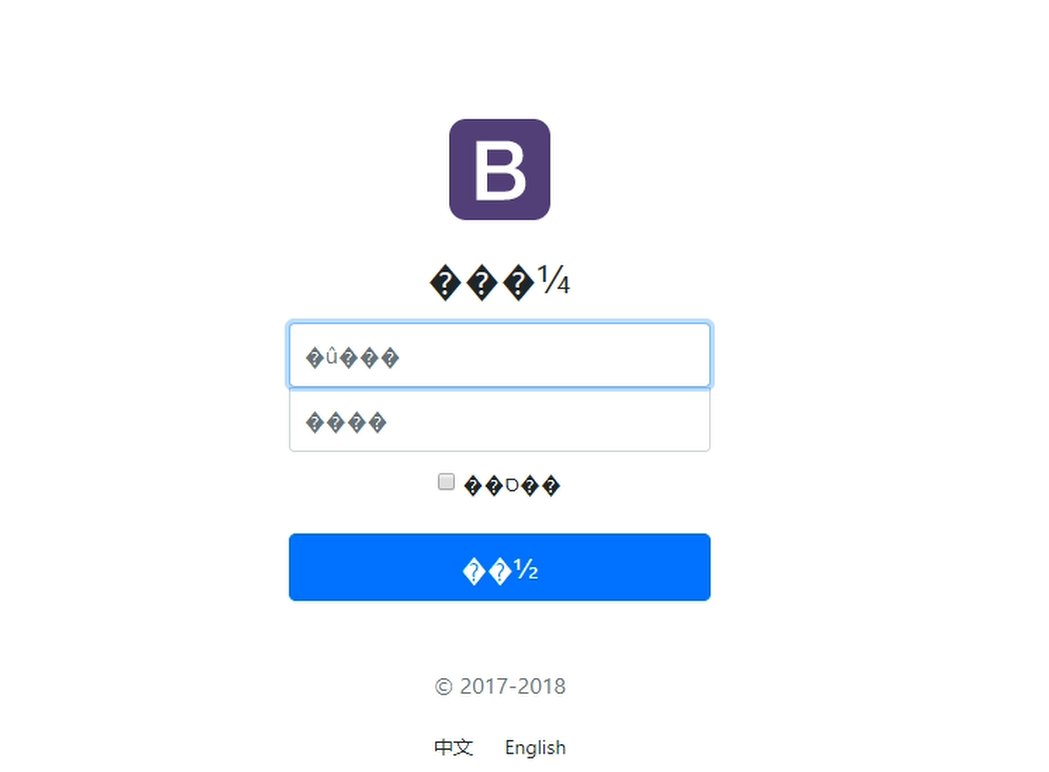
IDEA中将UTF-8自动组转为ASSIC码

File ——》 settings 里的设置只是针对当前项目的设置,要想设置全局的
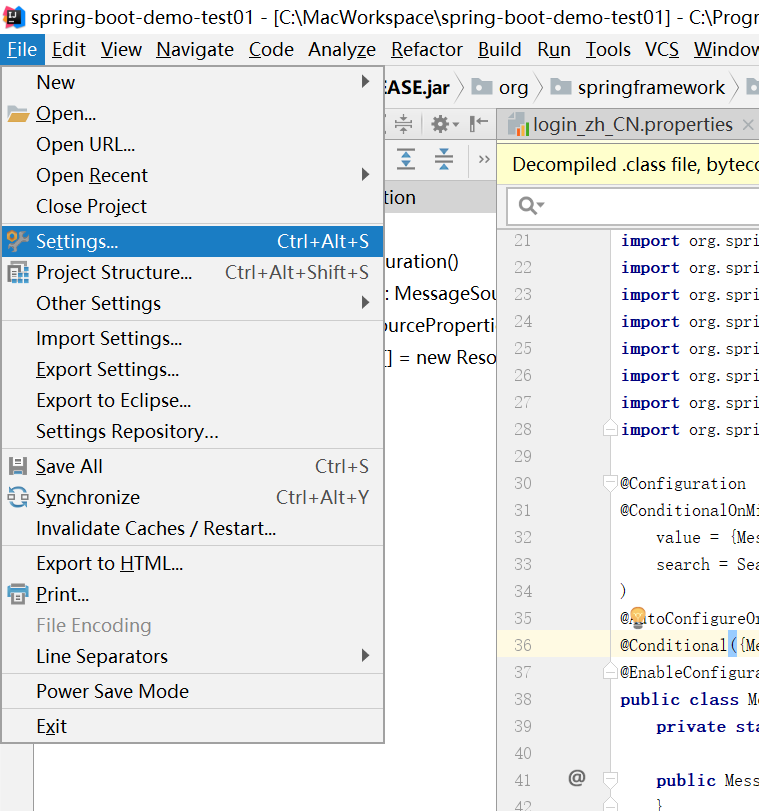
Settins ——》Other Settings ——》Default Settings 设置全局的默认设置
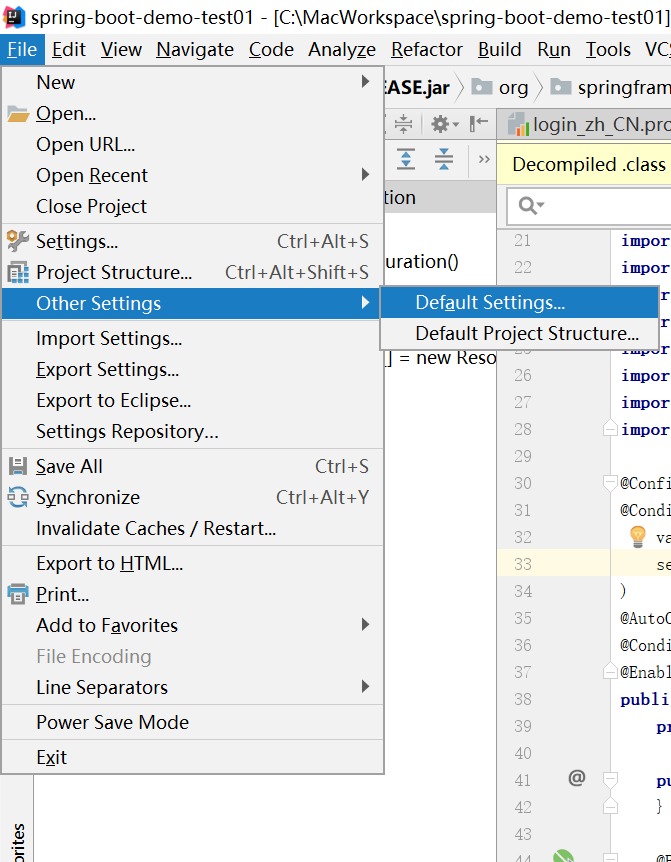
然后重新编辑有乱码的properties文件
根据浏览器的默认语言设置自动区分国际化字段的显示
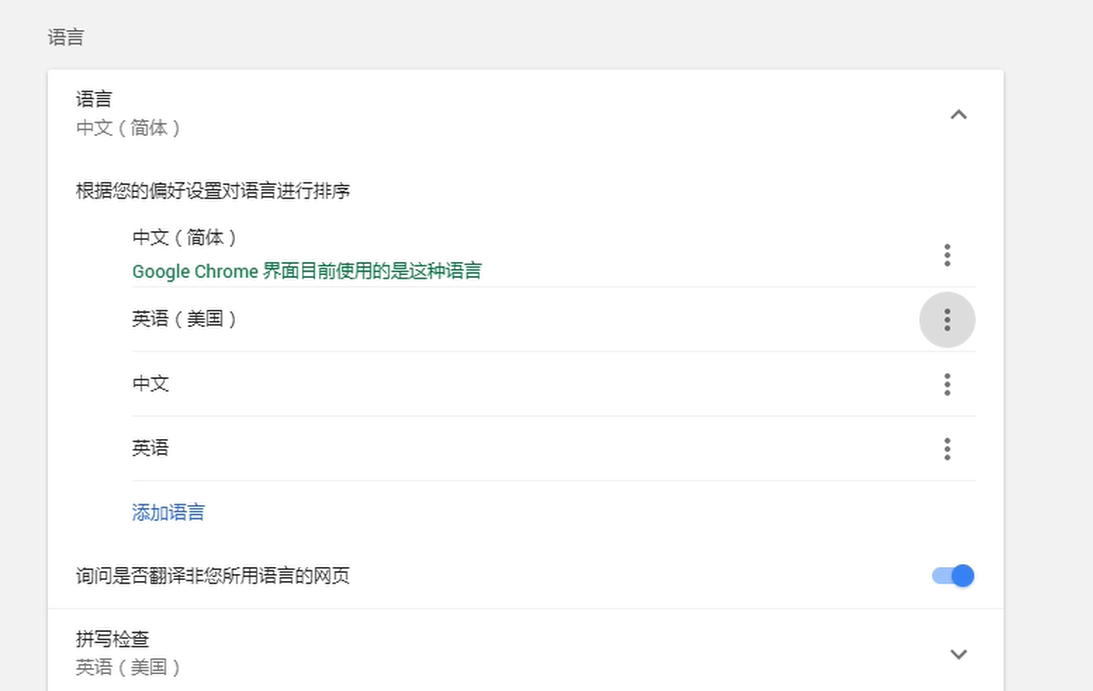
默认请求头里会有语言的信息

切换默认的语言,请求头中排在第一位的也就变了

实现原理:
国际化Locale(区域信息对象);LocaleResolver(获取区域信息对象)
public class WebMvcAutoConfiguration {

    public static class WebMvcAutoConfigurationAdapter implements WebMvcConfigurer, ResourceLoaderAware {

        @Bean

        @ConditionalOnMissingBean  //当项目中没有区域解析器的时候,才执行这个SprigBoot默认的配置,所以可以自定义

        @ConditionalOnProperty(

                prefix = "spring.mvc",

                name = {"locale"}

        )

        //

        public LocaleResolver localeResolver() {

            //默认从配置文件中获取

            if (this.mvcProperties.getLocaleResolver() == org.springframework.boot.autoconfigure.web.servlet.WebMvcProperties.LocaleResolver.FIXED) {

                return new FixedLocaleResolver(this.mvcProperties.getLocale());

            } else {//如果配置文件中没有,则从HttpRequest的header中获取

                AcceptHeaderLocaleResolver localeResolver = new AcceptHeaderLocaleResolver();

                localeResolver.setDefaultLocale(this.mvcProperties.getLocale());

                return localeResolver;

            }

        }

    }

    public class AcceptHeaderLocaleResolver implements LocaleResolver {

        public Locale resolveLocale(HttpServletRequest request) {

            Locale defaultLocale = this.getDefaultLocale();

            if (defaultLocale != null && request.getHeader("Accept-Language") == null) {

                return defaultLocale;

            } else {

                Locale requestLocale = request.getLocale();

                List<Locale> supportedLocales = this.getSupportedLocales();

                if (!supportedLocales.isEmpty() && !supportedLocales.contains(requestLocale)) {

                    Locale supportedLocale = this.findSupportedLocale(request, supportedLocales);

                    if (supportedLocale != null) {

                        return supportedLocale;

                    } else {//如果默认的区域解析器为空,则从requset请求头中获取

                        return defaultLocale != null ? defaultLocale : requestLocale;

                    }

                } else {

                    return requestLocale;

                }

            }

        }

    }
自定义区域解析器,点击链接切换国际化
public class MyLocaleResolver implements LocaleResolver {

    @Override

    public Locale resolveLocale(HttpServletRequest request) {

        String l = request.getParameter("l");

        Locale locale = Locale.getDefault();

        if (!StringUtils.isEmpty(l)) {

            String[] split = l.split("_");

            locale = new Locale(split[0], split[1]);

        }

        return locale;

    }

    @Override

    public void setLocale(HttpServletRequest httpServletRequest, @Nullable HttpServletResponse httpServletResponse, @Nullable Locale locale) {

    }

}
//将自定义的区域解析器加入到容器中来

@Bean

public LocaleResolver localeResolver(){

    return new MyLocaleResolver();

}
12. SpringBoot国际化的更多相关文章
- SpringBoot 国际化配置,SpringBoot Locale 国际化
SpringBoot 国际化配置,SpringBoot Locale 国际化 ================================ ©Copyright 蕃薯耀 2018年3月27日 ht ...
- springboot国际化与@valid国际化支持
springboot国际化 springboot对国际化的支持还是很好的,要实现国际化还简单.主要流程是通过配置springboot的LocaleResolver解析器,当请求打到springboot ...
- 【spring 国际化】springMVC、springboot国际化处理详解
在web开发中我们常常会遇到国际化语言处理问题,那么如何来做到国际化呢? 你能get的知识点? 使用springgmvc与thymeleaf进行国际化处理. 使用springgmvc与jsp进行国际化 ...
- SpringBoot 国际化
一.配置文件 二.application.properties 文件( 让国际化的文件被 SpringBoot 识别 ) spring.messages.basename=i18n.login 三.h ...
- 12.SpringBoot+MyBatis(XML)+Druid
转自:https://www.cnblogs.com/MaxElephant/p/8108342.html 主要是在Spring Boot中集成MyBatis,可以选用基于注解的方式,也可以选择xml ...
- Springboot国际化信息(i18n)解析
国际化信息理解 国际化信息也称为本地化信息 . Java 通过 java.util.Locale 类来表示本地化对象,它通过 “语言类型” 和 “国家/地区” 来创建一个确定的本地化对象 .举个例子吧 ...
- 补习系列(12)-springboot 与邮件发送【华为云技术分享】
目录 一.邮件协议 关于数据传输 二.SpringBoot 与邮件 A. 添加依赖 B. 配置文件 C. 发送文本邮件 D.发送附件 E. 发送Html邮件 三.CID与图片 参考文档 一.邮件协议 ...
- 【SpringBoot】SpringBoot 国际化(七)
本周介绍SpringBoot项目的国际化是如何处理的,阅读本章前请阅读[SpringBoot]SpringBoot与Thymeleaf模版(六)的相关内容 国际化原理 1.在Spring中有国际化Lo ...
- 补习系列(12)-springboot 与邮件发送
目录 一.邮件协议 关于数据传输 二.SpringBoot 与邮件 A. 添加依赖 B. 配置文件 C. 发送文本邮件 D.发送附件 E. 发送Html邮件 三.CID与图片 参考文档 一.邮件协议 ...
随机推荐
- Jquery 组 checkbox双向控制与tr变色
<!DOCTYPE html><html lang="zh-cn"><head> <meta charset="utf-8&qu ...
- centos7 搭建svn服务器
1.安装svn服务器: yum install subversion 2.配置svn服务器: 建立svn版本库根目录及相关目录即svndata及密码权限命令svnpasswd: mkdir -p /a ...
- python之Map函数
# map()函数使用举例 # 功能:map()接受一个函数f和一个或多个list,将f依次作用在list的每个元素,得到一个新的列表 # 语法:map(方法名,列表,[列表2]) # 注意:map( ...
- LODOP在页面不同位置输出页眉页脚
Lodop中的页眉页脚项的特点是:每页固定位置输出,具体该特点可查看本博客的其他博文:Lodop打印项对象类型属性区分 Lodop中有可以设置打印项次页偏移属性,但是该方法是针对单个打印项自动分页的, ...
- The Unique MST POJ - 1679 (次小生成树)
Given a connected undirected graph, tell if its minimum spanning tree is unique. Definition 1 (Spann ...
- 分数模板(C++模板)
貌似没什么用...没有多少毒瘤题要输出分数吧... update:真的有,而且在NOIP模拟赛里出现了!写double的卡精度到怀疑人生! 可以套个兼容性比较好的高精度模板进来. #include&l ...
- 【转】位置式、增量式PID算法C语言实现
位置式.增量式PID算法C语言实现 芯片:STM32F107VC 编译器:KEIL4 作者:SY 日期:2017-9-21 15:29:19 概述 PID 算法是一种工控领域常见的控制算法,用于闭环反 ...
- luogu1073 最优贸易 (tarjan+dp)
tarjan缩点,然后按照拓扑序,做1号点能到达的点的答案具体做法是对每个点记一个min[i],max[i],vis[i]和ans[i]做拓扑序的时候,假设在从u点开始做,有边u到v,如果vis[u] ...
- bzoj1492/luogu4027 货币兑换 (斜率优化+cdq分治)
设f[i]是第i天能获得的最大钱数,那么 f[i]=max{在第j天用f[j]的钱买,然后在第i天卖得到的钱,f[i-1]} 然后解一解方程什么的,设$x[j]=\frac{F[j]}{A[j]*Ra ...
- .net连接ORACLE数据库
这段时间维护客户的一个系统,该系统使用的是ORACLE数据库,之前开发的时候用的都是MSSQL,并没有使用过ORACLE.这两种数据库虽然都是关系型数据库,但是具体的操作大有不同,这里作下记录. 连接 ...