
learning at command AT+CEREG
AT command AT+CEREG
【Purpose】
Learning how to query the network registration status
【Eevironment】
Shell terminal, base on gcom command and gcom script
【Procdeure】
gcom script :
root@IoTP:~# cat /etc/gcom/getcereg.gcom

opengt

 set com 115200n81

 set comecho off

 set senddelay 0.02

 waitquiet 0.2 0.2

 flash 0.1

:start

 send "AT+CEREG?^m"

 get  "^m" $s

 print $s

 get  "^m" $s

 print $s,"\n"

:continue

 exit 0
root@IoTP:~# cat /etc/gcom/setcereg.gcom
opengt
set com 115200n81
set comecho off
set senddelay 0.02
waitquiet 0.2 0.2
flash 0.1
:start
send "AT+CEREG=2^m"
get 1 "^m" $s
print $s
get 1 "^m" $s
print $s,"\n"
:continue
exit 0
test method:
root@IOTP:/etc/gcom# gcom  -d  /dev/ttyUSB1 -s  setcereg.gcom

AT+CEREG=

OK

root@OpenWrt:/etc/gcom# gcom  -d  /dev/ttyUSB1 -s  getcereg.gcom

AT+CEREG?

+CEREG: ,,"","D0","523D306",
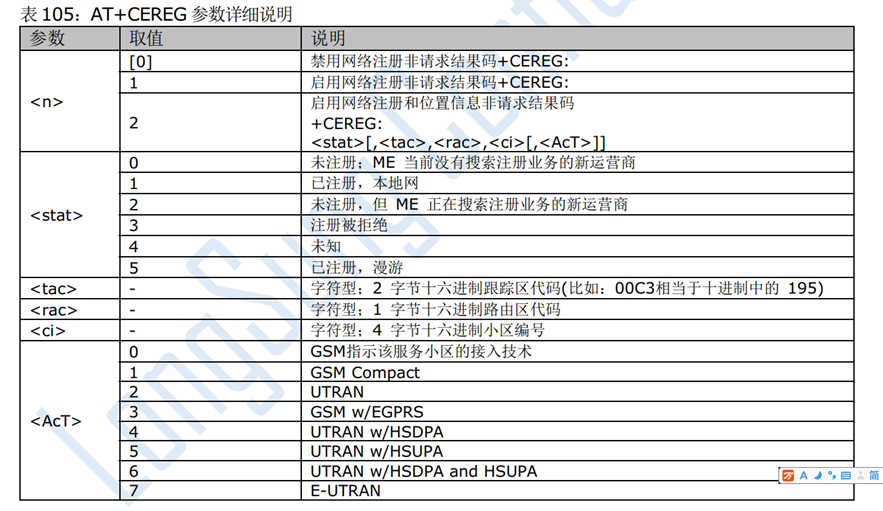
comparsion follow char , we can know module register in E-UTRAN network......
learning at command AT+CEREG的更多相关文章
- learning at command AT+CSUB
[Purpose] Learning how to get mobile module info [Eevironment] Shell terminal, base on gcom command ...
- learning at command AT+CIMI
AT command AT+CIMI [Purpose] Learning how to get the International Mobile Subscriber Identity ...
- learning at command AT+CSQ
AT command AT+CSQ [Purpose] Learning how to get mobile module single quality report [Eeviro ...
- learning at command AT+CGSN
AT command AT+CGSN [Purpose] Learning how to get mobile module international Mobile Equipment ...
- learning at command AT+CFUN
[Purpose] Learning how to controls the functionality level. It can also be used to reset the UE (飞行模 ...
- learning at command AT+CPIN
[Purpose] Learning how to check sim ready? [Eevironment] Shell terminal, base on gcom command and gc ...
- Linux command nmon
Linux command nmon [Purpose] Learning linux command nmon [Eevironment] Ubuntu 16.04 ...
- Linux command stty
Linux command stty reference: https://blog.csdn.net/lqxandroid2012/article/details/78929506 [Purpose ...
- Linux command automake
Linux command automake [Purpose] Learning linux command automake for generate Makefile.in for ...
随机推荐
- @media only screen and (max-width:640px)中的问题,响应式布局
<head> <meta charset="UTF-8"> <meta name="viewport" content=" ...
- Android 关于虹软人脸识别SDK引擎使用总结
虹软 最近开放了人脸识别的SDK引擎(免费的哦),刚好有Android版的,就体验了一波.下面来说说Android版的SDK使用心得: ArcFace 虹软人脸认知引擎简介 目前开放的版本有人脸比对( ...
- 虹软 Android 人脸检测与人脸识别集成分享
目前我们的应用内使用了 ArcFace 的人脸检测功能,其他的我们并不了解,所以这里就和大家分享一下我们的集成过程和一些使用心得 集成ArcFace FD 的集成过程非常简单 在 ArcFace FD ...
- 用C#二次封装虹软arcface
相信很多用C#又想用虹软的SDK的童鞋要花很多心思去研究怎么转换,所以写了一篇文章和一个demo方便用C#的童鞋方便调用虹软的接口,文章的地址是:https://blog.xgcos.com/show ...
- Linux命令echo
echo "hello world" echo 显示字符串内容
- 牛客国庆集训派对Day3 A Knight
Knight 思路: bfs打表找规律 如下图 代码: #pragma GCC optimize(2) #pragma GCC optimize(3) #pragma GCC optimize(4) ...
- echarts的学习
博客1.:https://zrysmt.github.io/ 博客2:http://blog.csdn.net/future_todo/article/details/60956942 工作中一个需求 ...
- 第 8 章 容器网络 - 053 - overlay 是如何隔离的?
overlay 是如何隔离的? 不同的 overlay 网络是相互隔离的. 创建第二个 overlay 网络 ov_net2 并运行容器 bbox3. docker network create -d ...
- 第 7 章 多主机管理 - 046 - 创建 Machine
创建 Machine Machine 就是运行 docker daemon 的主机. “创建 Machine” 指的就是在 host 上安装和部署 docker. 创建第一个 machine: hos ...
- 【转】 C语言文件操作详解
转自:http://www.cnblogs.com/likebeta/archive/2012/06/16/2551780.html C语言中没有输入输出语句,所有的输入输出功能都用 ANSI C提供 ...